

Argo CD keeps Kubernetes deployments automated, consistent, and always in sync with Git. Instead of relying on manual fixes or hoping that cluster state still matches repository state, GitOps gives teams a repeatable way to deliver applications through versioned infrastructure configuration.
Right now, many teams already have Git in place, but they have not fully embraced GitOps. In other words, Git helps them track code versions, but they do not yet have a system that enforces every infrastructure change through commits to a repository. They also need a CI/CD pipeline that can build, test, and deploy code automatically.
The main goal is simple: deliver an application into a Kubernetes cluster. The implementation details are where the tradeoffs appear. Kubernetes supports multiple deployment strategies, and each option has its own benefits, risks, and operational habits.
Git Repositories and the Push Model
In a push model, building, testing, and deploying an application to a Kubernetes cluster happens after a git push. A developer pushes code changes, and that action starts a chain of automated steps that ends with a new version of the application running for users.
Most Git platforms provide enough built-in capability to support this workflow.
How the Push Model Works
A typical push-based pipeline looks like this:
- A developer commits changes in a feature branch or merges them into the main branch.
- That commit triggers a pipeline with tasks such as building, testing, and deploying.
- The build process usually uses Docker or a similar tool to create a container image.
- Tests confirm that the new code works as expected and still fits with existing components.
- Once the tests pass, the new image is pushed to a container registry.
- Finally, deployment places the new version of the application into the target environment, such as production, staging, or development.
Below are three common tools for Kubernetes deployment from this kind of pipeline:
- Kubectl
- Kustomize
- Helm
Each of them can be useful, but they solve slightly different problems.
Kubectl
kubectl is the standard command-line tool for operating applications in a Kubernetes environment. It allows you to deploy, scale, update, and troubleshoot services.
To use it well, you usually provide YAML manifests that describe the desired state of Kubernetes resources:
Deploymentcontrols rollout behavior and replica counts.Podis a running instance of a containerized application.Servicemakes the application accessible inside or outside the cluster.Ingressroutes external traffic into the cluster.ConfigMapandSecretstore configuration data and sensitive credentials.
Here is an example pipeline job that applies Kubernetes manifests directly:
deploy-kubectl:
  stage: deploy
  image: myregistry/tools/kubectl:latest
  before_script:
    - kubectl config use-context $MY_CLUSTER_CONTEXT
  script:
    - kubectl apply -f my-demo-app/
  rules:
    - if: $CI_COMMIT_BRANCH
      when: manual
The kubectl apply command tells Kubernetes to align the cluster with the resource definitions in the YAML files.
Pros of Kubectl
kubectl is versatile. You can create, update, delete, or patch Kubernetes resources, and you can script advanced deployment patterns such as blue-green or canary releases.
It is also flexible because it is the official Kubernetes CLI and integrates well into many workflows.
Cons of Kubectl
The main downside is operational discipline. You need to understand command parameters, resource types, and YAML syntax. Each step requires you to specify resources manually, and a single mistake can disrupt the deployment.
When a team depends only on kubectl apply, it is also easy for drift to appear between what is in Git and what is actually running in the cluster.
Kustomize
Kustomize manages Kubernetes configuration without templates. It modifies base YAML manifests using patches and transformations, then produces final manifests that can be applied with kubectl.
The main concepts are:
Base: a directory with the main YAML manifests.Overlay: a directory with environment-specific patches and transformations.kustomization.yaml: the file that describes bases, overlays, patches, and transformations.Patches: YAML files that merge or change resources.Transformations: bulk changes applied to resources in the base.
For example, you might have a base directory for shared configuration and overlays for dev, staging, and prod.
Here is a pipeline job that uses Kustomize before deployment:
deploy-kustomize:
  stage: deploy
  image: myregistry/tools/kubectl-kustomize:latest
  before_script:
    - kubectl config use-context $MY_CLUSTER_CONTEXT
    - cd deploy/base
    - kustomize edit set namespace $CI_ENV_NAME-demo
    - kustomize edit set image demo-app=$CI_REGISTRY_IMAGE/demo-app:$CI_COMMIT_SHORT_SHA
    - kustomize build ../overlays/$CI_ENV_NAME > $CI_PROJECT_DIR/final.yaml
  script:
    - kubectl create ns $CI_ENV_NAME-demo || true
    - kubectl apply -f $CI_PROJECT_DIR/final.yaml
  rules:
    - if: $CI_COMMIT_BRANCH
      when: manual
In this setup, kustomization.yaml controls how patching and environment-specific changes are handled.
Why Choose Kustomize
Kustomize is declarative and reusable. It clearly states how configuration is layered, and it makes it easier to adapt the same base for different environments.
It also has a straightforward syntax because it does not introduce a separate templating language.
Potential Downsides
Kustomize still requires a learning curve. Patching can become subtle, especially when several overlays evolve over time. If the structure is not kept clean, overlays can become difficult to reason about.
Helm
Helm is the package manager for Kubernetes. It bundles everything needed for an application into a chart: Deployments, Services, ConfigMaps, Secrets, and other resources.
Helm uses Go-based templating. Values provided through files such as values.yaml are used to generate the final Kubernetes manifests. Charts can also contain subcharts and are often stored in registries.
When you run commands such as helm install or helm upgrade, Helm creates or updates the necessary resources:
deploy-helm:
  stage: deploy
  image: myregistry/tools/helm-kubectl:latest
  before_script:
    - kubectl config use-context $MY_CLUSTER_CONTEXT
  script:
    - helm upgrade --install my-demo-app ./chart \
        -f values.yaml \
        -n demo-namespace --create-namespace
  rules:
    - if: $CI_COMMIT_BRANCH
      when: manual
This deploys or updates my-demo-app using the chart in the chart directory and the configuration from values.yaml.
Benefits of Helm
Helm simplifies deployment because you do not need to manually manage many separate YAML files. It also provides versioning, rollback support, reusable charts, and a large ecosystem of official and community-maintained charts.
That makes Helm especially useful when an application has many related resources or dependencies.
Drawbacks
Helm introduces its own chart structure and templating model. Learning Go templating can be challenging, and a misconfigured chart can introduce reliability or security issues.
Secrets should not be stored directly in charts. Use Kubernetes Secrets, external secret managers, or vault-style integrations instead.
Pull Model, GitOps, and Argo CD
The push model works, but it has a weakness: Kubernetes stores resource definitions in its internal database, etcd. If someone manually changes a resource in the cluster, the running state can drift away from what is stored in Git.
This creates several problems:
- Kubernetes tries to reconcile cluster resources based on its current stored state.
- Manual edits can become the state that Kubernetes remembers.
- If a resource is deleted directly from the cluster, it may be lost unless it is reapplied from Git.
GitOps with Argo CD helps solve this by switching the workflow to a pull model.
Pull Model
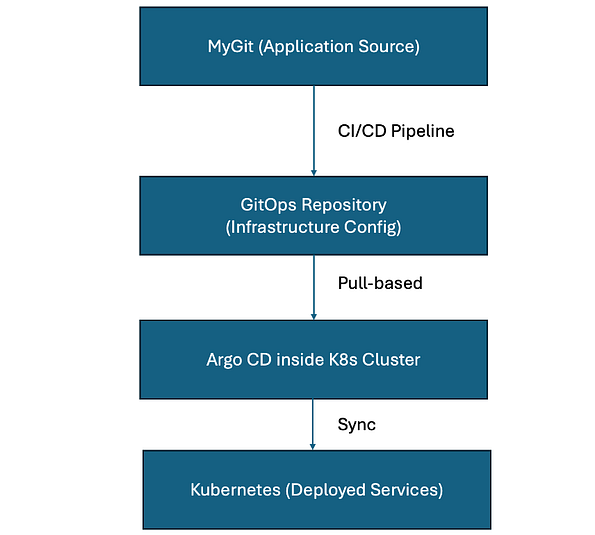
In GitOps, the cluster pulls changes rather than receiving them through manual deployment commands. Infrastructure configuration still lives in Git, but an automated agent runs inside the cluster and watches the repository.
When the agent detects a difference between Git and the cluster, it updates the cluster to match the repository.
The key advantage is that manual, out-of-band edits are overwritten by the GitOps controller. The cluster always moves back toward the state described in Git. That forces changes to go through the repository and improves consistency.
Argo CD
Argo CD is a declarative GitOps continuous delivery tool for Kubernetes. It watches Git repositories, compares the desired state with the live cluster state, and reconciles differences.
Its main components are:
API Server: handles authentication and exposes the Argo CD API.Application Controller: compares the cluster state to Git and reconciles mismatches.Repository Server: caches Git repositories, stores commit references, and renders manifests using tools such as Helm, Kustomize, or plain YAML.
Unlike manually applying YAML files, Argo CD manages a higher-level object called an Application. An Application defines what to deploy, where to deploy it, and which source repository or path should be treated as the desired state.
Here is an example Application manifest:
apiVersion: argoproj.io/v1alpha1
kind: Application
metadata:
  name: my-sample-app
  namespace: argocd
spec:
  source:
    path: sample-app
    repoURL: https://some-git-service.com/my-org/k8s-config.git
    targetRevision: HEAD
  destination:
    namespace: sample-app
    server: https://kubernetes.default.svc
  project: production
This tells Argo CD to deploy the manifests from the sample-app path in the GitOps repository into the sample-app namespace.
ApplicationSet
When a platform has many services, manually creating one Application per service becomes repetitive. ApplicationSet automates this process with generators that watch repository structure or other sources.
For example:
apiVersion: argoproj.io/v1alpha1
kind: ApplicationSet
metadata:
  name: all-tenants
  namespace: argocd
spec:
  generators:
  - git:
      repoURL: https://some-git-service.com/my-org/k8s-config.git
      revision: HEAD
      directories:
      - path: tenants/*
Here, the Git generator checks for new folders under tenants/. When a folder appears, Argo CD can automatically create an Application for it.
Argo CD also uses Applications and Projects to organize deployments:
Application: a logical bundle of Kubernetes resources that references a Git path, Helm chart, Kustomize directory, or plain YAML.Project: a boundary for organizing Applications and controlling which clusters and repositories are allowed.
Argo CD also includes a useful UI for viewing synchronization status, comparing versions, checking diffs, and inspecting deployment health.
Unified Deployment
Modern development teams often manage many different projects. Some are actively developed, some need to be migrated between clusters, and others may need to be revived after a long period without updates.
It gets messy when every project has its own custom pipeline.
GitOps with Argo CD helps standardize the deployment process. Instead of building one-off deployment logic for each project, the application pipeline updates the desired state in a GitOps repository. Argo CD then applies that desired state to the cluster.
One common workflow is:
- The application pipeline builds and pushes a container image.
- The pipeline updates the image tag in a GitOps repository.
- Argo CD detects the commit.
- Argo CD syncs the application into the target cluster.
Here is a simplified CI job that updates a values.yaml file with the current commit SHA and pushes the change back to the GitOps repository:
.deploy_template:
  stage: deploy
  image: myregistry/tools/yq:latest
  script:
    - git clone "https://$GIT_USER:$GIT_TOKEN@$GITOPS_REPO_URL" my-gitops
    - cd my-gitops
    - yq -i ".app.image.tag = strenv(CI_COMMIT_SHORT_SHA)" path/to/myapp/values.yaml
    - git config --global user.email "[email protected]"
    - git config --global user.name "CI Pipeline"
    - git commit -am "Deploy myapp - ${CI_COMMIT_SHORT_SHA}"
    - git push
Once the new tag is committed, Argo CD notices the change and updates Kubernetes so that the live environment matches Git.
Our Approach
The approach I prefer is built around separation of concerns:
- Separate repositories for application source code and environment configuration.
- Umbrella Helm charts for managing shared dependencies and deployment structure.
- GitOps repository updates from CI pipelines instead of direct cluster mutation.
- Argo CD as the cluster-side reconciler.
The result is a workflow where CI builds and records the desired version, while Argo CD owns synchronization into the cluster.
Benefits of Argo CD
Argo CD gives teams a convenient web UI for monitoring deployments, synchronization status, health, and diffs. It continuously synchronizes applications, reduces drift, and keeps the cluster aligned with the repository.
It also provides a single source of truth for configuration. That makes deployments easier to audit, easier to roll back, and easier to replicate across clusters.
For teams managing multiple services or environments, this consistency can reduce a lot of day-to-day maintenance.
Drawbacks
Argo CD still requires thoughtful setup. Teams need a clear repository strategy, reusable Helm charts or Kustomize layouts, access controls, and conventions for environments.
GitOps also changes how teams think about deployment. The cluster should not be modified casually by hand. Changes should go through Git, and that requires discipline across engineering and operations.
Conclusion
Adopting GitOps principles and implementing Argo CD can unify Kubernetes delivery across many projects. Configuration drift becomes less of a problem because the live cluster state is continuously compared with the Git repository.
Kubernetes already makes scaling and moving workloads easier. Argo CD adds a deployment model that makes those workloads easier to control.
The strongest results come when the team has a solid foundation in Kubernetes and a clear strategy for repositories, charts, access, and environments. Pairing a managed Kubernetes service with Argo CD can provide an automated path from code to production while reducing the daily effort spent on infrastructure management.
GitOps is not just a deployment tool choice. It is a delivery model where Git becomes the contract, automation becomes the operator, and Argo CD keeps the cluster honest.