

A Playwright script that works well on a laptop can still become unreliable once it is turned into a recurring scraping worker. After deployment, the problems are usually operational rather than syntactic: browser startup inside containers, larger images caused by bundled browser binaries, proxy and credential handling, retry behavior, overlapping scheduled runs, and JavaScript-rendered pages that behave differently under repeated automation.
That changes the goal. The challenge is no longer just opening a page and extracting data once, but building a worker that can run predictably, finish cleanly, and fit into a batch execution model. For this implementation, I kept Playwright as the automation layer, used Kubernetes Jobs and CronJobs for execution, and attached to a remote browser over CDP.
In this article, I will show a practical version of that setup:
- Playwright as the automation layer
- a remote browser backend for browser execution
- Kubernetes Jobs and CronJobs as the execution model
That combination is a natural fit because Kubernetes Job is meant for one-off tasks that run to completion, while CronJob creates such Jobs on a schedule. If overlapping runs would be risky, Kubernetes also supports concurrencyPolicy: Forbid to prevent a new scheduled run from starting while the previous one is still active.
Why This Stack Makes Sense
When browser automation moves from local testing into a recurring scraping pipeline, the browser itself becomes an operational concern. You are no longer just opening a page and extracting data once. You need a worker that can run repeatedly, handle JavaScript-heavy targets, keep secrets out of code, and finish cleanly under a scheduler.
That changes the architectural question. Instead of asking, "How do I launch Chromium inside this container?", the more useful question becomes, "What parts of browser execution should my workload own, and what parts should be delegated?"
For this implementation, I used a remote-browser approach. Playwright remained the automation layer, Kubernetes handled execution, and Bright Data Browser API provided the managed browser session that the worker connected to over CDP.
I kept the application itself very small:
- connect Playwright to Bright Data Browser API over CDP,
- open a JavaScript-rendered page,
- extract structured data from the DOM,
- package the worker into a container,
- run it as a Kubernetes Job,
- then promote the same worker definition into a CronJob.
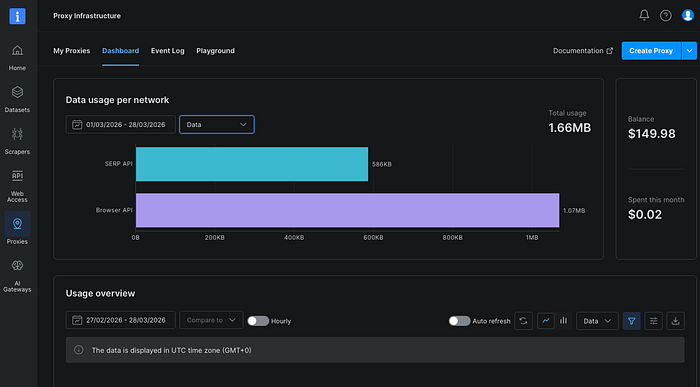
The first milestone was not "did the page open," but "did the remote browser actually render JavaScript content and return structured extraction output." In my test run, the worker connected successfully, printed a live inspection URL, loaded https://quotes.toscrape.com/js/, extracted 10 quote cards, and returned the first three quotes with authors and tags. That was the moment the setup stopped being theoretical and started behaving like a real scraping worker.
Step 1: Connect Playwright to Bright Data Browser API
For the remote browser layer, I used Bright Data Browser API. It exposes a managed browser session that Playwright can attach to over CDP, which made it a practical fit for this test.
This is the smallest useful Python worker I used:
import asyncio
import json
import os
from playwright.async_api import async_playwright

BROWSER_WS_ENDPOINT = os.environ["BROWSER_WS_ENDPOINT"]
TARGET_URL = os.getenv("TARGET_URL", "https://quotes.toscrape.com/js/")

async def main():
    async with async_playwright() as p:
        browser = await p.chromium.connect_over_cdp(BROWSER_WS_ENDPOINT)
        try:
            page = await browser.new_page()
            client = await page.context.new_cdp_session(page)

            frames = await client.send("Page.getFrameTree")
            frame_id = frames["frameTree"]["frame"]["id"]
            inspect = await client.send("Page.inspect", {"frameId": frame_id})
            print("inspect_url:", inspect["url"])

            await page.goto(TARGET_URL, timeout=120000)
            await page.wait_for_load_state("networkidle")

            quotes = await page.locator(".quote").evaluate_all(
                """elements => elements.map(el => ({
                    text: el.querySelector(".text")?.innerText ?? "",
                    author: el.querySelector(".author")?.innerText ?? "",
                    tags: Array.from(el.querySelectorAll(".tag")).map(t => t.innerText)
                }))"""
            )

            result = {
                "url": page.url,
                "title": await page.title(),
                "quotes_count": len(quotes),
                "first_3_quotes": quotes[:3],
            }
            print(json.dumps(result, ensure_ascii=False, indent=2))
        finally:
            await browser.close()

if __name__ == "__main__":
    asyncio.run(main())
This follows Bright Data's documented Browser API pattern very closely: connect with Browser API credentials, create a page, optionally create a CDP session, and then navigate the remote browser to the target site. Bright Data's own examples also show Page.inspect for getting a live debugging URL, and their quick-start guide explicitly frames Browser API as a way to launch a real remote browser session for JavaScript rendering and interactive pages.
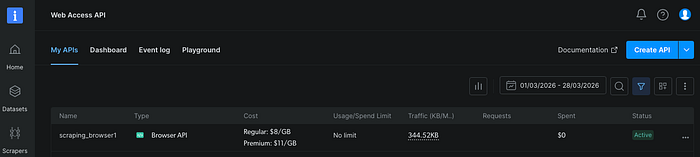
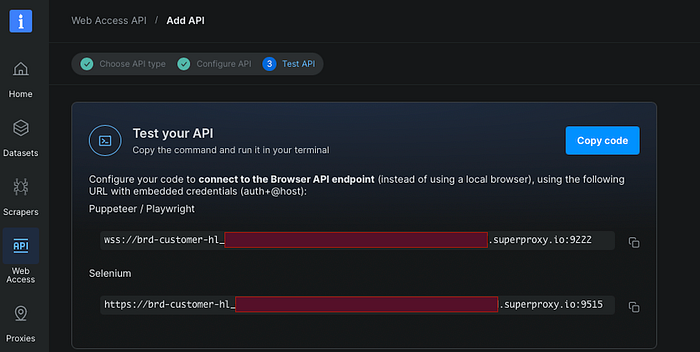
The first thing worth noticing is that this code does not use the Bright Data API key flow used by other Bright Data APIs. Browser API authentication uses the Browser API zone's Username and Password from the Overview page, not a Bearer API key. That distinction matters, and it is easy to miss if you have used Bright Data's REST-style APIs before.
Step 2: Validate a JavaScript-Rendered Target
I used https://quotes.toscrape.com/js/ as the smoke test target. Bright Data's "first browser session" guide explicitly recommends JavaScript-based sites for validating Browser API, and even lists quotes.toscrape.com/js/ among the sample targets.
In the successful run, the worker produced:
- a live
inspect_url, - the expected page title, Quotes to Scrape,
quotes_count: 10,- a structured array of quotes including author names and tags.
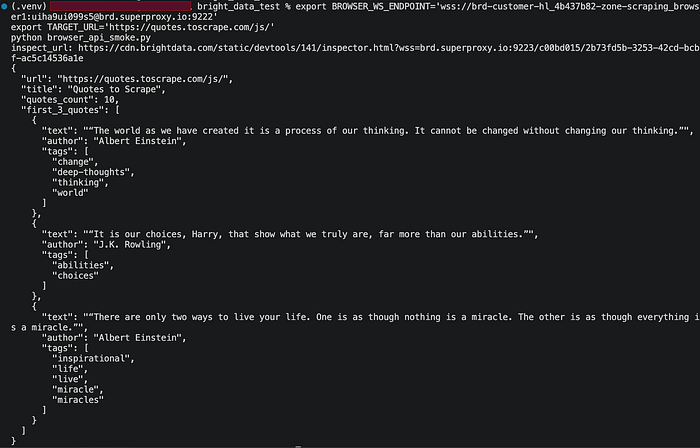
That result mattered for two reasons. First, it showed that the Browser API connection itself was correct. Second, it showed that this was not just a shallow connectivity test: the remote browser had fully rendered the page and made the DOM available for extraction.
Step 3: Package the Worker into a Container
The container image stayed intentionally small.
requirements.txt
playwright
Dockerfile
FROM python:3.11-slim

ENV PYTHONDONTWRITEBYTECODE=1
ENV PYTHONUNBUFFERED=1

WORKDIR /app

COPY requirements.txt .
RUN pip install --no-cache-dir -r requirements.txt

COPY browser_api_smoke.py .

CMD ["python", "browser_api_smoke.py"]
One subtle but important point here is that I did not install a local browser binary in the container. Because Playwright is attaching to a remote browser session over CDP, the container acts as a control-plane worker, not as the place where the browser itself must be launched. That keeps the image smaller and the runtime model cleaner.
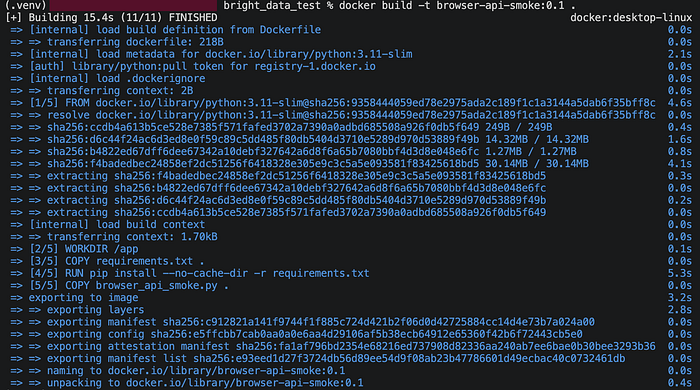
Step 4: Inject the Browser API Endpoint through a Kubernetes Secret
I wanted the deployment layer to own the connection string instead of hardcoding it into the application.
The worker expects a single environment variable: BROWSER_WS_ENDPOINT
That variable contains the complete WebSocket endpoint in the form:
wss://USERNAME:[email protected]:9222
This approach keeps the application code stable and moves credential management into Kubernetes.
Step 5: Run the Scraper as a Kubernetes Job
Kubernetes Job is the right resource when you want a finite task that should start, do its work, and exit. That matches scraping workers especially well, because a single scraping task is often conceptually one unit of work: scrape this target, emit output, stop. Kubernetes documents Job precisely in those terms: a run-to-completion workload that tracks successful completions and retries failed Pods up to the configured policy.
Here is the manifest:
apiVersion: batch/v1
kind: Job
metadata:
  name: browser-api-smoke
spec:
  backoffLimit: 1
  template:
    spec:
      restartPolicy: Never
      containers:
        - name: worker
          image: browser-api-smoke:0.1
          imagePullPolicy: IfNotPresent
          env:
            - name: BROWSER_WS_ENDPOINT
              valueFrom:
                secretKeyRef:
                  name: brightdata-browser
                  key: BROWSER_WS_ENDPOINT
            - name: TARGET_URL
              value: "https://quotes.toscrape.com/js/"
For a production cluster, the image: field should point to a real registry-backed image. For a development or demo cluster, the same manifest shape still works.
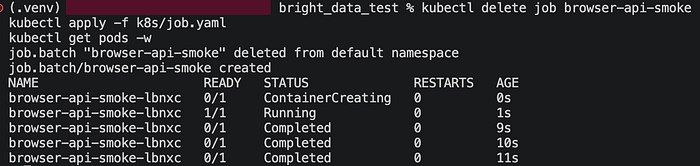
In my test run, the Job completed successfully in 11 seconds. The logs showed the live inspection URL and the expected extracted payload, including 10 quotes and the first three quote objects. That is exactly the kind of output you want because it proves the whole path: Kubernetes pod → Playwright worker → Bright Data Browser API → remote rendering → structured extraction.
Step 6: Promote the Same Worker into a CronJob
Once the one-off Job succeeded, the next step was to schedule it.
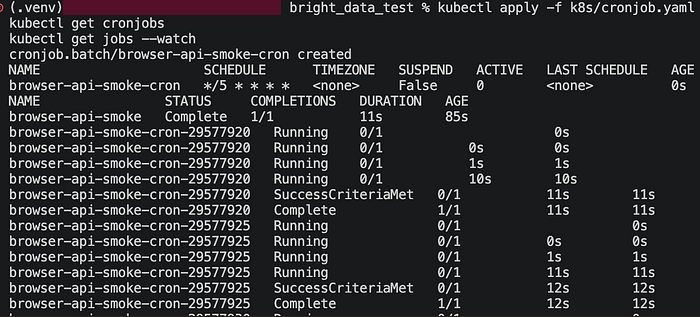
Kubernetes CronJob creates Job resources on a repeating schedule. For scraping pipelines, that is useful for recurring collection such as daily snapshots, price checks, or availability monitoring. Kubernetes also supports concurrencyPolicy, and Forbid is a very sensible default when you do not want overlapping runs against the same target.
Here is the scheduled version:
apiVersion: batch/v1
kind: CronJob
metadata:
  name: browser-api-smoke-cron
spec:
  schedule: "*/5 * * * *"
  concurrencyPolicy: Forbid
  successfulJobsHistoryLimit: 2
  failedJobsHistoryLimit: 2
  jobTemplate:
    spec:
      backoffLimit: 1
      template:
        spec:
          restartPolicy: Never
          containers:
            - name: worker
              image: browser-api-smoke:0.1
              imagePullPolicy: IfNotPresent
              env:
                - name: BROWSER_WS_ENDPOINT
                  valueFrom:
                    secretKeyRef:
                      name: brightdata-browser
                      key: BROWSER_WS_ENDPOINT
                - name: TARGET_URL
                  value: "https://quotes.toscrape.com/js/"
The important part is that the application code did not change at all. The same worker ran first as a Job and then as a CronJob. That is a good indicator of whether your scraping logic is actually deployment-friendly.
What Actually Mattered in Practice
Three operational details ended up mattering more than the core Python code.
1. Browser API credentials are not the same as API-key auth
If you have already worked with Bright Data APIs, it is very easy to assume that everything authenticates with an API key. Browser API does not work that way. It uses Browser API zone credentials — specifically the Username and Password visible in the zone's Overview tab. Bright Data's Browser API documentation is explicit about this.
2. CDP gives you more than navigation
Using connect_over_cdp() is not only about attaching to the remote browser. It also lets you create a CDP session and call protocol methods directly. Playwright documents this raw CDP access through CDPSession.send, and Bright Data's own examples use it to generate an inspection URL via Page.inspect. That made debugging the remote session much more concrete than a simple black-box request/response workflow.
3. Jobs are the right default for browser workers
A scraping browser session is usually a bounded unit of work, not a forever-running service. Kubernetes Job maps to that shape naturally. Start the pod, run the script, emit the result, exit cleanly. Then move to CronJob only when you want scheduled repetition. Kubernetes' own workload model strongly supports that separation.
Results
The final successful run returned the following output:
{
  "url": "https://quotes.toscrape.com/js/",
  "title": "Quotes to Scrape",
  "quotes_count": 10,
  "first_3_quotes": [
    {
      "text": "\u201cThe world as we have created it is a process of our thinking. It cannot be changed without changing our thinking.\u201d",
      "author": "Albert Einstein",
      "tags": ["change", "deep-thoughts", "thinking", "world"]
    },
    {
      "text": "\u201cIt is our choices, Harry, that show what we truly are, far more than our abilities.\u201d",
      "author": "J.K. Rowling",
      "tags": ["abilities", "choices"]
    },
    {
      "text": "\u201cThere are only two ways to live your life. One is as though nothing is a miracle. The other is as though everything is a miracle.\u201d",
      "author": "Albert Einstein",
      "tags": ["inspirational", "life", "live", "miracle", "miracles"]
    }
  ]
}
Conclusion
The main value of this setup is that it turns browser-based scraping into a cleaner production model.
Playwright stays focused on automation and extraction. Kubernetes provides the batch execution model. Bright Data Browser API serves as the remote browser layer that makes the whole design easier to operate, especially when the workload has to deal with JavaScript rendering, repeated scheduled runs, and production reliability concerns.
In practice, that changes the scraper from a fragile script into a worker with a clear runtime contract: connect, render, extract, exit cleanly, and run again when needed. That is where Bright Data added the most value in this implementation — not by changing the scraping logic itself, but by making the browser side of the system easier to manage.
Once the same Playwright worker worked reliably with Bright Data Browser API and then ran cleanly as a Kubernetes Job and CronJob, the pipeline stopped feeling experimental and started feeling deployable.