

Retrieval-Augmented Generation, or RAG, is one of the most practical ways to make LLM applications more useful. Not just using the model's internal knowledge — you use back information and inject it into the prompt as context.
This works great when your data exists in your local knowledge base, a vector store, or a set of internal documents. But there is a common catch: your knowledge can very easily become stale.
If you're using your application to provide up-to-date information — for example: product changes, documentation updates, late-breaking news or trends in the markets — then a static index is usually insufficient. You need some way to retrieve up-to-date information before you call the API.
That is where a search-based retrieval layer becomes useful.
In this tutorial, I will show how to use Bright Data's SERP API in Python to fetch fresh search results and turn them into a lightweight retrieval layer for a RAG workflow. The goal is not to build a massive production system, but to create a clean, practical pipeline that demonstrates the core idea clearly.
Why Static RAG Is Not Always Enough
A typical RAG setup uses embeddings and a vector database to retrieve the most relevant chunks from a fixed collection of documents. This is great for company knowledge bases, support content, contracts, or technical documentation that does not change every hour.
But many real-world questions are time-sensitive.
Imagine a user asking:
- What are the latest Python libraries for RAG?
- What changed in the newest release of a framework?
- What are the recent updates in browser automation tooling?
- What are the most recent articles about a specific AI topic?
If your retrieval layer only looks at an old local dataset, the answer may be incomplete or simply outdated.
A more flexible approach is to enrich your RAG pipeline with live search results. Instead of relying entirely on a prebuilt index, you can first retrieve fresh information from the web, then transform that information into context for the model.
That is the pattern we will build here.
Why Use Bright Data's SERP API
You can, of course, try to scrape search results yourself. But that often becomes messy very quickly. Search engines are dynamic, structures change, and once you move beyond a toy experiment, you start dealing with reliability issues instead of your application logic.
For this reason, using a dedicated SERP API is a much cleaner choice.
Bright Data's SERP API gives you programmatic access to search engine results, which makes it a good fit for freshness-sensitive RAG workflows. In this tutorial, I use it as a retrieval layer that feeds relevant, up-to-date search snippets into a Python pipeline.
The nice part is that this lets you focus on the workflow itself:
- send a query,
- receive search results,
- turn the results into usable context,
- pass that context into your LLM prompt.
What We Are Building
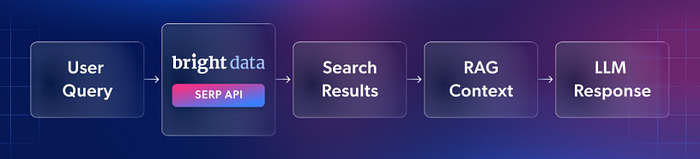
The pipeline in this article is intentionally simple:
- A user asks a question.
- Our Python script sends a search query through Bright Data's SERP API.
- We collect the top organic results.
- We turn titles, snippets, and source URLs into a structured context block.
- That context can then be passed into an LLM for answer generation.
This is a minimal but very practical pattern. It is especially useful when you want to combine the simplicity of search-driven retrieval with the structure of a RAG workflow.
Setting Up the API Call in Python
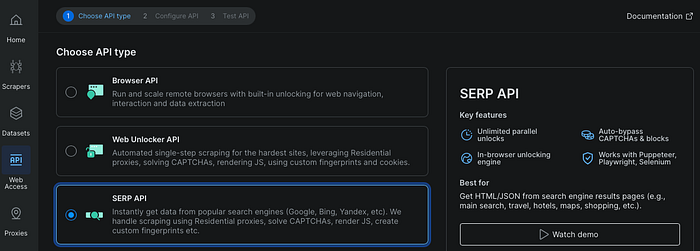
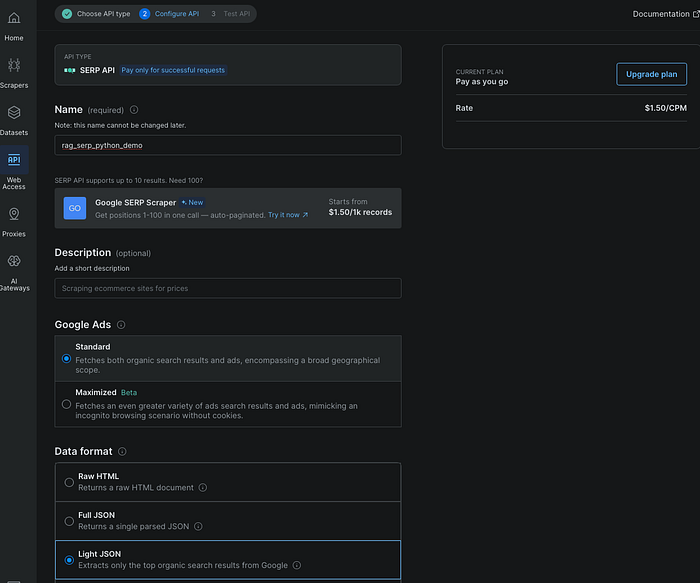
The first step is to create a SERP API zone in Bright Data and get your API key. Once that is ready, the Python side is straightforward.
I used requests and environment variables so that the script stays small and easy to run.
import os
import requests
from urllib.parse import quote_plus

API_URL = "https://api.brightdata.com/request"


def serp_search(query: str, zone: str, api_key: str, country: str = "us", language: str = "en") -> dict:
    search_url = (
        f"https://www.google.com/search"
        f"?q={quote_plus(query)}&hl={language}&gl={country}"
    )

    payload = {
        "zone": zone,
        "url": search_url,
        "format": "raw",
        "data_format": "parsed_light"
    }

    headers = {
        "Authorization": f"Bearer {api_key}",
        "Content-Type": "application/json"
    }

    response = requests.post(API_URL, headers=headers, json=payload, timeout=60)
    print(f"HTTP status: {response.status_code}")
    response.raise_for_status()
    return response.json()


def print_top_results(data: dict, limit: int = 5) -> None:
    organic = data.get("organic", [])[:limit]

    if not organic:
        print("No organic results found.")
        print(data)
        return

    print("\nTop organic results:\n")

    for idx, item in enumerate(organic, start=1):
        title = item.get("title", "No title")
        link = item.get("link", "No URL")
        description = item.get("description", "No description")

        print(f"{idx}. {title}")
        print(f"   URL: {link}")
        print(f"   Snippet: {description}\n")


if __name__ == "__main__":
    api_key = os.environ["BRIGHT_DATA_API_KEY"]
    zone = os.environ["BRIGHT_DATA_SERP_ZONE"]
    query = "best Python RAG libraries -site:reddit.com"

    result = serp_search(query=query, zone=zone, api_key=api_key)
    print_top_results(result)
This function takes a search query, builds a Google search URL, sends it to Bright Data, and returns a parsed response with the top organic results.
A couple of small details matter here.
First, I keep the API key outside the code by loading it from an environment variable. That is safer and cleaner than hardcoding credentials.
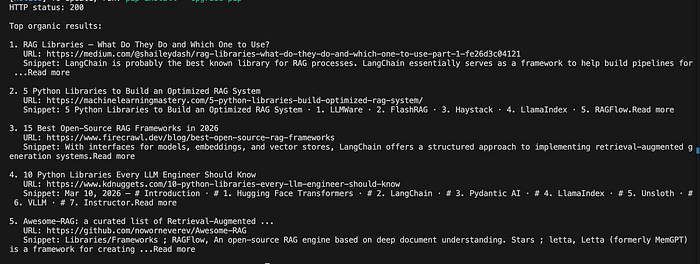
Second, I use a plain search query that resembles what a real user might ask. In this example, I tested the pipeline with best Python RAG libraries -site:reddit.com. That is a good demo query because it is broad enough to return multiple relevant results and specific enough to show how search snippets can become retrieval context.
Printing the Top Search Results
Once we have the API response, the next step is to inspect the top organic results.
At this point, you already have something useful: fresh search results arriving in a structured form that you can inspect, rank, filter, or transform.
This is important because a retrieval workflow does not always need full-page content immediately. In many cases, the title and snippet are already enough to identify whether a source is relevant.
Turning Search Results into RAG Context
Now comes the most interesting part.
Instead of stopping at raw search results, we can convert them into a context block that can be injected into an LLM prompt. This is the point where search becomes retrieval.
Here is a simple helper function:
def build_rag_context(data: dict, limit: int = 5) -> str:
    organic = data.get("organic", [])[:limit]
    chunks = []

    for idx, item in enumerate(organic, start=1):
        title = item.get("title", "").strip()
        snippet = item.get("description", "").strip()
        link = item.get("link", "").strip()

        chunk = f"[{idx}] {title}\n{snippet}\nSource: {link}"
        chunks.append(chunk)

    return "\n\n".join(chunks)


if __name__ == "__main__":
    api_key = os.environ["BRIGHT_DATA_API_KEY"]
    zone = os.environ["BRIGHT_DATA_SERP_ZONE"]
    query = "best Python RAG libraries -site:reddit.com"

    result = serp_search(query=query, zone=zone, api_key=api_key)
    context = build_rag_context(result)

    print("=== RAG CONTEXT ===\n")
    print(context)
This is not a full vector-based retrieval system, but it is already a meaningful RAG-style pattern. We are taking fresh external information, structuring it, and preparing it for downstream generation.
The resulting context includes a title, a short summary snippet, and a source URL for each result. That is enough to ground an LLM answer in recent, external information rather than relying purely on model memory.
Why This Pattern Is Useful
What I like about this approach is that it is both practical and extensible.
It is practical because you can build it quickly and use it immediately for freshness-sensitive tasks. If you are prototyping an AI assistant, a research helper, or a lightweight analyst workflow, this is often enough to get real value.
It is extensible because this simple version can be upgraded later. For example, you could:
- filter results by domain,
- add reranking,
- fetch full-page content from the top URLs,
- chunk the retrieved documents,
- store the results in a vector database,
- combine search-driven retrieval with your internal knowledge base.
In other words, this tutorial gives you the front end of a more advanced RAG architecture without forcing you to start with unnecessary complexity.
Limitations to Keep in Mind
This pattern is useful, but it is worth being honest about its limits.
First, snippets are not the same thing as full documents. If you need deep factual grounding, you will probably want to fetch and process the full content of selected pages later.
Second, search quality still depends on query quality. A weak query will produce weak retrieval, so prompt engineering is not only for generation. It matters at the retrieval stage as well.
Third, live retrieval is naturally more dynamic than working from a frozen local index. That is the whole point, but it also means you should think about consistency, caching, and cost if you scale the pipeline.
Still, for many use cases, this tradeoff is exactly what you want. You sacrifice some simplicity in exchange for fresher context and better relevance.
Conclusion
If your RAG workflow depends on up-to-date information, adding a live search layer is a very natural next step.
In this tutorial, I used Bright Data's SERP API as a retrieval component in a simple Python pipeline. The result is a lightweight but effective pattern: search for fresh information, convert it into structured context, and feed that context into your LLM workflow.
That makes this approach a good fit for AI applications that need more than static knowledge.
And perhaps the best part is that you can start small. You do not need a full production architecture on day one. A short Python script, a search query, and a clean context-building step are already enough to make your RAG pipeline much more current.