---
title: "Managed Kubernetes: The Word Is Doing a Lot of Work"
description: "All three clouds call their Kubernetes managed, and all three draw the line somewhere different. What the provider actually operates, what quietly stays yours, and the two costs nobody puts on the comparison page."
author: Aleksei Aleinikov
date: 2026-08-27
lang: en
tags: [managed-kubernetes, managed-kubernetes-services, eks-vs-aks-vs-gke, gke-autopilot, eks-auto-mode, kubernetes-node-reservations, kubernetes-cluster-cost]
canonical: https://www.alekseialeinikov.com/en/blog/topics/cloud/managed-kubernetes-what-eks-aks-gke-actually-manage-2026
source: alekseialeinikov.com
---
# Managed Kubernetes: The Word Is Doing a Lot of Work
Three clouds sell you Kubernetes with the word *managed* in front of it. All three mean something different by it, and the differences are not in the marketing tables.
Everyone manages the control plane. That part is genuinely settled: AWS, Microsoft and Google all run the API server and etcd, patch them, and refuse to let you near them. If that were the whole story, the choice would be a coin toss.
The story starts at the node. That is where the boundary moves, and where the work you thought you had outsourced quietly comes back.
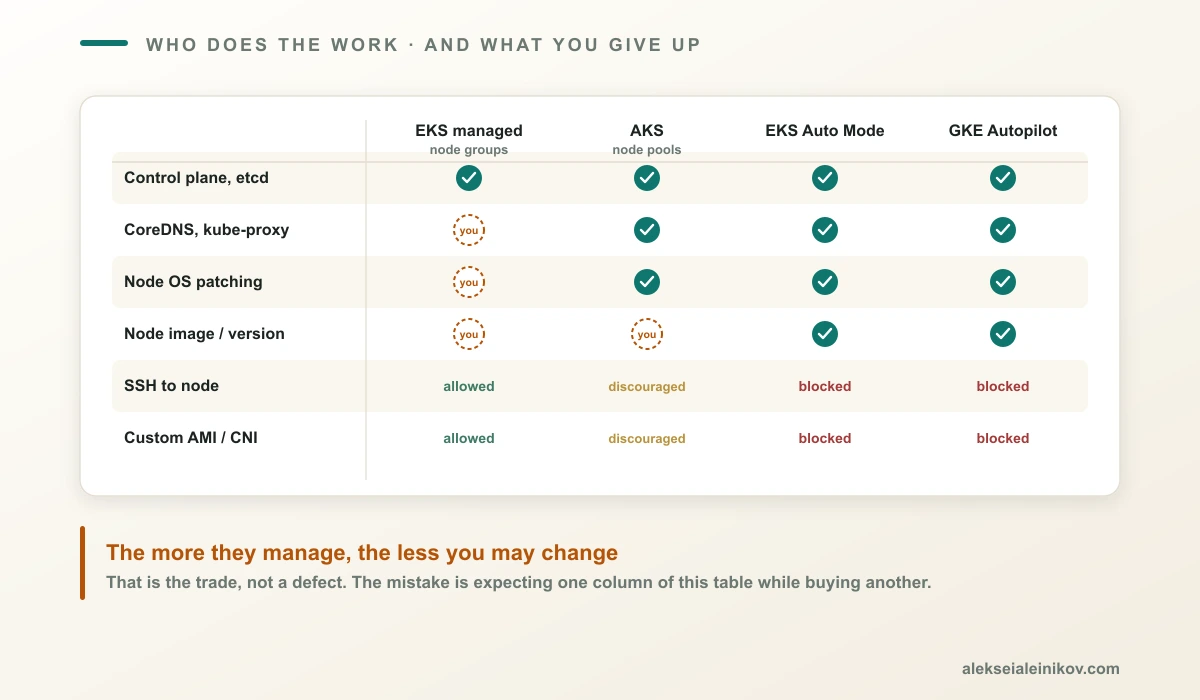
Four of the five models side by side. Everyone manages the control plane; the line moves at the node — and it moves a long way.
## What Every Provider Manages
The common floor is real and worth stating precisely, because it is the part you genuinely never think about again.
AWS describes it through the shared responsibility model: AWS is responsible for the Kubernetes control plane, including the control plane nodes and the etcd database. Microsoft's list is longer — the API server, etcd, DNS services such as CoreDNS, kube-proxy and networking except when you bring your own CNI, and **any other add-on or system component running in the kube-system namespace**. Microsoft also takes automated etcd backups every 30 minutes, though those backups exist for their disaster planning and are not available to you on demand.
Note the asymmetry already. Microsoft treats CoreDNS and kube-proxy as managed components of the cluster. On EKS they exist as **EKS add-ons** — AWS builds them, scans them, patches them and fully supports them, but they are separate objects whose versions you decide when to move. The difference is not who writes the patch. It is who decides when it lands.
There is a wrinkle worth knowing: AWS installs self-managed versions of the VPC CNI, kube-proxy and CoreDNS on every cluster, and whether you get the *managed* add-on variants depends on how you created the cluster. The console does it automatically. So does `eksctl` from version 0.184.0. Any other path leaves you with the self-managed ones until you convert them.
## Where the Line Actually Moves: Nodes
Here are the five models, and they are genuinely different products wearing the same word.
**EKS managed node groups.** AWS's own comparison table answers three questions with *Yes*: must deploy and manage EC2 instances, must secure and patch the operating system, must update the node AMI yourself. The console tells you an update is available. You still click the button. If you brought a custom AMI, you do not even get the notification.
**AKS.** A middle position that is easy to misread. Microsoft ships a base OS image with monitoring and networking agents, and **nodes receive OS patches automatically**. Node auto-repair restarts broken kubelet, containerd or kube-proxy components without you. But read the customer responsibility section: Microsoft publishes patches and new node images weekly, and **you** must apply them. The sentence that should go in your calendar: *Microsoft does not support node images that are older than 90 days.* Kubernetes version upgrades are also yours.
**GKE Standard.** Closest in shape to AKS node pools, but with a meaningfully different default: **node auto-upgrade is enabled by default** when you create a cluster or node pool through the console or gcloud. Nodes are drained and recreated to match the control plane version, with rollouts phased across weeks. You can disable it, and Google's docs are candid about the consequence — you then own version-skew compatibility, and GKE will still upgrade nodes once a version passes end of support "to ensure cluster health."
**EKS Auto Mode.** The same AWS table now answers *No* to all three questions. AWS deploys and manages the instances, secures and patches the OS, and updates the node version. It also absorbs a set of things you would otherwise install: Pod and Service networking, cluster DNS, autoscaling, block storage, the load balancer controller and the Pod Identity agent. Those controllers run on AWS-owned infrastructure, so you may not see them in your account at all. What you give up is specific: no SSH into nodes, no custom AMI, no custom CNI, no Windows containers, no per-Pod security groups.
**GKE Autopilot.** Google manages the nodes outright — provisioning, scaling, security patching within your maintenance windows, and bin-packing. Every Autopilot cluster is enrolled in a release channel, so control plane and nodes track qualified versions automatically, and auto-upgrade cannot be turned off. An idle Autopilot cluster can scale to zero nodes, at which point system Pods are unschedulable, which is expected behaviour and surprises people the first time.
| | Node OS patching | Version upgrades | Node access |
| --- | --- | --- | --- |
| EKS managed node groups | Yours | Yours | SSH allowed |
| AKS | Automatic | **Yours** — images >90 days unsupported | Possible, discouraged |
| GKE Standard | Automatic | **Auto-upgrade on by default** | SSH allowed |
| EKS Auto Mode | AWS | AWS | No SSH |
| GKE Autopilot | Google | Google, cannot disable | No SSH |
One shared rule across every row where nodes are recreated: **changes written directly to a node's boot disk do not survive.** Google says it about node re-creation during upgrades, Microsoft says it about upgrade, scale and reboot. Both point at the same answer — a DaemonSet.
The pattern is consistent: **the more the provider manages, the less you are allowed to customise.** That is not a flaw, it is the trade. The mistake is expecting one row of this table while buying another.
## The Modification Trap
There is a rule on AKS that catches teams who treat nodes as ordinary VMs, and it is stated bluntly in the support policy: any modification made directly to the agent nodes using the IaaS APIs **renders the cluster unsupportable**. The nodes appear in the Azure portal as normal resources in an `MC_*` resource group. They are not normal resources. Changes made outside the AKS API do not survive an upgrade, scale or reboot — and they cost you support.
The sanctioned path is a Kubernetes-native one: a privileged DaemonSet or init container for sysctl tuning, security agents and third-party software. Microsoft recommends it and then says it cannot troubleshoot what your DaemonSet does to the node. That is a fair deal, stated honestly, and it is worth reading before someone on your team SSHes in to "just fix one thing."
## Managed Is Not the Same as Supported
Here is a distinction that only becomes visible during an incident: the vendor operating a component and the vendor helping you when it breaks are two different promises.
AKS documents its support boundary in unusual detail, and the exclusions are worth reading before you architect around them. Microsoft Support does **not** cover:
- **Third-party ingress controllers** — nginx, Kong, Traefik. This explicitly includes the case where your ingress controller stops working *after* a Kubernetes version upgrade, which is precisely when you would want help.
- **Third-party open-source projects** not shipped with the cluster — Istio, Envoy and similar. Helm gets best-effort.
- **Custom or third-party CNI plugins** used in BYOCNI mode, and non-Microsoft network policy configurations.
- **DaemonSet-based node customisation** — the very mechanism Microsoft recommends for changing nodes.
- **Network appliances for egress control** — VPNs, firewalls. Azure Firewall gets best-effort advice.
- **Certificate issuance or renewal** for your applications.
The CVE clause deserves its own line, because it inverts an assumption. Microsoft provides vulnerability support **only for Microsoft-managed components**, and does not handle CVEs whose vendor fix is less than 30 days old. It is also your responsibility to keep the node VHD updated and to hand Support a filtered list containing only CVEs with fixes older than 30 days.
Read that sequence again: you run the scanner, you update the image, you filter the report, and then Microsoft engages. That is a reasonable division of labour — it is just not what most people picture when they read the word *managed*.
## The Managed Tax Nobody Quotes
Every provider takes a slice of each node before your first Pod schedules. This is not hidden — it is documented in detail — but it rarely appears in a comparison and it directly distorts your capacity planning.
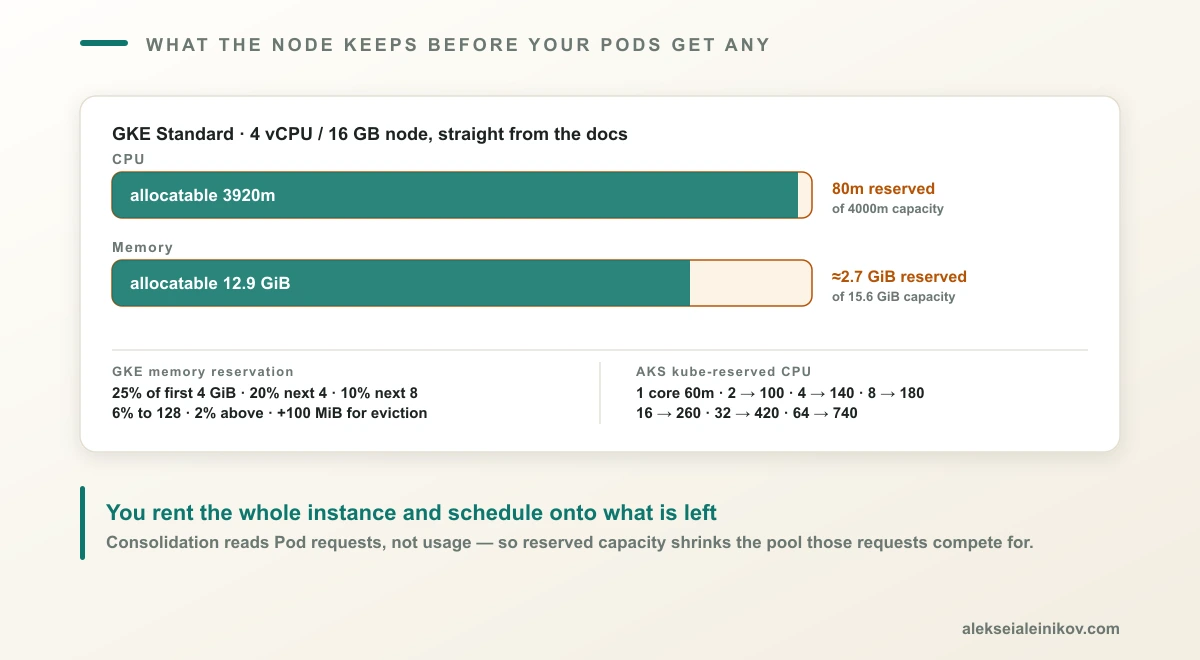
**GKE reserves memory** at 25% of the first 4 GiB, 20% of the next 4 GiB, 10% of the next 8 GiB, 6% of the next 112 GiB, and 2% above 128 GiB — plus **an extra 100 MiB on every node** for Pod eviction. CPU is 6% of the first core, 1% of the second, 0.5% of the next two, and 0.25% of everything above four. Raise max pods per node beyond 110 and GKE reserves another 400 mCPU. On shared-core E2 machines it reserves 1060 millicores outright.
Google's own documentation shows the result on a 4 vCPU node:
```text
capacity: allocatable:
cpu: "4" cpu: 3920m
memory: 16393264Ki memory: 13498416Ki
pods: "110" pods: "110"
```
Roughly **2.7 GiB of a 16 GB node is gone** before you deploy anything.
**AKS reserves CPU** from a flat table rather than a formula:
| Cores on host | 1 | 2 | 4 | 8 | 16 | 32 | 64 |
| --- | --- | --- | --- | --- | --- | --- | --- |
| Kube-reserved (millicores) | 60 | 100 | 140 | 180 | 260 | 420 | 740 |
For memory on AKS 1.29 and later, the reservation is the **lesser** of `20 MB × max pods + 50 MB` or 25% of total memory, plus a 100 Mi eviction threshold. Microsoft's example: an 8 GB VM supporting 30 pods reserves 650 MB, leaving 90.6% allocatable.
That looks better than GKE — and on that configuration it is. But the same docs show what the older rule cost: before AKS 1.29 the eviction threshold was 750 Mi and the reservation was regressive, so **a 7 GB node reported 34% of memory unallocatable**. If you are running an older AKS version, check before you size anything.
You rent the whole instance. You schedule onto what is left.
There is a second-order effect here that connects directly to autoscaling: node consolidation decisions are made on Pod **requests**, not usage. Reserved capacity shrinks the pool those requests compete for, so a node that looks half empty in your dashboards can be unschedulable and unconsolidatable at the same time. I wrote about that failure mode in detail in [Kubernetes autoscaling](https://www.alekseialeinikov.com/en/blog/topics/devops/kubernetes-autoscaling-2026-hpa-vpa-cluster-autoscaler).
## What the Control Plane Costs
This is the one number everybody quotes, and it is the least important one on the page.
| | Control plane fee | SLA |
| --- | --- | --- |
| **AKS Free** | $0 | None — best-effort only |
| **AKS Standard** | Paid | 99.95% with availability zones, 99.9% without |
| **EKS** | $0.10 / cluster / hour | Per AWS SLA |
| **GKE** | $0.10 / cluster / hour, flat | 99.95% Autopilot and regional, 99.5% zonal |
Two things stand out.
**AKS is the only genuinely free control plane** of the three. The Free tier includes all current AKS features and supports up to 1,000 nodes. What you do not get is a financially backed SLA — Microsoft is explicit that Free tier uptime is best-effort. For development and small-scale environments that is a real saving; for production it is a decision you should make consciously rather than by default.
**GKE's fee is genuinely flat** — $0.10 per cluster per hour regardless of mode, size or topology, charged in one-second increments. Google then hands back a free tier credit of **$74.40 per month per billing account**, which covers one zonal Standard or Autopilot cluster. The credit does not apply to regional clusters, and unused credit does not roll over.
At roughly $73 a month per cluster, this fee stops mattering the moment you have real nodes. Which is the point: **the control plane fee is not the cost of the cluster.** Nodes, load balancers, cross-AZ traffic, public IPv4 addresses, storage and logging are. AWS mentions the sneaky one directly on its pricing page: you pay for cross-AZ traffic from nodes to the control plane.
## The Bill That Arrives If You Do Not Upgrade
This is the cost I would put on the first slide, because it is large, avoidable, and almost never discussed.
On EKS a Kubernetes version gets **standard support for 14 months at $0.10 per cluster per hour**. After that it enters **extended support for 12 months at $0.60 per cluster per hour** — the base fee plus a $0.50 premium. AWS publishes the arithmetic itself: run a cluster for 26 months without upgrading the control plane and you average **$0.33 per hour**, more than three times the sticker price.
Google charges the same shape: clusters on the Extended release channel past standard support pay an extra $0.50 on top of the $0.10 base, also **$0.60 per cluster per hour**. On AKS, extended maintenance is what the Premium tier and its 24-month Long Term Support exist for.
Multiply by a fleet. Twenty clusters left on an old version is the difference between roughly $1,460 and $8,760 a month — for the same clusters, doing the same work.
Upgrade debt on managed Kubernetes is not just a security posture problem. It is a metered one.
## Choosing, Honestly
The useful question is not which service has more features. At the control plane they are close to equivalent, and any feature gap will close within a release or two. The question is **how much operational work you want to keep, and what you are willing to give up to hand the rest over.**
**Choose Autopilot or EKS Auto Mode** if you want nodes to stop being a concept your team thinks about, and you can live without SSH, custom AMIs and custom CNI. This is the right default for most application teams, and Google says as much in its own documentation.
**Choose node pools you control** — EKS managed node groups, AKS node pools, GKE Standard — if you need custom AMIs, a specific CNI, privileged DaemonSets, Windows nodes or per-Pod security groups. You are choosing to own patching and upgrades, though the defaults differ: GKE Standard auto-upgrades nodes unless you opt out, while AKS expects you to apply the weekly images. Put both on a schedule, and on AKS keep the 90-day node image limit in view.
**Choose the AKS Free tier** for development, test and learning environments where an SLA is not the point. It is the only one of the three that charges nothing to manage a cluster.
**And whichever you pick, budget the upgrade.** Not upgrading has a documented hourly price on two of the three platforms.
## The Point
Managed Kubernetes means the control plane is someone else's problem. Everything else is a negotiation, and the terms differ per vendor in ways that a feature matrix will not show you.
The three questions that actually separate these products:
1. Who patches and upgrades the nodes — and what happens if nobody does?
2. What are you forbidden from customising in exchange?
3. What does the node keep for itself before your workloads get any of it?
Answer those and the choice makes itself. Skip them and you will discover the answers later, in an incident review or an invoice.
---
**Related reading:** for the autoscaling controllers that sit on top of all this, see [Kubernetes autoscaling](https://www.alekseialeinikov.com/en/blog/topics/devops/kubernetes-autoscaling-2026-hpa-vpa-cluster-autoscaler). For the GKE-specific version of this trade-off, see [GKE Autopilot vs Standard](https://www.alekseialeinikov.com/en/blog/topics/cloud/gke-autopilot-vs-standard-2026). If you are considering running it yourself, see [k3s vs k0s vs MicroK8s vs RKE2](https://www.alekseialeinikov.com/en/blog/topics/devops/k3s-vs-k0s-vs-microk8s-vs-rke2-2026). For the foundation these clusters land in, see [what belongs in a cloud landing zone](https://www.alekseialeinikov.com/en/blog/topics/cloud/what-belongs-in-a-cloud-landing-zone-2026).
**Sources:** [Security in Amazon EKS](https://docs.aws.amazon.com/eks/latest/userguide/shared-responsibility.html), [Manage compute resources by using nodes](https://docs.aws.amazon.com/eks/latest/userguide/eks-compute.html), [Amazon EKS add-ons](https://docs.aws.amazon.com/eks/latest/userguide/eks-add-ons.html) and [Amazon EKS pricing](https://aws.amazon.com/eks/pricing/); [AKS support policies](https://learn.microsoft.com/en-us/azure/aks/support-policies), [AKS node resource reservations](https://learn.microsoft.com/en-us/azure/aks/node-resource-reservations) and [AKS pricing tiers](https://learn.microsoft.com/en-us/azure/aks/free-standard-pricing-tiers); [GKE Autopilot overview](https://docs.cloud.google.com/kubernetes-engine/docs/concepts/autopilot-overview), [Auto-upgrading nodes](https://docs.cloud.google.com/kubernetes-engine/docs/how-to/node-auto-upgrades), [About GKE node sizing](https://docs.cloud.google.com/kubernetes-engine/docs/concepts/plan-node-sizes) and [GKE pricing](https://cloud.google.com/kubernetes-engine/pricing). Prices are US list prices at the time of writing and vary by region — check the vendor calculators before budgeting.