
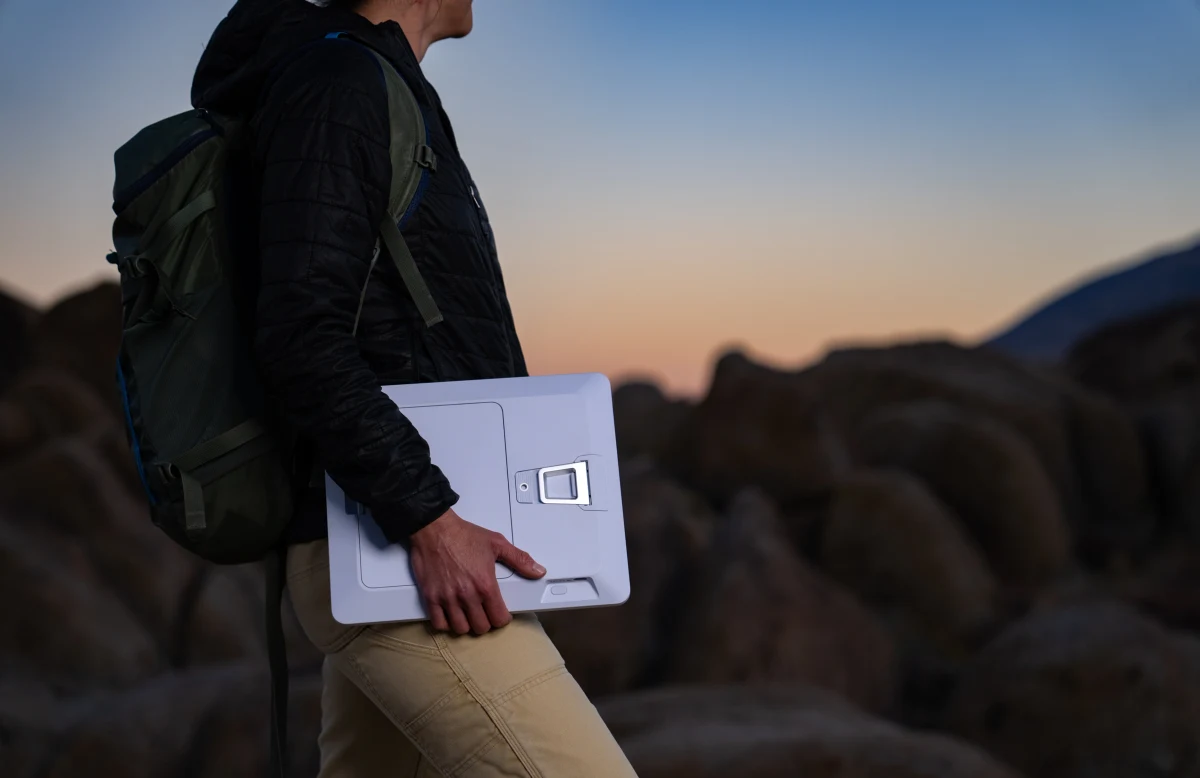
An internet connection can fit in a backpack and still be awkward to take anywhere: the terminal is small, but the power bank, adapter and cable become a second system to manage. Starlink Mini 2’s most interesting change is that the energy source becomes part of the portable kit.
That is a compelling reason to look at it. It is also a reason to ask better questions than “how fast is the new one?” A field connection has to stay powered, see the sky, reach the network and keep the application usable. Mini 2 changes some of those boundaries; others remain.
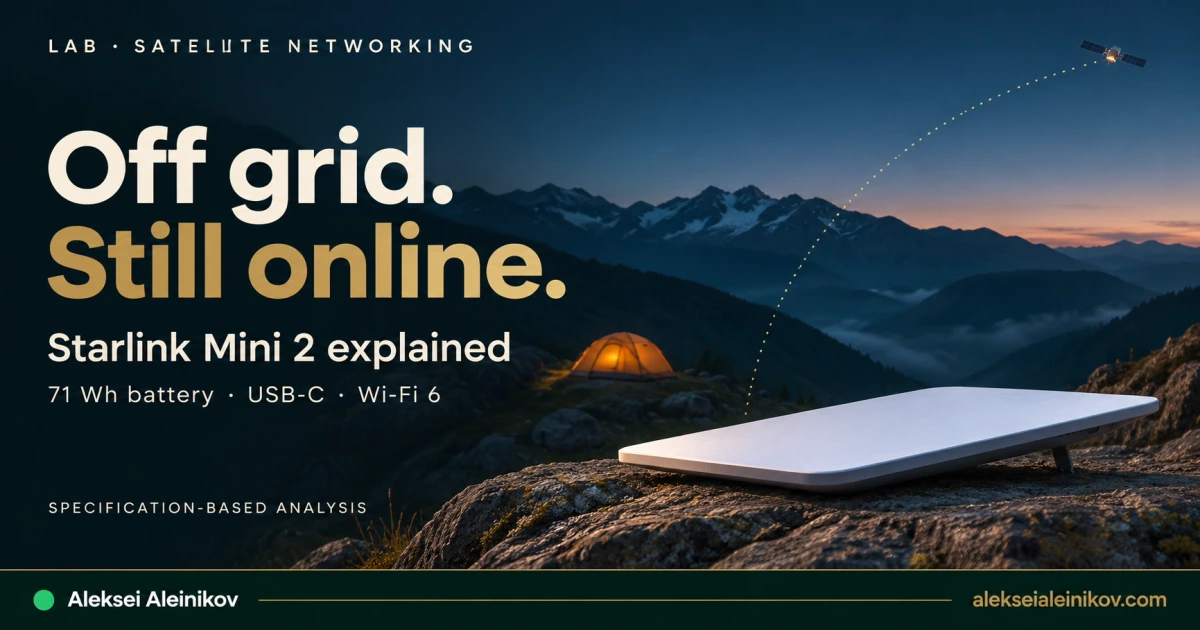
Starlink Mini 2 vs Mini: what actually changes
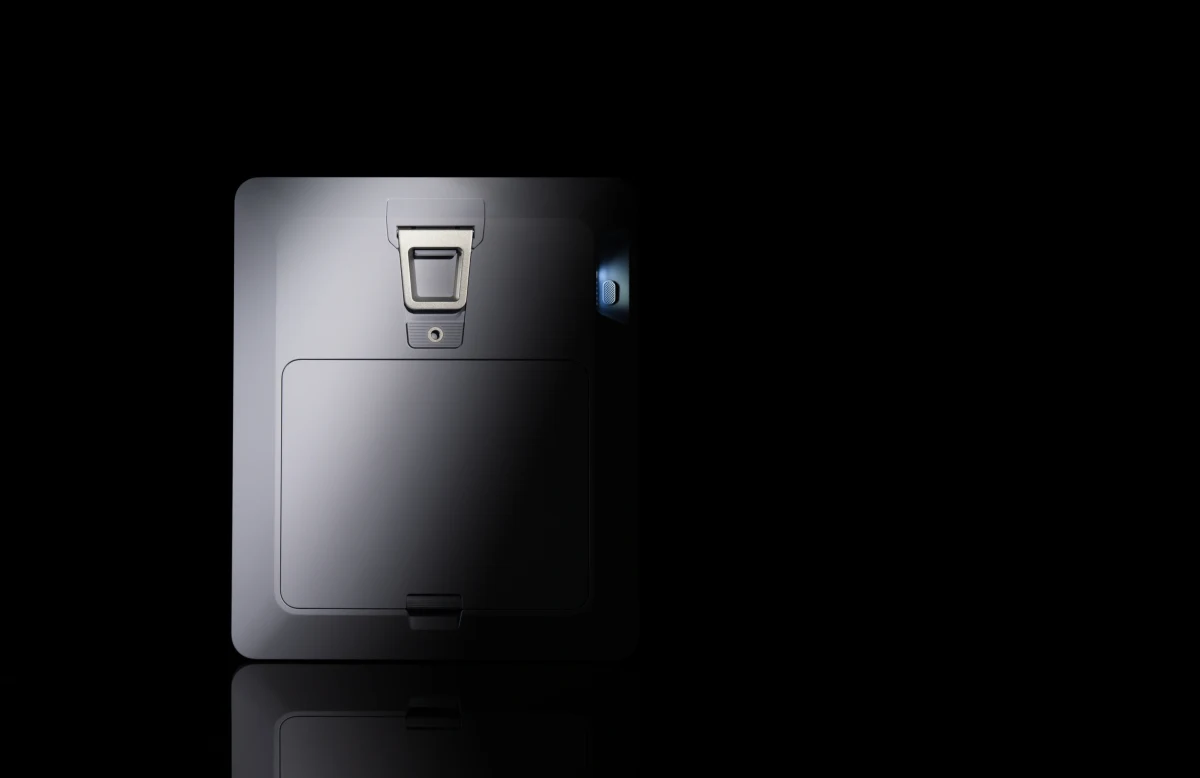
The official Mini 2 product page presents a portable terminal with a removable battery and integrated Wi-Fi. The original Mini specification sheet describes the comparison model. They are separate products: specifications must not silently migrate from the old PDF into a new-model comparison.
| Detail | Original Mini | Mini 2 | Why it matters |
|---|---|---|---|
| Portable power | External source required | Removable 71 Wh battery | Fewer separate components for a short deployment |
| Local Wi-Fi | Wi-Fi 5 | Wi-Fi 6 | Changes the local access link, not the service tier |
| Power connection | DC input; USB-C accessory requires 100 W PD, 20 V / 5 A | USB-C 60 W listed | Check the new model’s supported power equipment |
| Advertised battery runtime | No included battery runtime | Up to 4.5 hours | A maximum claim, not a field guarantee |
| Mass | 1.10 kg terminal; 1.16 kg with kickstand | 1.6 kg with battery and kickstand | Compare complete carrying setups |
| Enclosure dimensions | 298.5 × 259 × 38.5 mm | 263 × 314 × 23.1 mm | Thinner does not mean compatible with old mounts |
| Wired LAN | One documented Ethernet port | Not established by the checked specification table | Verify before designing router failover |
| Average consumption | 25–40 W specified | No average figure in the checked table | Charging power is not operating consumption |
The USB-C connector is a convenience, not a complete compatibility specification. Neither the connector’s shape nor the charger’s headline wattage tells you every supported voltage profile or cable requirement.
Mini 2 is particularly interesting when the goal is one compact kit for a short session outside. If the original Mini already runs from a suitable vehicle supply or power station, the value of integrating the battery is less obvious. It is a change in deployment convenience before it is a demonstrated change in WAN performance.
How the connection gets from a laptop to the internet
A useful conceptual path is:
Laptop → local Wi-Fi → Mini 2 terminal → satellite → ground gateway → Starlink network / point of presence → internet service.
That is not a fixed route for every packet. Starlink’s technology overview describes a low-Earth-orbit constellation and optical links between satellites. Traffic may cross intersatellite links before reaching a ground gateway; the ground path and the eventual application endpoint matter too.
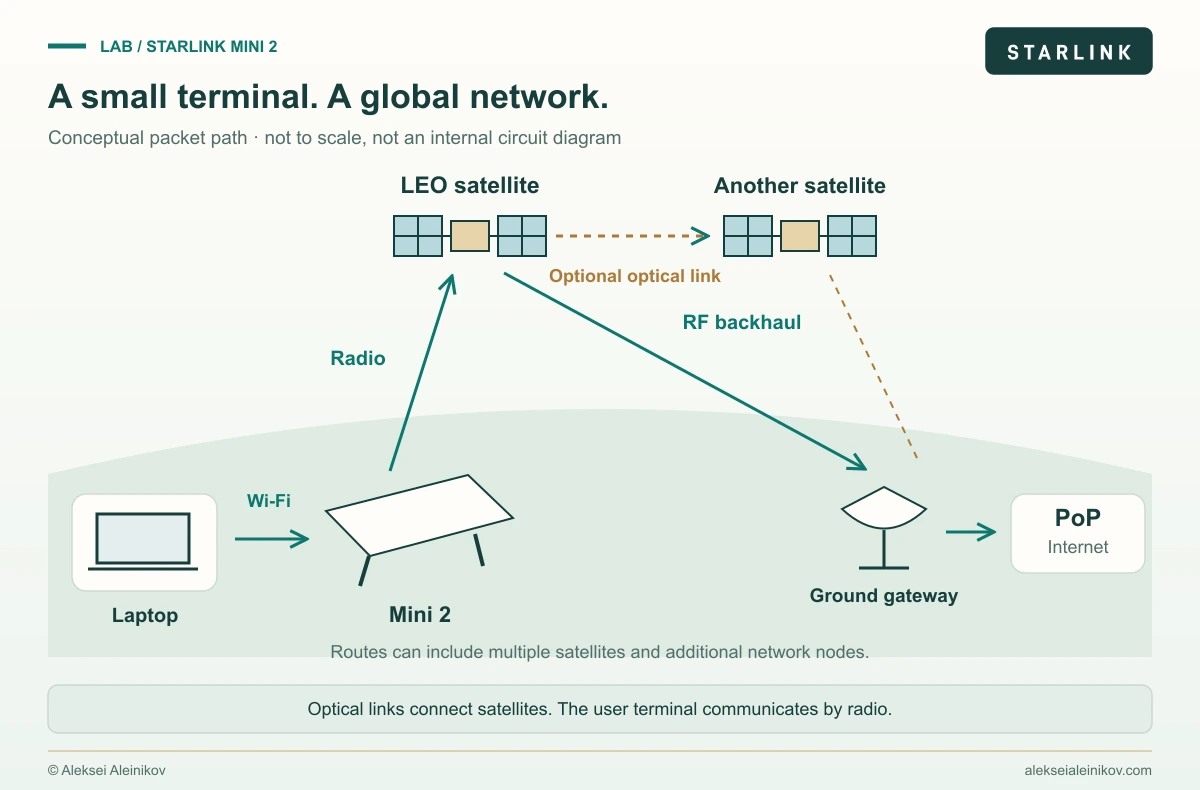
Three distinctions make this architecture easier to reason about:
- Wi-Fi is the local link. Moving a laptop farther from the terminal can impair that link without changing the satellite service.
- The terminal-to-satellite path is radio. The optical mesh is between equipped satellites; Mini 2 does not shoot a laser at the sky.
- The gateway is not the application. A good radio connection can coexist with a slow VPN endpoint, overloaded application or congested terrestrial path.
The hardware specifications do not reveal Mini 2’s full internal board architecture. A conceptual block diagram should therefore stop at functional boundaries. Naming an undocumented modem chip, antenna-element count or internal power rail would turn an explanation into a guess.
Why a flat antenna can follow moving satellites
A phased array combines signals from multiple antenna elements. Adjusting their relative phase changes the direction in which the combined array is most sensitive or radiates most strongly. That is electronic beam steering, rather than physically swinging a dish to follow every movement.
For a simple uniform linear-array model, the phase-step magnitude is:
|Δφ| = (2πd / λ) × |sin θ|
d = element spacingλ = wavelengthθ = steering angle measured from broadside
For half-wavelength spacing and a 30° steering angle, the phase-step magnitude is 90°. This is an educational example from array theory, not Mini 2’s disclosed element spacing or beamformer configuration. The sign depends on the steering direction and phase convention. Analog Devices explains the underlying geometry and coherent combining.
Electronic steering does not make a roof, tree or cliff transparent. Starlink’s obstruction guidance describes satellite switching and the possibility of outages, packet loss and reduced speed when obstacles remain in the field of view. Installation geometry still belongs in the network design.
A 71 Wh battery is an energy budget
Watts describe power; watt-hours describe energy. A 71 Wh rating cannot tell you runtime until you specify the average load and the usable share of that energy.
A basic planning model is:
Runtime (hours) = nominal energy (Wh) × usable fraction / average load (W)Using an assumed 90% usable fraction gives 63.9 Wh. The following loads are deliberately hypothetical; none was measured on a Mini 2.
| Assumed average load | Calculated runtime from 63.9 Wh |
|---|---|
| 15 W | 4.26 hours |
| 20 W | 3.20 hours |
| 25 W | 2.56 hours |
| 30 W | 2.13 hours |
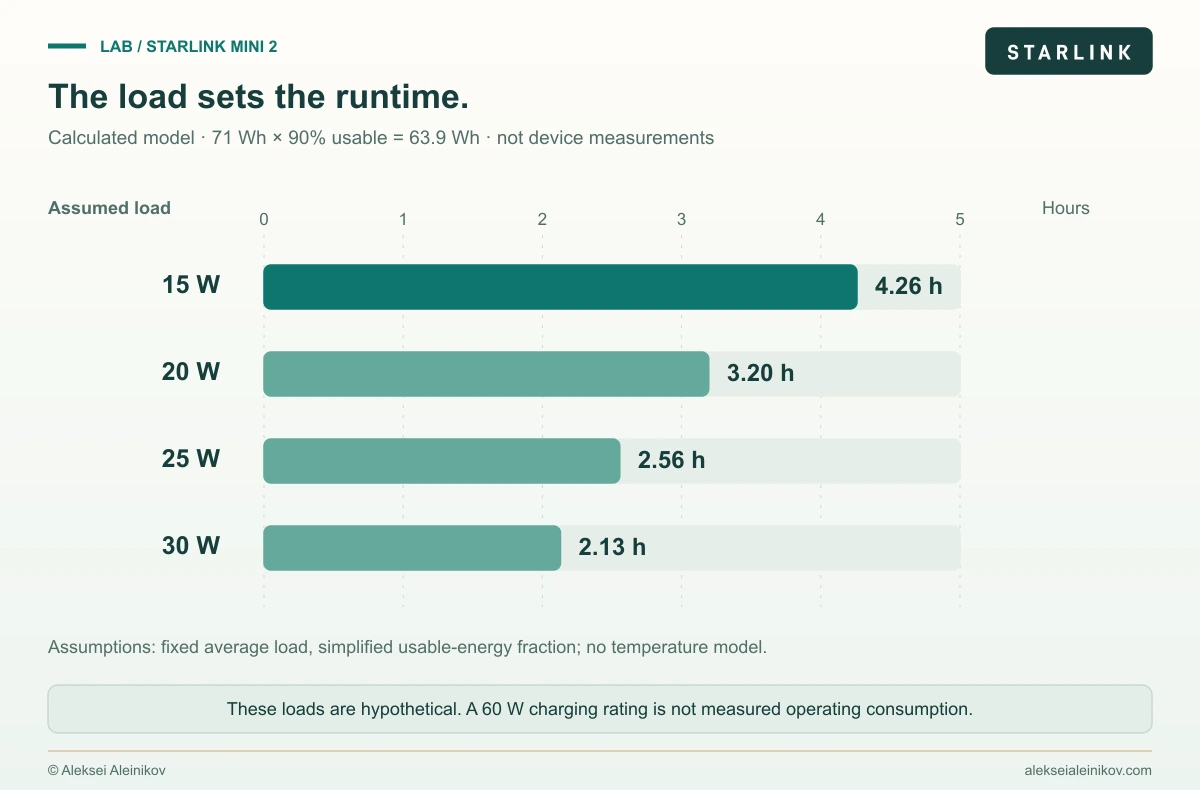
Dividing the advertised 71 Wh by the advertised maximum of 4.5 hours gives about 15.8 W if all nominal energy were usable. It does not establish average operating consumption. Battery reserves, conversion losses, temperature and the workload would have to be known to interpret that number as a device property.
The listed 60 W USB-C charging figure is a different quantity again. A charging capability is neither a promise of 60 W continuous consumption nor a statement of net charging speed while the terminal is operating. The manufacturer also describes online use while charging. That makes external power useful, but it does not document every power-sharing behavior.
Finally, quick-swap is not a hot-swap specification. Until a supported procedure or a controlled test establishes otherwise, plan a battery change as a possible interruption. Keep the laptop’s battery in the same operational budget: a powered terminal cannot rescue a laptop that has shut down.
The battery removes a cable dependency for a while. It does not remove the energy budget.
Wi-Fi 6 and CGNAT solve different problems
Wi-Fi 6 describes the connection between local clients and the terminal. It is not a guarantee of a faster satellite allocation, lower internet latency or a larger upload rate.
IP addressing is another layer. Starlink’s IP-address documentation describes CGNAT as its default IPv4 policy, using shared space from 100.64.0.0/10. That range is reserved for provider shared address space by RFC 6598. An address in it is not a public IPv4 endpoint that a remote operator can simply SSH into.
For remote administration, a useful design is to initiate a VPN outward from the laptop or a supported gateway toward an accessible endpoint. That does not imply the Starlink router itself runs your chosen VPN software. An overlay can provide another option, but Tailscale’s connection documentation distinguishes direct paths from relay paths; NAT traversal is not a promise that every session will be direct.
The design comparison is covered in Tailscale vs WireGuard. For a small fixed topology, an outbound tunnel to a reachable server may be enough. For a roaming team, identity, revocation and relay fallback can be worth the additional dependency.
Do not expose a Kubernetes API or administrative dashboard merely to make remote access convenient. The satellite link is an access network, not an authorization boundary. Keep the same identity, device and application controls you would require on hotel Wi-Fi.
What a convincing performance test would measure
A speed-test screenshot is one observation. It does not establish whether a connection is good enough for on-call work.
| Question | Useful observation | Why a peak download result misses it |
|---|---|---|
| Does SSH stay usable? | Round-trip-time distribution, loss and interruptions over time | Short stalls can dominate the experience |
| Will a video call survive uploads? | Latency and loss while saturating the upload path | An idle link can behave very differently under load |
| Is the VPN the bottleneck? | Public endpoint and VPN endpoint compared; direct/relay status | The overlay adds its own route and processing |
| Can a backup finish? | Sustained upload, retries, data allowance and usable battery time | Download throughput does not answer an upload question |
| Is failover automatic? | Loss of the primary WAN followed by real application recovery | Route recovery and session continuity are different outcomes |
For a controlled comparison, keep the site, service plan, placement and workloads comparable. Record firmware, obstruction status and the exact power setup. Use multiple periods rather than treating one quiet afternoon as the network’s permanent behavior.
The most useful first measurements are likely to be runtime under a named workload, latency under upload load, reconnect time and VPN-path behavior. Those are proposed test objectives here, not results.
Where Mini 2 fits—and where to pause before buying
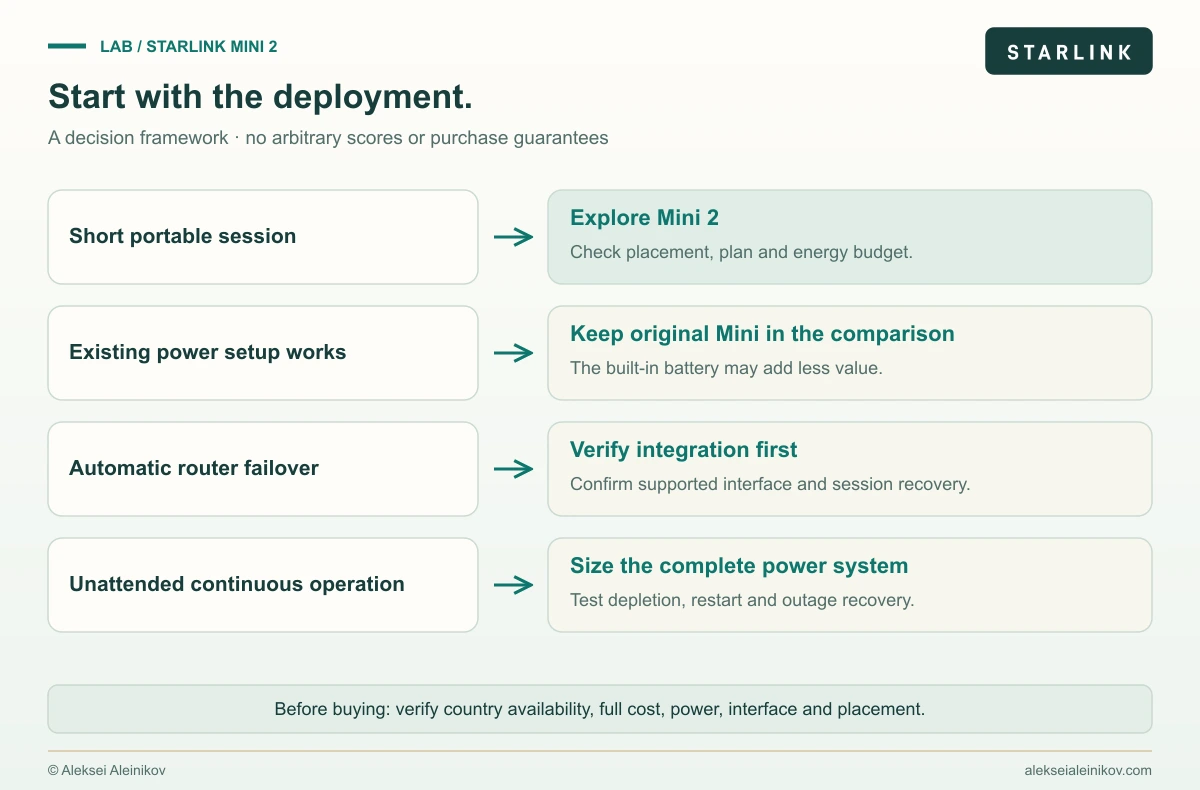
A temporary remote workspace is the strongest fit. A self-contained terminal can simplify a short outdoor session where terrestrial access is unavailable. The appeal is less setup and fewer components. Confirm that the actual site has usable sky visibility and service before treating that possibility as a work plan.
Backup access for an engineer is another plausible fit. An independently powered alternate access path can be valuable when the local broadband connection or mains supply fails. It does not establish disaster-proof service: coverage, gateway infrastructure and the provider remain dependencies. For a laptop, a manual switch to another network may be enough; an office failover design needs more verification.
An existing RV, boat or homelab network deserves closer inspection. Do not assume an original Mini mount, cable, power adapter or Ethernet workflow carries over. Confirm the supported Mini 2 interface and mounting arrangement for the exact installation. An integrated battery is less valuable if power is already available continuously and router integration is the real requirement.
An unattended site needs a different power plan. Even an excellent short-session runtime is not an overnight power specification. Size the whole installation and define recovery after a fully depleted battery. Verify that connectivity and remote access recover after power is restored.
Before you order: five checks that change the decision
The checked product page describes invitation-based preorders for selected US customers, with expansion to other customers and countries to follow. That is not a confirmed general release in Germany or a worldwide purchase offer. Check the product and order flow for your location rather than borrowing another country’s launch terms.
- Availability and service: Is this exact hardware offered for your country and intended use? Does the selected plan cover where and how you will use it?
- Complete cost: Separate hardware, included service, subsequent subscription, accessories and any recurring commitment. A bundle price and a standalone hardware price are different comparisons.
- Power: Which supported supply, cable and spare-battery arrangement will the complete workload need?
- Integration: Can your laptop or router connect through a supported interface, and what happens to its sessions when the primary connection fails?
- Placement: Is the chosen location usable, mechanically suitable and compatible with the manufacturer’s installation instructions?
The official Mini 2 page is the place to verify current availability and ordering terms. No affiliate or referral code is attached here.
Choose Mini 2 when reducing the friction of a short, off-grid session is the problem you need to solve. Keep the original Mini in the comparison when existing power and network integration already work. Wait for a device test when uninterrupted battery changes, sustained performance or unattended recovery are the requirements that decide the purchase.
Sources and image credits
- Starlink Mini 2: official product page. Public product tables and default English text checked on November 14, 2026; the browser-delivered page may require JavaScript. The first-generation PDF is not used as a Mini 2 datasheet.
- Original Starlink Mini specification sheet. Comparison hardware only.
- Starlink technology, obstructions and IP addressing. Network-level documentation; it does not disclose Mini 2’s internal circuit design.
- Analog Devices: phased-array beam characteristics, RFC 6598 and Tailscale connection types. Background engineering references.
- Official product photographs: Starlink / SpaceX. Cover: AI-assisted editorial illustration. Architecture, runtime and decision diagrams: original explanatory artwork; no proprietary internal design or device measurement is implied.