
The cloud console says the server is running. The browser says connection refused. Both can be correct: creating a machine and making an application usable are different jobs.
Ansible vs Terraform is easiest to understand at that boundary. Terraform is usually the better starting point for managing infrastructure resources. Ansible is usually the better starting point for configuring systems and coordinating operational tasks. Many teams use both; many smaller systems need only one. The useful question is which part of the work each tool should own.

Ansible vs Terraform: the short answer
| Your immediate problem | Best starting point | Why |
|---|---|---|
| Create a VPC, subnet, VM or managed database | Terraform | Resource identity, dependencies and planned lifecycle changes |
| Install packages and manage files on existing servers | Ansible | Inventory targeting and reusable configuration tasks |
| Coordinate a maintenance procedure across hosts | Ansible | Ordered plays, conditions and operational steps |
| Create VMs and configure the applications inside them | Both | Separate infrastructure ownership from guest configuration |
| Run workloads entirely on managed/serverless services | Terraform, possibly without Ansible | There may be no guest operating system to maintain |
| Deploy applications into an existing GitOps Kubernetes platform | The platform’s delivery workflow | Adding another manager for the same objects can create conflicts |
This is a beginner’s ranking by task, not a numerical score. “Which is better?” becomes answerable once you name what must change and who will maintain it afterward.
First, five terms without the jargon
Infrastructure as code (IaC) means describing infrastructure in versioned files so changes can be reviewed and repeated. Provisioning creates or updates resources such as a network, virtual machine or database. Configuration management brings selected settings inside a system to their intended values: a package is present, a file has particular content, a service is enabled.
Desired state is what you ask for. Drift is a difference between that intention and what currently exists. These are useful ideas across both tools, not exclusive features of Terraform.
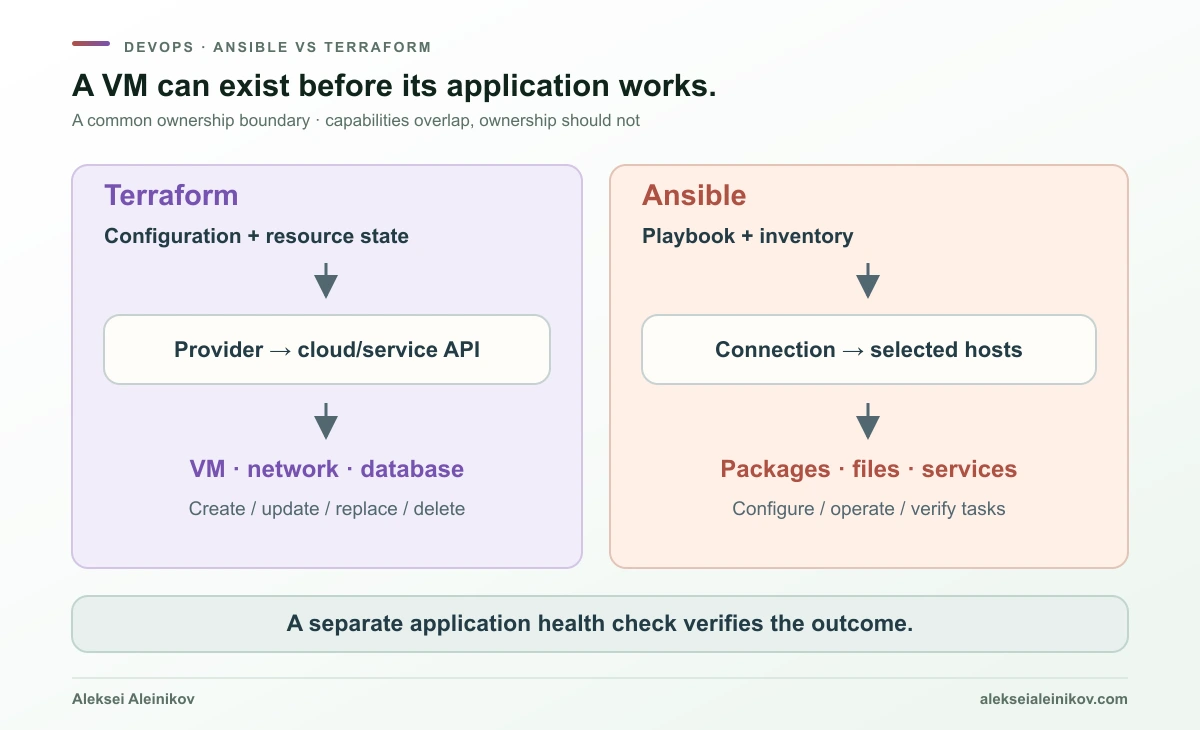
Think of a building. Terraform commonly manages the plot, structure and utility connections. Ansible commonly installs and arranges the equipment inside. The analogy has limits: both tools can call service APIs, and some infrastructure needs no configurable guest at all.
What Terraform actually does
You write configuration, typically in HCL, and Terraform uses providers to interact with cloud or service APIs. A resource describes something to manage; a data source reads information. References between values establish dependencies, allowing Terraform to order operations without you writing a sequence of shell commands. Terraform introduction
A typical loop is:
terraform initterraform plan -out=reviewed.tfplanterraform apply reviewed.tfplaninit prepares the working directory and providers. plan proposes actions. Applying the saved plan executes the reviewed proposal; it can still fail because permissions, quotas, availability or remote conditions changed. Review the plan for replacements and destruction, not just the number of resources. Plan reference
The important extra ingredient is state. It maps a configuration address, such as aws_instance.web, to a real resource identity. Terraform is not simply searching for anything with a matching display name. State also carries information needed to coordinate later operations. It is an operational dependency, not a disposable cache. State documentation
Terraform CLI does not continuously patrol your cloud after apply exits. You need another run, a scheduled workflow or a platform capability to check for drift again. Continuous reconciliation, such as the loop in Argo CD and Flux, is a different operating model.
What Ansible actually does
Ansible starts with an inventory: hosts and groups, together with connection information and variables. A playbook contains plays that select targets and run tasks. A module performs a specific kind of action; a collection packages modules and related plugins. Roles organize reusable automation. Ansible concepts
For a Linux server, tasks might say:
- name: Ensure nginx is installed  ansible.builtin.apt:    name: nginx    state: present
- name: Ensure nginx runs at boot and now  ansible.builtin.service:    name: nginx    enabled: true    state: started
Those are desired-state declarations, even though task order also matters. Ansible normally executes tasks in playbook order under its default strategy, with behavior adjustable through strategies and other controls. Playbooks
“Agentless” means a normal managed Linux host does not need a permanent Ansible daemon. It still needs a usable connection, suitable permissions and the dependencies required by its modules—often Python. Network devices, Windows and API-driven modules can use other transports or execution locations. The control node must be maintained too.
Also distinguish ansible-core, the Ansible community package and Red Hat Ansible Automation Platform. The first provides the runtime and built-in plugins; the community package includes selected collections; the enterprise platform adds a supported operating environment and organizational capabilities. They are not interchangeable product names. Release and maintenance guide
The differences that matter after the first tutorial
| Dimension | Terraform | Ansible |
|---|---|---|
| Common unit of ownership | API resource and its lifecycle | Task-managed settings or operational actions |
| Configuration | HCL; JSON syntax also supported | YAML playbooks, variables and inventory |
| Coordination model | Dependency graph plus persisted resource state | Plays, inventory, modules, conditions and execution strategy |
| Typical connection | Provider authenticates to an API | SSH, other transports or API calls, depending on module |
| Preview | Provider-backed resource plan | Check/diff for supported tasks |
| Repeated run | Re-evaluates managed resources and proposes differences | Re-evaluates tasks; behavior depends on modules and task design |
| Removing an object from input | Removing a managed resource block generally proposes destruction | Removing a host from inventory does not delete it |
| Continuous enforcement | Requires an external run/scheduling mechanism | Requires an external run/scheduling mechanism in a normal push workflow |
| Reuse | Modules | Roles and collections |
| Main operational burden | State, provider versions, permissions and lifecycle review | Inventory accuracy, credentials, runtime/collection versions and task design |
Declarative versus imperative is an incomplete explanation
A Terraform resource describes a desired object. An Ansible apt task with state: present also describes a desired condition. Conversely, an Ansible shell command can perform arbitrary operations whose safety cannot be inferred from YAML.
Idempotency means repeating an operation under the same relevant conditions does not keep changing the result. A file module managing fixed content can be idempotent. A command that appends a line on every run is not automatically idempotent because Ansible launched it.
For Terraform, a clean plan means no changes are proposed to the attributes and resources within its management scope. It does not establish that the guest OS has no drift or that the application passes a health check.
Automation becomes easier to trust when “what this tool owns” is clearer than “what this tool can technically do.”
State versus inventory is more than a file-format difference
Terraform state records resource identity. Ansible inventory answers which systems to target. Inventory can be generated from cloud APIs instead of maintained by hand; it does not thereby become Terraform state. Inventory guide
This changes deletion behavior. Removing a VM from an Ansible group stops targeting it; the VM remains. Removing a Terraform-managed VM resource from configuration normally makes its destruction part of the next plan. Read deletion plans before applying them. Lifecycle settings and deliberate state-management operations can change behavior, so avoid treating this rule as an invitation to experiment in production. Lifecycle reference
Existing infrastructure can be brought under Terraform management through an import workflow. Import still needs correct configuration and review; it is not a discovery button that makes an entire account safely managed. Import overview
Terraform plan vs Ansible check mode
A Terraform plan describes proposed managed-resource operations based on configuration, state and information read through providers. It can contain values that will only become known during apply. It is not an execution of arbitrary guest configuration.
Ansible --check asks supported modules to predict changes; --diff requests before/after detail where supported. Tasks that depend on results from previous tasks can behave differently in a simulation. A task can also explicitly opt out of check mode. Check and diff modes
ansible-playbook -i inventory.json site.yml --check --diffUse both previews, then add application tests. A green Terraform apply and an Ansible recap without failures still do not prove DNS resolves, TLS is correct, the backend is healthy or authorization is enforced.
Practical example: Terraform creates a VM, Ansible configures nginx
The workflow below uses one private Ubuntu EC2 instance. Terraform owns the VM. Ansible owns nginx installation, one static HTML file and the service’s running/enabled state. Existing networking and SSH credentials are supplied by you.
Download main.tf, site.yml, example variables and the complete setup and cleanup notes. The snippets here explain the important parts; use the full files together.
1. Prepare the small but real prerequisites
Use a disposable account or isolated lab environment. You need Terraform, a supported Ansible/Python combination, AWS credentials, an approved Ubuntu amd64 AMI in your selected region, an existing subnet/security group and an existing EC2 public key pair. The matching private key stays with the controller, ideally in an SSH agent.
The controller needs a routed connection to the VM’s private IP: a runner in the VPC, VPN or appropriately configured bastion. Allow SSH only from the controller and HTTP only from the test client. The VM needs controlled DNS/package-repository access through existing egress or a mirror. The sample creates no public IP, NAT gateway, VPC or firewall rules.
Verify the SSH host key through a trusted channel and configure known_hosts; do not disable verification. The image must provide Python, apt and suitable sudo access. Allow initial image setup to finish before installing packages. This is a paid cloud resource, not a promised free-tier exercise.
2. Describe the VM in Terraform
The full file declares the AWS provider and input variables. Its central resource is:
resource "aws_instance" "web" {  ami                         = var.ubuntu_ami_id  instance_type               = "t3.micro"  subnet_id                   = var.subnet_id  vpc_security_group_ids       = [var.security_group_id]  key_name                    = var.ssh_key_name  associate_public_ip_address = false
  metadata_options {    http_tokens = "required"  }  root_block_device {    encrypted = true  }  tags = {    Name = "ansible-terraform-demo"  }}
The AMI ID is an explicit input so you can select a reviewed image rather than silently taking whichever image is newest. The example requests encrypted root storage and IMDSv2 tokens; those settings do not replace correct account, network and IAM controls. Official AWS provider resource documentation
Copy terraform.tfvars.example to terraform.tfvars and replace every placeholder. Then:
terraform initterraform fmt -checkterraform validateterraform plan -out=demo.tfplanterraform apply demo.tfplanKeep state, variable files containing sensitive data and saved plans out of Git. Commit the reviewed .terraform.lock.hcl so colleagues and CI select the same provider version. Local state is adequate for this single-user teaching lab; shared operation needs a properly secured backend.
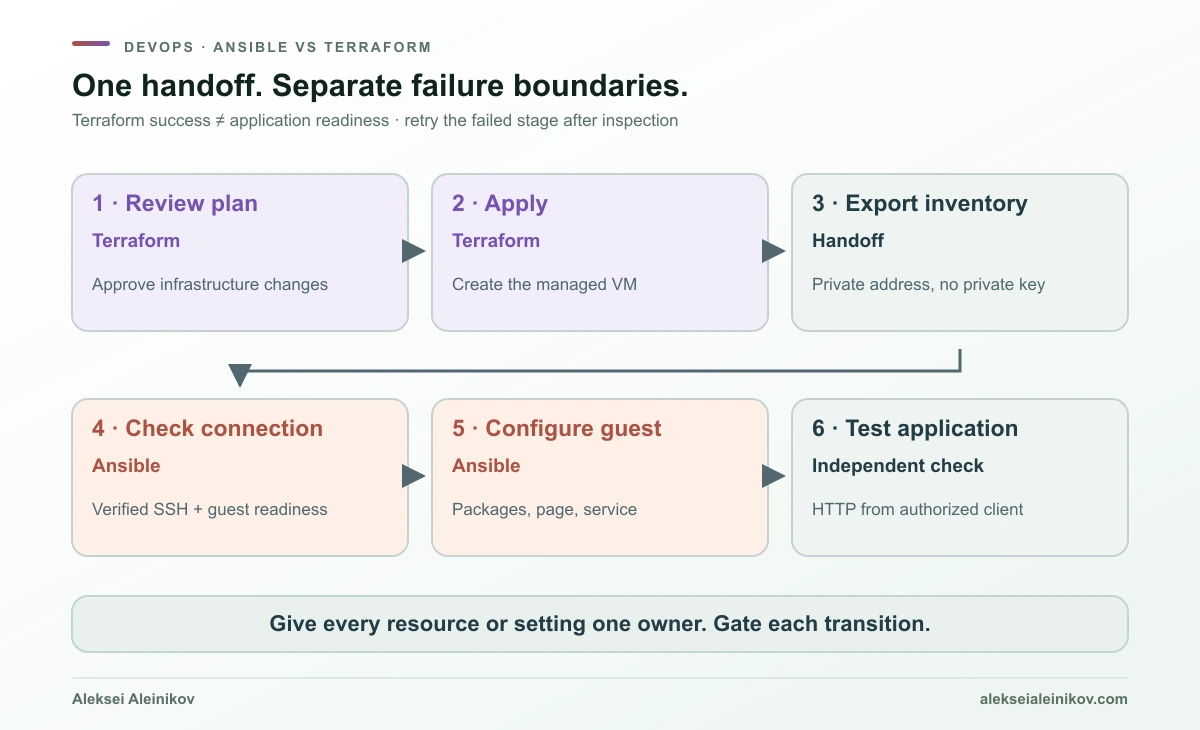
3. Make the handoff explicit with an inventory output
Terraform exports only the connection information needed by Ansible:
output "ansible_inventory" { value = { all = { children = { web = { hosts = { web1 = { ansible_host = aws_instance.web.private_ip } } vars = { ansible_user = "ubuntu" } } } } }}terraform output -json ansible_inventory > inventory.jsonansible-inventory -i inventory.json --graphansible web -i inventory.json -m ansible.builtin.wait_for_connection -a 'timeout=180'A named Terraform output with -json emits its value directly. The JSON inventory is accepted by Ansible’s YAML inventory plugin with its default extensions. No private key is exported. Regenerate inventory after infrastructure changes so you do not target a stale address. Terraform output, Ansible inventory plugin
The readiness task waits for a usable Ansible connection rather than assuming that a successful EC2 API call means the guest is ready. It does not configure routing or authenticate an unknown SSH host for you. wait_for_connection
4. Configure the guest with Ansible
The downloaded playbook selects group web and uses become: true for privileged package and service operations. Three tasks install nginx, publish deterministic content and enable/start the service.
- name: Publish a deterministic home page ansible.builtin.copy: dest: /var/www/html/index.html content: "Infrastructure ready. Configuration managed.\n" owner: root group: root mode: "0644"Explicit file permissions avoid relying on the controller’s or target’s defaults. Copy module
ansible-playbook -i inventory.json site.yml --syntax-checkansible-playbook -i inventory.json site.yml --ask-become-passansible-playbook -i inventory.json site.yml --check --diff --ask-become-passansible-playbook -i inventory.json site.yml --ask-become-passOmit --ask-become-pass if your lab image uses passwordless sudo. On a fresh VM, run the real install before relying on the full check-mode preview: the directory created by the package may not exist yet.
The apt task uses state: present, not an unconditional upgrade, and limits package-cache refreshes with cache_valid_time. Repository changes and expired caches can still affect a later run. The service task uses started, not restarted, so it does not request a restart on every execution. Apt module, Service module
From the authorized test client, request http://PRIVATE_IP/ with curl --fail. Substitute the address in inventory.json. The returned page should match the managed text. This is an isolated HTTP exercise, not an internet-ready TLS configuration.
5. Observe a repeat run, then clean up
With stable infrastructure and unchanged inputs, the next Terraform plan should propose no changes. With the guest already configured, the next Ansible run should report no managed changes apart from cache refreshes or changed external conditions. These are expected behaviors to verify yourself, not measured results claimed by this article.
Now change only the page text. Ansible should update the file; Terraform should have no guest-file change to plan. That tiny experiment makes the ownership boundary tangible.
When finished, review destruction in the same disposable working directory:
terraform plan -destroy -out=destroy.tfplanterraform apply destroy.tfplanThis removes the sample VM and its managed attached root volume under the example’s defaults. Supplied networking and the existing key pair are outside this configuration. Protect remaining state/backups and remove generated inventory and plan artifacts when no longer needed.
What happens when something fails halfway?
Suppose the VM was created successfully, but nginx installation failed because package repositories were unreachable. Terraform’s infrastructure success does not become an application success. Fix the connectivity issue, inspect the host and rerun Ansible; recreating the VM is not automatically necessary.
Neither workflow is a transaction across your whole application. Earlier successful operations may remain after a later failure. A Terraform replacement may affect dependencies; an Ansible rollout may leave some hosts updated and others untouched. Design explicit recovery steps and health gates.
| Symptom | Investigate first | Avoid |
|---|---|---|
| VM exists; SSH times out | Routing, security group, SSH user/key, guest readiness | Disabling host-key checking to “fix” a network problem |
| Terraform wants to replace a VM | Changed resource attributes and provider behavior | Applying before checking data and availability impact |
| Ansible reports changes every time | Task/module semantics, generated content, cache expiry | Hiding changes with changed_when: false without understanding them |
| Apply/playbook passes; HTTP fails | Service, listen address, network path and application logs | Treating an automation recap as a health test |
| Another operator is deploying concurrently | Backend locking and CI/job coordination | Two independent writers for the same resources or hosts |
When a configuration change requires a service reload, use a handler notified by that change, rather than restarting every run. A handler is a coordination tool; it is not an automatic rollback system. Ansible handlers
Using Ansible and Terraform together safely
The clean division is resource lifecycle → connection contract → guest configuration → health check. HashiCorp also documents a larger integration pattern using HCP Terraform and Ansible Automation Platform. That enterprise pattern validates the idea; you do not need both platforms to understand the basic boundary. Official integration pattern
Keep these ownership decisions written down:
- Terraform owns VM creation/deletion and the cloud resources declared in its configuration.
- Ansible owns explicitly chosen packages, files, accounts and services inside the guest.
- A pipeline gates the handoff, coordinates concurrent deployments and records outcomes.
- An application check establishes whether the service actually works.
Avoid an Ansible task editing a cloud attribute that Terraform also manages. Likewise, avoid both cloud-init and Ansible rewriting the same file on every boot. The problem is conflicting writers, even when both writers are individually reliable.
Why not run the entire playbook from a Terraform provisioner?
local-exec can invoke Ansible. That does not make every guest setting visible to Terraform’s resource model. It also couples configuration failures to infrastructure lifecycle behavior and can make retries or replacements surprising. HashiCorp recommends provisioners as a last resort when better mechanisms are unavailable. Provisioner guidance
Prefer a separate pipeline stage, a supported integration or an image/bootstrap workflow. Use cloud-init for a small initial bootstrap and image building when replacing a prepared machine is a better fit than modifying it repeatedly. Choose the boundary explicitly; “all commands fit in one .tf file” is not a maintenance strategy.
Security: both tools hold real authority
Terraform state and saved plans can contain secrets. sensitive = true suppresses ordinary display; it does not automatically encrypt a value or keep it out of state. Supported ephemeral mechanisms and write-only resource arguments can avoid persistence in specific workflows, but require compatible Terraform/provider features. Sensitive-data handling, Ephemeral values
For team operation, use an encrypted, access-controlled backend with locking where supported. Locking protects a state from concurrent writers; it does not coordinate every other tool that can reach the cloud or guest. Backups and a tested recovery procedure still matter. State locking
Ansible inventory variables, debug output, task diffs and credentials can leak sensitive data too. Ansible Vault encrypts files/variables; decryption access and runtime logging still need controls. Do not confuse it with the separate HashiCorp Vault service. Ansible Vault
Use short-lived cloud credentials where possible, verify SSH hosts, restrict privilege escalation and review provider/collection dependencies. A CI runner executing trusted-looking automation has the permissions of its credentials. The GitLab CI/CD hardening guide covers that execution boundary; workload identity federation explains how to reduce dependence on long-lived cloud keys.
Which should a beginner learn first?
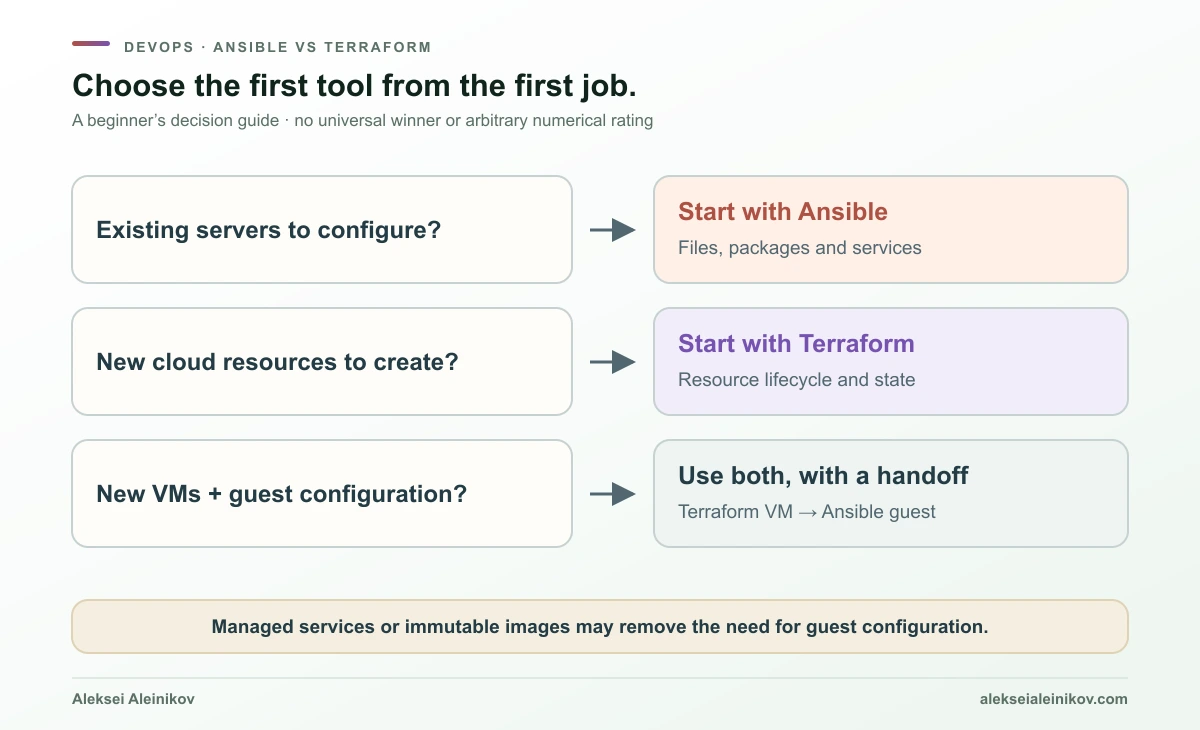
Start with Ansible if you already have servers. Make one file deterministic, manage one package and service, then run the playbook twice. Break something in a disposable environment and observe what is repaired. Learn inventory, variables, privilege escalation and handlers before assembling a large role library.
Start with Terraform if you need cloud infrastructure. Create a small isolated resource, read its plan, change one attribute and inspect state without editing it manually. Practice the difference between an in-place update, replacement and deletion. Learn permissions and backend operations alongside HCL.
Learn both when your work crosses the boundary. Provision a VM, export a narrow inventory and configure one service. Keep the tools separate enough that a configuration retry does not require an infrastructure rebuild.
| Learning milestone | What you should be able to explain |
|---|---|
| Before either tool | IP addresses, DNS, SSH, permissions, Git and environment separation |
| First Terraform exercise | What will be created, which credentials authorize it, where state lives and how to destroy it |
| First Ansible exercise | Which hosts are targeted, which tasks change them and why a repeat run is stable |
| First combined workflow | Who owns each resource, how addresses move between stages and how readiness is tested |
| Before production | Recovery, secret handling, review, dependency pinning and concurrent-run control |
There is no universal speed or cost winner. Provider API behavior, number of hosts, connection latency, task design and paid platform choices dominate. A stopwatch comparing different jobs would tell you very little.
Cost, licensing and nearby tools
Separate the CLI from the platform and the cloud bill. Community Ansible usage does not require an Automation Platform subscription. Terraform CLI usage and commercial HCP Terraform features are also different questions. Organizations should review the applicable licenses and service terms instead of treating “downloadable” as “unrestricted.” Ansible license, Terraform license
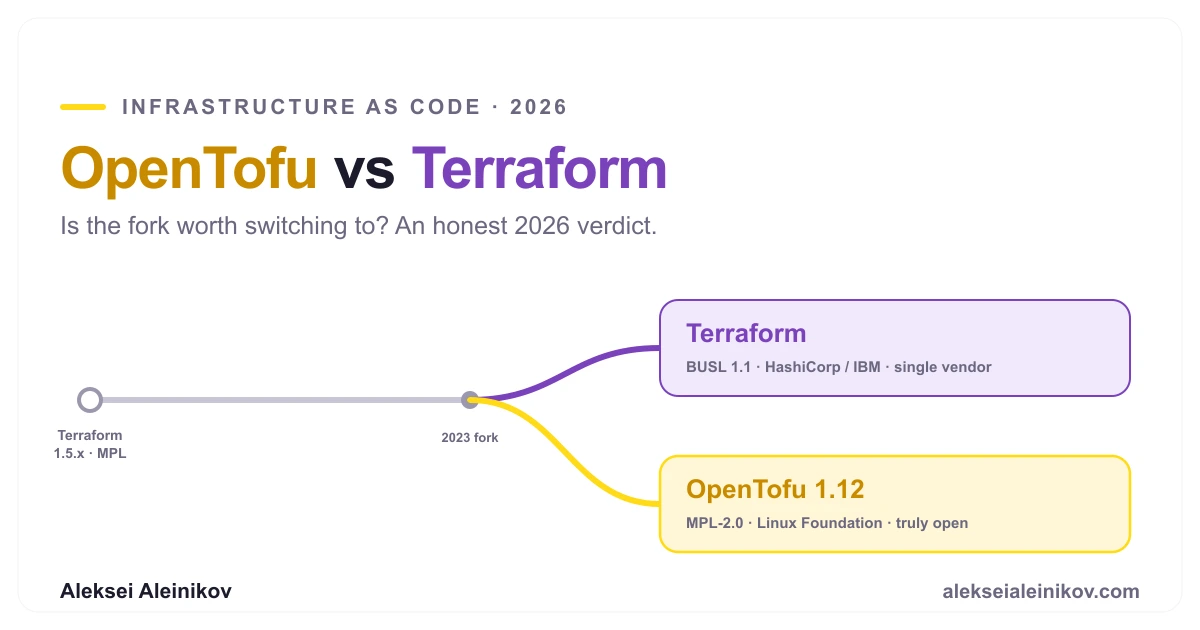
If the issue is Terraform licensing or governance, read OpenTofu vs Terraform: that is a comparison within the infrastructure-provisioning layer. It is a separate decision from choosing Ansible for configuration management.
For Kubernetes, Terraform can provision infrastructure and Ansible can automate preparation or maintenance. Application delivery may already belong to Helm, Argo CD or Flux. Do not add every tool from an ecosystem diagram to a small project. Add a tool when a specific responsibility becomes clearer and easier to operate.
Choose ownership before choosing a winner
Terraform is a strong starting point for what infrastructure exists and how its lifecycle changes. Ansible is a strong starting point for what selected systems should contain and which operational tasks must run. They can overlap, but overlap does not require shared ownership.
For a beginner, the most useful demonstration is small: create a machine, configure a service, rerun both, change one thing and clean up. If you can explain which tool sees each change—and how you recover when the second step fails—you understand the comparison well enough to make a sensible choice.



From the community
Discussion on Mastodon & Bluesky
Replies to this article from the open web, pulled in live. No ads, no tracking scripts.
Reply there — it shows up here automatically.