
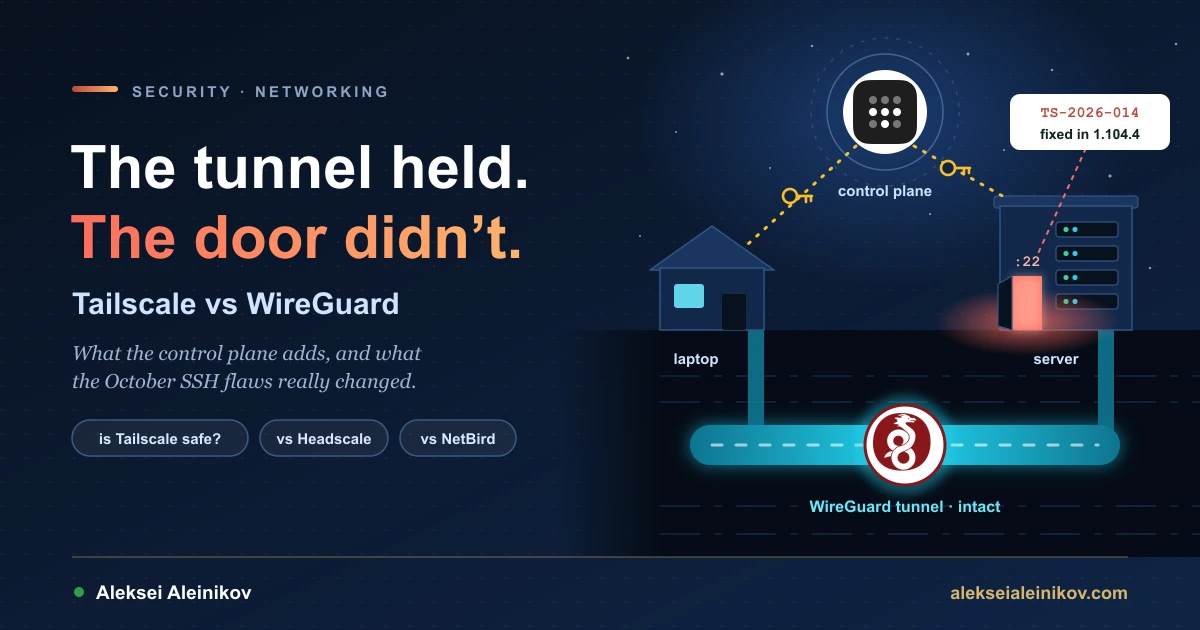
“Should I just use plain WireGuard?” is a question that comes back every few months in every homelab and platform team chat. This week it came back with a reason. On October 24 a researcher published a report called “Tailworm” describing privilege escalation through Tailscale SSH. Tailscale posted an investigation update on October 26, then shipped fixes in version 1.104.4 together with four security bulletins and a detailed write-up. For a few days the loudest opinion online was that the whole idea of a managed mesh VPN had been a mistake.
That reaction mixes up two different things. Tailscale is not a competitor to WireGuard. It runs WireGuard. What it adds is a control plane: the machinery that hands out keys, finds a path through NAT, maps people to machines and enforces a policy. None of the October bugs were in the tunnel. They were in a feature built on top of it. So the honest comparison is not “Tailscale or WireGuard”. It is how much of that control plane you need, who should run it, and how much extra code you are willing to run as root on every node to get it.
The Short Answer
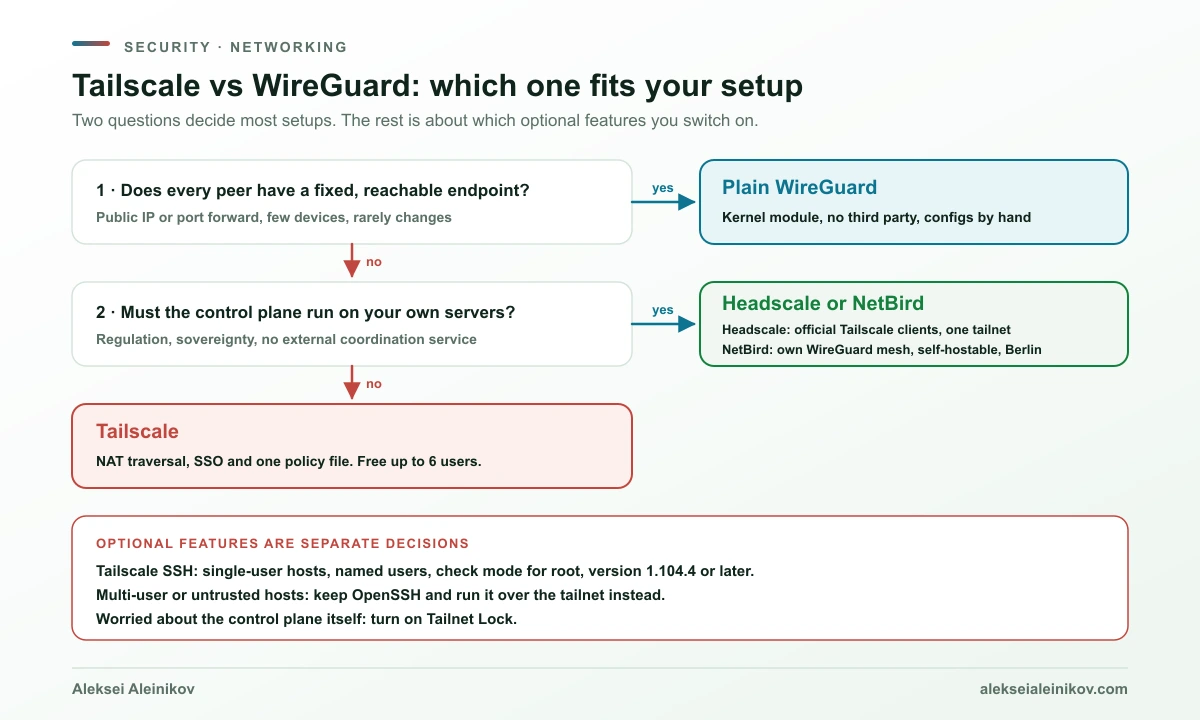
- Use plain WireGuard when the topology is small and stable: a few servers with public IPs, a site-to-site link, or phones and laptops dialling into one router you control. You get a tiny, auditable code base in the Linux kernel and no third party in the path.
- Use Tailscale when you have many devices that move between networks, sit behind NAT you do not control, and belong to more than one person. Its value is that adding, removing and restricting access becomes a policy change instead of a key-shuffling exercise.
- Use Headscale or NetBird when you want that control plane but not someone else’s servers.
- Treat Tailscale SSH and Serve as separate decisions. They are optional features with their own attack surface, and the October vulnerabilities were in exactly those features.
What WireGuard Is, and What It Deliberately Is Not
WireGuard is a VPN protocol and implementation designed to be small. It uses a fixed set of modern primitives (the Noise protocol framework, Curve25519, ChaCha20-Poly1305, BLAKE2s, SipHash24 and HKDF) instead of negotiable cipher suites. The project describes its goal as a code base small enough to be “comprehensively reviewable by single individuals”. It has been part of the mainline Linux kernel since version 5.6 in 2020.
Its central idea is cryptokey routing. Each peer is a public key with a list of AllowedIPs. Outbound, that list works like a routing table: packets for those addresses are encrypted to that key. Inbound, it works like an access list: a packet decrypted with that key is accepted only if its source address is in the list. Peers can roam between networks, and the tunnel follows them.
What WireGuard does not do is equally deliberate. Its own documentation says that “all issues of key distribution and pushed configurations are out of scope”. With plain WireGuard, you build all of the following yourself:
- Key distribution. Every peer must know the public key of every peer it talks to. A full mesh of 20 devices is 190 peer relationships to keep in sync.
- Reachability. At least one side of each tunnel needs a reachable UDP endpoint. If neither side has one, for example both sit behind NAT or carrier-grade NAT, you need a port forward or a hub server with a public IP.
- Revocation. Removing someone means deleting their key from every peer that trusted it.
- Identity. WireGuard knows keys, not people. There is no login, no SSO, and no “this laptop belongs to Alice”.
- Name resolution. You bring your own DNS.
For a handful of machines none of this is hard. A hub-and-spoke config with one public server and PersistentKeepalive on the clients covers a lot of homelabs, and routers such as OpenWrt and OPNsense ship WireGuard support. The pain grows with the number of peers, the number of people, and the rate of change.
What Tailscale Adds: a Control Plane Around the Tunnel
Tailscale splits the system into two planes.
The data plane is WireGuard. Tailscale’s implementation is built on wireguard-go, the userspace Go implementation, behind a TUN device. Packets between two devices are encrypted end to end with WireGuard keys that never leave the device.
The control plane is what WireGuard left out. A coordination server exchanges public keys between nodes, assigns each node a stable address, and pushes down the policy that decides which nodes may talk to which. Around it sit the features people actually notice:
- NAT traversal. Clients try hard to establish a direct UDP path, even when both sides are behind NAT.
- Relays. When a direct path fails, traffic goes through DERP relays. The relay forwards packets it cannot decrypt, so the connection stays end-to-end encrypted. Since February 2026, Peer Relays, which are self-hosted relays on your own nodes, are generally available as a higher-throughput option.
- Identity. Users log in through an identity provider, and devices are tied to users or tags.
- Policy. One tailnet policy file defines who can reach what, and changes reach clients within seconds.
- MagicDNS and extras such as subnet routers, exit nodes, Serve, Funnel and Tailscale SSH.
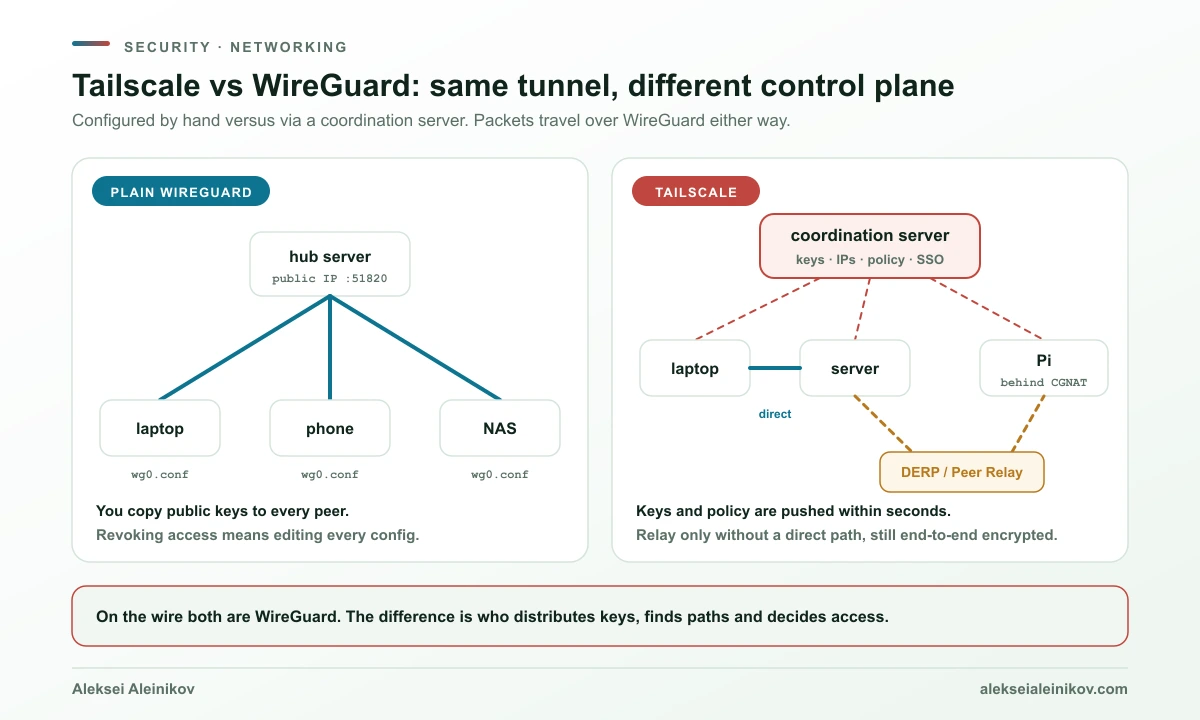
WireGuard is a tunnel. Tailscale is a key-distribution and policy system that happens to use WireGuard tunnels. Almost every argument about the two is really an argument about whether you want that system, and whether you want to run it yourself.
There is an important consequence for trust. With plain WireGuard, the only party that can add a peer is whoever edits the config. With Tailscale, the coordination server decides which public keys your nodes accept. Tailscale’s answer to “what if the control plane is compromised” is Tailnet Lock, generally available since 2025: new node keys must be signed by trusted keys held on your own devices before other nodes will accept them. If that threat model matters to you, turn it on. It is not enabled by default.
Is Tailscale Slower Than WireGuard?
The intuition says yes: kernel code should beat a userspace Go implementation. The published numbers say it is not that simple.
Tailscale has published two head-to-head benchmarks against kernel WireGuard, both on the same pair of Linux hosts. In April 2023 (version 1.40) it measured TCP with iperf3 after adding segmentation and receive offloads to wireguard-go. In November 2023 (version 1.54) it measured UDP and QUIC with Microsoft’s secnetperf after extending those offloads to UDP traffic, which needs a Linux 6.2 or newer kernel:
| Test, single flow | Stock wireguard-go | Kernel WireGuard | Tailscale’s wireguard-go |
|---|---|---|---|
| TCP, bare metal (i5-12400, 25 GbE), Apr 2023 | 8.36 Gb/s | 11.8 Gb/s | 13.0 Gb/s |
| TCP, AWS c6i.8xlarge, Apr 2023 | 5.34 Gb/s | 2.67 Gb/s | 7.32 Gb/s |
| UDP/QUIC, bare metal, Nov 2023 | 2.94 Gb/s | 5.42 Gb/s | 12.46 Gb/s |
| UDP/QUIC, AWS c6i.8xlarge, Nov 2023 | 2.20 Gb/s | 2.74 Gb/s | 7.21 Gb/s |
Read these numbers with three caveats. They come from the vendor. Tailscale itself says the AWS results hit a wall of about 7 Gb/s set by the underlying network, not by the software. And they are old: as of October 2026, Tailscale has not published a newer head-to-head against kernel WireGuard. Its most recent performance post, from September 2026, reports incremental work instead: about a 5% speed-up on Linux and Android from smarter packet buffers shipping with 1.104, and multi-queue processing for subnet routers, app connectors and exit nodes planned for a later release. What the numbers do show is that “userspace means slow” no longer holds on a modern Linux host.
What does cost real throughput is the path, not the implementation. In a January 2026 write-up, a Tailscale engineer connecting from Delhi to a homelab in Minnesota measured this over the same internet link:
| Path | Throughput (iperf3, TCP) |
|---|---|
| Relayed through DERP | 2.2 Mb/s |
| Through a self-hosted Peer Relay | 27.5 Mb/s |
| Plain internet, no tunnel | 31.1 Mb/s |
DERP servers are shared and rate-limited so that everybody gets fair access. That is where people see the speeds that make them search “why is Tailscale slow”. Run tailscale ping <device>: if replies say via DERP, you are relayed. The fixes, in order: make direct connections possible (open UDP, avoid double NAT), add a Peer Relay on a node with a reachable UDP port, and on Linux subnet routers and exit nodes use a 6.2+ kernel with the ethtool UDP GRO settings from Tailscale’s performance guide. Swapping to plain WireGuard fixes a relayed connection only because plain WireGuard forces you to have a reachable endpoint in the first place.
The Tailscale SSH Vulnerability: What Actually Happened
Tailscale SSH is an optional feature. When you enable it on a Linux host (tailscale set --ssh), the Tailscale daemon takes over port 22 on the host’s Tailscale address and runs its own SSH server. Authentication comes from the WireGuard node key and the tailnet policy instead of authorized_keys. Your normal sshd keeps working on other addresses.
That design is convenient, and it has a sharp edge. The daemon runs as root, so the SSH server inside it starts as root and must drop privileges to the right user for every session, every forwarded socket and every subprocess. OpenSSH spent decades hardening that boundary with privilege separation. The October findings were failures at exactly that boundary.
Timeline, from Tailscale’s investigation update and its blog post of October 28:
- October 23: concerns about Tailscale SSH start circulating on social media.
- October 24: the “Tailworm” report reaches Tailscale in the morning; the researcher publishes it two hours later.
- October 26: investigation update with interim advice: narrow SSH policies and disable SSH forwarding if you do not need it.
- Fix: Tailscale 1.104.4, with security bulletins TS-2026-014 to TS-2026-017 and “architectural safeguards” aimed at whole classes of similar bugs.
What the bulletins say:
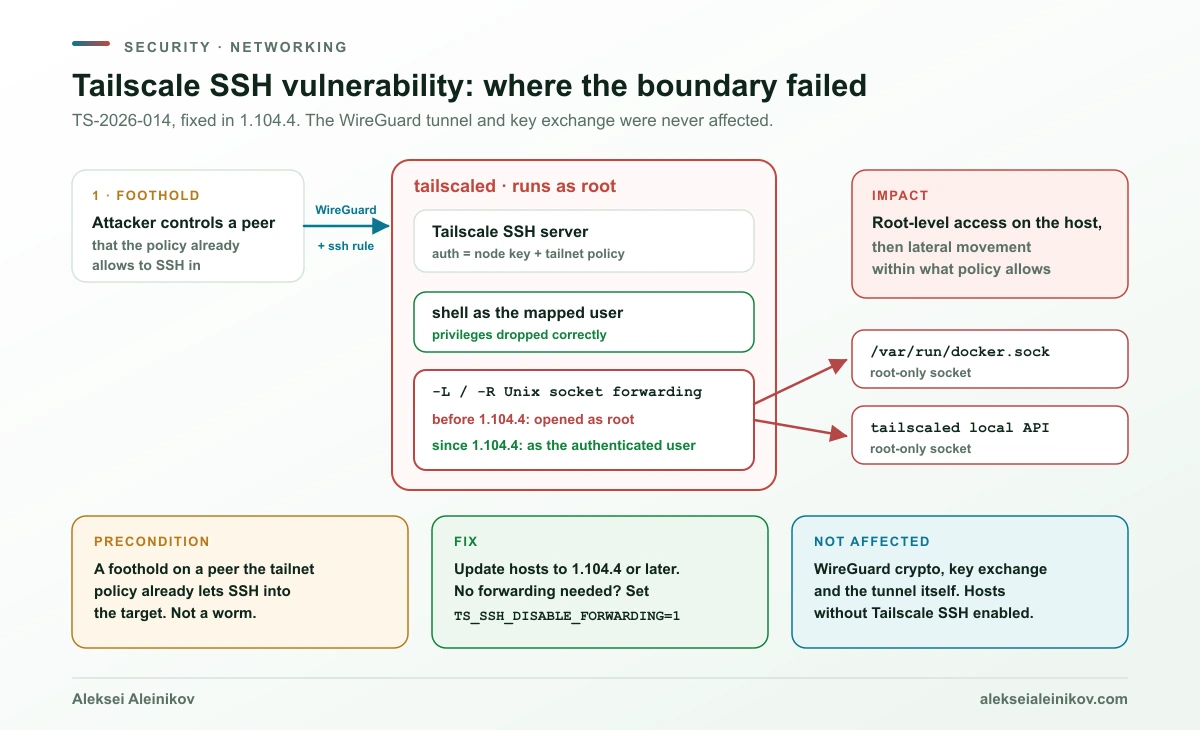
- TS-2026-014 (the serious one): Tailscale SSH checked Unix socket paths by name but opened them as root. Through
ssh -L,ssh -Rand a race condition, a peer that was allowed to forward could reach root-only sockets such as the Docker socket or the tailscaled local API. It affects hosts with Tailscale SSH and forwarding allowed. Forwarding now runs as the authenticated user. - TS-2026-015: an authorized SSH session could grow tailscaled’s memory without limit through window-change messages and environment appends. The resulting out-of-memory kill takes down every Tailscale connection on that node.
- TS-2026-016: Tailscale Serve with Unix socket backends could be pointed at privileged sockets, including the local API, by someone who could write Serve configuration or swap a backend path for a symlink. That is a local attacker, not a remote one, but the impact was full node takeover.
- TS-2026-017: with Serve over TLS and HTTP/2, concurrent requests to two different mounts could receive each other’s
Tailscale-App-Capabilitiesvalues. Only apps that authorize users by that header were affected.
What it was not. Despite the name, this was not a self-spreading worm. The SSH findings needed an attacker who already controlled a node that the tailnet policy allowed to SSH into the target. Tailscale describes the impact as lateral movement limited to connections the policy already permitted. That is a real problem, because “limited to what the policy permits” is often “every server”, but it is not remote code execution from the internet. The report also covered five Serve and Funnel findings: three were real bugs fixed in 1.104.4, and Tailscale says the other two work as designed. A flaw in Conn25, an unreleased next generation of app connectors, did not reach users.
What it fits into. These were not the first Tailscale SSH bulletins of 2026. In June, TS-2026-004 fixed a symlink bypass in Unix socket forwarding and TS-2026-006 fixed a case where the UID 0@host slipped past autogroup:nonroot. In July, TS-2026-009 fixed a username of -i being passed to getent in a way that produced a root session, and TS-2026-010 fixed acceptEnv values showing up in process command lines and logs. Serve had its own run: TS-2026-005 let a non-root operator proxy privileged sockets, and TS-2026-008 let a single malformed request pin a CPU core, from anywhere on the internet if Funnel was on. Different bugs, one theme: features that run inside a root daemon carry a large, subtle privilege boundary.
None of the 2026 Tailscale SSH bulletins touched WireGuard, the key exchange or the tunnel. Every one was in a feature layered on top. That is the most useful lesson of the incident for the Tailscale vs WireGuard question: the attack surface is not the VPN, it is everything you switch on around it.
What To Do if You Use Tailscale SSH
- Update every node to 1.104.4 or later. Tailscale SSH is server-side code, so the fix has to be on the hosts you SSH into.
- If you do not need port or socket forwarding, turn it off. Tailscale’s mitigation is the environment variable
TS_SSH_DISABLE_FORWARDING=1for tailscaled, followed by a restart. It disables forwarding without disabling Tailscale SSH. On Linux packages that read/etc/default/tailscaled:
echo 'TS_SSH_DISABLE_FORWARDING=1' | sudo tee -a /etc/default/tailscaledsudo systemctl restart tailscaledtailscale version # should print 1.104.4 or later- Tighten the
sshsection of the policy file. Name the users explicitly instead of allowingautogroup:nonrooton shared hosts, and putrootand production behind check mode, which forces a fresh login with your identity provider:
{ // Excerpt: groups, tagOwners and grants omitted. The policy file is HuJSON, so comments are allowed. "ssh": [ { "action": "accept", "src": ["autogroup:member"], "dst": ["autogroup:self"], "users": ["autogroup:nonroot"] }, { "action": "check", "src": ["group:sre"], "dst": ["tag:prod"], "users": ["deploy"], "checkPeriod": "1h" } ]}- Or keep Tailscale for the network and use OpenSSH for the shell. Tailscale’s own documentation says Tailscale SSH may not be a good fit for multi-user machines, or for client machines running code you do not trust, because any local OS user there can open Tailscale SSH connections without an SSH key. It also says you can simply run a normal SSH server over the tailnet instead. You keep the private network and lose only the key-free login. Tailscale itself says it is not recommending that everyone disable Tailscale SSH. For shared or high-value hosts, though, the boring option is a reasonable one.
Is Tailscale Safe, Free and Open Source?
Is Tailscale a VPN? Yes, but not the kind most people picture. A classic VPN sends your traffic through a provider’s server. Tailscale builds a private mesh between your own devices, and traffic goes directly from one device to another whenever a direct path exists. It only routes your internet traffic through another machine if you choose an exit node.
Is Tailscale safe? The cryptography is WireGuard’s, and Tailscale’s servers do not hold the private keys needed to decrypt your traffic. The risk sits elsewhere: in the coordination server you trust to hand out keys (Tailnet Lock removes most of that trust), and in the optional features that run with root privileges on your nodes. Tailscale publishes its security bulletins openly, including uncomfortable ones, which is a good sign. Two defaults are worth changing on day one:
- The default access policy lets every device reach every other device on every port. Replace it with grants that match who should reach what.
- The client sends connectivity logs to Tailscale for support. On Linux you can turn that off with
TS_NO_LOGS_NO_SUPPORT=truein/etc/default/tailscaled, at the cost of support being able to see what went wrong.
Is Tailscale free? The Personal plan costs nothing for up to 6 users with unlimited personal devices, which covers most homelabs and families. Teams pay $8 (Standard) or $18 (Premium) per user per month.
Is Tailscale open source? Mostly on the client side. The main client code is BSD-3 licensed, but the GUI clients for Windows, macOS and iOS and the coordination server are closed. If that matters, Headscale replaces the coordination server.
Tailscale vs WireGuard Side by Side
| WireGuard | Tailscale | |
|---|---|---|
| What it is | Tunnel protocol and implementation | WireGuard data plane plus a coordination service |
| Data path | Kernel module on Linux | wireguard-go in userspace, direct or relayed |
| Key distribution | Manual | Automatic via the coordination server |
| NAT traversal | None. One side needs a reachable endpoint | Built in, with DERP and Peer Relay fallback |
| Identity | Public keys only | SSO users, devices and tags |
| Access control | AllowedIPs per peer |
Central policy file with grants and SSH rules |
| Revocation | Remove the key from every peer | One policy or admin change |
| Licence | GPLv2 in the kernel | Client code BSD-3; Windows, macOS and iOS GUI clients and the control server are closed |
| Cost | Free | Free up to 6 users, then $8 or $18 per user per month |
| Third party in the path | None | Coordination server and, if used, DERP relays |
| Code running as root | A small kernel module | A daemon with networking, DNS and optional SSH and Serve features |
When Plain WireGuard Is the Right Answer
- The topology is fixed. Two offices, a few cloud VMs with public IPs, or a home router that everybody connects to. You configure it once and rarely touch it.
- You want the smallest possible trusted code base. A kernel module built to be reviewed by a single person is a very different audit target from a feature-rich daemon.
- No external coordination service is allowed. Regulated or air-gapped environments often cannot accept an external control plane, even one that never sees traffic.
- You already run infrastructure as code. If peers come from Terraform or Ansible anyway, key distribution is just another template.
Plain WireGuard is also what many projects you already use rely on underneath: Kubernetes CNIs such as Cilium and Calico both encrypt pod traffic with WireGuard. There the CNI is the control plane.
When Tailscale Is Worth It, From Teams to Homelabs
- Devices move and sit behind NAT you do not control. Laptops on hotel Wi-Fi, phones on mobile networks, a Raspberry Pi behind carrier-grade NAT. This is the case where hand-made WireGuard turns into port forwards and a hub server.
- More than one person needs access, with different rights. A policy file tied to identity beats a spreadsheet of public keys.
- Offboarding must be fast. Removing a user or narrowing a rule in one place cuts access across every device, and for Tailscale SSH it also ends sessions that are already open.
- Homelabs with many services. Proxmox, TrueNAS, Home Assistant and similar setups are where the “Tailscale or WireGuard for homelab” question usually comes from. If you are the only user and your router has a public IP, WireGuard on the router is enough. If you share access with family or friends, or your ISP uses CGNAT, Tailscale’s free tier removes a lot of work.
Self-Hosted Tailscale Alternatives: Headscale and NetBird
If the objection to Tailscale is the hosted control plane rather than the client, there are two well-established options.
Headscale is an open-source, BSD-3 licensed implementation of the Tailscale coordination server. You keep using the official Tailscale clients and point them at your own server. Its scope is deliberately narrow: a single tailnet, aimed at personal use or a small open-source organisation. It is not affiliated with Tailscale Inc., although one of its maintainers works there. It is popular, with roughly 45,000 GitHub stars. Note what it does not change: the daemon on every device is still Tailscale’s, so Tailscale SSH bugs are still your concern if you enable that feature. If you self-host Headscale with SSO, an open-source identity provider such as Keycloak, which has no paid tier at all, fits naturally.
NetBird is a separate WireGuard-based mesh from NetBird GmbH in Berlin. It uses kernel WireGuard where available, ICE and STUN for NAT traversal, and relays as a fallback. The client is BSD-3, while the management, signal and relay services are AGPLv3, and the whole stack can be self-hosted on a small VM with a domain. The hosted version is free for up to 5 users and 100 machines, with paid plans at €6 and €12 per user per month. For European teams that want a vendor under EU jurisdiction, that is a meaningful difference. NetBird also offers SSH access with central policies, which brings back the same class of privilege boundary, so evaluate it with the same care.
ZeroTier and Cloudflare Tunnel come up in the same searches but solve different problems. ZeroTier uses its own protocol rather than WireGuard. Cloudflare Tunnel publishes services through Cloudflare’s network instead of building a device-to-device mesh.
How to Get Started With Each
The first ten minutes look very different, and that difference is the comparison in miniature.
Plain WireGuard (Linux, one server with a public IP, one laptop). Generate a key pair on each machine, then write one config per side:
wg genkey | tee privatekey | wg pubkey > publickey# /etc/wireguard/wg0.conf on the laptop[Interface]PrivateKey = <laptop private key>Address = 10.8.0.2/32
[Peer]PublicKey = <server public key>Endpoint = vpn.example.com:51820AllowedIPs = 10.8.0.0/24PersistentKeepalive = 25The server’s config mirrors it with ListenPort = 51820, its own address, and a [Peer] block for the laptop with AllowedIPs = 10.8.0.2/32. Open UDP 51820 on the server’s firewall, then run sudo wg-quick up wg0 on both sides and sudo wg show to confirm a recent handshake. Every new device repeats this, and every removal means editing the server.
Tailscale. Install the client and log in through your identity provider:
curl -fsSL https://tailscale.com/install.sh | sh # or use the distro packagessudo tailscale uptailscale statusThen do the two things most guides skip: replace the allow-all default policy with grants, and decide per host whether you want Tailscale SSH at all. Device keys expire periodically by design. You can disable expiry for servers in the admin console, but Tailscale warns that this reduces security, so do it only for machines you trust.
Headscale. Run the server on your own VM, then point the normal Tailscale client at it:
sudo tailscale up --login-server https://headscale.example.comNetBird. Install the client and connect to NetBird Cloud, or pass your own management URL when self-hosting:
curl -fsSL https://pkgs.netbird.io/install.sh | shnetbird up # opens SSO loginnetbird up --setup-key <KEY> --management-url https://netbird.example.com # servers, self-hostedPiping an install script into a shell is convenient, not mandatory. Tailscale and NetBird both publish signed package repositories if you prefer to add those yourself.
The Bottom Line
Comparing Tailscale and WireGuard as if they were rivals hides the real decision. WireGuard is an excellent tunnel that deliberately stops at the tunnel. Tailscale is a control plane that makes those tunnels easy to create, route and revoke across many devices and people. The cost is a third-party coordination service and a lot more privileged code on each machine.
The October Tailscale SSH vulnerabilities make that cost concrete without changing the core answer. The tunnel held. The feature on top did not, and it was fixed within days of the report. If you use Tailscale, update to 1.104.4, keep SSH policies narrow and enable only the features you need. If your topology is small and stable, plain WireGuard remains the simplest secure option. And if you want the convenience without the hosted control plane, Headscale and NetBird are mature enough to take seriously.
For the bigger picture of where private connectivity sits in a cloud foundation, see What Belongs in a Cloud Landing Zone.
From the community
Discussion on Mastodon & Bluesky
Replies to this article from the open web, pulled in live. No ads, no tracking scripts.
Reply there — it shows up here automatically.