
Almost every login you use today ends with a JSON Web Token. The identity provider hands one to your app, the app sends it with every API call, and the API trusts it without asking anyone. That last part is the whole point of a JWT, and also the reason a small mistake in how it is checked turns into “anyone can be admin”.
This guide explains what a JWT is, part by part, how a server should verify one, which signing algorithm to pick, and the attacks that still work against real systems. Every example token in it can be pasted into the free JWT decoder and security analyzer, which runs entirely in your browser.
What is a JWT? A JSON Web Token example
A JWT (JSON Web Token, pronounced “jot”) is a compact, URL-safe string that carries a set of claims and a signature over them. It is defined in RFC 7519; the signing and encryption formats underneath it are JWS (RFC 7515) and JWE (RFC 7516).
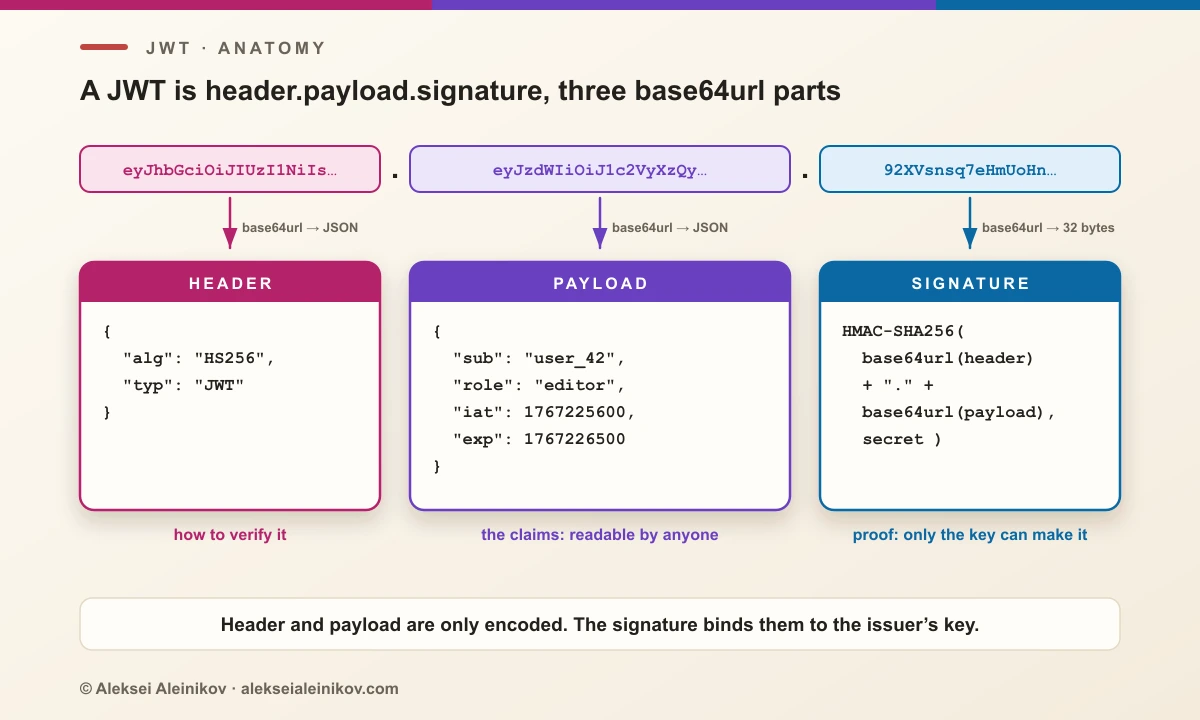
A signed JWT has three parts separated by dots:
eyJhbGciOiJIUzI1NiIsInR5cCI6IkpXVCJ9.eyJzdWIiOiJ1c2VyXzQyIiwicm9sZSI6ImVkaXRvciIsImlhdCI6MTc2NzIyNTYwMCwiZXhwIjoxNzY3MjI2NTAwfQ.92XVsnsq7eHmUoHn1v4cCfyufbIv5l0Pm8L_Ec6PDH8Decode the first two parts from base64url and you get two ordinary JSON objects:
{ "alg": "HS256", "typ": "JWT" }{ "sub": "user_42", "role": "editor", "iat": 1767225600, "exp": 1767226500 }The third part is the signature: 32 bytes of HMAC-SHA256 over header.payload, computed with a secret only the issuer knows. Change one character of the payload, for example "role": "admin", and the signature no longer matches.
That is all a JWT is: claims plus proof of who wrote them. The interesting part is everything around it.
Anatomy of a JSON Web Token
The header
The header says how to verify the token. The fields that matter:
| Field | Meaning | Watch out for |
|---|---|---|
alg |
Signing algorithm: HS256, RS256, ES256, EdDSA… |
none, or an algorithm your server never issues |
typ |
Token type: JWT, or at+jwt for OAuth access tokens (RFC 9068) |
Missing type makes token confusion easier |
kid |
Key ID: which key in the issuer’s key set signed it | Treated as a file path or SQL value |
jku, x5u |
URL of a key set or certificate | Fetched blindly by the verifier |
jwk |
A public key embedded in the token itself | Trusted as the verification key |
The payload: claims
The payload is a JSON object of claims. RFC 7519 registers seven of them; everything else is up to the issuer.
| Claim | Name | What the verifier does with it |
|---|---|---|
iss |
Issuer | Must match the identity provider you trust |
sub |
Subject | The user or client the token is about |
aud |
Audience | Must contain your API’s identifier |
exp |
Expiration time | Reject after this moment |
nbf |
Not before | Reject before this moment |
iat |
Issued at | Age checks, debugging |
jti |
JWT ID | Unique ID for one-time use or revocation |
Times are NumericDate: whole seconds since 1970-01-01 UTC. A surprising number of bugs come from writing milliseconds (Date.now() in JavaScript) instead: the token then expires tens of thousands of years from now.
The signature
For HS256 the signature is:
HMAC-SHA256( base64url(header) + "." + base64url(payload), secret )For RS256, ES256 or EdDSA it is a public-key signature over the same input. Either way it covers the encoded header and payload, so the server verifies exactly the bytes it received.
Signed is not encrypted
Base64url is an encoding, not encryption. Anyone holding a JWT can read every claim in it, no key needed:
node -e 'console.log(JSON.parse(Buffer.from(process.argv[1].split(".")[1], "base64url")))' "$TOKEN"This is the most common misunderstanding about JWTs, and it has consequences. Tokens end up in browser storage, logs, analytics, crash reports and proxy caches. Whatever you put in the payload, you are publishing to all of them.
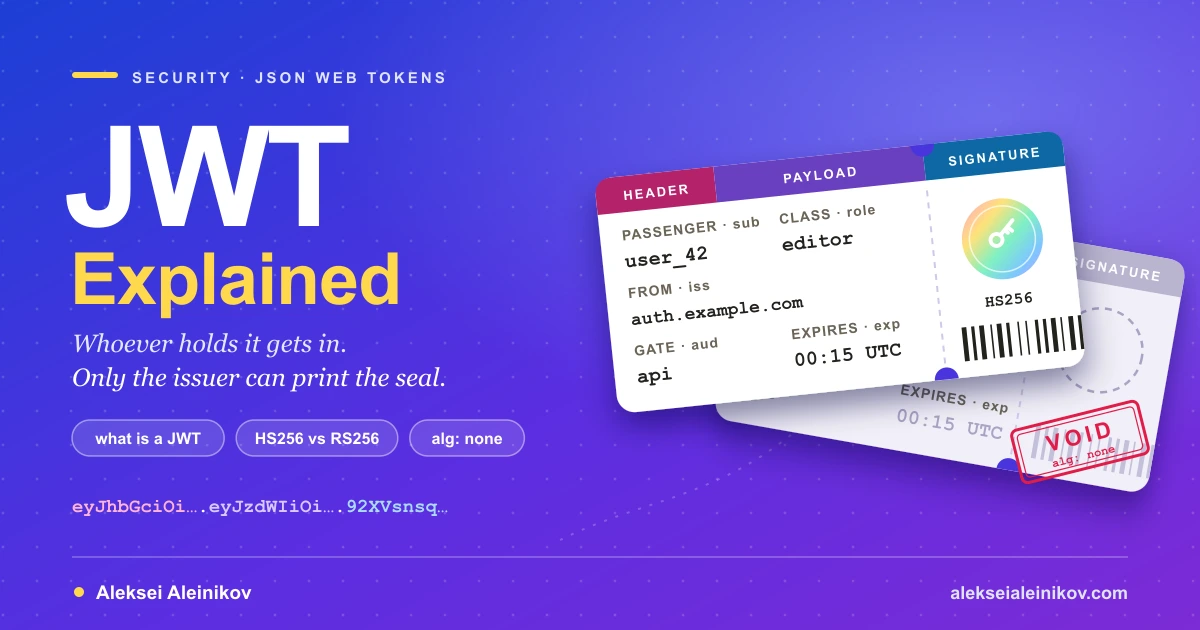
A JWT is a boarding pass. Anyone who sees it can read the name on it, whoever holds it gets on board, and only the issuer can print the seal that makes it valid.
So keep the payload to identifiers and permissions. No passwords, API keys, card numbers or personal data beyond what the API needs. If the content really must be confidential, use an encrypted JWT (JWE, five dot-separated parts instead of three), or keep the data on the server and put an opaque ID in the token.
How to verify a JWT correctly
Decoding tells you what a token claims. Verifying tells you whether to believe it. Verification is a checklist, and the order matters: each step closes a specific attack.
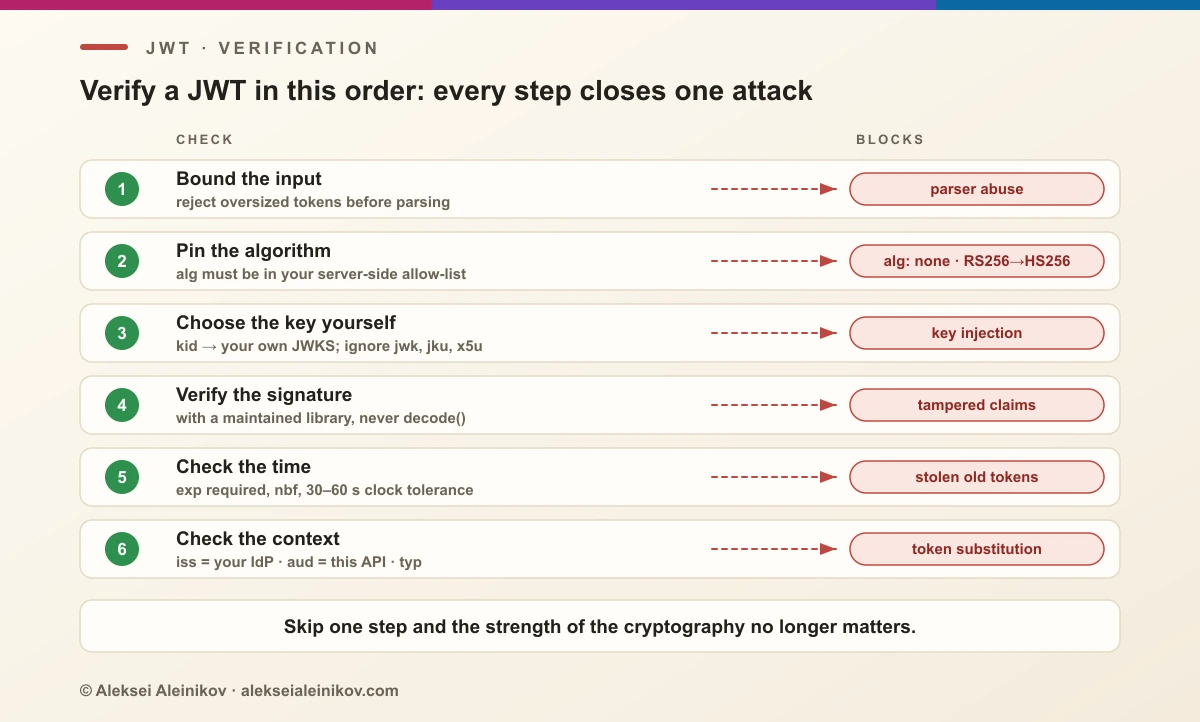
- Bound the input. Reject tokens above a sane size before parsing.
- Pin the algorithm. Accept only the algorithms you actually issue, configured on the server. Never let the token’s
algchoose. - Choose the key yourself. Look the
kidup in your key set (a JWKS from your identity provider). Ignorejwk,jkuandx5ufrom the token. - Check the signature.
- Check time:
expandnbf, with a small clock tolerance (30–60 seconds), and requireexpto be present. - Check context:
issis your identity provider,audcontains your API,typis what this endpoint expects.
With a maintained library this is a few lines. In Node.js with jose:
import { createRemoteJWKSet, jwtVerify } from 'jose';
const jwks = createRemoteJWKSet(new URL('https://auth.example.com/.well-known/jwks.json'));
const { payload } = await jwtVerify(token, jwks, {    algorithms: ['ES256'],    issuer: 'https://auth.example.com',    audience: 'https://api.example.com',    typ: 'at+jwt',    clockTolerance: 30,});
And in Python with PyJWT:
import jwt
jwks = jwt.PyJWKClient("https://auth.example.com/.well-known/jwks.json")key = jwks.get_signing_key_from_jwt(token).key
claims = jwt.decode(    token, key,    algorithms=["ES256"],    issuer="https://auth.example.com",    audience="https://api.example.com",    leeway=30,    options={"require": ["exp", "iat", "iss", "aud", "sub"]},)
The highlighted lines are the security. Delete any one of them and the code still “works” in every test, which is exactly why they get deleted.
HS256 vs RS256 vs ES256: which algorithm?
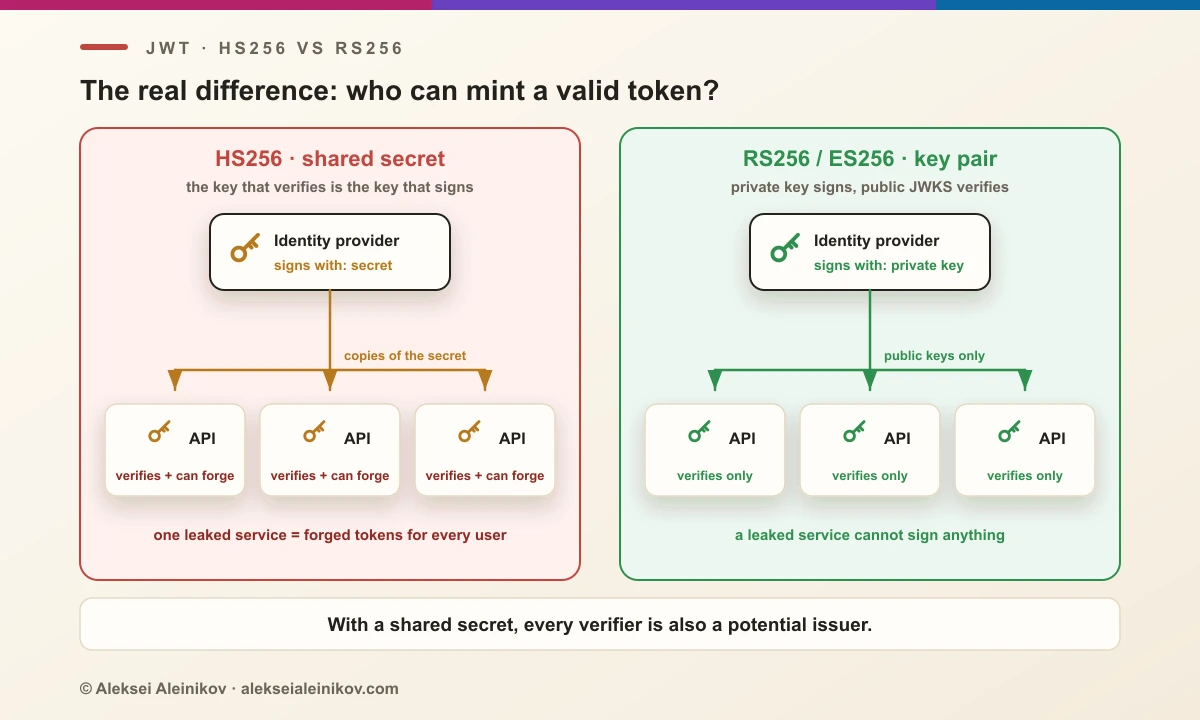
The real question is not speed or key length. It is who can mint tokens.
| Algorithm | Type | Signature size | Use it when |
|---|---|---|---|
| HS256 | HMAC, shared secret | 32 bytes | One service issues and verifies its own tokens |
| RS256 | RSA PKCS#1 v1.5 | 256 bytes (2048-bit key) | Broadest library support; most identity providers default to it |
| PS256 | RSA-PSS | 256 bytes (2048-bit key) | RSA, with the more modern padding |
| ES256 | ECDSA P-256 | 64 bytes | Small tokens, wide support; a good default for new systems |
| EdDSA | Ed25519 | 64 bytes | Simplest safe signatures, where your libraries support it |
With HS256 the verification key is the signing key. If five microservices verify tokens, five services hold a secret that lets them create a token for any user, and a leak from the least protected one compromises all of them. With an asymmetric algorithm only the identity provider holds the private key; services fetch the public keys from a JWKS URL, and you can rotate keys by publishing a new kid.
If you do use HS256, the secret must be random and long: RFC 7518 requires a key at least as long as the hash output (256 bits for HS256), and RFC 8725 says human-memorable passwords must not be used as HMAC keys.
openssl rand -base64 32Six JWT attacks that still work
None of these break HMAC, RSA or ECDSA. They exploit the verifier: code that trusts the token to explain how it should be trusted. Tim McLean’s 2015 write-up of critical vulnerabilities in JWT libraries made the first two famous, and they are still found in custom code and old dependencies.
1. alg: none
JWS defines an “unsecured” algorithm called none with an empty signature. An attacker takes a valid token, changes the payload, sets "alg": "none", removes the signature and keeps the trailing dot. A verifier that honours the header accepts it. Variants such as None or nOnE slip past naive string checks.
Fix: an explicit algorithm allow-list on the server, as in the code above.
2. Algorithm confusion (RS256 to HS256)
The server expects RS256 and verifies with the issuer’s public key. The attacker changes alg to HS256 and signs the token with HMAC, using that public key, which is public, as the secret. A library that picks the algorithm from the header now runs HMAC with the same key bytes, and the forged token verifies.
Fix: pin the algorithm, and use libraries that bind a key to one algorithm type.
3. Weak HMAC secrets
An HS256 token is an offline puzzle: anyone with one token can test candidate secrets without touching your server. secret, changeme, the framework’s sample value, or your-256-bit-secret copied from a tutorial fall in seconds; hashcat even has a dedicated mode for JWTs (16500).
Fix: a random 256-bit secret from a secret manager, or move to an asymmetric algorithm.
4. Key injection through the header
jwk embeds a public key in the token, and jku or x5u point to a URL where the key can be found. A verifier that uses them lets the attacker sign with their own key and supply the matching public key. kid is subtler: it is just a string, and code that uses it as a file path (../../dev/null) or inside a SQL query turns it into path traversal or injection.
Fix: take keys only from your own configured key set; treat kid as an opaque lookup key. RFC 8725 calls this out explicitly: do not trust received claims.
5. Missing audience and issuer checks
Your company has two APIs that trust the same identity provider. A token issued for the low-risk one is replayed against the payments API, and it verifies, because the signature and expiry are fine. Nobody checked aud.
Fix: every API checks that aud names it and that iss is the expected issuer. Use explicit typ values so an ID token cannot be used as an access token.
6. Tokens that live forever
A token without exp, or with a lifetime of months, is a long-lived password that cannot be changed. A stolen one keeps working after the user logs out, changes their password or leaves the company.
Fix: access tokens measured in minutes, exp required by the verifier, and rotating refresh tokens that the server can revoke.
Library bugs exist too: in 2022 Java’s ECDSA implementation (versions 15 to 18) accepted an all-zero signature as valid for any message, which made every ES256 token forgeable on unpatched runtimes (CVE-2022-21449, “Psychic Signatures”). Keeping crypto runtimes and JWT libraries patched is part of the checklist.
JWT decoder: read a token without leaking it
A JWT is a bearer credential: whoever holds an unexpired production token can usually call your API as that user. Pasting one into a random website that uploads it to a server is handing it over.
Three safe options:
- Command line: the Node.js one-liner above, or your language’s equivalent. Nothing leaves the machine.
- A local browser decoder: the JWT decoder and security analyzer on this site decodes, verifies and audits tokens with Web Crypto in the page itself; tokens, secrets and keys are never uploaded, stored or put into the URL.
- Expired or test tokens, when you only need to see the structure.
Here is what the analyzer reports for a token signed with your-256-bit-secret, the sample secret that circulates in countless tutorials:
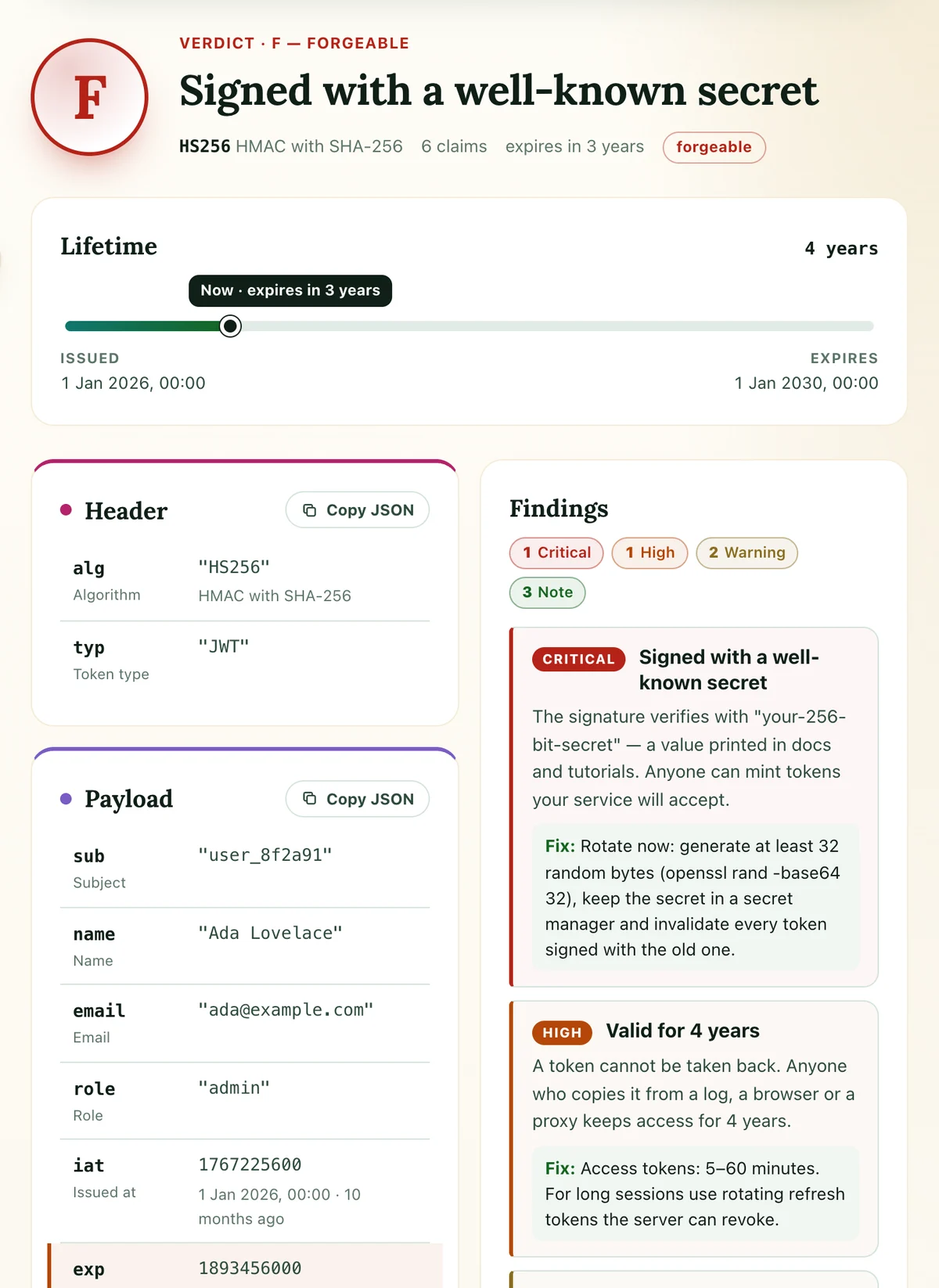
It flags the forgeable signature first, then the multi-year lifetime and the missing iss and aud, and gives a fix for each. Paste the issuer’s public key or JWKS and it verifies RS256, PS256, ES256 and EdDSA signatures as well. If you work with AI agents, the same analysis is exposed to them as a WebMCP tool, analyze_jwt.
JWT vs session cookies: when to use a JWT
JWTs are popular enough that they get used where a session would be simpler. An honest comparison:
| Server-side session | JWT | |
|---|---|---|
| State | Stored on the server, cookie holds an ID | Self-contained, verified with a key |
| Revocation | Instant: delete the session | Waits for exp, unless you add server state |
| Scaling | Needs a shared session store | Any service with the public key can verify |
| Across services and domains | Awkward | What it was designed for |
| Size per request | A few dozen bytes | Hundreds of bytes to several KB |
Use a session for a classic web app with one backend. Use JWTs when several services, an API gateway or third parties must verify identity without a shared store, and wherever OAuth 2.0 and OpenID Connect already hand you one: ID tokens are always JWTs, and many access tokens are.
JWT vs OAuth
They are not alternatives. OAuth 2.0 is a protocol for getting an access token on a user’s behalf; a JWT is a token format. An OAuth access token can be a JWT (RFC 9068 standardises that profile, with typ: at+jwt) or an opaque random string the API checks with the authorization server. OpenID Connect, the identity layer on top of OAuth, always uses a JWT for the ID token.
The two combine well. For browser apps, the safest place for a JWT is an HttpOnly cookie, not localStorage; the details, including CSRF protection, are in why you should stop storing JWTs in localStorage. If you run your own identity provider, Keycloak or Authentik will issue and sign the tokens for you, and a stronger login in front of them, such as passkeys, protects the moment a token is created.
The HMAC behind HS256 is the same primitive that signs webhooks; webhook signatures face the same rules about secret strength and constant-time comparison.
The Bottom Line
A JWT is a readable JSON document with a signature. The format is simple and the cryptography is sound; what fails in practice is the code around it. Pin the algorithm, choose the key yourself, require exp, check iss and aud, keep tokens short-lived and keep secrets out of the payload. Do that with a maintained library, and a JWT is one of the most convenient credentials you can hand out.
And the next time you need to see what is inside one, decode it locally, not in a page that uploads it.

From the community
Discussion on Mastodon & Bluesky
Replies to this article from the open web, pulled in live. No ads, no tracking scripts.
Reply there — it shows up here automatically.