
The first LLM feature is easy. You put an API key in an environment variable, call the provider’s SDK and ship. The trouble starts with the second and third: three provider keys copied into five services, nobody able to say which team spent the money last Tuesday, and one provider’s outage taking the whole product down with it. The usual answer to all three is the same piece of infrastructure, and it goes by two names: AI gateway and LLM gateway.
This guide explains what an AI gateway is, what sits inside one, how it differs from the API gateway you already run, when it is worth adding, what changes in your code, and what breaks once real traffic runs through it. It also measures the part that vendors’ landing pages skip: what the extra hop costs. Four gateways, one mock model, the same CPU budget for each, and a repository you can run yourself.
What is an AI gateway?
An AI gateway, also called an LLM gateway, is a proxy between your applications and the model providers they call. Every app sends its requests to one endpoint, usually OpenAI-compatible, with a key the gateway issued. The gateway checks who is calling, enforces request and token limits and budgets, picks the provider and model, retries or falls back when a provider fails, and logs tokens, cost and latency for every call. The real provider keys never leave it.
That is the whole idea: one door between your code and every model. The rest of this article is about what happens at that door.
AI gateway vs LLM gateway vs LLM proxy vs LLM router
The vocabulary is messier than the concept, so here are the terms you will meet in docs and vendor pages:
| Term | What it means in practice |
|---|---|
| AI gateway | The full thing: auth, limits, budgets, routing, fallback, caching, guardrails, logs. Covers chat and usually also embeddings, images, audio and MCP tool calls. |
| LLM gateway | The same product under another name, with the emphasis on text models. Used interchangeably with “AI gateway”. |
| LLM proxy | The minimal version: one OpenAI-compatible endpoint that forwards and translates requests to many providers. Often the starting point of a gateway. |
| LLM router | The part that decides which model answers: by alias, price, latency, load or the content of the prompt. Sometimes a feature of a gateway, sometimes a separate service. |
| API gateway | The general-purpose proxy for HTTP APIs (Kong, Envoy, NGINX, cloud API gateways). Some of them grow AI plugins and become AI gateways too. |
What sits inside an AI gateway
Every gateway on the market is a combination of the same building blocks. Some do all of them, some only a few:
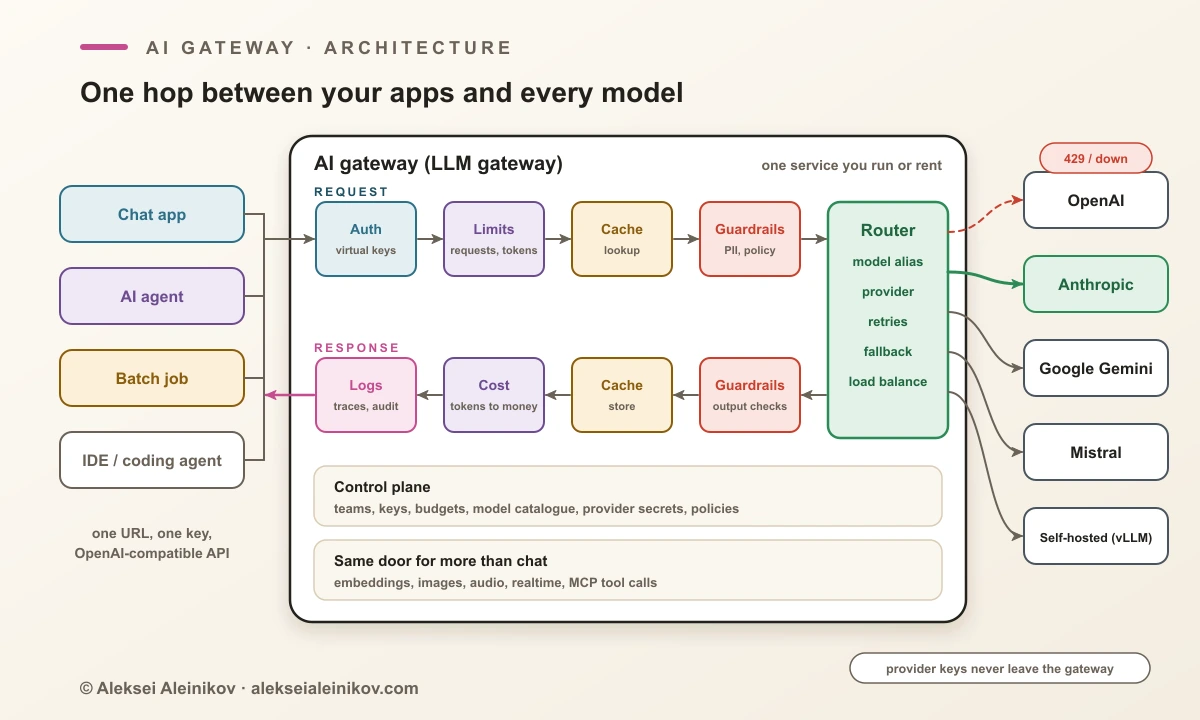
- Auth and virtual keys. Apps get keys issued by the gateway, one per team, app or user, and the gateway swaps them for the real provider key on the way out. Revoking a leaked key no longer means rotating your OpenAI key in twelve places.
- Limits. Not just requests per second: tokens per minute and tokens per day, because one request can cost 200 tokens or 200,000. The algorithms are the same as for any API, and so are the mistakes; I wrote about those in rate limiting in practice.
- Budgets. Spend caps per team, key or project, counted in money. The gateway knows the price of every model, so it can stop a runaway agent at a fixed amount instead of at the end of the month.
- Routing, retries and fallback. Model aliases (
chat-defaultmaps to whatever you decide this week), load balancing across keys or regions, retries with backoff, and fallback to another provider when the first returns429or5xx. Because providers have different APIs, the gateway translates request and response formats on the fly. - Caching. Exact-match caching of identical prompts is cheap and safe. Semantic caching answers prompts that are merely similar, which saves more and is wrong more often.
- Guardrails. Checks on prompts and answers: personal data, secrets, banned topics, prompt-injection patterns. They help, but they are not a security boundary on their own; why, is in prompt injection defence.
- Observability and cost. Every call logged with model, tokens, latency, cost, team and key. This is often the first reason a company installs a gateway: finance wants the report.
The gateway also gives the same treatment to self-hosted models. A vLLM or Ollama server becomes one more provider behind the same endpoint, with the same keys, limits and logs.
AI gateway vs API gateway
If you already run an API gateway, the obvious question is why it is not enough. It can be, partly. Kong is literally an API gateway with an AI plugin set. But a plain API gateway misses the parts that make LLM traffic different:
| API gateway | AI gateway | |
|---|---|---|
| Unit of limits | requests per second | requests and tokens per minute, per key |
| Cost | not its concern | price per model, budgets, spend per team |
| Typical response | small JSON in milliseconds | long text, often streamed for seconds or minutes |
| Failover | another replica of the same service | another vendor with a different API and model |
| Cache key | URL and headers | the prompt, optionally by meaning |
| Content checks | schema, size, injection patterns | personal data, secrets, prompt injection, policy |
| Logs | status, latency, bytes | model, prompt and completion tokens, cost, user |
The short version: an API gateway counts requests, an AI gateway counts tokens and money.
Do you need an AI gateway?
Not always. A gateway is one more service to run, secure and keep up to date, and it sits on the hot path of every model call. For a single app on a single provider it mostly adds a hop. Three questions decide it:
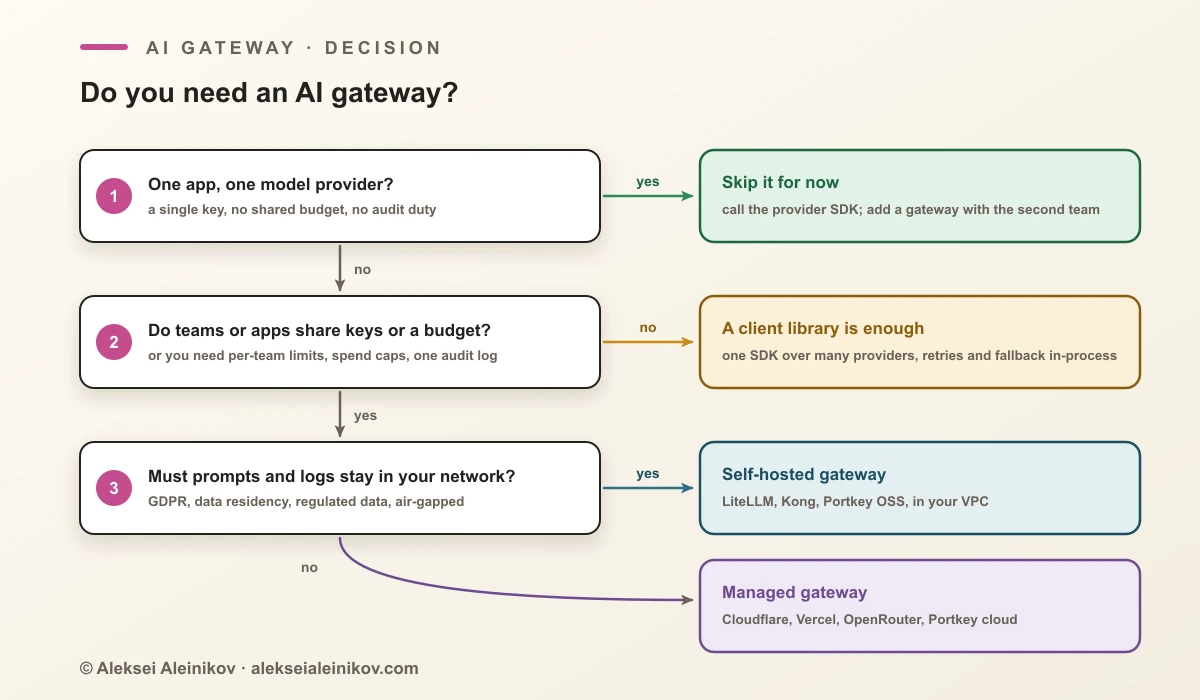
The middle option deserves a word. A client library that wraps many providers (the LiteLLM Python SDK, the Vercel AI SDK and others) gives you one API, retries and fallback inside your process, without a network hop. What it cannot give you is a central place for keys, budgets and logs across teams. That is the line where a library stops and a gateway starts.
And writing your own? A proxy that forwards OpenAI-format requests is an afternoon of work. The months go into what comes after: translating between provider APIs that keep changing (new endpoints, reasoning parameters, tool formats), counting tokens correctly on streams, keeping price tables current, and every edge case of server-sent events. Unless the gateway is your product, start from an existing one.
Putting one in: what changes in your code
Less than you might expect. Most gateways speak the OpenAI API, so the application change is two lines, the base URL and the key:
import osfrom openai import OpenAI
client = OpenAI(    base_url="https://llm-gateway.internal/v1",  # the gateway, not the provider    api_key=os.environ["LLM_GATEWAY_KEY"],       # a virtual key for this app    max_retries=0,                               # the gateway retries; see below)
reply = client.chat.completions.create(    model="chat-default",  # an alias that the gateway resolves    messages=[{"role": "user", "content": "Summarise this support ticket."}],)
The model name is now an alias. Which provider and model sit behind chat-default, and what happens when it fails, lives in the gateway. In the LiteLLM proxy it looks like this:
model_list:  - model_name: chat-default    litellm_params:      model: anthropic/claude-sonnet-5-5      api_key: os.environ/ANTHROPIC_API_KEY  - model_name: chat-backup    litellm_params:      model: openai/gpt-6.1-sol      api_key: os.environ/OPENAI_API_KEY
litellm_settings:  num_retries: 2  fallbacks: [{"chat-default": ["chat-backup"]}]
general_settings:  master_key: os.environ/LITELLM_MASTER_KEY
Kong, Portkey and the managed gateways write it differently, but the shape is the same: aliases on the outside, providers and keys on the inside. Changing the default model becomes a config change instead of a redeploy of every service.
A rollout order that avoids surprises:
- Route and observe, change nothing. Point one service at the gateway with generous limits and only logging on. You get the first honest cost report and a latency baseline.
- Issue virtual keys, then revoke the direct ones. One key per app or team. A provider key still sitting in some
.envfile makes the gateway optional, and optional controls get bypassed. - Run budgets and limits in report-only mode first. Look at who would have been blocked last week before you block anyone.
- Add fallback last, and test it. Run your evals against the fallback model before it ever serves a user. The production section below explains why.
The benchmark: what does the extra hop cost?
An AI gateway is one more network hop and one more process on every model call, so the fair question is what that costs. Vendor pages answer with a single number measured on their own hardware. I wanted all of them on the same terms.
The setup. A small Go server plays the model: it speaks the OpenAI chat API and answers instantly, with a 1.4 KB reply or a stream of 40 chunks. Because the model takes no time, every millisecond above a direct call is the gateway’s own work. Each gateway runs alone in Docker with the same budget of 2 CPUs and 2 GB, default settings, no caching, no guardrails and no logging database. A plain nginx reverse proxy sets the floor: the cost of one extra hop that does nothing. The load is open-loop, so requests keep arriving on schedule even when a gateway slows down, and a request only counts if the answer is complete and valid. Chat runs at 100, 500, 1,000 and 2,000 requests per second, streaming at 100 and 500; each scenario runs 3 rounds of 20 seconds after a warm-up, and the tables show the median round.
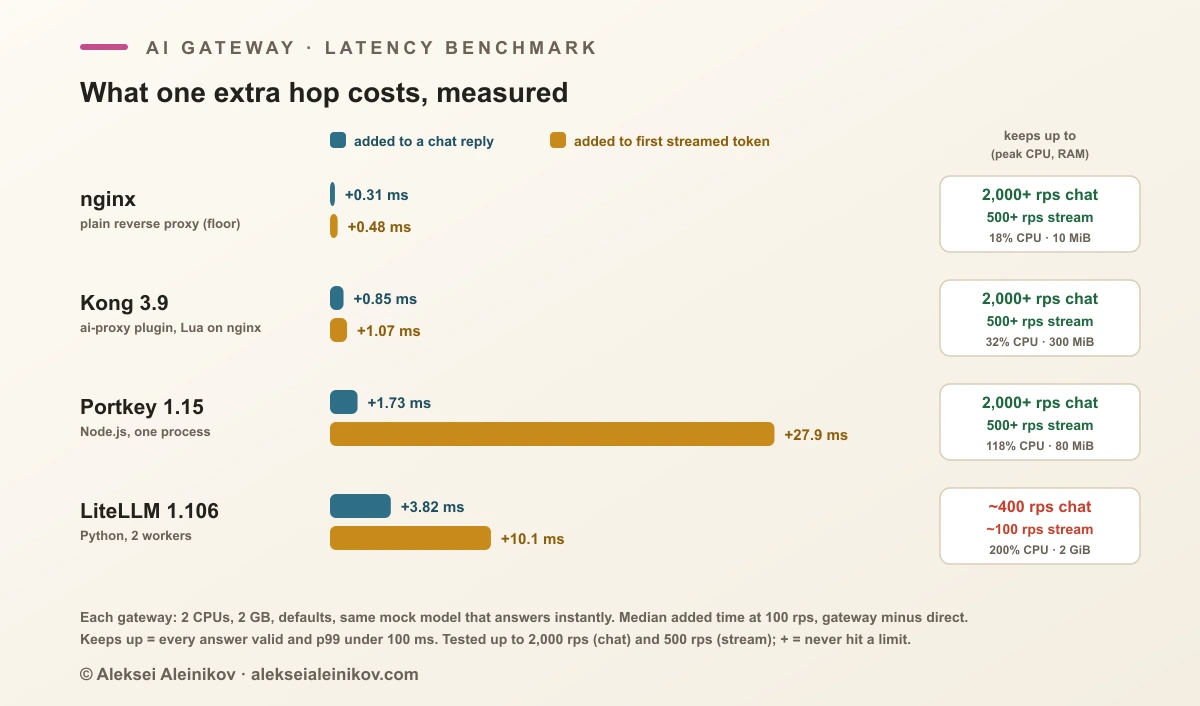
| Gateway (version) | Added to chat reply, p50 / p99 | Added to first streamed token, p50 | Chat, 2,000 rps | Stream, 500 rps | Peak CPU / memory |
|---|---|---|---|---|---|
| nginx 1.29 (floor) | +0.31 / +1.84 ms | +0.48 ms | 100% valid | 100% valid | 18% / 10 MiB |
Kong 3.9, ai-proxy |
+0.85 / +2.55 ms | +1.07 ms | 100% valid | 100% valid | 32% / 300 MiB |
| Portkey 1.15 | +1.73 / +1.40 ms | +27.9 ms | 100% valid | 100% valid | 118% / 80 MiB |
| LiteLLM 1.106, 2 workers | +3.82 / +3.72 ms | +10.1 ms | 28% valid, 368 rps served | 28% valid | 200% / 2 GiB |
Added latency is measured at 100 requests per second; CPU and memory are the peaks over all scenarios, and 200% means both CPUs of the budget were busy. What the numbers say:
- The hop itself is cheap. Below their limits, nginx, Kong and Portkey added less than 2 ms to a chat reply and LiteLLM about 4 ms. A hosted model usually needs hundreds of milliseconds before its first token, so a gateway in normal operation is a rounding error next to it.
- Capacity is where they really differ. With two workers on two CPUs, LiteLLM kept up to about 400 chat requests per second: 100% valid and a p99 of 51 ms in a separate step test. At 500 the median reply already took 0.7 s, at 1,000 only 60% of requests completed, and both CPUs sat at 100% the whole time. Streaming tops out lower, at about 100 per second: at 150 it served only 114 per second and the first token took two seconds. nginx, Kong and Portkey handled every scenario without a single invalid answer.
- Memory differs by two orders of magnitude. nginx needed 10 MiB, Portkey 80 MiB, Kong 300 MiB. LiteLLM with two workers used 1.5 GiB while idle and stayed just under the 2 GB limit under load, without being killed. Give it more memory than this test did.
- Portkey adds a fixed 28 ms to the first streamed token. It does not depend on load: 28 ms at 100 streams per second, 26 ms at 500. To check whether Portkey buffers whole streams, I slowed the mock down to 20 ms and then 100 ms between chunks. The full stream took exactly as long as a direct call, and the first chunk still arrived about 30 ms late. So the stream is passed through as it arrives, and the cost is a constant on the first chunk. For a chat window that is invisible; for a voice agent that chains several model calls it adds up.
- Kong stays closest to the floor. About half a millisecond above plain nginx, which is what you would expect from Lua running inside nginx, with moderate memory. The catch is the license: open-source images stop at 3.9, so new AI plugin features land in the commercial versions.
What this test does not show: a real model’s latency, a logging database, caching or guardrails, and anything above 2 CPUs. Adding a database for keys and spend logs costs every gateway something, and LiteLLM is usually run with one. All of it ran on a single machine under Docker, which makes p99 values noisy; compare gateways within one run, not with numbers from other benchmarks. More replicas raise capacity for every gateway here. The point of the test is what one replica on a fixed budget does.
Self-hosted or managed?
Both kinds do the core job, whether you are choosing a first gateway or looking for a LiteLLM alternative. The difference is who sees your traffic, who runs the service, and how you pay.
| Type | Written in | License / pricing | Notes | |
|---|---|---|---|---|
| LiteLLM | self-hosted (also a Python SDK) | Python | open source core, paid enterprise features | 100+ providers, virtual keys, budgets, Postgres for keys and spend |
| Kong AI Gateway | self-hosted or Konnect | Lua on NGINX | the last open-source image is 3.9; newer Kong Gateway images need a license | a full API gateway with a large AI plugin set: proxy, semantic cache, guardrails, PII sanitizer, MCP proxy |
| Portkey Gateway | self-hosted or hosted | TypeScript (Node.js) | MIT; hosted plans from free (10,000 logged requests a month) | now part of Palo Alto Networks as Prisma AIRS AI Gateway; open-source 2.0 in pre-release |
| Cloudflare AI Gateway | managed | runs on Cloudflare’s network | core features free | caching, rate limiting, retries and fallback, logs; unified billing adds a fee on credits |
| Vercel AI Gateway | managed | runs on Vercel | no markup on provider token prices, also with your own keys | budgets per team, project, key or member; fallbacks |
| OpenRouter | managed | hosted service | pay per token through one account | one key for hundreds of models from many providers; check the current fees on its pricing page |
Two practical notes from building the benchmark. Kong: the kong/kong-gateway images from 3.10 onwards start in read-only mode without a license and answered every request with 426, so the benchmark uses kong:3.9, the last open-source image, where the ai-proxy plugin works without one. LiteLLM: the 1.106 proxy refuses to start without a strong master key (UnsafeMasterKeyError), which is the right default and one more reason to read the next section.
What bites in production
On a diagram a gateway is a clean box. These are the parts that hurt once real traffic runs through it.
Streaming
- Buffering. Any proxy on the path that buffers responses turns a stream into one late blob, and the user stares at an empty box. NGINX buffers by default (
proxy_buffering on); switch it off for streaming routes on every hop, not only in the gateway. - Idle timeouts. Reasoning models can think for a minute before the first token. The common 60-second defaults, NGINX’s
proxy_read_timeoutor the idle timeout of an AWS Application Load Balancer, cut those requests off. The client sees a dropped connection, retries, and you pay twice. - Token counts. In OpenAI-style streaming, usage arrives only in the last chunk and only when requested (
stream_options: {"include_usage": true}). A gateway that does not ask for it has to estimate, and its cost report drifts. - No fallback after the first token. Once a chunk has reached the client, the gateway cannot switch providers without sending a second, different answer. Fallback covers failures before the first chunk; after that, a broken stream is a client-side retry.
Fallback is not free
- Another model is another product. Different tokenizer, context window, tool-calling quirks, JSON behaviour and refusal style. A prompt tuned for one model can come back in a different shape from the other, and your parsing breaks at the worst moment: during an outage.
- Reasoning state does not travel. Encrypted reasoning from one provider cannot be read by another. LiteLLM’s documentation describes dropping it on fallback, so the backup model starts that turn’s thinking from scratch. Long agent runs that fail over get slower and may take a different path.
- Retries multiply. The OpenAI Python SDK retries twice by default. Two retries in the SDK, two in the gateway and two in your own code turn one failed call into up to 27 attempts against a provider that is already rate-limiting you. Retry in one layer, the gateway, and set the client to zero, as in the snippet above.
- Budgets and access rules must cover the fallback target. A request for a cheap model that falls back to an expensive one is billed at the expensive price. LiteLLM re-checks budget and model access for every fallback target; whatever you run, test that a key without access to a model cannot reach it through a fallback.
Budgets are estimates
A gateway cannot know what a request costs until the answer exists. It either reserves the worst case from max_tokens (safe, but blocks early) or charges afterwards (accurate, but overshoots: fifty parallel agent calls all pass the check before the first one is billed). With several gateway replicas the counters live in a shared store such as Redis and have the same race conditions as any distributed rate limiter. Treat a budget as a soft cap with a known overshoot, and alert well before it.
Caching can leak, and can break the cheaper cache
- The cache key must include everything that changes the answer: model, system prompt, parameters, tools, and the tenant. A shared semantic cache that ignores the tenant can hand one customer’s answer, with their data in it, to another customer.
- Providers cache too. OpenAI and Anthropic bill repeated prompt prefixes at a discount, but only when the prefix is byte-for-byte identical. A gateway that injects a timestamp, a request ID or per-user guardrail text at the start of the prompt breaks that prefix and quietly raises your bill. Anything dynamic goes at the end.
The gateway is now on every critical path
Once all model traffic goes through it, a gateway outage is an outage of every AI feature you have. Run at least two replicas, keep the request path stateless, and decide per function what happens when its database or Redis is down: logging can fail open, authentication and budgets should fail closed. Deploy it close to the apps, because every hop shows up in time to first token.
Agents multiply everything
One click in an agent product can mean dozens of model calls and tool calls. Per-request limits stop meaning much; you want budgets and step caps per run, a loop detector, and the run ID on every log line so a single runaway task is visible as one thing. Many gateways now also sit in front of MCP tool calls, which is the same idea applied to tools: one place that decides which agent may call what.
For logs, use a format your stack already understands. OpenTelemetry defines GenAI semantic conventions (gen_ai.request.model, gen_ai.usage.input_tokens, gen_ai.usage.output_tokens), and gateways that export them plug into the tracing you already run. Do not log full prompts and answers by default; the next section shows why.
A gateway holds all your keys: the LiteLLM 1.107.0 lesson
Putting every provider key behind one door also means one door to break. On 21 October 2026, all seven wheels of LiteLLM 1.107.0 on PyPI shipped with two extra files, cook.pth and sitecustomize.py, which Python runs at startup in every process of the environment. According to the analysis by SafeDep and LiteLLM’s incident report, the first collected SSH keys, cloud and Kubernetes credentials, CI secrets, browser passwords, tokens of AI coding tools and environment variables, and the second started a daemon that fetched and ran new code every hour. For a gateway the worst detail is this: when DATABASE_URL was set, the stealer also dumped the proxy’s credentials and model tables, which means every provider key the gateway stored.
The timeline, in UTC: the wheels went up at 11:39–11:40, compromised Docker images followed at 11:46 (tags v1.107.0, latest, main-latest, main-stable), PyPI removed the release by 13:23, and the last Docker tags were fixed at 14:20. Clean versions are 1.106.2 and the 1.107.0 release candidates. The root cause is the uncomfortable part for every gateway operator. The attacker held GitHub CLI tokens of three developers, and LiteLLM believes they came from the logs of an internal LiteLLM deployment that was reachable from the internet: a coding agent had put the token into a response body, and the gateway logged response bodies. With those tokens the attacker pointed the release workflow at a lookalike repository, and the official pipeline built, signed and published the result, so a valid signature did not help.
What to take from it, whichever gateway you run:
- Pin by digest, update on purpose.
latestandmain-stablewere among the poisoned tags; the benchmark repository pins every image bysha256. Pinning is not “never update”: LiteLLM suspects the way into its internal deployment was a recently patched vulnerability. The npm supply-chain checklist applies to PyPI almost word for word. - Logged prompts and answers are secrets. Whatever passes through the gateway ends up in its logs: tokens pasted by users, keys echoed by agents, personal data. Redact before storing, keep retention short and restrict who can read them.
- Treat the gateway’s admin side as the crown jewels. No admin UI or API on the internet, SSO in front of it, and an alert on every new user or key.
- Keep provider keys out of the gateway’s database if you can. Read them from a secret manager at runtime and rotate them; a stolen database dump is then worth much less.
- Give the gateway its own narrow network path. It needs to reach the providers, not your whole cloud account or the instance metadata service.
- If you installed 1.107.0 anywhere, follow the incident report and rotate every key that machine could read, not only the provider keys.
The bottom line
An AI gateway, or LLM gateway, is not a new idea. It is the API gateway pattern applied to a kind of traffic that is billed by the token, streams for minutes and fails over between vendors. When the second team, the second provider or the first compliance question arrives, it pays for itself.
The benchmark puts a number on the fear of the extra hop: a gateway with enough capacity adds a millisecond or a few, far less than any model takes to answer. What separates the options is how much traffic one replica carries, how it streams, where it runs and who holds the keys.
To measure it on your own hardware, the benchmark repository runs everything with Docker in three commands.
From the community
Discussion on Mastodon & Bluesky
Replies to this article from the open web, pulled in live. No ads, no tracking scripts.
Reply there — it shows up here automatically.