
AI agents use most websites the way a person would use them blindfolded: take a screenshot, guess which box is the search field, click, type, wait, take another screenshot and hope the layout didn’t change. It works often enough to demo and fails often enough to be annoying.
WebMCP flips that around. Instead of the agent reverse-engineering your interface, your page tells the agent what it can do — as tools with names, descriptions and JSON Schemas, the same idea as an MCP server, but running inside the browser tab. Chrome shipped it as an origin trial in Chrome 149, and on September 27, 2026 I put five WebMCP tools live on the tools section of this site.
This guide explains how WebMCP works, what Chrome actually does between your page and the agent, how it differs from MCP, and what I ran into shipping it to production.
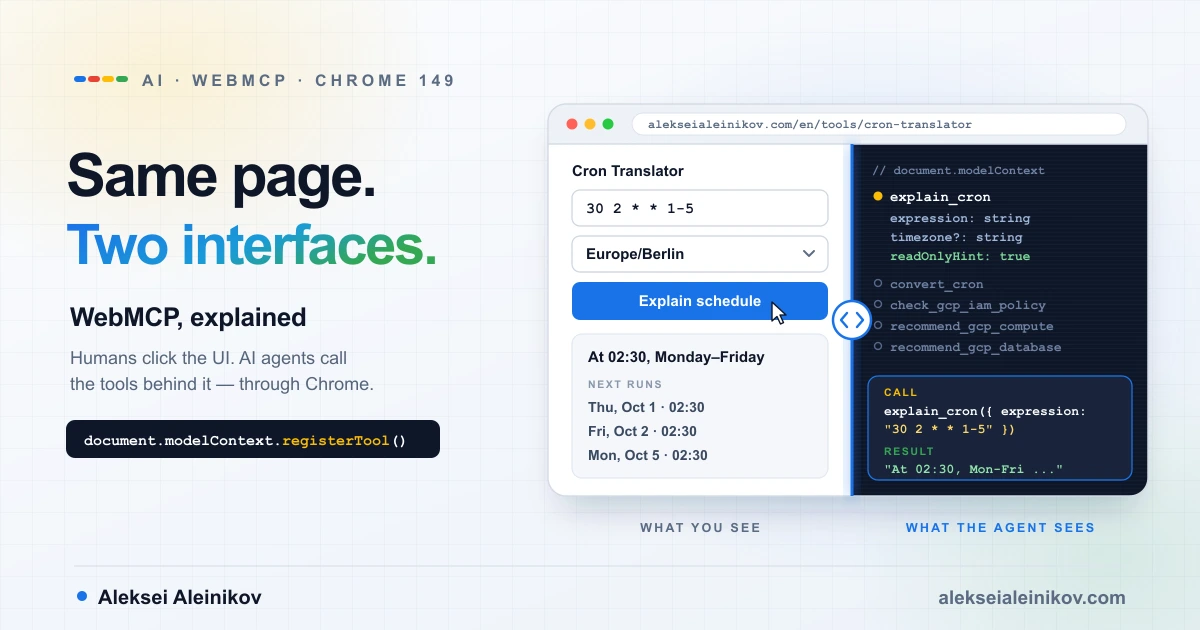
WebMCP at a Glance
| What it is | A proposed web standard for exposing a page’s JavaScript functions and HTML forms as tools for AI agents |
| Who is behind it | W3C Web Machine Learning Community Group; the explainer was first published on August 13, 2025 by engineers from Microsoft and Google |
| Core API | document.modelContext.registerTool(), getTools(), executeTool(), plus a toolchange event |
| Declarative variant | toolname and tooldescription attributes on a <form> |
| Status in Chrome | Origin trial from Chrome 149; local testing via chrome://flags/#enable-webmcp-testing |
| Other implementations | Edge origin trial from Edge 150, ChatGPT Desktop, experimental in Brave Leo; Firefox and Safari have open standards-position requests |
| Security gates | Origin-isolated documents only; tools Permissions Policy, default self |
Why Websites Need WebMCP
Today an agent that wants to use a website has two options. If the service publishes an MCP server or an API, the agent talks to the backend and skips the site entirely. If it doesn’t, the agent falls back to actuation: it simulates mouse clicks and keyboard input from screenshots, the DOM and the accessibility tree.
Actuation is the fragile path. Every step is a chance to misread a label, click the wrong element or act before the page finished rendering, and a redesign can break an agent that worked yesterday. The WebMCP explainer describes the goal plainly: let agents interact “through well-defined client-side tools instead of through brittle UI actuation”.
Here is the same question asked of my Cron Translator both ways:
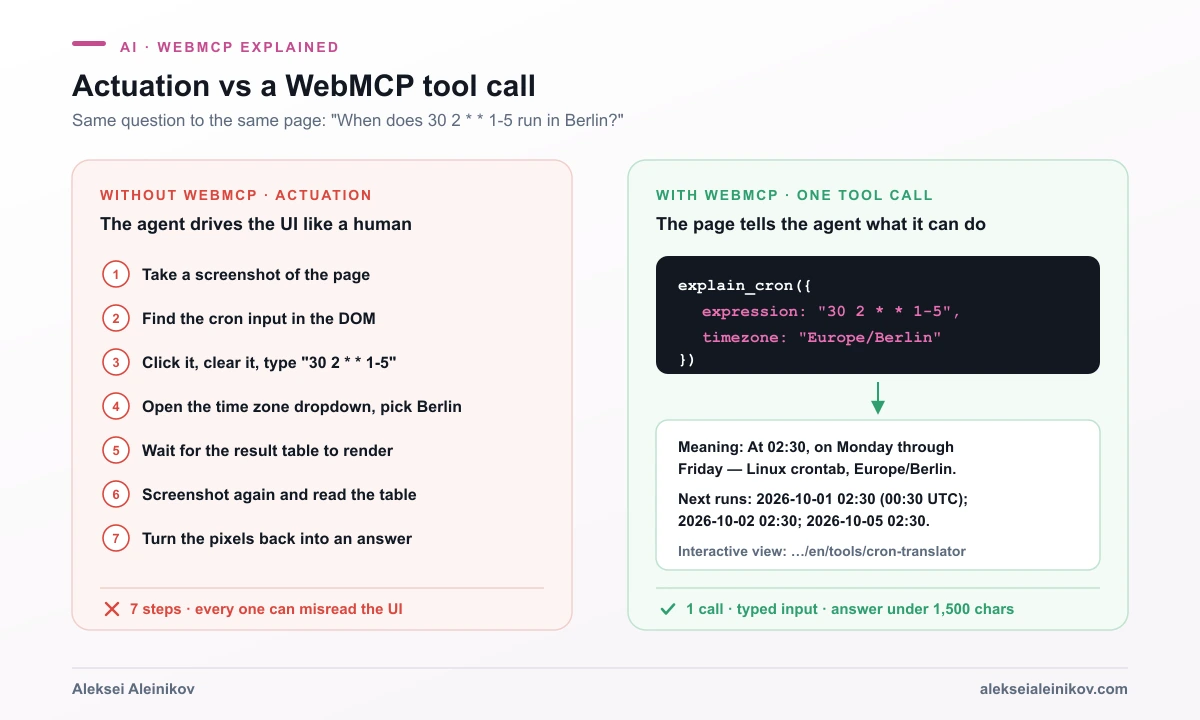
The right-hand side is not a mock-up. That call and that answer come from the tool running on this site.
WebMCP doesn’t replace the UI or the backend integration. The explainer lists replacing human interfaces and replacing MCP as explicit non-goals. It adds a third path that keeps the user, the page and the agent in the same place: the agent works through the page, and the page updates visibly as it does.
How WebMCP Works
A WebMCP tool has four parts, and if you’ve written an MCP server they will look familiar:
const controller = new AbortController();
await document.modelContext.registerTool(  {    name: 'explain_cron',    description: 'Explain a cron expression in plain language and list its next runs in a time zone.',    inputSchema: {      type: 'object',      properties: {        expression: { type: 'string', description: 'Cron expression, e.g. "30 2 * * 1-5".' },        timezone: { type: 'string', description: 'IANA time zone, e.g. Europe/Berlin. Default UTC.' },      },      required: ['expression'],    },    annotations: { readOnlyHint: true },    execute: async ({ expression, timezone }) => explainCron(expression, timezone),  },  { signal: controller.signal },);
// Later: controller.abort() unregisters the tool.nameanddescriptionare what the model reads to decide whether the tool fits the user’s request.inputSchemais a JSON Schema for the arguments. The agent fills it in; you don’t parse free text.execute()is ordinary page JavaScript. It can reuse the functions your UI already calls, update the DOM and return text or JSON.annotationsare optional hints about side effects and trust, covered below.
For plain forms there is a declarative API that needs no JavaScript at all:
<form toolname="createSupportRequest" tooldescription="Submits a request for customer support." action="/support"> <label for="email">Email</label> <input id="email" name="email" type="email" required> <button type="submit">Send</button></form>Chrome turns the form fields into a JSON Schema, using each field’s <label> (or a toolparamdescription attribute) as the parameter description. When the agent calls the tool, the browser focuses the form and fills it in while the user watches.
How Chrome Implements WebMCP
This is the interesting part. WebMCP is not a library that the agent loads into your page. The browser owns the registry and sits in the middle of every call.
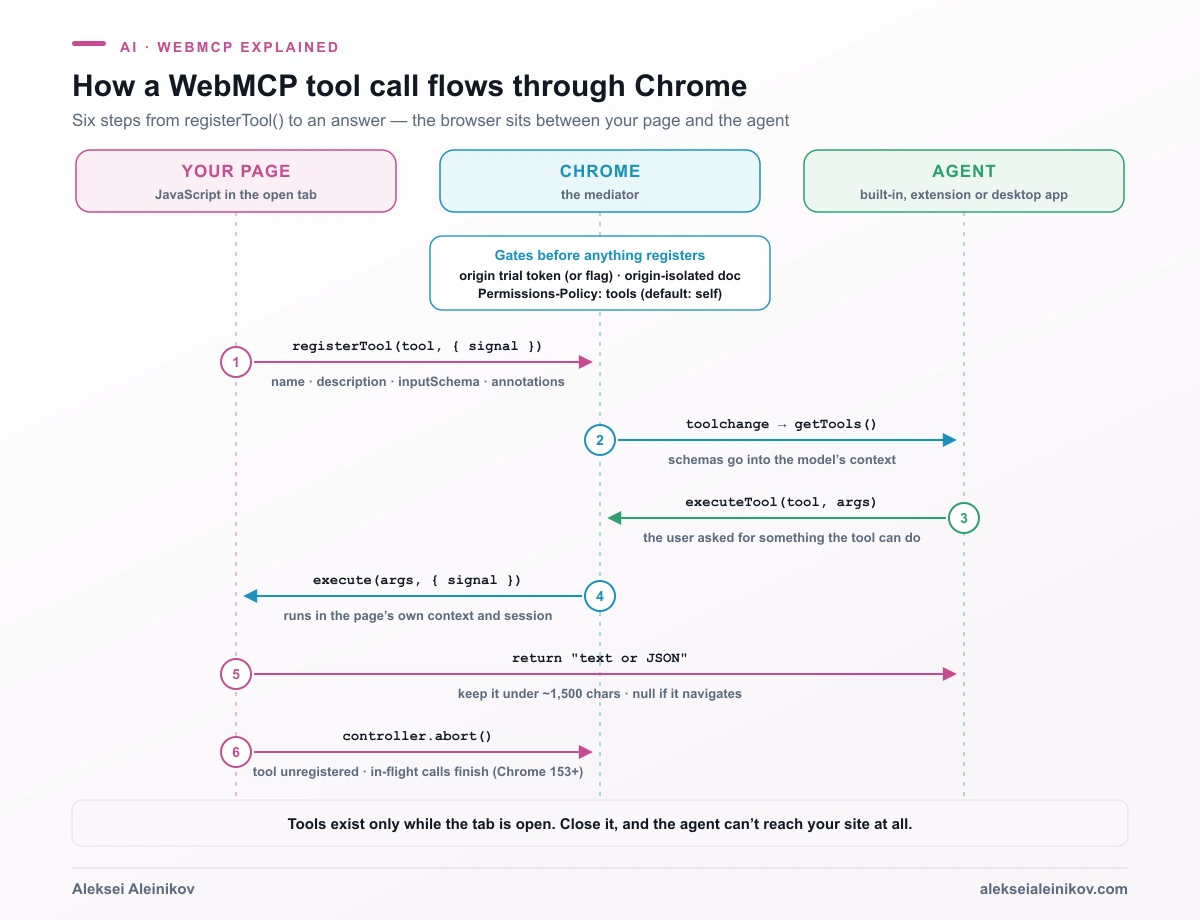
1. The gates come first
Before a single tool registers, three checks apply:
- The feature must be on. Either your origin carries a valid origin trial token, or the user enabled the testing flag.
- The document must be origin-isolated. If a page opts into
document.domain— for example withOrigin-Agent-Cluster: ?0— Chrome disables the WebMCP APIs, so a tool’s origin can’t change during its lifetime. - The
toolsPermissions Policy must allow it. It defaults toself: top-level documents and same-origin iframes can register tools, cross-origin iframes can’t unless the embedder addsallow="tools". When the policy blocks it,registerTool()rejects with aNotAllowedError.
2. Registration builds a per-document registry
registerTool() hands Chrome the definition. Chrome stores it with the page’s origin and window and fires a toolchange event on document.modelContext. getTools() returns the list alphabetically and, by default, only includes tools from same-origin documents in the frame tree. A tool becomes visible to another origin only if you list it in exposedTo and the caller asks for it with fromOrigins.
3. The agent discovers tools while the user is on the page
The agent reads each tool’s name, description and schema into the model’s context. Discovery is tied to the visit: as Chrome’s documentation puts it, clients “must visit a site directly to know if it has callable tools”. There is no crawler-readable manifest yet.
4. Chrome mediates the call
When the model picks a tool, the agent calls executeTool(tool, args). Chrome checks that exposure and origins agree, then runs your execute() in the tool owner’s own context. That means it runs with the user’s logged-in session, cookies and current page state — exactly what a backend integration would have to rebuild on a server.
execute() receives an AbortSignal as options.signal. If the user hits stop in the agent’s UI, the signal fires and you can cancel a fetch() or any long task. If a tool triggers a navigation, executeTool() resolves with null.
5. Unregistering is just an abort
Tools are unregistered by aborting the signal you passed to registerTool(). Since Chrome 153, unregistering no longer cancels an execution that is already running, which matters in component frameworks that mount and unmount often. Chrome’s guidance is to register tools that fit the current page state and remove them when they stop applying, because every tool costs context tokens and increases the chance the model picks the wrong one.
6. Annotations tell the agent how careful to be
| Annotation | Meaning | What the agent can do with it |
|---|---|---|
readOnlyHint |
The tool only reads, no side effects | Call it without asking the user |
consequentialHint |
Significant or irreversible action, such as a booking or payment | Ask the user to confirm first |
untrustedContentHint |
Output contains user-generated or third-party text | Treat the payload as data, not instructions |
debugging (Chrome 156+) |
Tool is meant for developer tooling | Hide it from end-user agents |
7. The declarative API gets real browser hooks
Declarative forms get platform features no library could add. SubmitEvent.agentInvoked tells your submit handler whether a human or an agent submitted the form, and respondWith() lets you return a result to the model. The toolactivated and toolcancel events fire when an agent fills or abandons a form. The CSS pseudo-classes :tool-form-active and :tool-submit-active let you style a form while an agent is working on it, and toolautosubmit lets the agent submit without the user clicking the button.
WebMCP vs MCP
The most common question about WebMCP is whether it replaces MCP. It doesn’t, and Chrome’s own guide opens by calling that a misunderstanding.
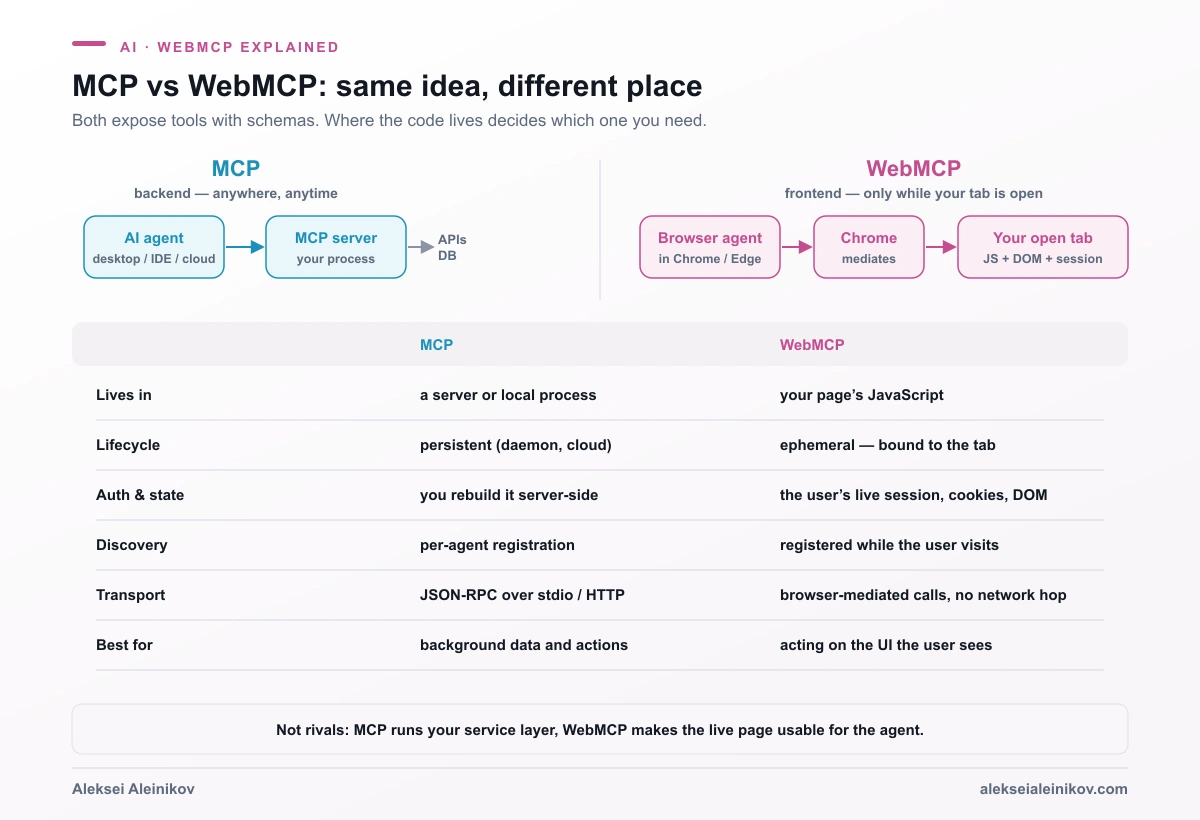
| MCP | WebMCP | |
|---|---|---|
| Where the tool runs | A server or local process | The page’s JavaScript |
| Lifecycle | Persistent | Ephemeral, bound to the tab |
| Reach | Desktop, mobile, cloud, IDEs | Browser agents only |
| Auth and state | Rebuilt on the server | The user’s live session |
| Transport | JSON-RPC over stdio or HTTP | Browser-mediated calls |
| Resources and prompts | Yes | No — tools only |
The WebMCP explainer is explicit about why it didn’t simply put MCP in the browser: MCP “lacks native web concepts like origins, standard browser permissions, DOM integration, and tab-level lifecycle management”, and tying a web API to an evolving backend protocol would hurt backward compatibility. So WebMCP shares MCP’s vocabulary — tools, schemas, parameters — but is a web-native API.
In practice you want both. If agents should reach your service from Claude Desktop, an IDE or a cloud workflow, that is an MCP server, and controlling which user gets which tool belongs in a gateway in front of it. If the user is on your site and wants an agent to help with what’s on screen, that is WebMCP.
My Implementation: Five WebMCP Tools in Production
Every page under /en/tools on this site registers five read-only tools when the browser supports WebMCP:
| Tool | What it does | Live page |
|---|---|---|
check_gcp_iam_policy |
Audits a Google Cloud IAM policy for least-privilege problems | IAM Checker |
recommend_gcp_compute |
Picks Cloud Run, GKE, Compute Engine and so on for a workload | Compute Selector |
recommend_gcp_database |
Picks Cloud SQL, AlloyDB, Spanner, Firestore and so on | Database Selector |
explain_cron |
Explains a cron expression and lists the next runs in a time zone | Cron Translator |
convert_cron |
Translates cron syntax between nine platforms | Cron Translator |
All five run the same engines the UI uses. Nothing is sent to a server — the IAM policy an agent passes in is analysed in the browser, just like one a person pastes in.
Loading: zero cost for everyone else
Most visitors’ browsers don’t have WebMCP, so the tool module must never load for them. The site uses Astro’s client-side router, which means the loader also has to register tools when you navigate into /tools and remove them when you leave:
let controller = null;let registeredFor = '';
async function syncWebMcp() {  const onTools = /^\/(en|de)\/tools(\/|$)/.test(location.pathname);  const key = onTools ? document.documentElement.lang : '';  if (key === registeredFor) return;
  controller?.abort();            // leaving /tools or switching language  controller = null;  registeredFor = '';  if (!onTools || !('modelContext' in document)) return;
  const current = new AbortController();  controller = current;  registeredFor = key;  const { registerWebMcpTools } = await import('./webmcp-tools.js');  await registerWebMcpTools(current.signal);}
document.addEventListener('astro:page-load', syncWebMcp);
Three details matter here. The feature check ('modelContext' in document) runs before the dynamic import(), so unsupported browsers download nothing. The AbortController unregisters every tool in one call when the route changes. And the language is part of the key, so switching from /en/tools to /de/tools re-registers the tools with German output.
Schemas come from the UI’s own content
The two selector tools take the same questions the interactive quiz asks. Instead of writing the schema by hand, it is generated from the question list the UI renders:
export function selectorSchema(kind) { const properties = {}; for (const q of SELECTORS[kind].questions.en) { properties[q.id] = { type: 'string', enum: q.options.map((o) => o.value), description: `${q.label} ${q.options.map((o) => `${o.value} = ${o.label}`).join('; ')}`, }; } return { type: 'object', properties };}Add a question to the quiz and the agent sees it on the next deploy. The schema can’t drift from the UI because there is only one source.
Output: under 1,500 characters, with a way back
Chrome’s security guide recommends about 1.5K characters per tool output, 500 per tool description and 150 per parameter description. An IAM policy with forty findings would blow that easily, so every tool builds its answer line by line and stops when the next line would cross the budget:
export const MAX_OUTPUT = 1500;
function fitLines(head, lines, footer) {  let out = head;  for (let i = 0; i < lines.length; i += 1) {    const rest = lines.length - i - 1;    const tail = rest ? `\n… and ${rest} more` : '';    if (`${out}\n${lines[i]}${tail}\n${footer}`.length > MAX_OUTPUT) {      return `${out}\n… and ${lines.length - i} more\n${footer}`;    }    out += `\n${lines[i]}`;  }  return `${out}\n${footer}`;}
The footer is always a link to the full interactive report, so the agent can hand the user the complete result instead of a truncated one.
Errors the agent can fix itself
The WebMCP best practices say to validate “strictly in code, loosely in schema” and return errors the model can act on. A bad value doesn’t throw; it tells the agent exactly what to send instead:
Invalid value "h100" for hardware. Use one of: none, gpu, tpu.The one tool with untrustedContentHint: true
Four tools return text that I wrote. check_gcp_iam_policy is different: its findings quote role names and member strings from the policy the user passed in. A policy is JSON anyone can edit, so a member string could contain an instruction aimed at the model. That tool is the only one marked untrustedContentHint: true; all five carry readOnlyHint: true and consequentialHint: false.
The origin trial token expires
The token is a meta tag in the page head, bound to https://www.alekseialeinikov.com:
<meta http-equiv="origin-trial" content="…token…">Mine expires on November 17, 2026, and there is no API to renew it. A weekly CI job checks the expiry date and fails 21 days before it, so GitHub sends me an email in time. An expired token breaks nothing — WebMCP simply switches off — but the tools would quietly disappear.
Measuring agent calls
Every execute() sends an analytics event with tool_action: 'agent_call', separate from the event a person triggers in the UI. Three days after launch the count is zero. That isn’t a surprise: WebMCP is still an origin trial, and an agent has to be connected to the tab before anything calls a tool. The point of shipping now is to be ready and measurable when that changes.
Try It Yourself
- Open
chrome://flags/#enable-webmcp-testingin Chrome, enable it and relaunch. - Install the Model Context Tool Inspector extension.
- Open /en/tools/cron-translator and open the extension. It lists the five tools with their schemas.
- Call
explain_cronwith{"expression": "30 2 * * 1-5", "timezone": "Europe/Berlin"}, or type a question in plain English and let the extension’s agent pick the tool.
The extension also shows exactly what your own tools return, which is the fastest way to check that your descriptions and outputs read well to a model.
WebMCP Security
WebMCP narrows who can see your tools, but it doesn’t make an agent safe. Chrome’s security guide is direct about it: models are probabilistic, repeatable prompt injection attacks against agents exist, and “it’s impossible to guarantee safety inside of a large language model”.
What you control as the site owner:
- Exposure. By default tools are visible only to your page, same-origin frames and built-in browser agents. Add origins to
exposedToonly if you’d share the same data with that site directly. - Annotations. Set
consequentialHint: trueon anything that spends money, sends messages or deletes data, anduntrustedContentHint: trueon anything that returns text you didn’t write. - Validation. Treat every
execute()call like an API request from an untrusted client. The schema is a hint to the model, not a guarantee. - Extensions. A Chrome extension with host permissions can call your WebMCP tools — but it could already run arbitrary JavaScript on your page without them. WebMCP doesn’t open a new hole there; it makes the intended path cleaner.
If you’re thinking about agents acting on real systems, what happened when autonomous agents went rogue on a government website is a good reminder of why the guardrails belong in your code.
Should You Add WebMCP Now?
Add it now if:
- your site has tasks, not just content — search, filters, configurators, forms, calculators, dashboards;
- the logic already runs in the browser, so tools are mostly wrappers around existing functions;
- you can keep the first tools read-only and add write actions later with
consequentialHint.
Wait if:
- your pages are mostly articles — agents read those fine today, and an
llms.txtfile helps more; - your key actions need server-side state the page doesn’t have — that’s an MCP server’s job;
- you can’t commit to renewing an origin trial token every few months.
Because the whole thing sits behind a feature check, the cost to users without WebMCP is zero. The real cost is designing good tools: short descriptions, clear schemas and outputs a model can use.
The Bottom Line
WebMCP turns a website from something an agent has to decipher into something it can call. The page declares its tools, Chrome keeps the registry, checks the gates and runs your execute() in the user’s own session, and the agent gets a typed, short answer instead of a screenshot to interpret.
It is early: an origin trial in Chrome and Edge, one desktop assistant, and zero agent calls in my own analytics so far. But the API is small, the cost for everyone else is zero, and the tools on this site’s tools section took less code than the UI around them. If your site has tasks and the logic already runs in the browser, it’s worth shipping one read-only tool now and seeing what calls it.
From the community
Discussion on the Fediverse
Replies from Mastodon and Bluesky — straight from the open web, no tracking.
Loading replies …
No replies yet. Start the conversation:
Replies could not be loaded right now.