
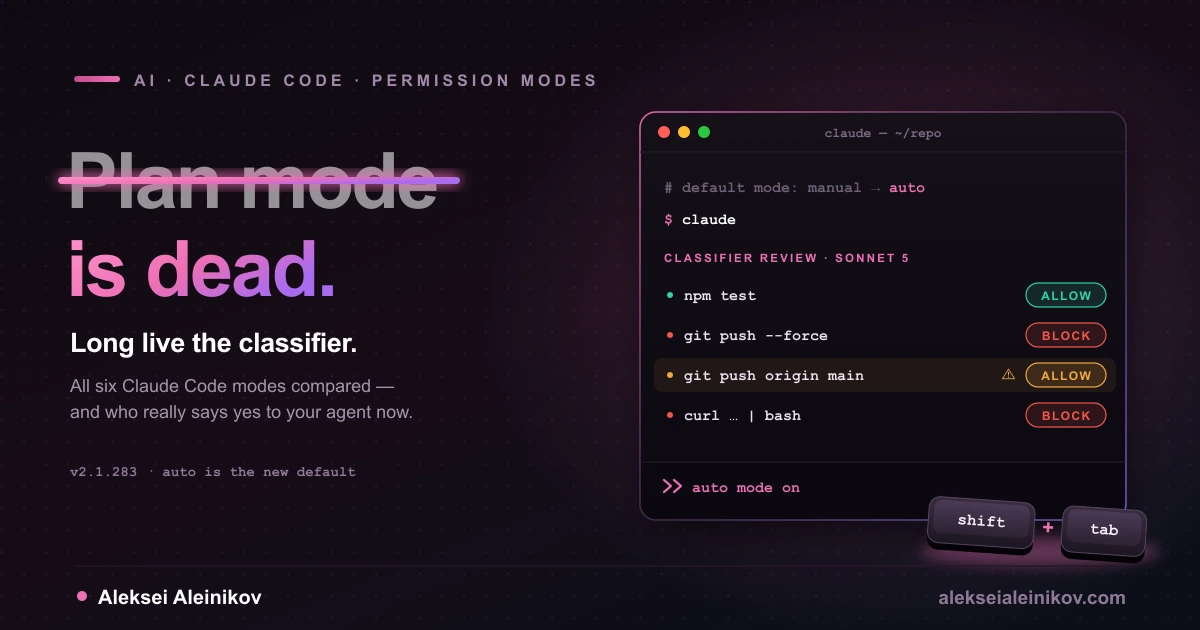
Last week a post titled Plan mode is dead hit the front page of Hacker News and collected 576 points and nearly 500 comments. The timing was not an accident. A few days later Claude Code v2.1.283 made auto mode the built-in starting mode for interactive terminal and VS Code sessions on every plan and provider. The ritual most developers perform before real work — press Shift+Tab until the footer says plan mode on — is no longer where a session begins.
To be clear up front: plan mode has not been removed or deprecated. Shift+Tab, the /plan prefix and --permission-mode plan all still work. What died is its role as the default first step.
Most of the debate is about workflow taste. The more useful story is underneath: plan mode was never a security boundary, and the thing that actually decides what your agent may do has moved from you to a classifier model, a set of rules and an OS sandbox. This guide compares all six modes on what they really allow, shows the three facts that ended plan mode’s reign, and ends with the configuration I’d run myself.
The Six Modes at a Glance
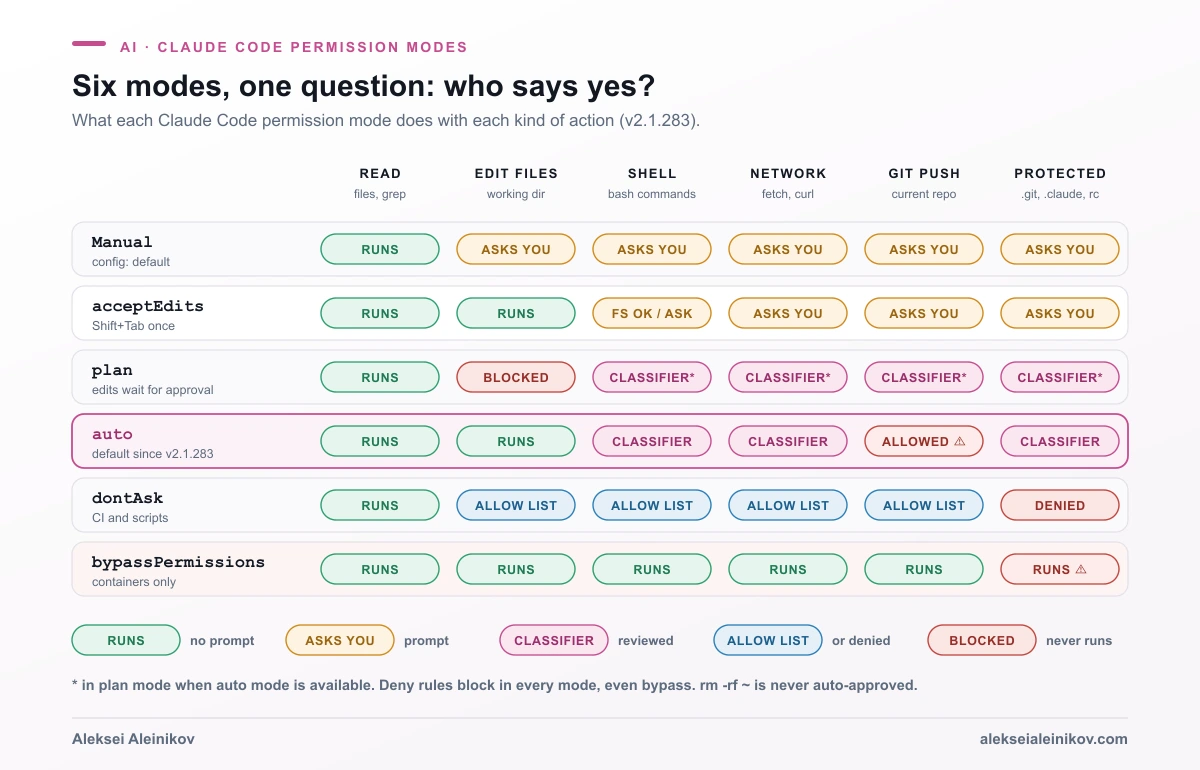
A permission mode answers one question: who approves each action? Everything else follows from that. The summary below is built from the official permission modes documentation and the Claude Code changelog, current as of v2.1.283.
| Mode | Runs without asking | Who approves the rest | Best for | The trap |
|---|---|---|---|---|
Manual (default) |
Reads only | You, per action | Sensitive repos, unfamiliar code | Prompt fatigue — you start clicking Yes blindly |
acceptEdits |
Reads, file edits, mkdir touch rm rmdir mv cp sed in the working dir |
You, for other shell | Iterating on code you review in git diff |
rm inside the project is auto-approved |
plan |
Reads; shell commands the classifier approves | You, at plan approval | Exploring before changing anything | Blocks edits, not actions — see below |
auto |
Everything, after a background check | A classifier model | Long tasks on trusted repos | Allows pushes to any branch of the current repo |
dontAsk |
Reads and your pre-approved tools | Nobody — the rest is denied | CI and scripts | Failures are silent denials |
bypassPermissions |
Everything, including .git and .claude |
Nobody | Throwaway containers and VMs | No protection against prompt injection |
Five details the table can’t hold:
- Manual got renamed. Since v2.1.200 the CLI labels the
defaultmode Manual and acceptsmanualas an alias, so--permission-mode manualand"defaultMode": "manual"both work. acceptEditshas a tripwire. Since v2.1.160 it still prompts before writing build-tool configs that can run code —.npmrc,.yarnrc*,bunfig.toml,.bazelrc,.pre-commit-config.yaml,.devcontainer/.- Protected paths are never auto-approved in any mode except bypass:
.git,.claude,.vscode,.idea,.husky, shell rc files,.npmrc,.mcp.jsonand more. In auto mode those writes go to the classifier; indontAskthey are denied. - Deny rules beat every mode, including bypass. Allow rules do nothing in bypass.
- Critical-path removals —
rm -rf ~,rm -rf /, a glob under an empty variable likerm -rf "$DIR"/*— are never auto-approved by any mode, allow rule or hook.
How to Switch Modes (and Where Each Setting Is Ignored)
In the terminal, Shift+Tab cycles Manual → acceptEdits → plan → back to Manual. Optional modes slot in after plan: bypassPermissions first (only if you launched with it enabled), then auto (when it’s available). From auto, the first press drops you to Manual. dontAsk never appears in the cycle — you set it with --permission-mode dontAsk.
Other entry points worth knowing:
claude --permission-mode planstarts in a mode;/plan fix the auth raceenters plan mode for a single prompt.Ctrl+Gopens the proposed plan in your editor so you can change it before approving.- In Manual and
acceptEdits, a Bash prompt can offer Yes, and switch to auto mode (v2.1.247+).
Where you put defaultMode matters more than most people realize. A repository cannot opt you into autonomy: "auto" and "bypassPermissions" in .claude/settings.json or .claude/settings.local.json are ignored, and a bypass value there starts the session in Manual. Set them in ~/.claude/settings.json, managed settings or a flag. The same logic applies to auto-mode rules — the classifier never reads autoMode from project settings, so a checked-in repo can’t write its own allow list.
Why Plan Mode “Died”: Three Facts
The Plan mode is dead essay by Ayman Nadeem argues that planning is not the same thing as a plan document, that agents now explore well enough on their own, and that the linear plan → approve → execute flow has been replaced by a loop: understand, act, inspect, clarify, adjust. You can agree or not. These three facts matter more.
1. Plan mode is a prompt plus an edit block — not a sandbox
In the Hacker News thread, a commenter who said they work on Claude Code described plan mode as, in essence, a reminder added to each message telling the model not to write code yet. The docs are more precise: plan mode lets Claude read, explore and write a plan, and blocks edits to your source until you approve. Shell commands are a different story:
- With auto mode available and
useAutoModeDuringPlanon — the default — the classifier reviews planning shell commands instead of you. Since v2.1.218 it even judges commands the static analyzer can’t prove read-only. - In an interactive terminal session with bypass permissions available, plan mode’s blocks aren’t enforced at all. Claude is still told to plan, but an edit or command it attempts runs without a prompt.
- The changelog shows how thin the wall used to be. v2.1.136 fixed plan mode not blocking file writes when a matching
Edit(...)allow rule existed. v2.1.212 fixed plan mode auto-running file-modifying Bash commands such astouchandrmwithout a prompt. v2.1.47 fixed plan mode being lost after context compaction.
If you treated plan mode as “safe mode”, you were trusting an instruction, not an enforcement layer.
2. Auto mode became the front door
Since v2.1.283 a new interactive session with no configured mode starts in auto. After a plan, the first approval option reads Yes, and use auto mode. Plan mode is now a detour you take on purpose, and auto is where you land afterwards. Anthropic also removed the separate ultraplan feature in v2.1.221.
3. The expensive part of planning moved to model choice
What plan mode still does well is buy you a reasoning pass before execution — and you can price that pass. The opusplan model alias runs Opus during plan mode and switches to Sonnet for execution. On the Anthropic API that’s Opus 5.5 at $4/$20 per million input/output tokens for the thinking, and Sonnet 5 at $2/$10 for the typing. That is a better lever than a mode switch: spend on judgment, save on keystrokes.
When Plan Mode Still Wins
“Dead” is a headline. There are four cases where I’d still reach for plan mode on purpose:
- Big, multi-file changes. Plan, approve with the option that clears the planning context (enable
showClearContextOnPlanAccept), then execute from a clean window. This avoids the drift that sets in when a long task gets compacted mid-flight. - A codebase you don’t know yet. Forcing an exploration pass before the first edit catches wrong assumptions while they are still cheap.
- Parallel research. Read-only agents can investigate several approaches side by side without stepping on each other’s files.
- Cost control.
/model opusplangives you a strong planner and a cheap executor in one session.
Auto Mode Through a Security Engineer’s Eyes
Auto mode is the part that deserves the attention plan mode used to get. Here’s how it works.
A second model reviews each action. The classifier runs on Claude Sonnet 5 by default, not on your /model choice. It sees your messages, Claude’s tool calls and your CLAUDE.md, but tool results are stripped from its requests. A malicious README or web page can’t talk to the classifier directly. A separate server-side probe also scans incoming tool results for suspicious content.
Not everything goes to it. Rules resolve first, reads and working-directory edits are approved without review, and everything else — shell, network, protected paths, subagent spawns — goes to the classifier. On entering auto mode, Claude Code drops broad allow rules that grant arbitrary code execution: Bash(*), wildcarded interpreters like Bash(python*), package-manager run commands and Agent allow rules. Narrow rules like Bash(npm test) stay. The dropped rules come back when you leave auto.
It fails toward you. After 3 blocks in a row or 20 in a session, auto mode pauses and Claude Code starts prompting again. In a -p run with no prompt tool, the blocked action just doesn’t run.
| Blocked by default (selection) | Allowed by default |
|---|---|
curl | bash and other download-and-execute |
Local file operations in the working directory |
| Sending sensitive data to external endpoints | Installing dependencies from your lock files |
Production deploys, migrations, terraform destroy |
Reading .env and sending credentials to their matching API |
Force push, git reset --hard, git clean -fd |
Read-only HTTP requests |
| Granting IAM or repo permissions | Pushing to any branch of the current repo, including the default branch |
| Writing to secret managers, DNS or TLS certificates | Creating a pull request that matches your request |
| Merging an unapproved PR, disabling CI checks | Sending data to trusted domains you list in autoMode.environment |
Fetching cloud instance-metadata credentials (169.254.169.254) |
Reading and writing security code as part of your task |
| Tunnels and reverse shells |
Three things in that list surprise people:
- Pushing to
mainis allowed. If you want a human checkpoint before code leaves your machine, you have to add it yourself (next section). - “Don’t push” in chat is soft. The classifier honors boundaries you state in conversation, but it re-reads them from the transcript on each check. Context compaction can remove them. A deny or ask rule is the durable version.
$defaultsis load-bearing. You can extend the classifier with prose rules inautoMode.environment,allow,soft_denyandhard_deny. Leave"$defaults"out of one of those arrays and you replace the whole built-in list for that section — including the force-push andcurl | bashprotections. Runclaude auto-mode configto see what the classifier actually uses, andclaude auto-mode critiqueto have your custom rules reviewed. The full reference is in Configure auto mode.
Out of the box the classifier trusts only your working directory and the repo’s configured remotes. A remote you add mid-session isn’t trusted, and pushing to your company’s other repos or writing to a team bucket is blocked until you describe them in autoMode.environment — or let /auto-mode-setup draft those entries for you.
Permission Rules Are Not a Security Boundary
Rules are evaluated deny → ask → allow, the first match wins, and specificity doesn’t change the order: a broad Bash(aws *) deny also blocks aws s3 ls, even if you allow that exact command. Rules are enforced by Claude Code, not by the model — CLAUDE.md is advice, a deny rule is policy.
But a Bash rule matches the command text Claude writes. The docs are blunt about what that means:
| Deny rule | Stops | Doesn’t stop |
|---|---|---|
Bash(curl *) |
curl https://example.com |
/usr/bin/curl …, sh -c 'curl …' |
Bash(rm *) |
rm -rf build/ |
/bin/rm -rf build/, bash -c 'rm -rf build/' |
Bash(git push *) |
git push origin main |
git -C . push …, git -c push.default=current push |
Rules also give you less file protection than they seem to. Read and Edit deny rules cover Claude’s file tools, file commands Claude Code recognizes in Bash such as cat and sed, and redirect targets. They don’t cover a Python script that opens the file itself. For that you need the sandbox: OS-level enforcement (Seatbelt on macOS, bubblewrap on Linux and WSL2) that holds for every child process, whatever the model decided.
Two sandbox caveats that are easy to miss:
- It covers Bash, PowerShell and Monitor commands. Built-in Read and Edit go through permissions instead.
- By default the sandbox allows reads of the whole machine, including
~/.aws/credentialsand~/.ssh. Addsandbox.credentialsentries to block them, ormaskto swap a real token for a placeholder that the proxy replaces only on the way out.
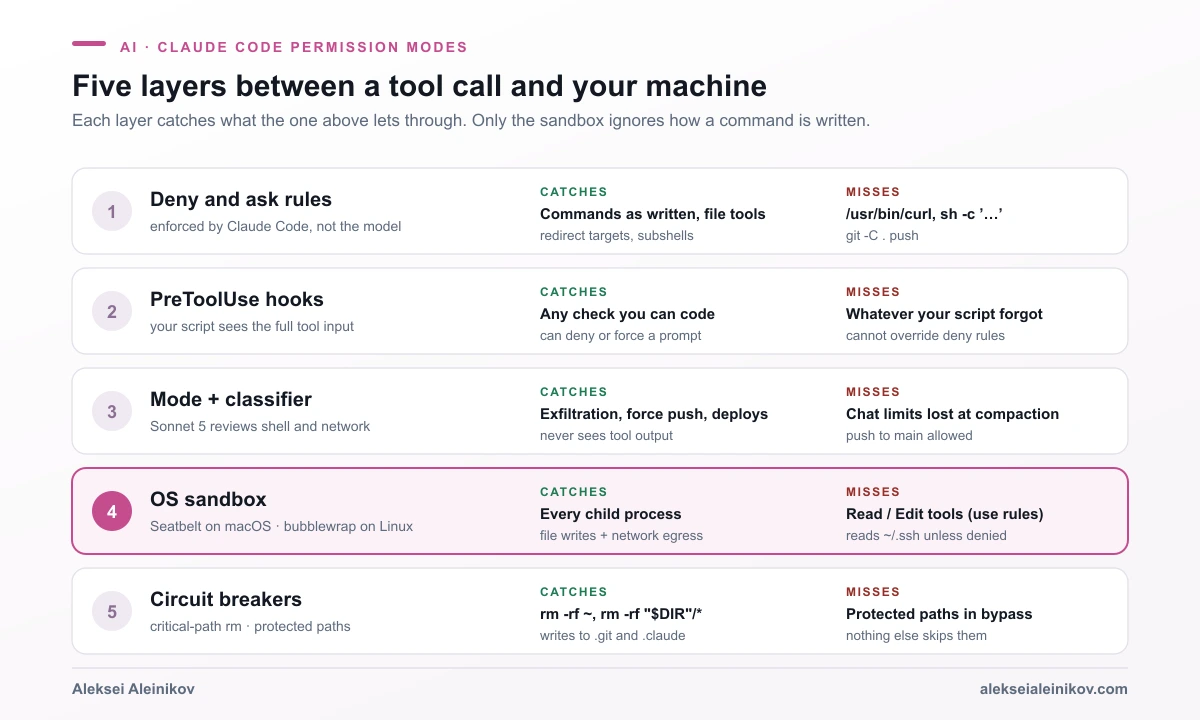
This is the same failure pattern behind the AI agents that escalated into hacking a government site: a blocked path gets routed around with a tool nobody thought of as dangerous. A command-text rule doesn’t stop that. A boundary the OS enforces does.
--dangerously-skip-permissions: Only in a Box You Can Throw Away
--dangerously-skip-permissions is the same thing as --permission-mode bypassPermissions. What it actually does in 2026:
- No prompts and no protected-path checks — since v2.1.126 it writes to
.git/,.claude/,.vscode/and shell config files without asking. - Still stops for explicit ask rules, deny rules and critical-path removals. Since v2.1.281 that removal prompt shows a two-minute countdown, then denies and tells Claude how to rewrite the command. After three unanswered prompts in a session, it denies them outright.
- Refuses root. On Linux and macOS it won’t start as root or under
sudo, unless it detects a recognized sandbox. The supported path is the dev container config, which runs Claude Code as a non-root user. - Can’t be smuggled in by a repo, as described above, and organizations can remove it with
permissions.disableBypassPermissionsMode: "disable".
If you want an unattended run on your own laptop, you don’t need bypass. dontAsk with an exact allow list, or auto mode with the sandbox, gets you most of the autonomy without giving up the brakes. There’s also --restricted (v2.1.248+), which removes the tools that run code, keeps file tools inside the working directory and refuses bypass entirely.
Plan Mode vs Auto Mode: Which Should You Use?
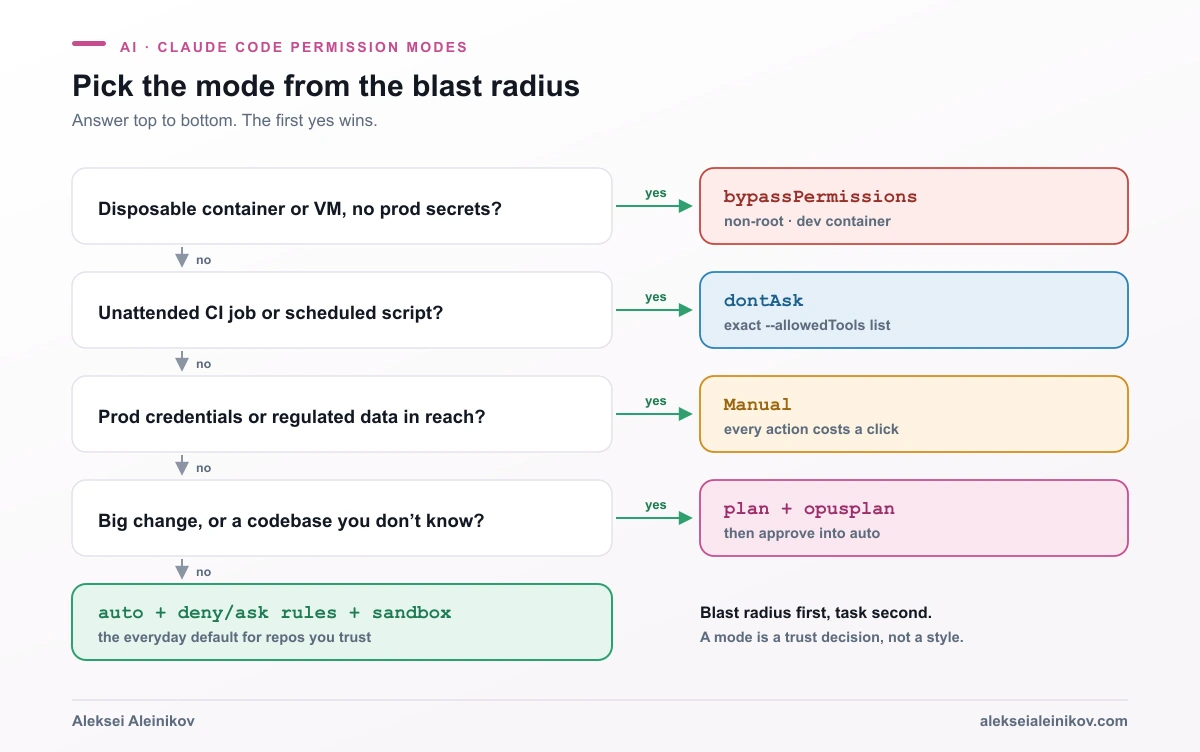
The short version:
- Disposable container or VM, fully unattended →
bypassPermissions, non-root, no production credentials inside. - CI or a scheduled script →
dontAskwith an explicit--allowedToolslist. - Production credentials or regulated data within reach → Manual. Some work should cost you a click.
- New codebase or a big refactor →
plan, withopusplan, then approve into auto. - Everyday work on a repo you trust →
autoplus the rules and sandbox below.
The Setup I’d Actually Run
Put this in ~/.claude/settings.json — user scope, because a project file can’t enable auto mode or autoMode rules:
{ "permissions": { "defaultMode": "auto", "deny": [ "Read(.env)", "Read(.env.*)", "Read(~/.ssh/**)", "Read(~/.aws/**)" ], "ask": [ "Bash(git push *)", "Bash(gh pr create *)", "Bash(terraform apply *)" ] }, "sandbox": { "enabled": true, "allowUnsandboxedCommands": false, "credentials": { "files": [ { "path": "~/.aws/credentials", "mode": "deny" }, { "path": "~/.ssh", "mode": "deny" } ], "envVars": [{ "name": "GITHUB_TOKEN", "mode": "deny" }] } }, "autoMode": { "environment": [ "$defaults", "Source control: github.com/your-org and all repos under it" ] }}What each block buys you:
denykeeps secrets out of Claude’s file tools.Read(.env)matches a.envat any depth under the current directory.askrestores the human checkpoint auto mode removes by default. Remember it matches the command as written, so pair it with the sandbox rather than trusting it alone.sandboxis the real boundary.allowUnsandboxedCommands: falseremoves the escape hatch where Claude retries a failed command outside the sandbox; list genuinely incompatible tools such asdocker *inexcludedCommandsinstead.autoMode.environmentwith"$defaults"teaches the classifier your org without deleting its built-in rules.
For CI, skip auto entirely:
claude -p "run the test suite and fix lint errors" \ --permission-mode dontAsk \ --allowedTools "Read" "Edit" "Bash(npm run lint *)" "Bash(npm test *)"Anything not on that list is denied instead of prompting, so the job never hangs waiting for a human. The agent loop itself is covered in how AI coding agents like Claude Code, Codex and opencode actually work. The same allow-list thinking applies to tools you plug in over MCP — see how to run MCP servers safely and a practical test for prompt injection defenses.
The Bottom Line
Plan mode didn’t die because planning stopped mattering. It died as a default because it was never where safety lived. It was a polite instruction with an edit block attached, and the product has moved the real decisions somewhere else: a classifier that reviews each action without reading tool output, deny and ask rules that Claude Code enforces, and a sandbox the operating system enforces.
So stop asking which mode is safest and ask which layer catches the thing you’re afraid of. Use plan mode when you want a better first draft of the work. Use auto mode when you want momentum. Put your real guarantees in rules and the sandbox, where compaction and clever prompts can’t reach them.
From the community
Discussion on the Fediverse
Replies from Mastodon and Bluesky — straight from the open web, no tracking.
Loading replies …
No replies yet. Start the conversation:
Replies could not be loaded right now.