“Free tier” is one of the most misleading phrases in cloud computing. Not because anyone lies, but because AWS, Google Cloud and Azure use the same two words for three different deals.
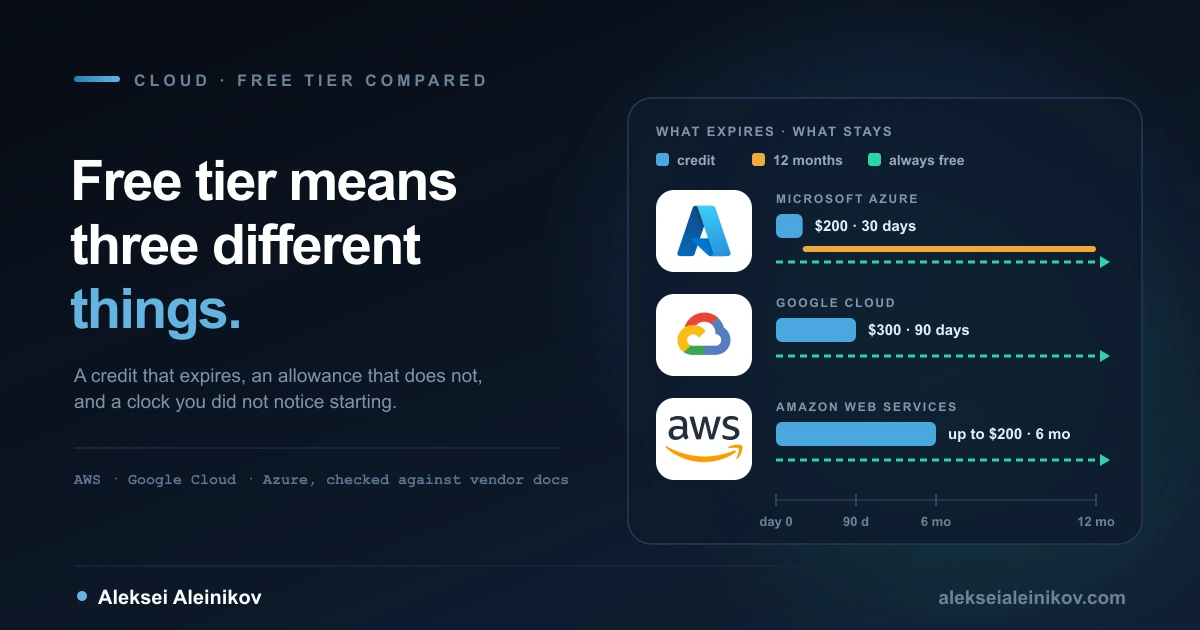
On one cloud “free” is a credit that expires. On another it is a monthly allowance that never expires but only works in three US regions. On the third it is a 12-month clock that quietly depends on a decision you have to make in the first 30 days. People compare the headline numbers ($200, $300, $200), pick one, and then find out which kind of free they signed up for when the first invoice arrives.
This is the side-by-side I wish I had when I opened my first cloud accounts: what each provider gives you at sign-up, what keeps renewing afterwards, what happens on the day the credit runs out, and the handful of mistakes that turn a free account into a bill. Every number below comes from each provider’s own free-tier and pricing documentation. I work mostly on Google Cloud, so keep that in mind when I say nice things about it.
Two Kinds of Free, Stacked
Every one of these offers is really two things layered on top of each other.
The sign-up credit is money. It pays for almost anything, it has an expiry date, and it runs out. The always-free allowance is a monthly quota on specific services at specific sizes. It does not expire, it resets every month, and unused amounts do not roll over.
The mistake is treating them as one thing. When the credit ends, the allowance stays. But everything you built with the credit that is outside the allowance starts costing money the moment you are on a paid plan.
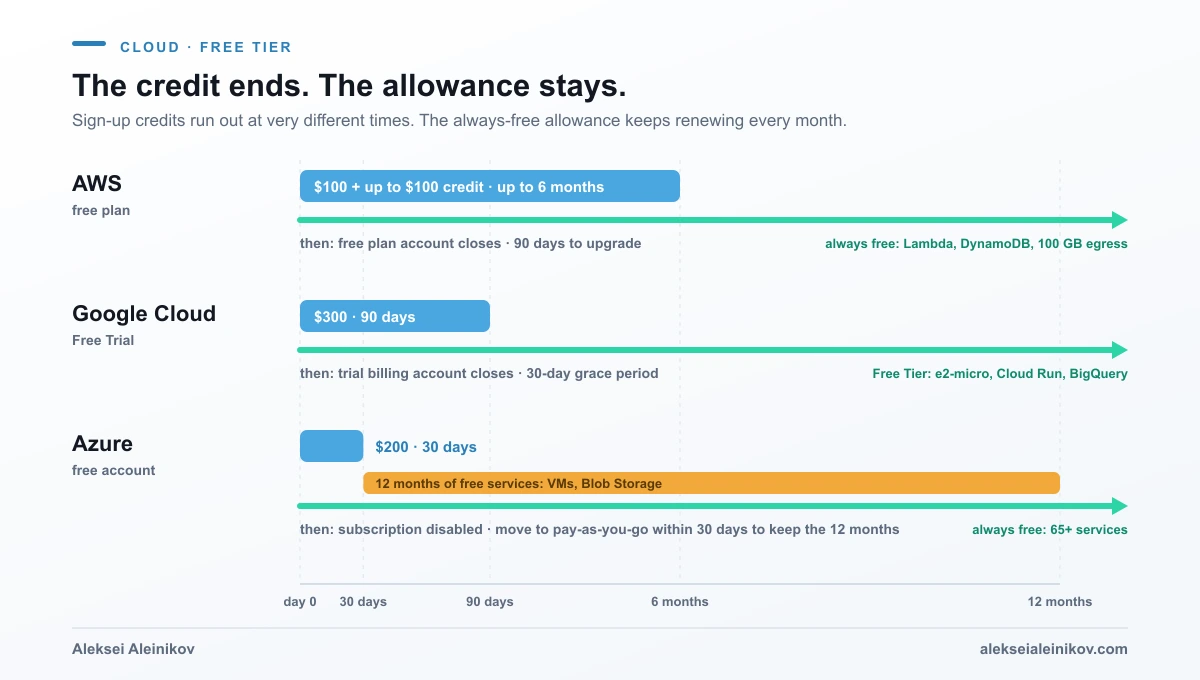
The Sign-Up Credit
| AWS | Google Cloud | Azure | |
|---|---|---|---|
| Credit | $100 at sign-up + up to $100 more for activities | $300 Welcome credit | $200 credit |
| Valid for | Up to 6 months on the free plan | 90 days | 30 days |
| When it ends | Free plan account closes | Trial billing account closes | Subscription is disabled |
| Recovery window | 90 days to upgrade | 30-day grace period | Upgrade to continue |
| Charged automatically? | No | No | No |
AWS changed its model for accounts created on or after 15 July 2025. New accounts get $100 in credits straight away and can earn up to $100 more by completing five guided activities in the console: launch an EC2 instance, try a model in the Amazon Bedrock playground, set up a cost budget with AWS Budgets, build a web app with Lambda, and create an RDS database. At sign-up you choose a free plan or a paid plan. The free plan never charges you, but it ends after six months or when the credits are gone, whichever comes first. It also blocks services that could burn through the credit in one go (Savings Plans, Reserved Instances, some Marketplace offers). The paid plan gets the same credits and access to everything, and bills you for anything beyond them. Either way, the credits must be used within 12 months of creating the account. Older accounts keep the previous model: 12 months of usage limits, then normal rates.
Google Cloud gives $300 for 90 days to anyone who has never been a paying customer of Google Cloud, Google Maps Platform or Firebase. It is the largest pot, but there are limits: during the trial you cannot add GPUs, use the Marketplace, request quota increases or create Windows Server VMs, and the credit cannot pay for the Gemini API in AI Studio. If you upgrade early, you keep the unused credit, but it still expires 90 days after sign-up.
Azure gives $200 for 30 days. That is the shortest window of the three, and it matters more than the amount: a month goes quickly when you are learning in the evenings. Azure is also the one where the free account comes with explicit spending protection, which ends when you move to pay-as-you-go.
What Stays Free After the Credit Is Gone
This is the part that decides whether a side project can keep running for nothing.
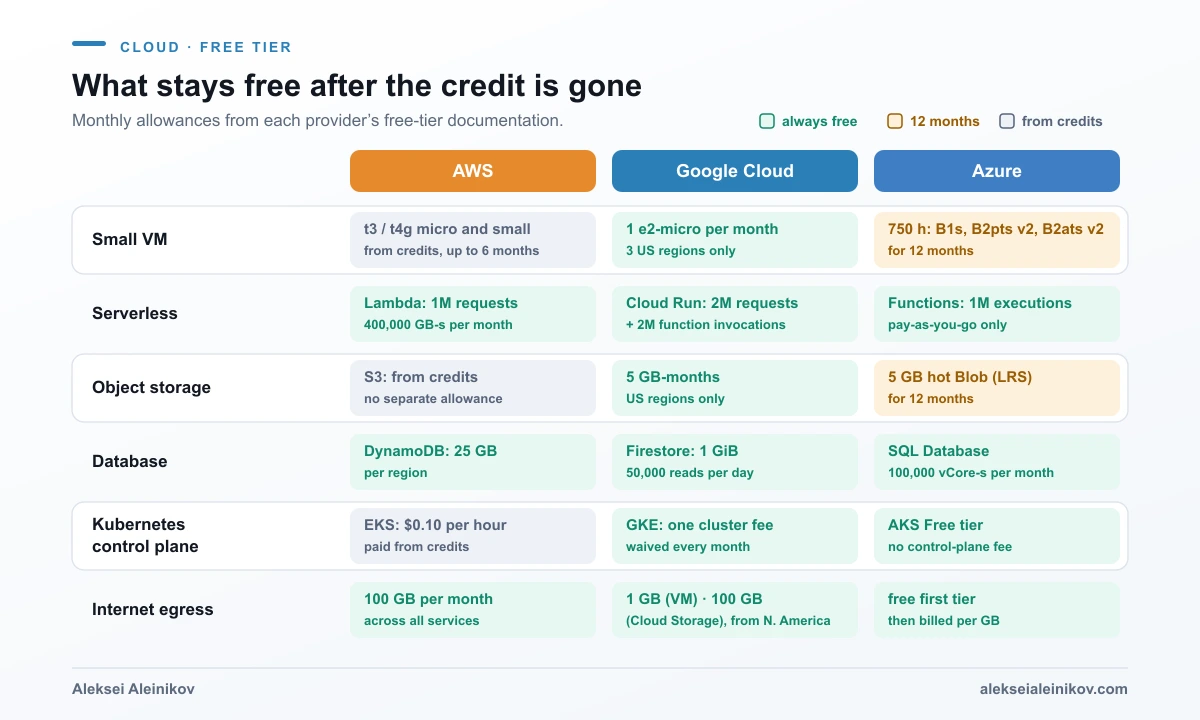
A small virtual machine. This is the biggest difference between the three. Google Cloud includes one non-preemptible e2-micro a month, with 30 GB-months of standard persistent disk and 1 GB of outbound traffic from North America. There is no end date. Azure includes 750 hours each of B1s, B2pts v2 (Arm) and B2ats v2 (AMD) burstable VMs, Linux or Windows, but for 12 months. On AWS, new accounts can run the instance types marked free-tier eligible (t3.micro, t3.small, t4g.micro, t4g.small, c7i-flex.large and m7i-flex.large), but they are paid out of your credits, not from a separate always-free allowance. When the credits or the six months run out, so does the free VM.
Serverless. All three are generous here, and for most hobby projects this is the right place to start anyway. AWS Lambda includes 1 million requests and 400,000 GB-seconds a month. Google Cloud Run includes 2 million requests, 180,000 vCPU-seconds and 360,000 GB-seconds of memory a month, and Cloud Run functions another 2 million invocations. Azure Functions on the Consumption plan includes 1 million executions and 400,000 GB-seconds a month, but only on pay-as-you-go subscriptions (the newer Flex Consumption plan includes 250,000 executions and 100,000 GB-seconds). If you are choosing between Google’s serverless options, App Engine or Cloud Run is covered separately.
Object storage. Google Cloud Storage includes 5 GB-months of regional storage, but only in us-east1, us-west1 and us-central1. Azure includes 5 GB of locally redundant hot Blob Storage for 12 months.
Databases. AWS DynamoDB includes 25 GB of storage and 25 read and 25 write capacity units per region. Amazon RDS runs on db.t3.micro or db.t4g.micro (MySQL, PostgreSQL, MariaDB or SQL Server Express) on the free plan, but it is paid from your credits, while Aurora DSQL is always free up to 100,000 DPUs and 1 GiB a month. Google Firestore includes 1 GiB per project plus 50,000 reads and 20,000 writes a day. Azure SQL Database includes 100,000 vCore-seconds of serverless usage and 32 GB of storage a month, with no end date, which is unusually generous for a relational database.
Analytics. BigQuery includes 1 TiB of queries and 10 GiB of storage a month. That is enough to learn SQL on real public datasets without paying anything.
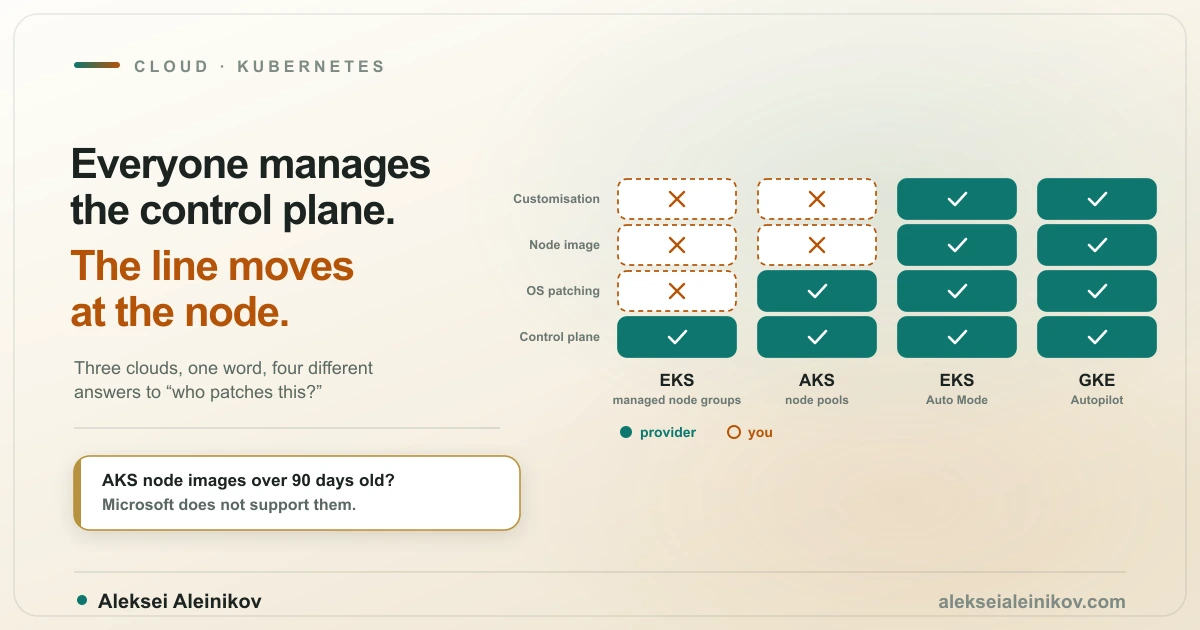
Kubernetes. GKE waives the cluster fee for one Autopilot or zonal Standard cluster per month (the nodes still cost money). AKS has a free control-plane tier with no SLA. EKS bills $0.10 per cluster per hour, which comes out of your AWS credits. What each managed service actually runs for you is a separate question, covered in what EKS, AKS and GKE actually manage.
The Day the Credit Runs Out
This is the moment people worry about, and it is less dangerous than it sounds. None of the three free plans will quietly start charging your card.
- AWS: the free plan ends after six months or when the credits are used up. The account closes automatically and you lose access to your resources. AWS keeps your content for 90 days, and if you upgrade to the paid plan in that window, the account comes back and any remaining credit carries over.
- Google Cloud: after 90 days or $300, the trial billing account closes, billing is disabled on your projects, and resources are stopped. You get a 30-day grace period. Upgrade in that window and you may be able to recover what you stopped. Otherwise it is deleted permanently.
- Azure: when the $200 runs out or the 30 days end, the subscription and its services are disabled. To keep going, you upgrade to pay-as-you-go.
The real risk is not the end of the trial. It is upgrading. Once you are on a paid plan, the free allowance still applies, but everything above it is billed at normal rates, and there is nothing standing between a mistake and your card.
That is why the timing matters most on Azure: its 12 months of free services only continue if you move to pay-as-you-go within the first 30 days. So you have to make the “do I give Microsoft a card that can actually be charged?” decision early, in exactly the month you know the least.
The Traps That Turn Free Into a Bill
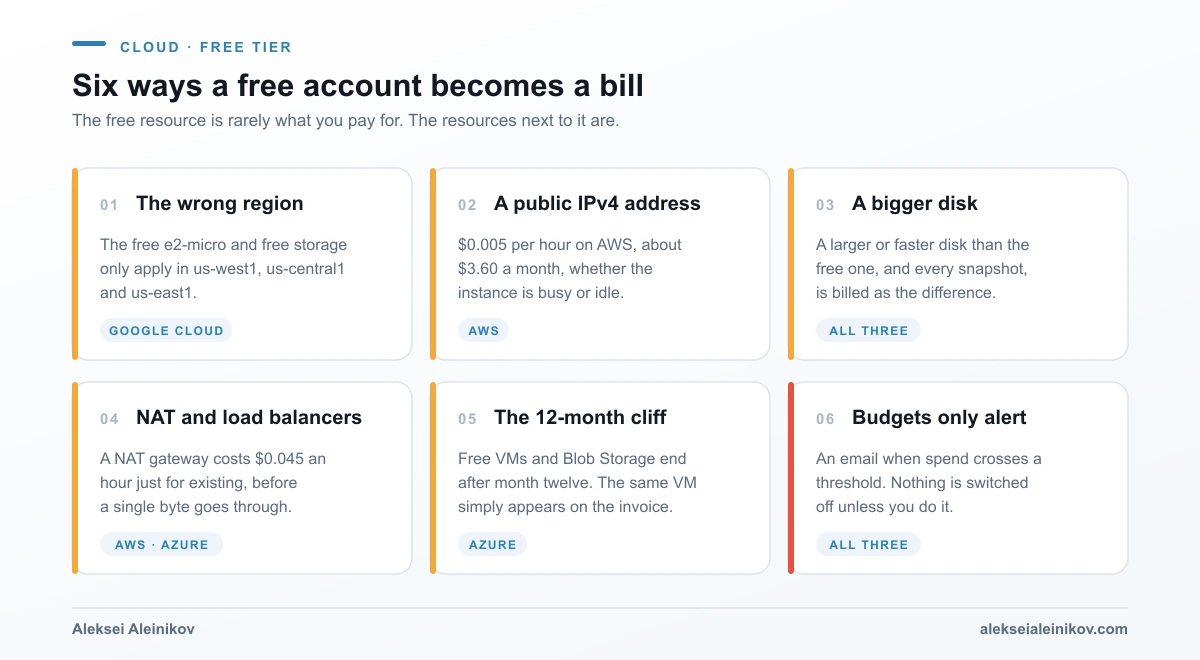
1. The wrong region. Google Cloud’s free e2-micro and free Cloud Storage only apply in three US regions. If you are in Europe and pick europe-west3 (Frankfurt) because it is close, you have created a normal, billed VM. The console will not warn you that it is outside the free tier.
2. The public IP address. On AWS, every public IPv4 address costs $0.005 per hour, around $3.60 a month, whether the instance is busy or idle. That is small, but it is not free, and it keeps running after you forget the instance exists.
3. The disk. The free VM comes with a free disk of a specific type and size. Choose a bigger disk or a faster disk type, or keep snapshots, and you pay for the difference.
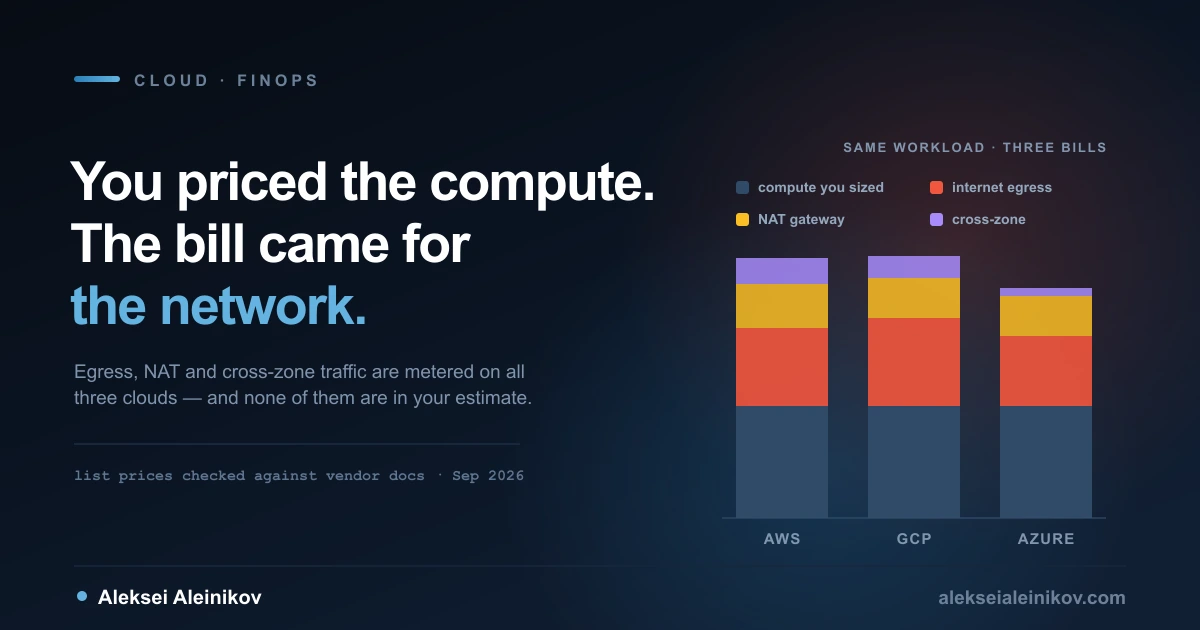
4. The networking around it. A NAT gateway or a managed load balancer is not part of any free VM allowance. A NAT gateway on AWS or Azure costs $0.045 an hour just for existing, before a single byte goes through. I went through those network charges in detail in the cloud bill you did not estimate.
5. The 12-month cliff. Azure’s free VMs and Blob Storage end after 12 months. Nothing breaks on day 366. The same VM simply starts showing up on the invoice.
6. Budgets that only alert. AWS Budgets, Google Cloud billing budgets and Azure Cost Management budgets all send you an email when spend crosses a threshold. None of them switch anything off by default. An alert that lands at 2 a.m. does nothing until you wake up.
Which One Should You Pick?
It depends on what you want to do with it, not on which headline number is biggest.
- You want to learn one cloud properly in a focused sprint (a certification, a course, a weekend project): Google Cloud’s $300 over 90 days is the biggest budget for the time.
- You want the longest runway without paying: AWS’s free plan runs for up to six months, and you earn part of the credit by learning the basics.
- You want a tiny server that keeps running for free: Google Cloud’s e2-micro, as long as you stay in one of the three US regions and accept that it is a very small machine.
- You want to build a serverless side project that lasts: any of the three. Lambda, Cloud Run and Azure’s serverless options all have monthly allowances that easily cover low traffic.
- You want to learn Kubernetes: GKE or AKS, because neither charges for the control plane on its free tier. On EKS, the control plane eats your credits.
- You work in a Microsoft environment (.NET, Windows Server, Entra ID): Azure, and its 12 months of free Windows VMs are a real advantage. Google’s trial does not let you create Windows Server VMs at all.
If you are not sure which cloud to learn first, I made the case for starting with Google Cloud in you can code, now learn the cloud. The honest answer is that the free tier should not decide that for you. What you learn transfers between the three far more than the free allowances suggest.
How to See How Much You Have Used
Each console shows what is left, but not in the same place:
- AWS: the Billing and Cost Management home page shows your credit balance and how long your free plan has left.
- Google Cloud: the Billing overview shows the remaining credit and days. In the Billing reports, anything covered by the trial or the Free Tier appears in the Other savings column, next to what it would have cost.
- Azure: open Subscriptions, select the subscription created with your free account, and check the free services grid. It shows how much of each free service you have used and when the free period ends.
The Google report is worth a look even if you plan to stay free: the Usage cost column is what the same usage would cost on a paid account.
Four Habits That Keep It Free
- Set a budget alert before you create anything. On AWS, this is one of the five activities that earns you extra credit, so it pays for itself.
- Write down what you create. One line per resource in a text file. Deleting things is easy. Remembering that they exist is not.
- Delete by container, not by resource. On Google Cloud, shut down the whole project. On Azure, delete the resource group. On AWS, check every region, because a resource in a region you are not looking at keeps billing.
- Do not upgrade until you have to. The free plans are the one setting on all three clouds that guarantees you will not be charged.
How to Re-Check This in Five Minutes
Free tiers change, and this article will age. The good news is that each provider keeps everything on a single page, and it takes about five minutes to check the numbers above against the current version:
- AWS: the AWS Free Tier page and the free plan and paid plan documentation.
- Google Cloud: Free Google Cloud features and trial offer, with the full Free Tier limits table.
- Azure: the Azure account page and Explore free Azure services.
When you check, look at three things: how long the credit lasts, which services and sizes are in the always-free allowance, and which regions it applies to. If those three have not changed, the rest of this article still holds.
The Bottom Line
The three free tiers are not three versions of the same offer. AWS gives you a budget with a long runway. Google Cloud gives you the biggest budget for a short sprint, plus the only permanently free VM. Azure gives you a short credit and a 12-month bundle, which you keep only if you decide early.
None of them will surprise you while you stay on the free plan. The surprise comes after you upgrade, and it almost never comes from the free resource itself. It comes from the IP address, the disk, the region and the gateway next to it. Know which kind of free you signed up for, and check what is sitting next to your free resources.