
For over a decade tsc has been a JavaScript program type-checking JavaScript programs, and every team with a big monorepo has learned its limits: a 30-second check, an editor that needs a minute to wake up, a CI job that reserves 8 GB of heap. TypeScript 7 replaces that engine. The compiler and the language service are now a native program written in Go, the language is unchanged, and npm i -D typescript installs it.
“Same language, faster” is the pitch, and it is mostly true. Mostly is the interesting part. This guide compares TypeScript 7 and TypeScript 6 side by side, shows a benchmark on real open-source projects including a case where the two compilers disagree, lists every option that turned into a hard error, and gives an upgrade path that does not break your build on a Friday.
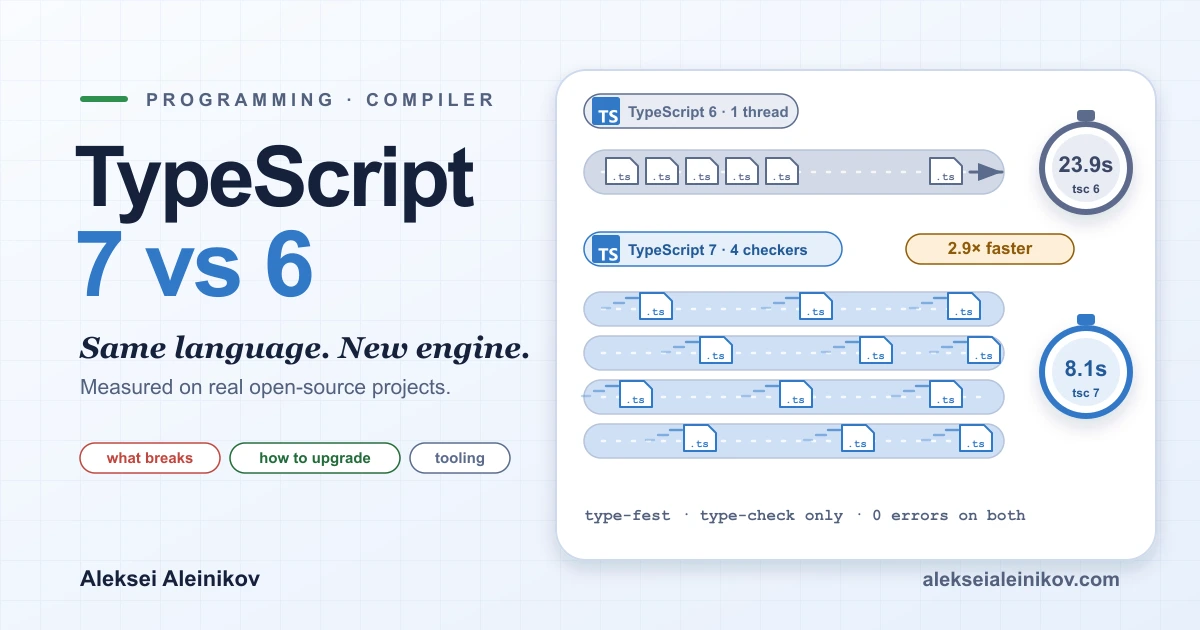
TypeScript 7 vs 6 at a glance
| TypeScript 6.0 | TypeScript 7.0 | |
|---|---|---|
| Released | 23 March 2026 (6.0.3 on 16 April) | 8 July 2026 (beta 21 April, RC 18 June) |
| Written in | TypeScript/JavaScript, runs on Node.js | Go, native binary |
| Role | Last JS-codebase release, the bridge from 5.9 | The new default compiler and language service |
| Parallelism | One thread | Parallel parse, check and emit (--checkers, --builders) |
| Deprecated options | Warn; ignoreDeprecations: "6.0" silences them |
Hard errors |
| Compiler API | Yes (import ts from "typescript") |
Not in 7.0; new API in 7.1 |
| Vue, Svelte, Astro, MDX, Angular language services | Work | Not yet |
| Install | typescript@6 or @typescript/typescript6 (tsc6) |
typescript@latest (7.0.2 at time of writing) |
The names are the source of most confusion, so it helps to be precise. TypeScript 6.0 is not “the slow one”. It is the release that prepared the ground: it changed defaults, deprecated the legacy options and added a flag to make diagnostics deterministic, so that 7.0 could be a straight port. The detailed announcements are on the TypeScript team’s blog for 6.0 and 7.0.
Why 7 is faster: native code and parallel workers
A TypeScript build has four stages: parse the files, bind names to symbols, check types, and emit output. In TypeScript 6 all of it runs in one JavaScript thread, under the memory limit of the V8 heap. Type-checking is the expensive part, and it is also the part that was hardest to split up.
TypeScript 7 changes two things at once. The code is native, so no JIT warm-up and no garbage-collected heap of JavaScript objects. And the stages share memory, so work can be split across threads:
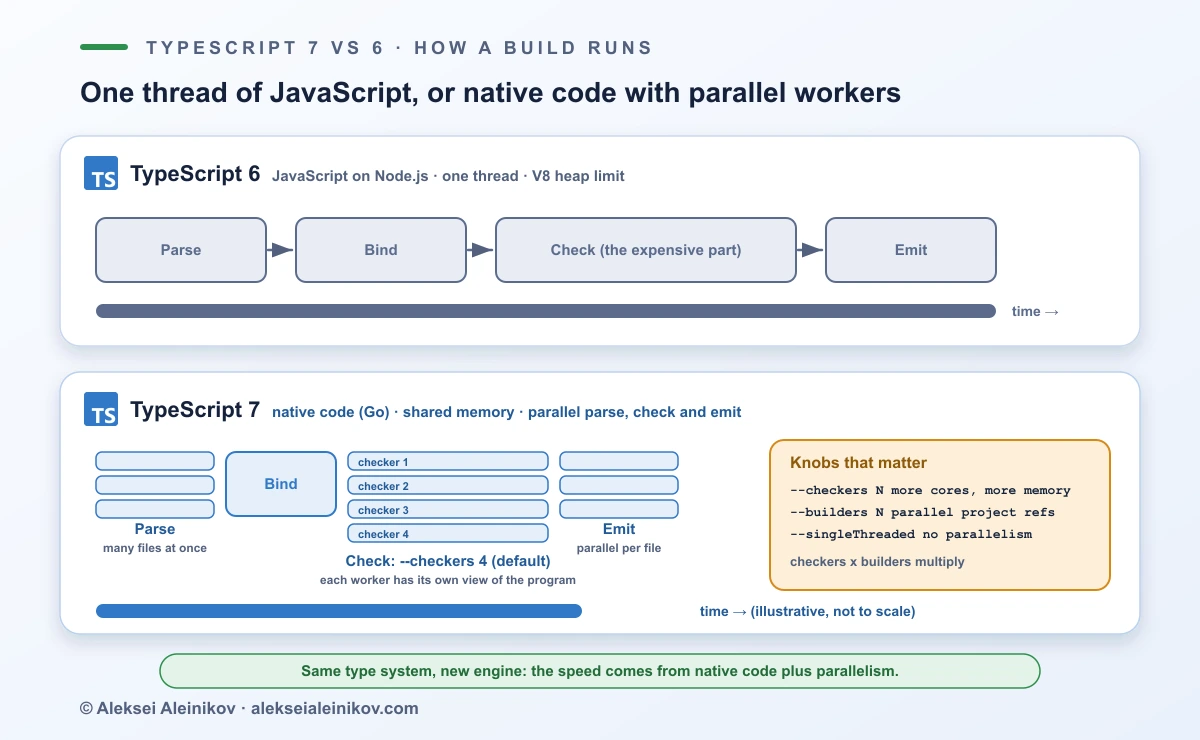
Three flags control the parallelism (the release notes mark --checkers and --builders as experimental):
--checkers Nsets the number of type-checking workers (default 4). More workers use more cores and more memory, because each has its own view of the program.--builders Nbuilds project references in parallel undertsc --build. It multiplies with--checkers: 4 builders with 4 checkers can mean 16 workers.--singleThreadedturns it all off, which is useful on small CI runners and for the benchmark below.
If you are curious how a native runtime schedules this kind of work onto OS threads, the Go side of it is covered in How Many Threads Does Go Really Use?.
The watch mode was rebuilt on a native file watcher, and the language service got the same treatment. Microsoft’s reported numbers from the release post are worth knowing, with the caveat that they are Microsoft’s and from large codebases: “typically 8× to 12×” on full builds, VS Code’s time to the first error down from 17.5 s to under 1.3 s, Slack’s CI type-check from 7.5 to 1.25 minutes, and Canva’s time to the first error in the editor from 58 to 4.8 seconds.
The benchmark: three real projects, three compilers
Release notes promise “10x faster”. I wanted to see it on code I did not write, so I took three popular open-source projects, type-checked each one with TypeScript 6.0.3, TypeScript 7.0.2 (default and --singleThreaded) and the 7.1.0-beta from 20 October, and timed every run. The whole setup is open source, so you can repeat it on your own machine: typescript-7-vs-6-benchmark on GitHub. Every run was tsc -p <tsconfig> --noEmit: type-checking only, no emit.
The test subjects, starting with the stress test:
- type-fest, a collection of type utilities that spends nearly all of its time in type-level computation. Recursive conditional types all the way down.
- kysely, a type-safe SQL query builder. A typical generics-heavy library.
- hono, a web framework, checked twice: on the source only, and on source plus tests. The tests are where the two compilers start to disagree, as you will see below.
Each configuration ran several times in separate processes on Node.js 24. The first run was thrown away as a warm-up, and the table shows the median of the rest. All compilers got the same generous Node heap. The 7.1 beta pulled a handful more files into the program on type-fest, so read its column as a close comparison rather than an exact one.
| Project | TS 6.0.3 | TS 7.0.2 --singleThreaded |
TS 7.0.2 default | TS 7.1.0-beta | Speedup 7.0.2 vs 6.0.3 |
|---|---|---|---|---|---|
| type-fest | 23.9 s | 16.4 s | 8.1 s | 4.6 s | 2.9× |
| kysely | 1.37 s | 0.48 s | 0.27 s | 0.22 s | 5.1× |
| hono (src + tests) | 0.82 s | 0.34 s | 0.16 s | 0.15 s | 5.0× |
| hono (src only) | 0.46 s | 0.17 s | 0.10 s | 0.10 s | 4.4× |
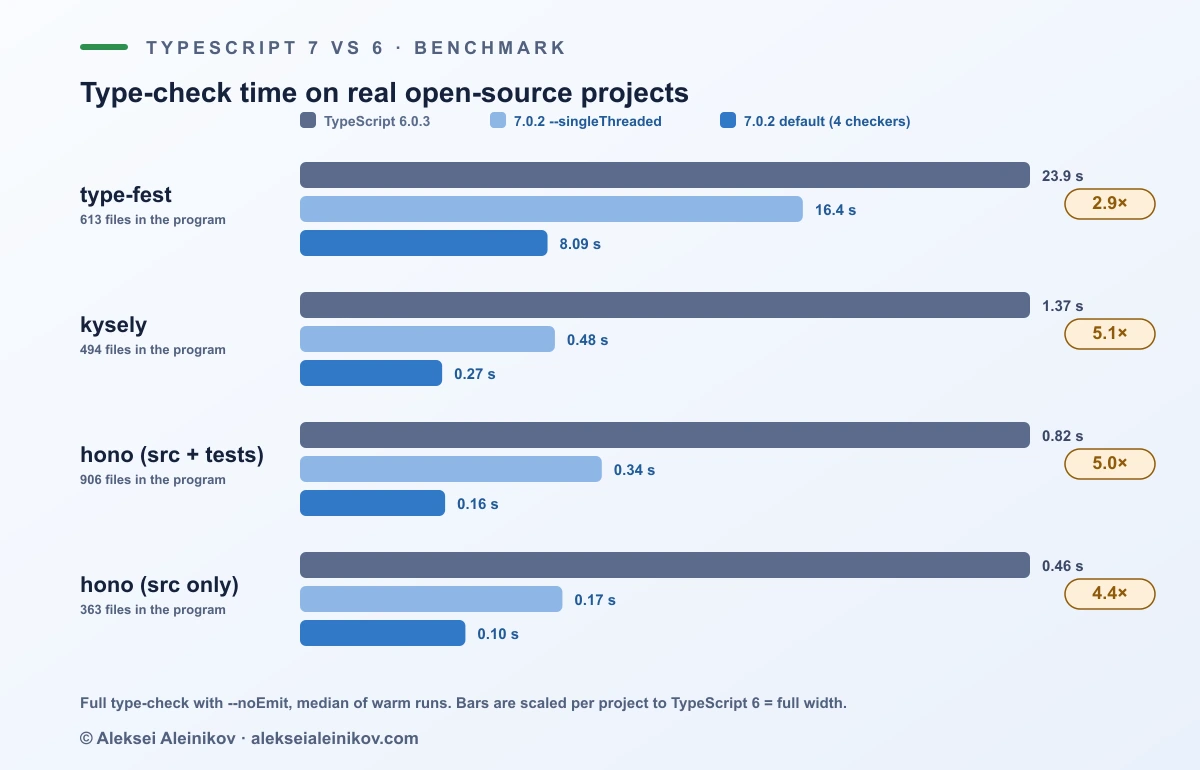
What the numbers say, without rounding in my favour:
- 3× to 5×, not 10×. That is lower than the headline 8–12×, and I would not stretch the table to fit. Microsoft’s figures are for full builds of large repositories, and the projects here are smaller. type-fest is the extreme case: it is a pile of recursive conditional types, so the time is dominated by the type-level work itself, and it still came out nearly three times faster. A fair summary is “between about 3× and 12×, depending on the codebase”, and the only reliable way to place yours is to measure it.
- Native code alone is the bigger half.
--singleThreadedwas 1.5–2.9× faster than TypeScript 6. The four default checkers then roughly halved the time again (1.6–2.1×). - TypeScript 6 cannot even finish type-fest on a default Node heap. It ran out of memory at about 4 GB of heap and needed
--max-old-space-sizeraised to complete, which is the JavaScript ceiling that a native binary does not have. - 7.1 is faster again. The beta cut type-fest from 8.1 s to 4.6 s, 5.1× faster than 6.0.3, and was 4.7–6.4× faster than TypeScript 6 on the others.
Memory is a more mixed story. Peak resident memory, in megabytes:
| Project | TS 6.0.3 | TS 7.0.2 default | TS 7.1.0-beta |
|---|---|---|---|
| type-fest | 6,196 | 7,141 | 5,838 |
| kysely | 460 | 307 | 222 |
| hono (src + tests) | 440 | 207 | 165 |
| hono (src only) | 327 | 117 | 97 |
On the small and medium projects TypeScript 7 used a third to two thirds less memory. On type-fest, with the most type-level work, four checkers used about 15% more than the single JavaScript thread, and the 7.1 beta used less than both. If your CI runners are memory-bound, --checkers 2 or --singleThreaded is the first knob to try.
What TypeScript 6 changed for you
Most of the upgrade work happens in 6.0, because that is where the defaults moved. If your tsconfig.json is short and relies on defaults, these are the ones that bite:
| Setting | Default before 6.0 | Default in 6.0 and 7.0 |
|---|---|---|
strict |
false |
true |
module |
commonjs |
esnext |
target |
es5 |
the latest stable ECMAScript version |
types |
all of @types/* |
[] (nothing is included automatically) |
rootDir |
inferred from the input files | the folder containing the tsconfig.json |
noUncheckedSideEffectImports |
false |
true |
libReplacement |
true |
false |
Type ordering (stableTypeOrdering) |
not deterministic | opt-in flag in 6.0, always on in 7.0 |
Two of these deserve attention. types: [] means process, describe and every other global from @types/node or @types/jest disappears until you list them, which is the most common first error in an upgraded project. The upside is real: the 6.0 announcement notes that many projects gained 20–50% in build time simply by setting types explicitly. And stableTypeOrdering makes the order in which the checker discovers types deterministic, which in 6.0 you can opt into with a flag (it costs up to 25% in check time, so it is for diagnosing your migration, not for everyday use). In 7.0 it is always on and cannot be turned off, so it is one of the places where results can differ from what you saw on 6.0.
A tsconfig that works on both versions looks like this:
{ "compilerOptions": { "target": "es2022", "module": "esnext", "moduleResolution": "bundler", "types": ["node"], "strict": true, "noEmit": true }, "include": ["src"]}6.0 also added features that are worth knowing, all available on 7: #/ subpath imports, bundler resolution together with commonjs, the es2025 target and library, Temporal types, Map.getOrInsert and RegExp.escape.
What breaks in TypeScript 7
In 6.0, a set of long-standing options became deprecated and could be silenced with "ignoreDeprecations": "6.0". In 7.0 that switch is gone, and the options are hard errors:
| Option or syntax | Why it goes | Do instead |
|---|---|---|
target: "es5" |
Legacy output target | Target es2015 or newer and let a bundler down-level if you really need old browsers |
downlevelIteration |
Only needed for targets below ES2015 | Remove it |
moduleResolution: "node10" (node) and "classic" |
Pre-ESM resolution | bundler, node16 or nodenext |
module: "amd", "umd", "systemjs", "none" |
Obsolete module formats | esnext or preserve with a bundler, or commonjs |
baseUrl |
Resolves bare imports to the project root | paths with explicit mappings, or #/ subpath imports |
outFile |
Removed in 6.0 | A bundler |
esModuleInterop: false, allowSyntheticDefaultImports: false |
Interop is always on now | Remove the setting |
alwaysStrict: false |
Strict mode is always on | Remove the setting |
module Foo {} for namespaces |
Ambiguous keyword | namespace Foo {} |
import x from "y" assert { type: "json" } |
Replaced by with |
with { type: "json" } |
tsc file.ts while a tsconfig.json exists |
Easy to forget the config is ignored | tsc --ignoreConfig file.ts |
Most of these are one-line deletions. baseUrl is the one that touches imports, and a small tool, ts5to6, rewrites baseUrl and rootDir for you.
Beyond configuration, a few behaviours changed deliberately: template-literal type inference now treats strings by code points, and JavaScript support lost some old JSDoc and Closure-style syntax (@enum, @class, postfix !, Closure function types). Neither will touch most TypeScript code, but they are the places to look if a test fails after the switch with no config error.
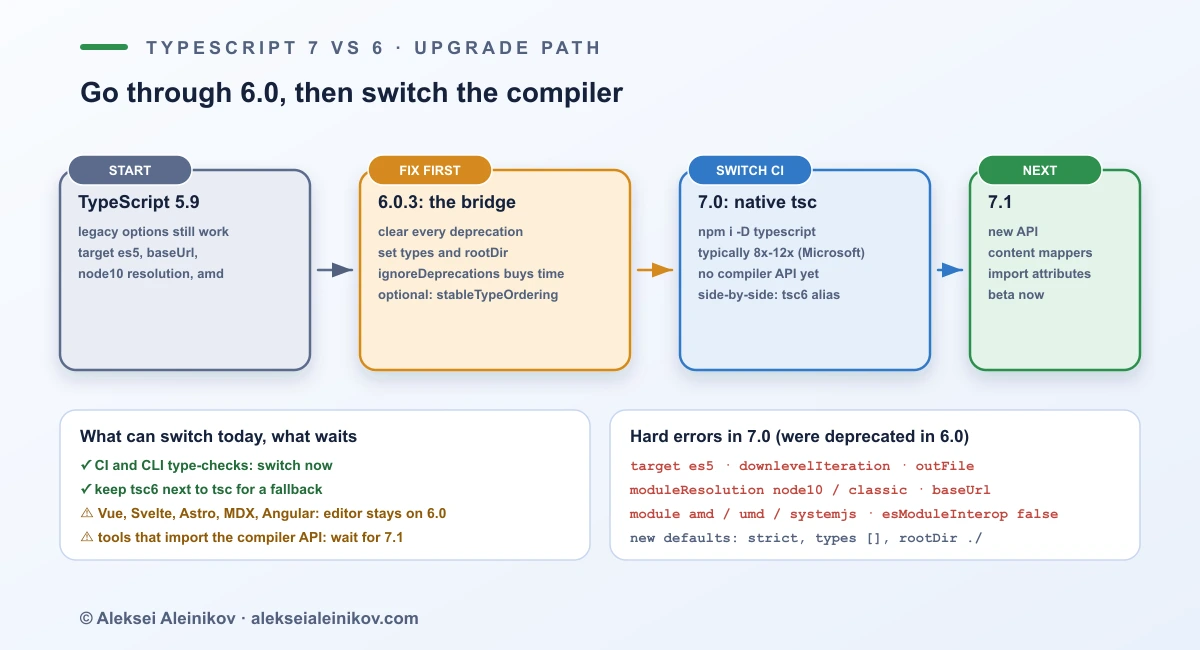
Tooling: what works with 7 today
This is where “same language” meets reality. TypeScript 7.0 ships without a programmatic API, because the compiler is no longer a JavaScript library you can require. That has a clear consequence:
| What | Works on 7.0? |
|---|---|
tsc in the terminal and in CI |
Yes |
| Editor type-checking for plain TS and TSX | Yes, through the TypeScript 7 language server (a VS Code extension; Visual Studio enables it per workspace) |
Tools that import "typescript" (typescript-eslint, codemods, doc generators) |
Not directly; use the 6.0 alias |
| Language services for Vue, MDX, Astro, Svelte, Angular templates | Not yet |
--watch |
Yes, rebuilt on a native watcher |
The workaround is to run both. The @typescript/typescript6 package ships the 6.0 compiler with a tsc6 binary, and npm aliases let anything that imports typescript keep getting 6.0 while the native compiler lives under its own name:
{ "devDependencies": { "typescript": "npm:@typescript/typescript6@^6.0.2", "@typescript/native": "npm:typescript@^7.0.2" }}npm i -D typescript@7 @typescript/typescript6npx tsc --noEmit # native TypeScript 7npx tsc6 --noEmit # TypeScript 6.0 for comparisonThis installs both command-line tools. Use the alias form above instead when tools such as typescript-eslint need import "typescript" to resolve to 6.0. In VS Code, the “Disable TypeScript 7 Language Server” command switches the editor back to 6.0 if the language server ever gets in your way.
The same “run old and new side by side” discipline is what makes other toolchain swaps painless. It is how I would approach replacing ESLint and Prettier with Biome and what made the Jest to Vitest migration predictable.
A safe upgrade path
- Upgrade to TypeScript 6.0.3 and pin it. Fix the errors that appear, mostly missing
typesentries andstrictfallout, and commit. - Clear every deprecation warning. Run
tscand treat each deprecation as an error; usets5to6forbaseUrlandrootDir. Do not reach forignoreDeprecationsas the final answer, because it does nothing on 7. - Set
typesandrootDirexplicitly. It is the cheapest speedup in the whole migration and removes the two defaults that changed most. - Optionally run 6.0 with
--stableTypeOrdering. It makes 6.0 diagnostics deterministic in the same way as 7.0, so any difference you see afterwards is from the port, not from ordering. - Add TypeScript 7 next to 6 in CI. Run both
tscandtsc6, fail the build ontsc6, and reporttscas a non-blocking job. Read every disagreement. - Switch the blocking check to 7. Keep the 6.0 alias for editors and any tool that imports
typescript. - Tune the parallelism. Start with the default four checkers; use
--checkers 2or--singleThreadedon memory-limited runners; use--builderson monorepos with project references. Pin the same--checkersvalue on every machine and in CI, because the release notes warn that changing it can, in rare cases, surface order-dependent results.
If you maintain a library that exposes the compiler API, or a project with Vue, Svelte, Astro or Angular templates, stop at step 5 for now. That is a decision, not a failure.
What TypeScript 7.1 adds
TypeScript 7.1 reached beta on 20 October 2026, installable as typescript@beta, with a release candidate expected about a month later. It is the release that closes most of the gaps above:
- A new compiler API, with entry points such as
typescript/sync,typescript/astandtypescript/fs, snapshots, file-system layers and support forusing. - Content mappers, configured with
contentMappersintsconfig.json, for non-TypeScript files such as Vue, Astro, Svelte and MDX, withtsc --runExternalCodeto run them. - Import attributes in ambient modules,
import sourcesyntax, thees2026target and new library methods. - More optimizations, visible in the benchmark above, and stricter checking of distributive type parameters, which can surface new errors in type-heavy code. I did not trace the extra hono diagnostics to a specific change, so treat their cause as unknown.
Which version should you run?
| Your situation | Use |
|---|---|
| Plain TypeScript or React app, CI type-check is slow | 7.0 for CI now, after a side-by-side run |
| Large monorepo with project references | 7.0, with --builders and --checkers tuned to your runners |
| Vue, Svelte, Astro, MDX or Angular templates | 6.0 for the editor, 7.0 for CLI checks, wait for 7.1 |
Library or tool that imports typescript |
6.0 until the 7.1 API is stable |
Still on target es5, baseUrl, node10 resolution or AMD/UMD |
6.0 first, clear the deprecations, then 7.0 |
| Memory-limited CI runners | 7.0 with --checkers 2 or --singleThreaded |
The Bottom Line
TypeScript 7 is the same language with a new engine, and the engine is what you will notice: in this test, type-checks were 2.9–5.1× faster than on TypeScript 6, with a larger win on bigger codebases according to Microsoft’s own numbers, and the 7.1 beta is faster still. The price is a migration with edges. Every option 6.0 deprecated is now an error, the compiler API and the template-language services have to wait for 7.1, and on at least one popular project the two compilers disagree about the same code. So go through 6.0, run both compilers side by side, switch CI first and the rest of the toolchain when its support lands. If you do that, the upgrade takes an afternoon of configuration, and you get your build minutes back.

From the community
Discussion on Mastodon & Bluesky
Replies to this article from the open web, pulled in live. No ads, no tracking scripts.
Reply there — it shows up here automatically.