
Every web scraping demo looks the same: a few lines of Python, a clean JSON object, done in five minutes. Then you point it at a real commercial site, and the demo quietly falls apart — blocks, CAPTCHAs, JavaScript-rendered pages, and a layout that changes the week after you ship.
So the real question in 2026 is not “how do I write a scraper?” It is “which path keeps my scrapers alive without eating my week?” There are three honest answers:
- A managed platform — Scraper Studio from Bright Data: describe the target, get a working scraper with proxies and unblocking built in.
- An actor marketplace — Apify: build your own actor, or run one someone else published.
- A DIY stack — Scrapy for crawling, Playwright for rendering, and your own proxy and retry layer.
None of them is wrong. They just put the cost in different places. This is a builder’s comparison of where that cost actually lands.
New to the space? Start with web scraping vs web crawling for the difference between discovering URLs and extracting data — this article assumes you already know you need both.
The 30-Second Comparison
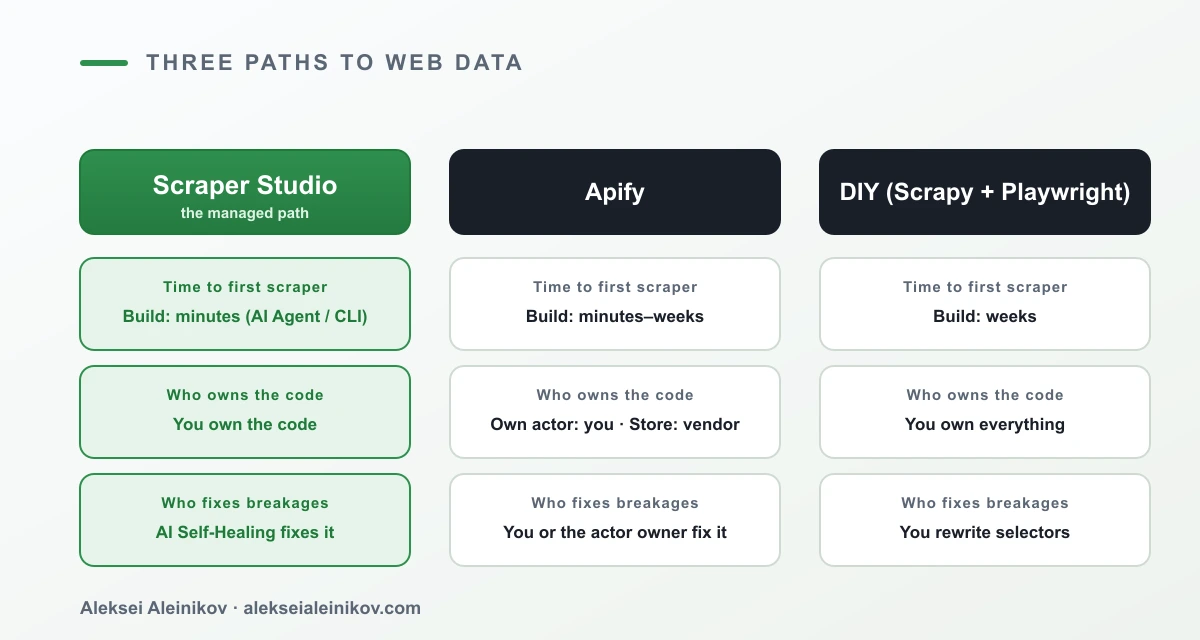
| Scraper Studio | Apify — own actor | Apify — Store actor | DIY (Scrapy + Playwright) | |
|---|---|---|---|---|
| Time to first scraper | Minutes | Days–weeks | Minutes | Weeks |
| Who owns the code | You | You | The actor’s author | You |
| Who fixes it when the site changes | AI Self-Healing (you) | You | You wait for the author | You rewrite selectors |
| Proxies & unblocking | Built in | You wire it up | Built in | You build it |
| Coding-agent native | Yes (CLI + skills) | No | No | Partial |
| Pre-built scrapers | 800+ via Web Scraper API | Only if you build them | Marketplace catalog | None |
| Pricing model | Flat per 1,000 page loads | Compute + usage | Actor’s own pricing | Infra + engineer time |
| Delivery destinations | API, SDKs, CLI, webhook, S3/GCS/Azure | API, SDK, datasets, webhooks | Depends on actor | You build it |
Keep that table in mind and read on for the five questions that decide which column is right for your team.
1. How Fast Can You Build a Working Scraper?
Scraper Studio. You describe the target in plain English — “extract product title, price, rating, and availability from this category” — and the AI Agent returns a working JavaScript scraper plus a defined output schema in minutes. Prefer to stay in your editor? Drive the same flow from a coding agent through the Bright Data CLI:
npm install -g @brightdata/clibdata loginbdata scraper create https://example.com/category "Extract title, price, rating, availability"# → returns a Collector ID: c_xxxxxxxxApify — your own actor. You write the actor in Node or Python, wire up the SDK, handle the request queue, and deploy it. Powerful and fully yours, but it is days to weeks of work before the first row of data.
Apify — a Store actor. If someone already published an actor for your exact target, you are running in minutes. The catch is in the next two sections: you did not write it, so you do not own it.
DIY. Scrapy plus Playwright is a genuinely great stack — and it is weeks of setup before it survives contact with a defended site, because you also own proxy rotation, browser fingerprinting, CAPTCHAs, and retries.
An honest caveat: faster to a working scraper is not the same as zero skill. You still need to know what fields you want, validate the output, and reason about the target. Scraper Studio removes the plumbing, not the thinking.
2. Who Fixes the Scraper When the Site Changes?
This is the question that actually decides your monthly cost, and it is where the three paths diverge the most. A scraper that runs today is worth very little if it silently returns null next Tuesday because a <div> class changed.
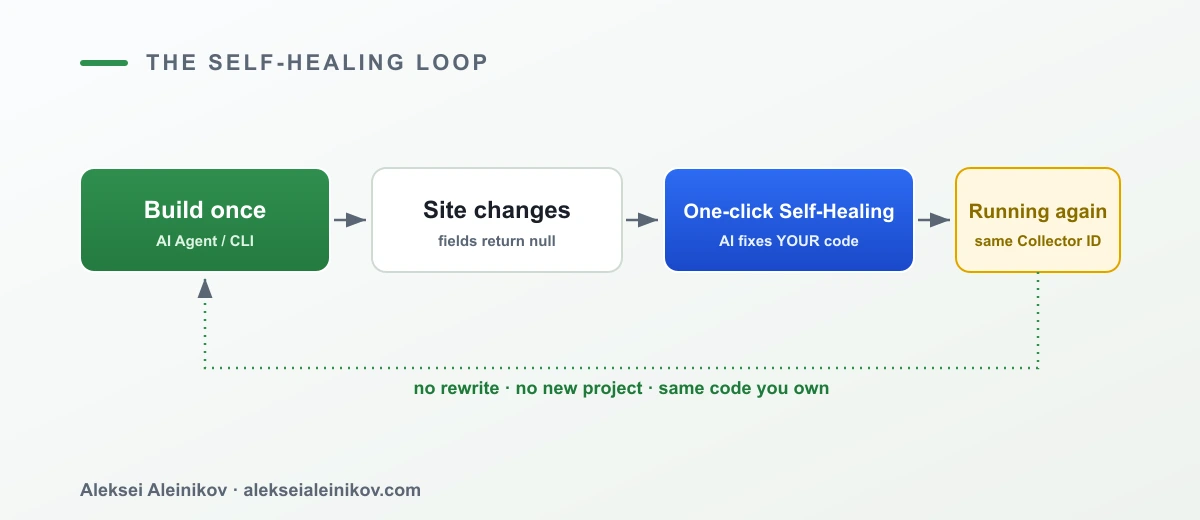
Scraper Studio. When extraction drifts, you trigger AI Self-Healing — the AI repairs the extraction logic on the scraper you own, keeping the same collector ID so nothing downstream has to change:
bdata scraper heal c_xxxxxxxx "Prices moved into a new layout" --url https://example.com/product/123Apify — Store actor. You file an issue and wait for the author to ship a fix. Sometimes that is hours; sometimes the actor is abandoned and it is never. You have no code to patch.
Apify — own actor / DIY. You rewrite the selectors yourself. Full control, full ownership — and full responsibility for every layout change across every site you track.
The difference is not whether scrapers break. They all break. The difference is whether fixing them is a one-line command on code you own, a support ticket to a stranger, or a recurring line item on your team’s sprint board.
3. How Fast Can You Expand to a New Target Site?
One scraper is a script. A data product is dozens of them, and the second axis of cost is how quickly you can add site number twelve.
Scraper Studio. Each new target is minutes, not a new project — same workflow, same delivery, same schema discipline. And for common targets you often do not build at all: the Web Scraper API ships 800+ pre-built scrapers for popular sites, so you configure instead of code.
Apify. Expansion depends on whether a Store actor exists for the new target. If it does, minutes. If it does not, you are back to writing an actor from scratch.
DIY. Every new site is a new spider, new selectors, and new edge cases. It scales linearly with engineer time — which is exactly the cost curve managed platforms exist to flatten.
Honest framing: pre-built coverage is broad, not infinite. For a niche or bespoke target you will still define the extraction yourself — the win is that the common 80% stops consuming your team.
4. Do Coding Agents Fit Into the Workflow?
This is where Scraper Studio does something the others simply do not. If your team already builds with Claude Code, Cursor, or Codex, the scraper can be built and maintained by the agent — because the CLI and its skills are things an agent can call directly.
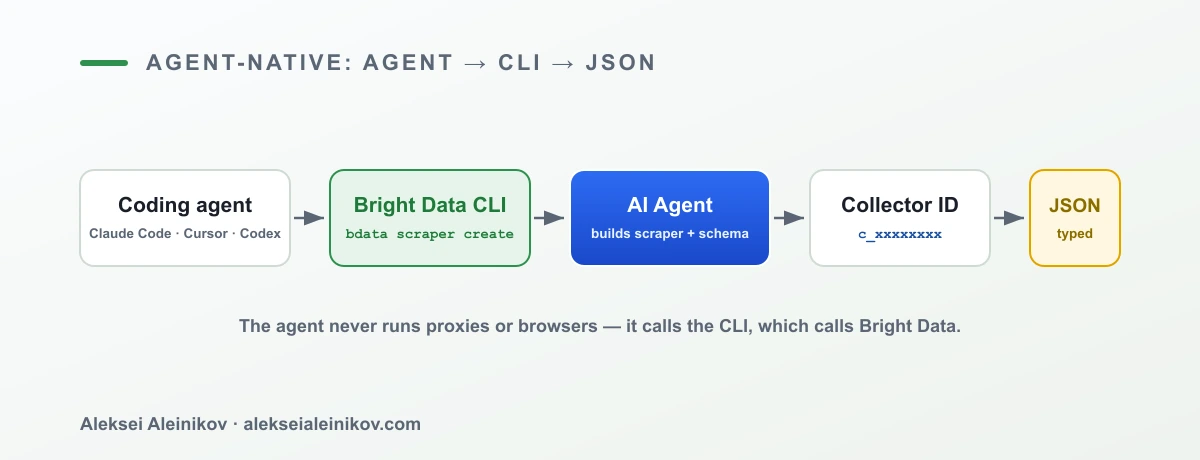
You add the skill once, then let the agent drive:
brightdata skill add scraper-builder# now your coding agent can run, in its own session:# bdata scraper create <url> "Extract ..."# bdata scraper run c_xxxxxxxx <url> --pretty# bdata scraper heal c_xxxxxxxx "selectors moved" --url <url>Under the hood, the scraper-builder skill walks the agent through a disciplined six-phase build — instead of the agent free-styling a brittle script:
- Target analysis — what data do you actually want, and in what shape?
- Site reconnaissance — how the page is structured and rendered.
- API selection — pick the right Bright Data endpoint for the job.
- Extractor — the field-level extraction logic.
- Pagination — walk lists, categories, and infinite scroll.
- Assembly — stitch it into a runnable collector with a typed schema.
The important part: the agent never runs a proxy pool or a headless browser. It calls the CLI, and the unblocking infrastructure stays on Bright Data’s side. Pin the collector ID in your CLAUDE.md, .cursor/rules, or CODEX.md, use BRIGHTDATA_API_KEY in CI, and the whole build-and-heal loop becomes something your agent handles between commits.
Apify and pure DIY do not offer this out of the box. An agent can write Scrapy code for you, but then it also has to write — and you have to run and maintain — all the infrastructure underneath it. That is the difference between an agent that produces a scraper and an agent that produces a scraper plus a subsystem you now own.
5. How Do You Get the Data Out?
A scraper that only prints to a terminal is a toy. Production means the data lands where your pipeline already lives.
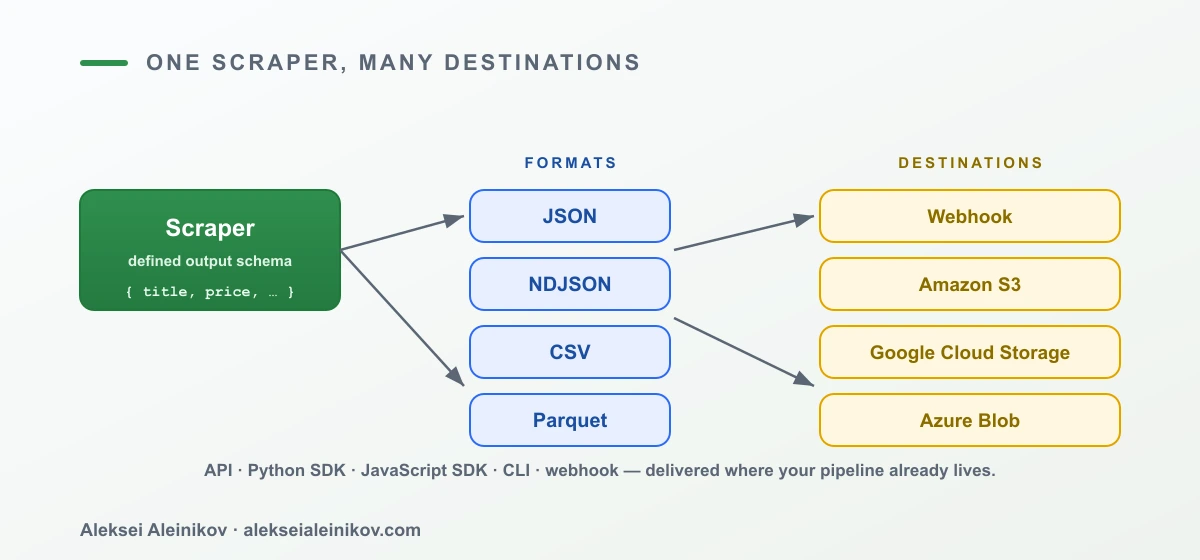
Scraper Studio. Every collector has a defined output schema and multiple ways out: REST API, Python SDK, JavaScript SDK, CLI, and webhooks, with delivery to Amazon S3, Google Cloud Storage, Azure Blob, or Alibaba OSS. Trigger a run and pull the dataset with two calls:
# triggercurl -X POST "https://api.brightdata.com/dca/trigger?collector=c_xxxxxxxx" \ -H "Authorization: Bearer $BRIGHTDATA_API_KEY"# fetch the dataset when readycurl "https://api.brightdata.com/dca/dataset?id=<snapshot_id>" \ -H "Authorization: Bearer $BRIGHTDATA_API_KEY"Apify. Also strong here: API, SDK, dataset storage, and webhooks. This is table stakes for a mature platform, and Apify clears it.
DIY. You build the delivery layer too — item pipelines, storage clients, retry-and-dedupe on the write path. More code you own and maintain.
The Comparison, Honestly
Let me be straight about all three, because this only helps if it is fair.
- DIY is the right call when scraping is your product, you have the engineering time, and you want zero external dependencies. You will spend that time on infrastructure, not just extraction — go in with eyes open.
- Apify is a strong marketplace with a real ecosystem. If a well-maintained actor exists for your target, it is a fast, legitimate path. The risk is maintenance ownership on Store actors: someone else’s code, someone else’s timeline.
- Scraper Studio wins on the maintenance axis — self-healing on code you own, agent-native building, and broad pre-built coverage. Its pricing is designed to be predictable rather than surprising, but predictable is an engineering expectation, not a guarantee; model your own volumes before you commit.
Where does that leave the six things most teams actually care about?
- Speed — prompt or CLI command to a working scraper in minutes.
- Self-healing on owned code — the strongest differentiator; breakages become a command, not a sprint.
- Agent-native — the only path here that a coding agent can drive end to end via CLI and skills.
- Predictable pricing — flat per-page-load billing instead of opaque compute units.
- Pre-built plus custom in one place — 800+ ready scrapers via the Web Scraper API, custom collectors for the rest.
- A real free tier — enough to evaluate the whole loop before any commitment.
Pricing You Can Predict
Scraper Studio bills on page loads, not mystery compute units — a flat, per-page rate that gets cheaper at volume, starting from the free tier. There are no surprise bandwidth or infrastructure line items, which is the whole point: you can model the cost of a new target before you build it, instead of discovering it on the invoice. The proof points behind it: ISO 27001 and SOC 2, 20,000+ customers, a 4.6/5 rating on G2, and a public-data-only stance. Teams like Cervello (NLP across tens of thousands of product pages) and Seamless Digital Automations (20+ industrial supplier sites for ThyssenKrupp) run on exactly this model. For the current per-tier numbers, see the pricing page.
Try It Before You Decide
You do not have to take any of this on faith. Scraper Studio has a free tier — 5,000 credits every month, no credit card, no commitment (not a time-limited trial that expires on you). That is enough to build a real scraper, break it on purpose, heal it, and see the delivery pipeline end to end.
If you decide to scale up, the promo code APIS25 takes 25% off for six months.
Build your first scraper in Scraper Studio →
The Bottom Line
All three paths can get you a working scraper. Where they part ways is the boring, expensive part — keeping scrapers alive as the web changes underneath them:
- DIY gives you total control and hands you the entire maintenance bill.
- Apify gives you a marketplace, with maintenance ownership that depends on whose actor you run.
- Scraper Studio gives you speed, one-click AI Self-Healing on code you own, and a CLI your coding agents can drive — so a broken selector is a one-line fix, not a lost afternoon.
Pick by the question that will define your next twelve months: not how fast can I write a scraper, but who fixes it when the site changes? Answer that honestly, and the right column picks itself.
From the community
Discussion on Mastodon & Bluesky
Replies to this article from the open web, pulled in live. No ads, no tracking scripts.
Reply there — it shows up here automatically.