
If you are choosing a cloud data warehouse in 2026, the shortlist almost always comes down to two names: BigQuery and Snowflake. I work on Google Cloud every day, so I will be upfront about my bias — but this is not a sales pitch. Both are excellent. The honest answer is that they win in different situations, and picking the wrong one costs you money and engineering time.
Here is how they actually differ, and how to choose.
The core architecture difference
Everything else follows from one design decision: how compute is provisioned.
BigQuery is fully serverless. You write SQL, and Google’s Dremel engine allocates compute — measured in “slots” — automatically. There is no cluster to start, no warehouse to size, nothing to auto-suspend. Storage lives in Colossus, fully managed and separated from compute.
Snowflake also separates storage from compute, but you provision the compute yourself as virtual warehouses. You spin up a small warehouse for dashboards and an extra-large one for heavy ELT, and you are responsible for sizing, suspending and tuning them.
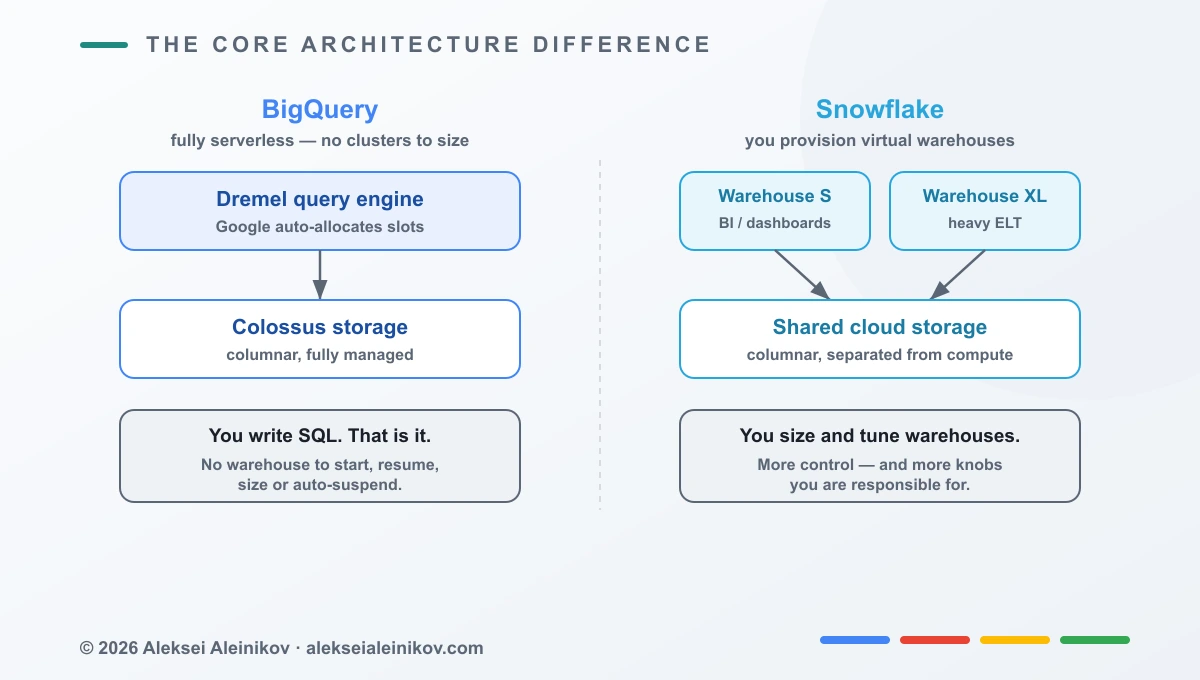
Neither approach is objectively better. Serverless removes an entire category of operational work — most teams never want to think about warehouse sizing again. But explicit warehouses give you fine-grained control: you can guarantee that a runaway analytics query never steals compute from your production pipeline, because they run on physically separate warehouses.
How you actually pay
This is where teams get surprised, so read carefully.
BigQuery bills on two things: storage, plus compute in one of two modes:
- On-demand — you pay per terabyte your query scans. Idle costs nothing.
- Editions (capacity) — you buy slots for a predictable flat rate.
The cost driver is bytes read. Partition and cluster your tables so queries scan less, and your bill drops. The same query-shape discipline that speeds up any database applies here — see SQL Query Optimization in 2026 for techniques that translate directly into fewer scanned bytes.
Snowflake bills on storage plus credits per second of warehouse runtime, with a 60-second minimum each time a warehouse resumes. The cost driver is warehouse size × time it runs. Auto-suspend is your best friend — an idle warehouse left running quietly burns money.
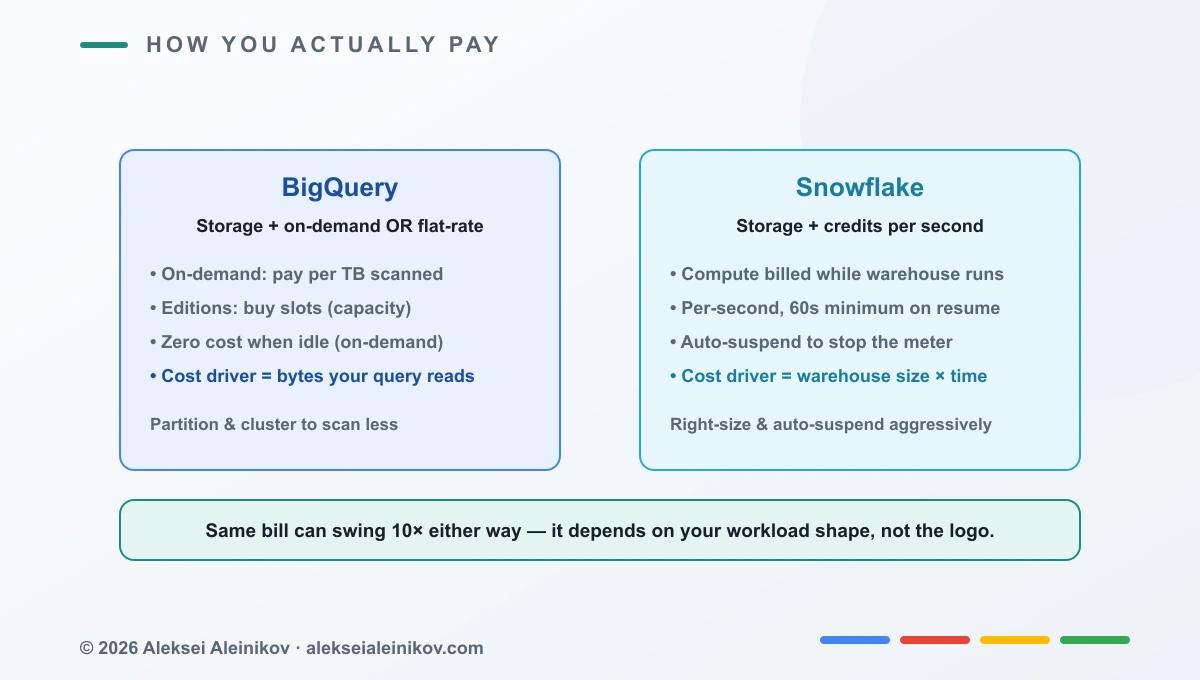
The practical takeaway: the same workload can cost 10x more on the wrong model. Spiky, bursty query patterns tend to favour BigQuery’s on-demand billing — you pay only for the queries you run. Steady, high-utilisation pipelines that keep a warehouse busy can be cheaper on a right-sized Snowflake warehouse. Model your real workload before you commit; do not trust a generic per-TB price comparison.
Performance
In 2026, both engines are genuinely fast, and benchmark wars are mostly noise — each vendor publishes numbers where they win. What matters in practice:
- BigQuery shines on massive scans and unpredictable concurrency, because Google throws its shared slot pool at your query. Streaming inserts at scale are a strong point.
- Snowflake shines when you want predictable, isolated performance — a dedicated warehouse means a heavy job never contends with another team’s dashboards.
For most workloads, the performance difference will not be your deciding factor. Cost model and ecosystem fit will.
Streaming data into the warehouse is only half the pipeline — you still have to move events reliably to get there. For the ingestion side on GCP, see Kafka vs Pub/Sub in 2026, the same managed-vs-self trade-off applied to messaging.
Data and AI
This is where the gap is widest, and where my GCP bias is most defensible.
BigQuery is deeply wired into Google Cloud’s AI stack. You can train models directly in SQL with BigQuery ML, call Vertex AI without moving data, and use Gemini for natural-language querying and generation. If your AI workloads already live on Google Cloud, BigQuery removes the most glue code of any option — and if you want to put agents on top of that data, building production AI agents with Google’s ADK is the natural next step.
Snowflake has closed a lot of ground with Cortex and a strong data-sharing marketplace, and it integrates well with external AI tooling. But if your goal is an AI-native data platform on GCP, BigQuery is the shorter path.
So which one should you pick?
Here is the decision I would actually give a team.
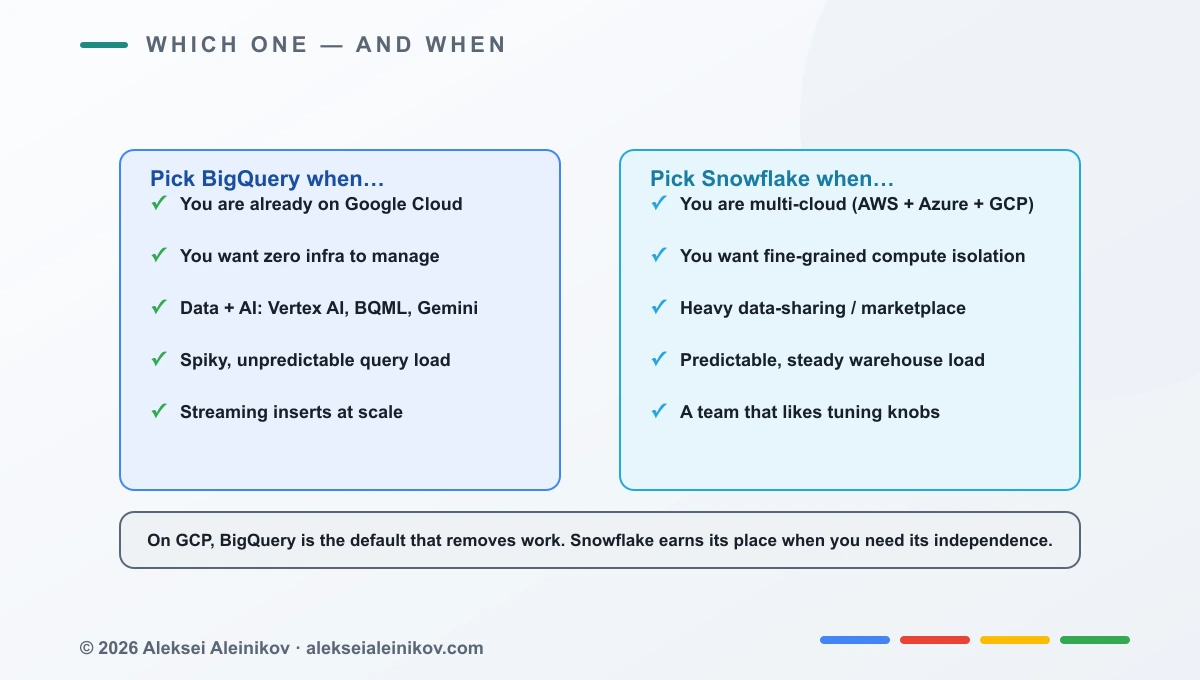
Pick BigQuery when:
- You are already on Google Cloud — it is the native default that removes work.
- You want zero infrastructure to manage.
- Data and AI are central: Vertex AI, BigQuery ML, Gemini.
- Your query load is spiky and unpredictable.
- You need streaming inserts at scale.
Pick Snowflake when:
- You are genuinely multi-cloud (AWS + Azure + GCP) and want one warehouse across all of them.
- You need fine-grained compute isolation between workloads.
- Data sharing and the marketplace are core to your business.
- Your load is predictable and steady.
- Your team likes having tuning knobs.
My honest verdict
On Google Cloud, BigQuery is the default that removes work. It is serverless, it bills on what you actually scan, and its AI integration is unmatched inside GCP. That is why, for teams already committed to Google Cloud, I reach for it first.
Snowflake earns its place when you need something BigQuery does not offer as cleanly: true cross-cloud portability, or physically isolated compute per workload. Those are real requirements for some organisations — just make sure they are your requirements before you pay the premium of running a third-party warehouse on top of your cloud.
The worst decision is picking on hype. Model your workload, match it to the billing model, and let the shape of your data — not the logo — make the call.
If you found this useful, I write regularly about Google Cloud, data platforms and platform engineering. You can find more on the blog or on my highlights page.

From the community
Discussion on the Fediverse
Replies from Mastodon and Bluesky — straight from the open web, no tracking.
Loading replies …
No replies yet. Start the conversation:
Replies could not be loaded right now.