
You price a commercial CSPM platform for your Google Cloud estate, and the quote comes back with more zeros than your monthly cloud bill. Meanwhile the actual problem — a public bucket, a service account with Owner, a firewall open to the world — costs nothing to find and five minutes to fix.
Here is what the sales deck will not tell you: on GCP you already have most of CSPM, for free, and everything it does not do you can build with open-source tools. You do not need a six-figure platform to know whether your cloud is configured safely.
This is the field guide I wish I had before that sales call: what CSPM actually is, the two honest ways to get it on GCP, and how to decide which one — or which mix — fits your team.
First, What Is CSPM Actually?
CSPM — Cloud Security Posture Management — is a fancy name for a simple job: continuously check whether your cloud is built safely. It scans your configuration against known-good baselines and compliance standards, then hands you a list of what is wrong: public storage, open firewalls, unencrypted disks, overprivileged identities, disabled logging.
The single most common confusion is worth killing on day one:
- CSPM is posture. “Is my cloud configured safely?” It finds misconfigurations before they are abused.
- Threat detection is runtime. “Is someone attacking me right now?” It reads logs and behavior to catch attacks in progress.
CSPM is the locked door; threat detection is the alarm that goes off when someone picks the lock. This article is about the door. On GCP you can get it two ways.
Road 1: The Built-In Baseline (Security Command Center)
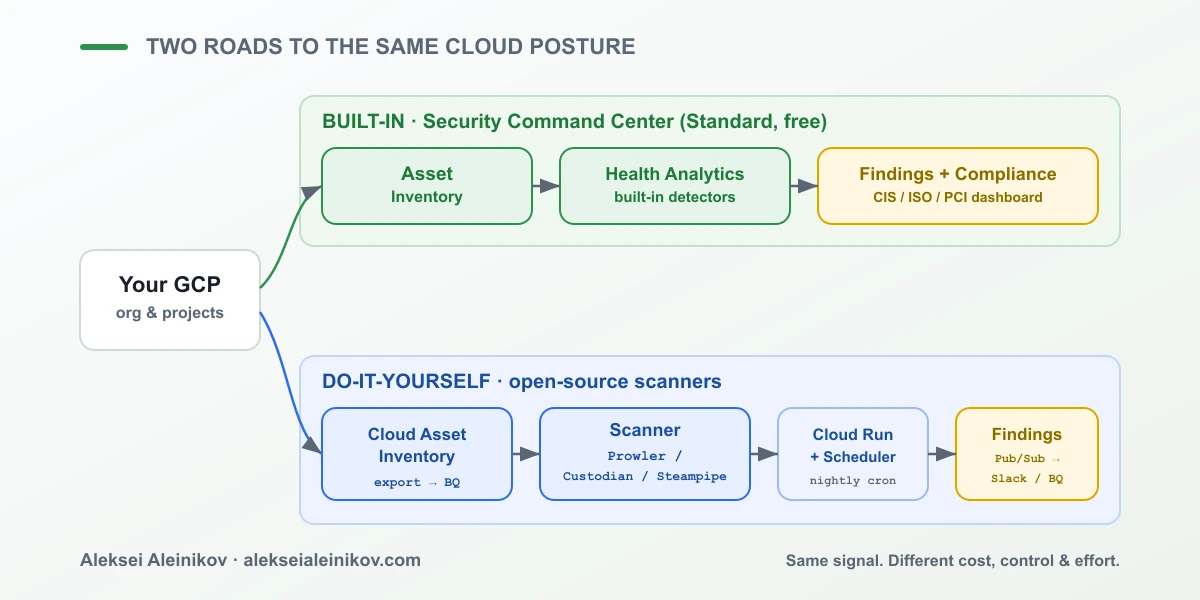
If you are on GCP, you already have a CSPM engine sitting idle: Security Command Center (SCC). Its free Standard tier does the core posture job on every project — asset inventory, misconfiguration detectors (Security Health Analytics), and compliance mapping to CIS, ISO, PCI and more.
Turning it on is one toggle:
# Enable Security Health Analytics at the org levelgcloud scc settings services enable \ --organization=ORG_ID \ --service=security-health-analyticsWait for the first scan, and you get a native posture read that no external tool can match — because SCC sees your resources exactly the way Google does, with no API lag and no missing services. Pull the real backlog straight from the CLI:
gcloud scc findings list ORG_ID \ --filter="state=\"ACTIVE\" AND severity=\"HIGH\"" \ --format="table(category, resourceName)"Where Standard stops: it does not do threat detection (that is Premium), it does not do multi-cloud, and its detectors are fixed — you cannot easily add “flag any bucket without our mandatory data-owner label.” For a GCP-only shop that wants a fast, trustworthy baseline, that is often enough. For everything past its edges, you build.
If you have never opened SCC, start with The First 24 Hours with Security Command Center — it walks through the scary first scan before you extend it.
Road 2: The Do-It-Yourself Stack (Open Source)
When SCC’s fixed detectors or GCP-only view are not enough, an open-source stack gives you CSPM you fully control. Three tools cover almost every need, and they compose:
Prowler — the fastest way to a compliance report. Point it at a project and it runs hundreds of checks mapped to CIS, ISO and PCI:
# One command, a full CIS-mapped posture report for a GCP projectprowler gcp --project-ids my-project \ --compliance cis_3.0_gcp \ --output-formats html jsonCloud Custodian — policy-as-code that can remediate, not just report. You write rules in YAML and Custodian enforces them:
# c7n-gcp: find buckets that allow public accesspolicies: - name: gcs-no-public-buckets resource: gcp.bucket filters: - type: iam-policy key: "bindings[?members[?contains(@, 'allUsers')]]" value: presentSteampipe — query your cloud like a SQL database, then write posture checks as SELECT statements:
-- Every bucket in the org that is world-readableselect name, locationfrom gcp_storage_bucketwhere iam_policy -> 'bindings' @> '[{"members":["allUsers"]}]';The catch is the part the diagram makes obvious: a tool is not a system. To make this run continuously you wrap it in a pipeline — Cloud Asset Inventory as the source, a scanner on Cloud Run triggered by Cloud Scheduler, findings pushed to Pub/Sub, and results landing in BigQuery or Slack. That pipeline is powerful and portable, but it is yours to build, run and maintain.
The Honest Comparison
Neither road is “better.” They optimize for different constraints, and the right answer depends on which constraint is biting you.
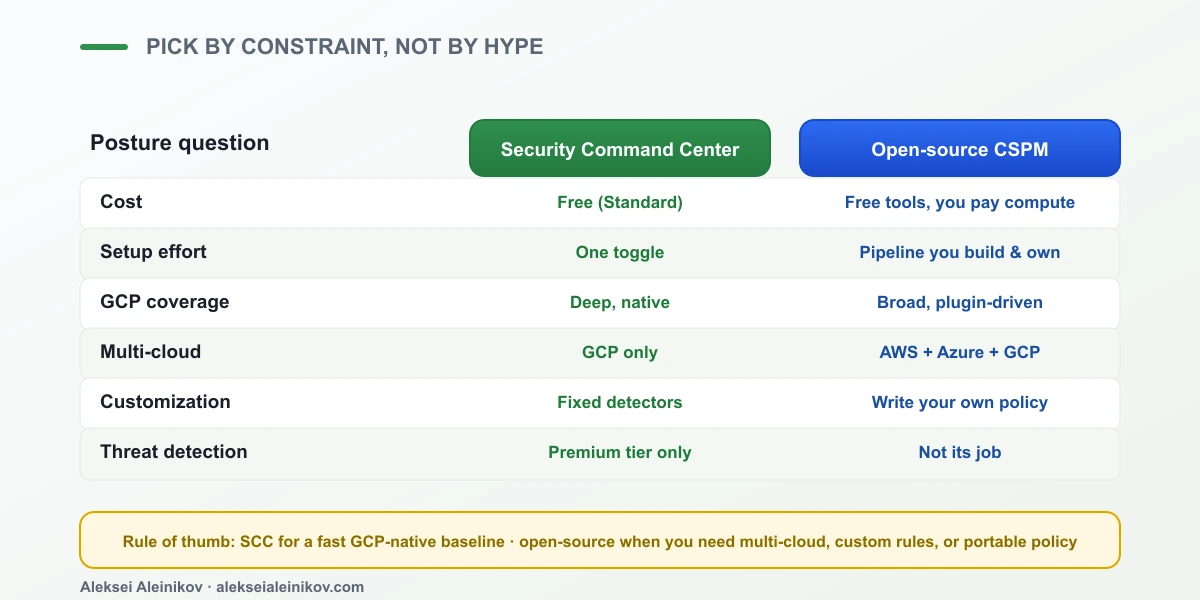
Read the matrix by your pressure point:
- You want a GCP baseline by lunchtime. SCC Standard. One toggle, native coverage, zero pipeline.
- You run AWS and Azure too. Open source. Prowler and Custodian speak all three clouds from one policy set.
- You have organization-specific rules (“every prod bucket must carry a
data-ownerlabel”). Open source — SCC’s detectors are fixed; Custodian and Steampipe let you write and version your own. - You need auditable policy-as-code. Open source, in Git, reviewed like any other code.
- You want the config-safety half without paying for anything or building anything. SCC Standard, full stop.
You Do Not Actually Have To Choose
The framing “SCC vs open source” sells articles, but in production the strong move is both. Let Security Command Center be the always-on native floor — it is free, it sees GCP perfectly, and it costs you a single toggle. Then add open-source scanners only for the gaps SCC genuinely leaves: multi-cloud coverage, custom organizational policy, and portable rules you keep in version control.
That layering gives you a trustworthy baseline you did not have to build, plus exactly the custom depth you do need — without paying a platform for the 80% you already had.
The Part That Actually Matters
Whichever road you take, remember what CSPM is for. The dashboard is not the product. Hundreds of findings sitting in a console that nobody wired to an action is not security — it is a very detailed way to feel bad.
The value is the remediation loop: a finding becomes a ticket, a fix, or an auto-remediation, and the next scan confirms it is gone. SCC gives you that loop natively; Cloud Custodian gives it to you as code. Build whichever fits — but build the loop, not just the scanner.
The Bottom Line
You do not buy CSPM on GCP — you assemble it. Security Command Center Standard is a free, native baseline that most teams should turn on today. An open-source stack of Prowler, Cloud Custodian and Steampipe covers the multi-cloud, custom-rule and policy-as-code needs SCC does not. A paid platform earns its price only once you are at real scale across many clouds and accounts.
Start with the free toggle. Add open source where it hurts. Wire the remediation loop. That is CSPM — built by you, for the cost of the compute it runs on.
From the community
Discussion on the Fediverse
Replies from Mastodon and Bluesky — straight from the open web, no tracking.
Loading replies …
No replies yet. Start the conversation:
Replies could not be loaded right now.