
For more than a decade the answer to “how do I keep my JavaScript clean?” was the same two-headed reflex: install eslint, install prettier, then spend an afternoon wiring them together so they stop fighting each other. Add the TypeScript parser, an import plugin, a React plugin, an accessibility plugin, a config to disable the rules Prettier already handles, and you end up with a dozen dependencies and four config files just to format and lint code you have not written yet.
Biome collapses that entire stack into a single binary. It is a formatter, a linter, and an import sorter written in Rust, configured by one biome.json, fast enough that you stop thinking of “lint” as a step you wait for. This article is a hands-on look at what it actually replaces, how the migration really goes, what the benchmark numbers look like, and — just as important — what you give up when you switch.

This is the tooling half of a bigger 2026 theme — deleting the heavy defaults you installed on reflex. If you still carry
lodashtoo, the same logic applies to your utilities: see Delete lodash: es-toolkit is 2x faster and 97% smaller.
What Biome actually is
Biome is the descendant of the Rome project: a toolchain for web languages built in Rust rather than JavaScript. Instead of a formatter here and a linter there, each with its own parser and its own config dialect, Biome parses your code once and runs everything against that single tree:
- Formatter — an opinionated formatter in the Prettier tradition, with a compatible style for JavaScript, TypeScript, JSX, JSON, and CSS.
- Linter — hundreds of rules covering correctness, suspicious code, style, and TypeScript, plus framework rules for React and accessibility.
- Import sorting — deterministic import organization, no separate plugin required.
All of it ships as one dependency, @biomejs/biome, and reads one config file. That is the whole pitch: fewer moving parts, one source of truth.
npm install --save-dev --save-exact @biomejs/biomenpx biome initbiome init drops a biome.json with sensible defaults. From there, formatting and linting your project is a single command each:
npx biome format --write .npx biome lint .# or do both, plus import sorting, in one pass:npx biome check --write .The pain it removes: plugin soup
The reason Biome resonates is not novelty — it is fatigue. A mature ESLint + Prettier setup tends to look like this before you have configured a single rule of your own:
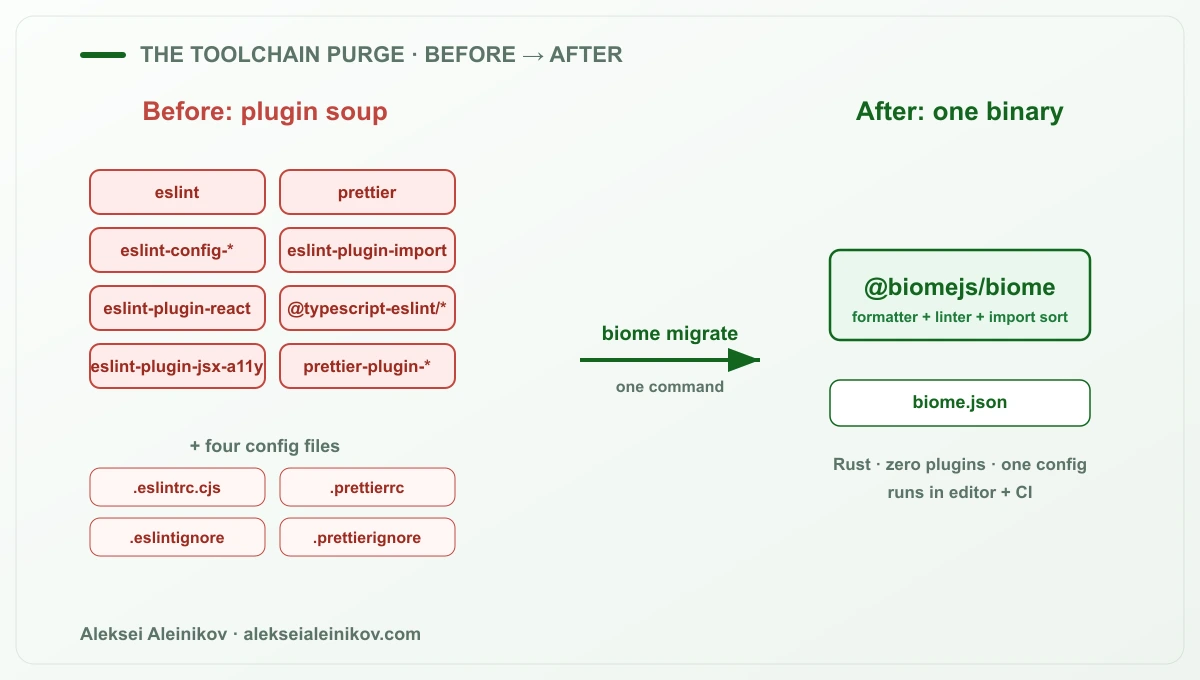
Every one of those packages has its own release cadence, its own peer-dependency demands, and its own way of breaking on a major version bump. The eslint-config and eslint-plugin matrix is a genuine maintenance tax: someone on the team owns keeping it consistent, and every upgrade is a small negotiation. The .eslintrc / .prettierrc split means two config dialects, and the classic footgun of Prettier and ESLint disagreeing about the same line until you add eslint-config-prettier to make them stop.
Biome replaces the whole diagram with two things: the @biomejs/biome binary and a biome.json. There is no plugin resolution step, no peer-dependency graph, and no formatter-versus-linter turf war, because the formatter and the linter are the same program.
The migration: one command, not a rewrite
The fear with any “replace your tooling” pitch is the migration cost. Biome answers it directly with built-in migration commands that read your existing configuration and translate it:
# translate your ESLint rules into biome.jsonnpx biome migrate eslint --write
# translate your Prettier options into biome.jsonnpx biome migrate prettier --write
These commands parse your .eslintrc and .prettierrc (including extends chains and overrides) and map them onto Biome’s equivalents, so your line width, quote style, semicolon preference, and the rules Biome supports all carry over. You review the resulting biome.json, delete the old config files and their dependencies, and wire Biome into your scripts:
{ "scripts": { "format": "biome format --write .", "lint": "biome lint .", "check": "biome check --write ." }}Add the official VS Code extension and set Biome as the default formatter, and the editor experience is the same “format on save” you already had — just faster and from one tool.
The benchmark
This is the part everyone actually wants, so let us be precise about what the numbers mean. Biome is fast because it is native Rust, parses each file once, and runs across all your cores. ESLint and Prettier pay Node.js startup, per-file plugin resolution, and single-threaded parsing on top of the actual work.
The chart below is scaled to the ratios in the official Biome benchmarks — it shows the shape of the difference on a large codebase, not a promise about your exact repo:
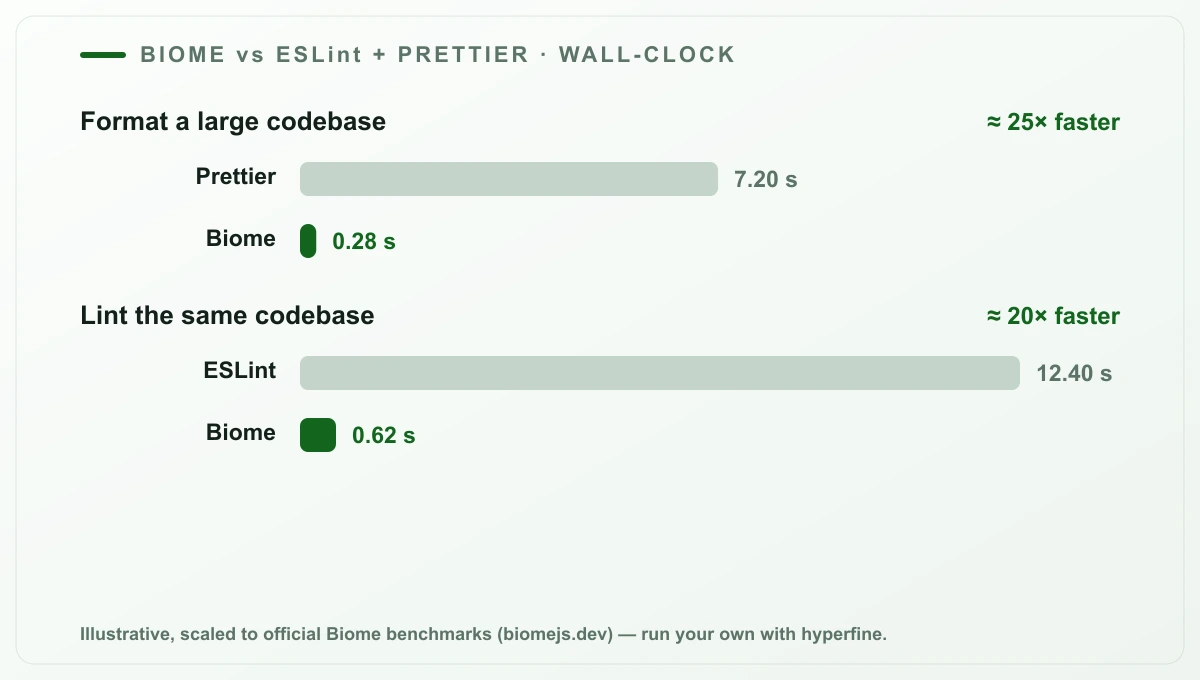
The headline from Biome’s own published benchmarks is that its formatter runs on the order of 25x faster than Prettier, and linting lands around 20x faster than ESLint. In practice the win shows up in two places:
- CI — a lint-and-format check that used to take several seconds drops to a fraction of a second, which matters when it runs on every push across every PR.
- The editor — format-on-save and lint-on-type feel instant even on large files, because there is no plugin pipeline to spin up.
The honest caveat: absolute times depend entirely on your codebase, your machine, and your rule set. Do not ship someone else’s number as your own. Measure it yourself — it takes two minutes:
# install hyperfine (brew install hyperfine) and compare wall-clock timehyperfine --warmup 3 \  'npx prettier --write "src/**/*.{ts,tsx}"' \  'npx biome format --write src'
hyperfine --warmup 3 \  'npx eslint "src/**/*.{ts,tsx}"' \  'npx biome lint src'
The ratio in your terminal is the number that belongs in your team’s decision, and in my experience it lands in the same order of magnitude the official benchmarks report.
What you actually lose
Honesty matters more than hype, so here is the counter-case — the things you should weigh before you delete .eslintrc:
- The plugin ecosystem. This is the big one. ESLint has thousands of community rules and framework-specific plugins. Biome covers the widely used ones and adds more every release, but if you depend on a niche plugin or a bespoke internal rule, there may be no Biome equivalent yet.
- Custom rules. If your team wrote its own ESLint rules to enforce internal conventions, those do not port. Biome’s plugin story is growing, but it is not the same open-ended
eslint-pluginmodel. - Long-tail language and format support. Biome’s language coverage (JS/TS/JSX/JSON/CSS and expanding) is strong but not universal; a Prettier plugin for some exotic file type may not have a match.
The pragmatic pattern most teams land on is not “delete ESLint forever.” It is: run Biome for formatting and for every lint rule it covers — which is the overwhelming majority of what a normal project uses — and keep a thin ESLint config only for the specific plugin rules Biome has not reached yet. You still delete most of the stack; you just keep the one plugin you truly cannot live without.
Verdict: when to switch, when not to
Switch to Biome if you want your formatter and linter to be one fast, zero-config-drama tool, if your rule needs are covered by its built-in set, and if you are tired of maintaining the ESLint + Prettier plugin matrix. For a new project in 2026, reaching for Biome first is the sensible default — you get formatting, linting, and import sorting in one install, and CI that finishes before you have switched tabs.
Stay on ESLint — or run it alongside Biome — if your project leans on niche plugins or custom rules that Biome has not implemented yet. In that case use Biome for formatting and the rules it covers, and keep a minimal ESLint config for the rest. You still shed most of the weight.
The point is not to chase a new tool for its own sake. It is that formatting and linting stopped being a place where you should be spending afternoons on config and seconds on every CI run. Biome makes both of those close to free.
npm install --save-dev --save-exact @biomejs/biomenpx biome migrate eslint --writenpx biome migrate prettier --writenpx biome check --write .

From the community
Discussion on the Fediverse
Replies from Mastodon and Bluesky — straight from the open web, no tracking.
Loading replies …
No replies yet. Start the conversation:
Replies could not be loaded right now.