
For a decade the rule was simple: small data goes in pandas, big data goes in a warehouse, and anything in between gets a Spark cluster nobody wants to maintain. DuckDB quietly broke that rule. It is a full analytical SQL database that installs with pip, runs inside your Python process, and reads a folder of Parquet files faster than most teams’ warehouse returns a dashboard tile.
That makes it easy to overhype. DuckDB is not a BigQuery killer, and it is not a faster SQLite for your app. It is something more specific, and once you see where its edges are, it becomes one of the most useful tools in a data stack. This guide explains what DuckDB is, shows a benchmark you can rerun yourself, and draws the line between “use DuckDB” and “you still need the warehouse”.
What DuckDB actually is
DuckDB is an in-process OLAP database. Each of those words matters:
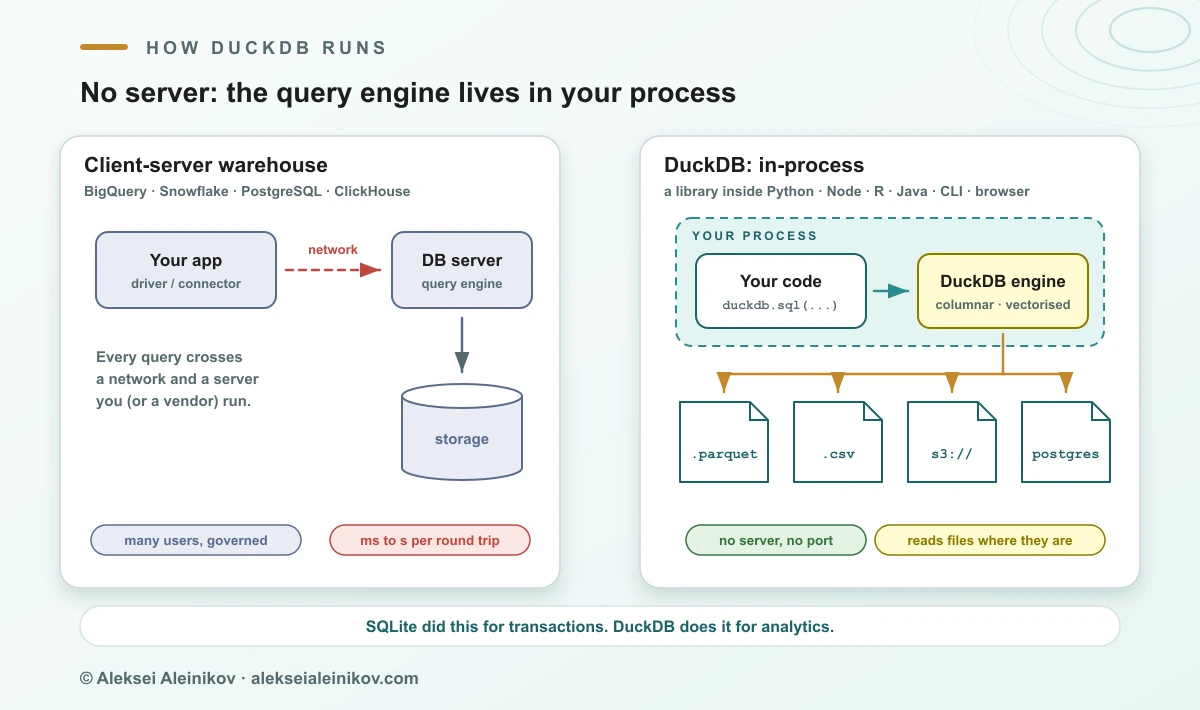
- In-process. There is no server. DuckDB is a library linked into your program: Python, R, Node.js, Java, Go, Rust, the CLI, even the browser through WebAssembly. A database is a single file, or just memory. Nothing to deploy, no port, no connection pool.
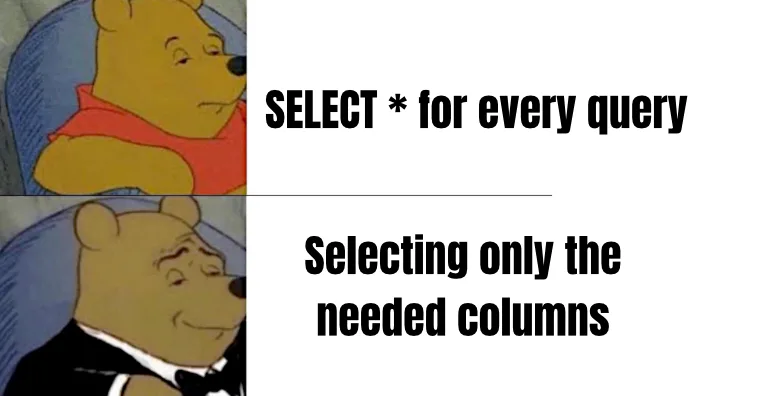
- OLAP. It is built for analytical queries: scan millions of rows, filter, join, group, aggregate. Data is stored by column, so a query that touches five columns of a hundred reads only those five.
- Vectorised. Instead of processing one row at a time, the engine works on batches of values per column, which keeps CPU caches busy and uses every core.
It came out of the database research group at CWI in Amsterdam, created by Mark Raasveldt and Hannes Mühleisen and first released in 2019. It is MIT-licensed and governed by the non-profit DuckDB Foundation. In August 2026 the project passed 40,000 GitHub stars, and the same month DuckLabs, the company behind its development, announced it would join AWS with an explicit promise that DuckDB, DuckLake and Quack stay MIT-licensed under the Foundation.
The best one-line description is still the old one: DuckDB is SQLite for analytics.
Five minutes from zero to a query
The fastest way to understand DuckDB is to point it at a file you already have.
pip install duckdbimport duckdb
# Query Parquet files directly: no CREATE TABLE, no load step.duckdb.sql(""" SELECT payment_type, count(*) AS trips, avg(total_amount) AS avg_total FROM 'yellow_tripdata_2025-0*.parquet' GROUP BY payment_type ORDER BY trips DESC""").show()A few things that surprise people the first time:
- Files are tables.
FROM 'data/*.parquet',FROM 'export.csv'andFROM 'events.json'all work, with globbing and automatic schema detection. - DataFrames are tables too. If a pandas or Polars DataFrame called
dfis in scope,duckdb.sql("SELECT ... FROM df")queries it in place, and.df()or.pl()turns the result back into one. - Remote storage is a path. With the
httpfsextension,FROM 's3://bucket/events/*.parquet'or a GCS or HTTPS URL works the same way, and DuckDB reads only the columns and row groups it needs. - It speaks lakehouse. Extensions read and write Iceberg and Delta tables and attach PostgreSQL, MySQL and SQLite databases, so one SQL statement can join a Postgres table with Parquet on S3.
If you prefer a terminal, the duckdb CLI does the same, and duckdb -ui opens a local notebook-style web UI.
The benchmark: 11.2 million taxi trips on a laptop
Claims like “100× faster” are cheap, so here is a test you can rerun. The data is the public NYC TLC yellow-taxi record for January to March 2025: three Parquet files, 189 MB, 11,198,026 trips. Three questions any analyst would ask:
- Q1: trips and average fare by payment type (one group-by).
- Q2: trips and average distance per hour of day, ignoring zero-distance trips (filter, timestamp function, group-by).
- Q3: top 10 pickup zones by revenue (join with the 265-row zone lookup, group-by, sort).
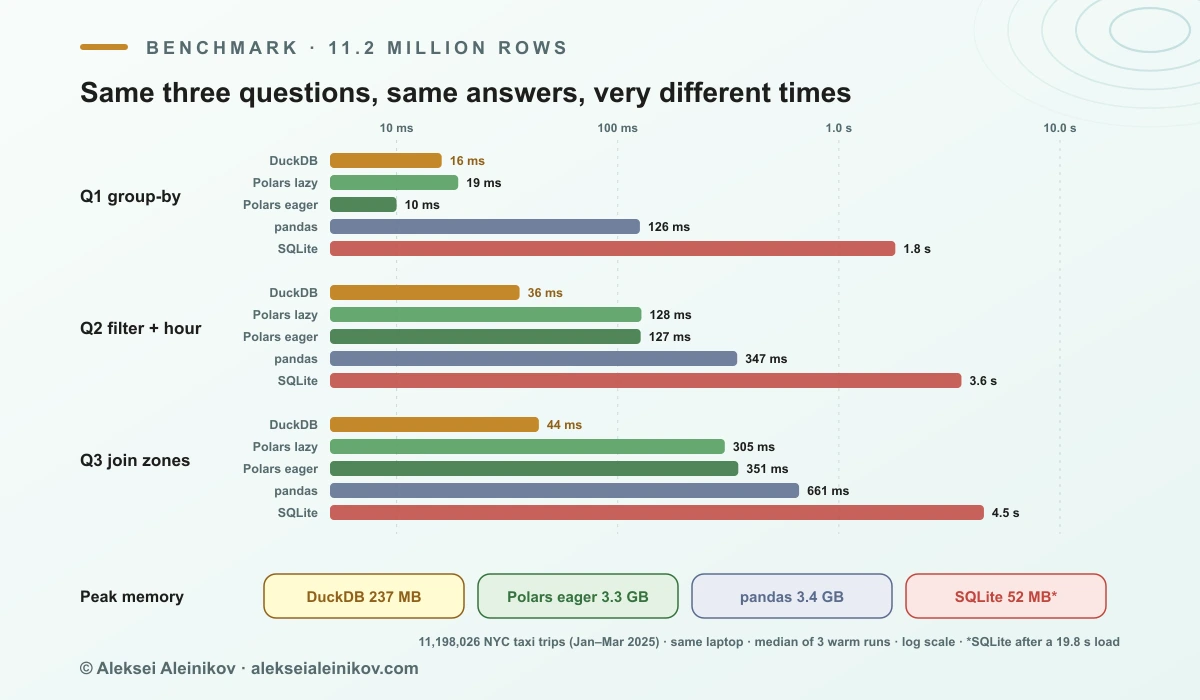
Each engine ran in its own process on the same laptop. Every query ran four times; the table shows the median of the last three. All engines returned identical answers (7,484,734 card trips averaging $28.47; JFK Airport first with $31.4 million).
| Engine | Load step | Q1 | Q2 | Q3 | Peak memory |
|---|---|---|---|---|---|
| DuckDB 1.5.6 (SQL on Parquet) | none | 16 ms | 36 ms | 44 ms | 237 MB |
Polars 1.36 (lazy, scan_parquet) |
none | 19 ms | 128 ms | 305 ms | not measured |
| Polars 1.36 (eager, data in RAM) | 0.07 s | 10 ms | 127 ms | 351 ms | 3.3 GB |
| pandas 2.3 (data in RAM) | 1.5 s | 126 ms | 347 ms | 661 ms | 3.4 GB |
| SQLite 3.53 (table on disk) | 19.8 s | 1,800 ms | 3,584 ms | 4,529 ms | 52 MB |
What the numbers say, honestly:
- DuckDB vs SQLite: about 100× faster. Not because SQLite is bad, but because it is a row store built for transactions. Every analytical query reads every column of every row. SQLite used little memory because it streamed from disk, and it needed a 20-second load into a 529 MB file first.
- DuckDB vs pandas: 8–15× faster, a fifteenth of the memory. pandas first has to materialise all 11 million rows in RAM (1.5 s, 3.4 GB). DuckDB streams the Parquet files and never holds the whole dataset.
- DuckDB vs Polars: close on simple work, ahead on joins. Polars tied on Q1 and is a superb DataFrame library. On Q2 and Q3 DuckDB was 3.5–7× faster in this setup. Your queries may differ; the honest takeaway is that both are in a different league from pandas.
The memory column is the one to remember. A laptop with 16 GB cannot load 50 GB into pandas, but DuckDB will query it: it streams what fits and spills to disk for what does not. In March 2026 the DuckDB team ran all 99 TPC-DS queries at scale factor 300 on the cheapest MacBook, with 8 GB of RAM, in 79 minutes.
DuckDB vs SQLite, Polars, pandas, ClickHouse, Spark and BigQuery
Most “DuckDB vs X” questions are really “which shape of problem is this”. Here is the whole family on one page:
| DuckDB | SQLite | Polars | pandas | ClickHouse | Spark | BigQuery / Snowflake | |
|---|---|---|---|---|---|---|---|
| What it is | Embedded analytical SQL DB | Embedded transactional SQL DB | DataFrame library (Rust) | DataFrame library | Columnar database server | Distributed compute engine | Managed cloud warehouse |
| Runs as | Library in your process | Library in your process | Library in your process | Library in your process | Server or cluster | Cluster | Cloud service |
| Best at | SQL analytics on files and DataFrames | Many small reads and writes | DataFrame pipelines | Small data, rich ecosystem | Real-time analytics, many users | Terabyte-scale ETL | Shared, governed analytics at any scale |
| Weak at | Many concurrent writers | Scans and aggregates | SQL-first teams | Memory, speed at scale | Embedding, ops overhead | Small data (overhead) | Latency, cost of frequent scans |
| Data larger than RAM | Yes, spills to disk | Yes (row-by-row) | Yes, streaming engine | No | Yes | Yes | Yes |
| Pick when | One person or job, MBs to hundreds of GBs | An app’s own data | You think in DataFrames | Data fits in RAM easily | Dashboards for hundreds of users | Data does not fit on one big machine | A company shares one source of truth |
Three distinctions do most of the work:
- DuckDB vs SQLite is OLAP vs OLTP. Keep SQLite (or PostgreSQL) for application state; reach for DuckDB to analyse it. DuckDB can even
ATTACHthe SQLite file and query it in place. - DuckDB vs Polars is mostly SQL vs DataFrame API. Both are fast, both stream, and they interoperate through Arrow with zero copies. Use whichever your team reads more easily.
- DuckDB vs ClickHouse is embedded vs server. ClickHouse is built to serve hundreds of concurrent dashboard users from a cluster; DuckDB is built to sit inside one program.
Where DuckDB beats the warehouse, and where it does not
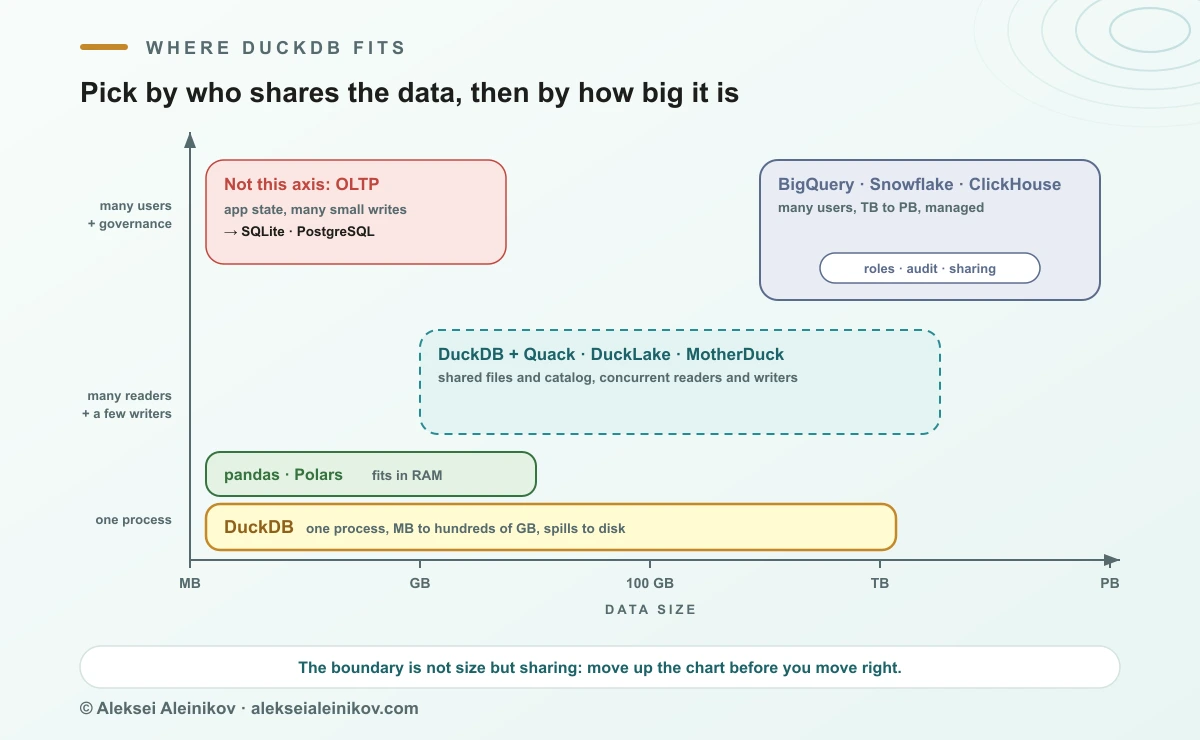
The most useful way to frame DuckDB is not “instead of BigQuery” but “before and beside BigQuery”.
DuckDB wins when:
- One person or one job is asking the questions: an analyst in a notebook, a nightly batch job, a CI test.
- The data is a file or an extract: Parquet on S3 or GCS, a CSV export, a sample of the warehouse.
- Latency matters more than scale: 40 ms in a notebook loop beats a two-second round trip to any cloud service.
- You want tests for data code. A dbt project or a SQL transformation can run against a DuckDB file in CI in seconds, with no cloud credentials. dbt v2 (September 2026) ships the DuckDB adapter built in.
The warehouse still wins when:
- Many people and services need the same data at the same time, with roles, audit logs, row-level security and sharing.
- Data reaches many terabytes, or queries routinely scan more than one large machine can read quickly.
- You need managed operations: backups, high availability, governance, and someone else on call.
And the cost argument is subtler than the hype suggests. The five columns used above add up to under half a gigabyte for 11.2 million rows. In BigQuery on-demand, at $6.25 per TiB scanned after the first free TiB each month, a query over all of them costs about a quarter of a cent. At this size DuckDB does not save money; it saves the round trip. The money argument starts when dashboards and scheduled jobs rescan terabytes all day. That is where pulling a stable extract into Parquet and querying it with DuckDB can take a real line off the bill. If you are still choosing the warehouse itself, see BigQuery vs Snowflake: An Honest Comparison.
DuckDB does not replace the warehouse. It replaces the cluster you were about to build for data that fits on one machine, and the hundred small queries you were sending to the cloud just to look at it.
The real limit is concurrency, not size
People expect DuckDB’s limit to be data volume. In practice it is who else is writing.
In plain in-process mode, one process can open a database file read-write, using as many threads as it likes, or many processes can open it read-only. Two services cannot both write to the same .duckdb file. That is a deliberate trade-off: keeping state in one process’s memory is part of why it is fast.
Two developments in 2026 move that line:
- Quack, DuckDB’s own client-server protocol. Released as a preview in May 2026, it lets any DuckDB process serve its databases over HTTP and any other DuckDB
ATTACHto it. In the team’s benchmarks, Quack moved 60 million rows in 4.9 seconds where the PostgreSQL protocol took 158, and handled about 5,400 small write transactions per second on eight threads, ahead of PostgreSQL on the same machines. Quack becomes stable with DuckDB 2.0. - DuckLake, a lakehouse format built on SQL. Data lives as Parquet in object storage; the catalog (which files make up which table version) lives in a real database such as PostgreSQL. Many DuckDB instances can then read and write the same tables concurrently. DuckLake 1.0 was declared production-ready in April 2026. It solves the same problem as Iceberg and Delta, with a simpler catalog; the trade-offs between those two are in Iceberg vs Delta Lake: A Plain Guide.
If you would rather not run any of that, MotherDuck is the managed option: DuckDB in the cloud with storage, per-user compute, sharing and access control. Its pricing has a free Lite plan (10 GB storage, 10 hours of compute a month) and a Business plan at $250 per organisation per month plus usage, with EU regions in Frankfurt and Dublin, which matters for GDPR-minded teams in Germany.
What is new in DuckDB 2.0
DuckDB 2.0, codenamed “Cyanoptera”, is on the release calendar for 21 October 2026, with a 2.0.1 bugfix release planned for November. The preview lists more than 10,000 commits since 1.5. The highlights that change how you use it:
- DuckDB as a server. Quack graduates to stable, and a new
CONNECTstatement points your session at a remote DuckDB, or at PostgreSQL or MySQL, and pushes the SQL down to run there. VARIANTas a first-class type. Semi-structured data (think JSON logs) is shredded into columns automatically, so it compresses and queries like typed data without declaring a schema.- Triggers,
BEFOREandAFTER, per row or per statement: audit tables without application code. - Asynchronous I/O throughout the engine, with the biggest gains on S3 and other network storage.
NEARESTjoins for top-k similarity search over embeddings, useful if you are weighing whether you need a dedicated vector database at all.- A new storage format and a new PEG-based SQL parser, plus a small set of breaking changes. Files written by 2.0 use the new format by default, so pin versions before upgrading shared files.
If you need stability over features, the 1.4 line is the long-term-support release, supported until November 2026; from 1.4 on, every other minor version is LTS.
A practical starting point
You do not need a migration plan to get value from DuckDB. Start small:
- Replace the slowest pandas step in a notebook with
duckdb.sql(...)over the same DataFrame or Parquet file, and keep the rest. - Export a stable warehouse table to Parquet once a day and point exploratory work at the file instead of the warehouse.
- Run your SQL transformations against DuckDB in CI, so a broken model fails in a pull request instead of in production.
- Only then decide whether you need shared access through MotherDuck, Quack or DuckLake, or whether the warehouse should simply stay the source of truth.
Keep the model in mind: one process, columnar, vectorised, reads files where they are. Everything DuckDB is great at follows from it, and so does everything it is not built for. If you want to place it among the broader database families first, start with SQL vs NoSQL: database types and how to choose.
The Bottom Line
DuckDB earns its hype on a narrow, very common problem: one person or one job asking analytical questions of data that fits on one machine. There it is faster than pandas, far faster than SQLite, at least as fast as Polars on most work, and it needs no infrastructure at all. It is not a shared warehouse, and pretending otherwise ends in file-lock errors. Use it before and beside BigQuery or Snowflake, not instead of them, and watch the concurrency story: with Quack and DuckLake, the line between “laptop database” and “real database” is moving faster than any other part of the data stack.
From the community
Discussion on Mastodon & Bluesky
Replies to this article from the open web, pulled in live. No ads, no tracking scripts.
Reply there — it shows up here automatically.