
Open the root of an actively maintained repository in 2026 and there is a good chance you will find a folder you did not have a year ago: .claude/skills/, .github/skills/ or .agents/skills/. Inside, short Markdown files called SKILL.md. That folder has quietly become the most portable way to teach an AI agent a job. Anthropic introduced Agent Skills in October 2025, published the format as an open standard on December 18, 2025, and the official client list now names more than 40 products — Claude Code, GitHub Copilot, VS Code, OpenAI Codex and ChatGPT, Cursor, Gemini CLI, JetBrains Junie, OpenCode, Kiro, Goose and Pulumi Neo among them.
The hype makes skills sound like a replacement for everything that came before: prompts, MCP servers, AGENTS.md, custom agents. They are not. Skills solve one specific problem — procedural knowledge an agent needs only some of the time — and they solve it remarkably well. They also introduce a new software supply chain that runs with your agent’s permissions. This guide covers both halves: how skills actually work, where each major agent looks for them, how they differ from MCP and the other customization layers, and how to write and install them without handing your laptop to a stranger.
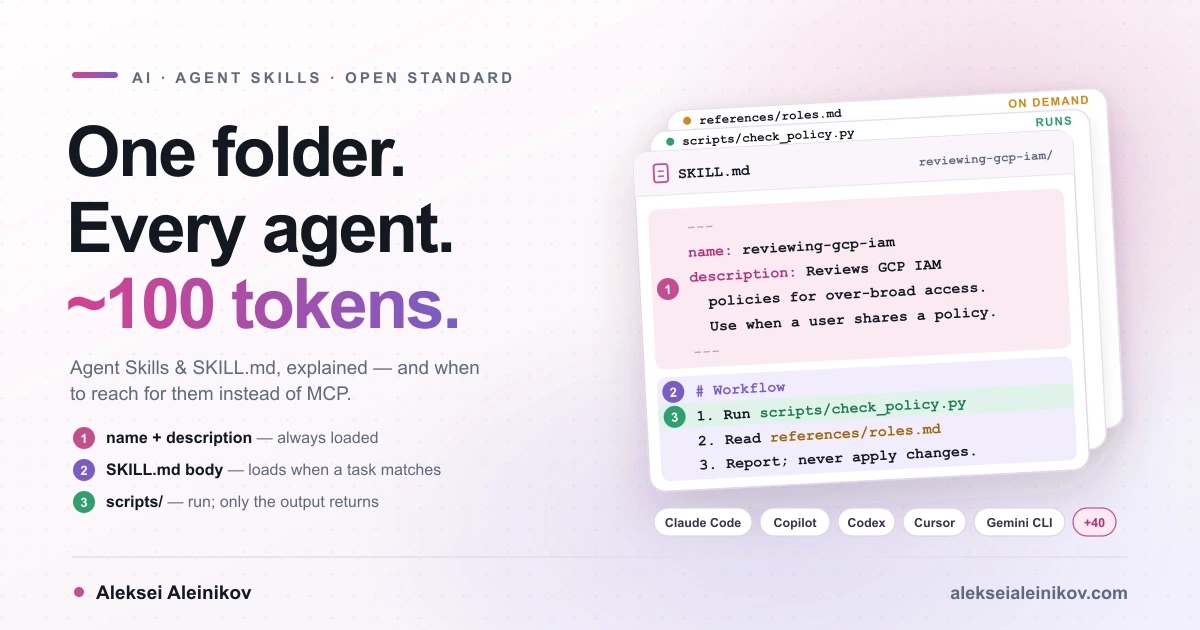
What an Agent Skill Actually Is
An Agent Skill is a folder containing a SKILL.md file — YAML frontmatter with a name and a description, followed by Markdown instructions — that an AI agent discovers at startup and loads only when a task matches. Everything else in the folder is optional:
reviewing-gcp-iam/├── SKILL.md # required: metadata + instructions├── scripts/ # optional: code the agent runs├── references/ # optional: docs the agent reads on demand└── assets/ # optional: templates, schemas, imagesThe specification is short enough to memorise. The frontmatter has two required fields and four optional ones:
| Field | Required | Rules |
|---|---|---|
name |
Yes | 1–64 characters, lowercase letters, digits and hyphens; no leading, trailing or double hyphens; must match the folder name |
description |
Yes | 1–1,024 characters; says what the skill does and when to use it |
license |
No | A license name or a bundled license file |
compatibility |
No | Up to 500 characters of environment requirements (product, system packages, network) |
metadata |
No | Free-form string-to-string map, e.g. author and version |
allowed-tools |
No | Space-separated pre-approved tools, e.g. Bash(git:*) Read — experimental, support varies |
The body after the frontmatter has no required structure. The spec recommends step-by-step instructions, input and output examples and edge cases, keeping SKILL.md under 500 lines and moving detail into referenced files one level deep. The reference validator, skills-ref validate ./my-skill, checks the frontmatter and naming rules.
That is the entire format. The interesting part is not what a skill is but how agents load it.
How Skills Load: Progressive Disclosure
A skill is designed around one constraint: the context window is shared and expensive. Everything an agent knows during a task — the system prompt, your conversation, tool definitions, file contents — competes for the same tokens. Why that budget matters is covered in Context Engineering in 2026. Skills are the cleanest context-engineering primitive so far, because they load in three stages:
- Discovery — about 100 tokens per skill. At startup the agent reads only
nameanddescriptionfrom every installed skill and puts them into its system prompt. That is enough to know a skill exists and when it might be relevant. - Activation — under 5,000 tokens recommended. When your request matches a description, the agent reads the full
SKILL.mdbody into context. In Claude, that is literally a shell call:cat reviewing-gcp-iam/SKILL.md. - Execution — only what the task touches. If the instructions point to
references/finance.md, the agent reads that one file and leavesreferences/sales.mdon disk. If they say runscripts/check_policy.py, the agent executes it and only the script’s output enters the context — never its source code.
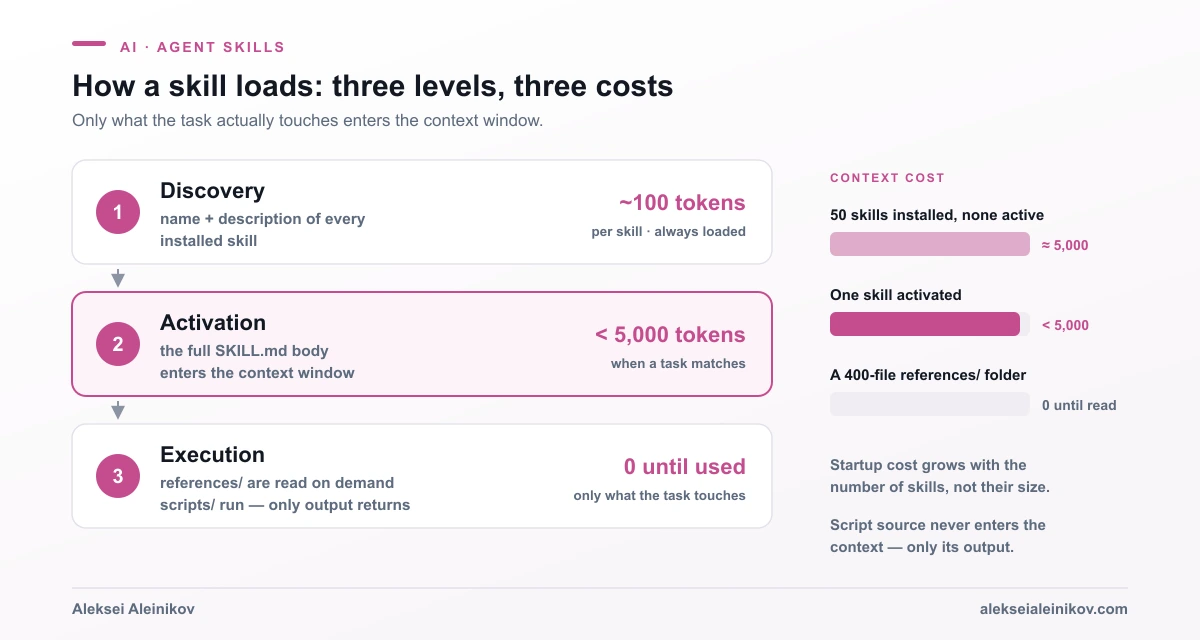
The consequence is bigger than it sounds. With a classic system prompt or CLAUDE.md, every line costs tokens on every turn whether it is relevant or not. With skills, a 20-page runbook costs about as much as a sentence until the moment it is needed. Anthropic’s engineering write-up goes further: for an agent with a filesystem and code execution, the amount of context you can bundle into a skill is effectively unbounded, because files cost nothing until they are read.
Two details the marketing usually leaves out:
- The discovery list has a budget too. Claude Code gives the skill listing about 1% of the model’s context window and caps each entry’s description at 1,536 characters; when the listing overflows, it drops descriptions of the skills you invoke least. Codex keeps the initial list within 2% of the context window (or 8,000 characters when the window is unknown) and shortens descriptions first. Install 200 skills and some of them will be invisible.
- A loaded skill stays loaded. In Claude Code the rendered
SKILL.mdenters the conversation once and stays there across turns. After auto-compaction, Claude Code re-attaches only the first 5,000 tokens of each invoked skill, within a shared 25,000-token budget. Put the rules that must survive at the top.
Skills vs MCP vs AGENTS.md vs Subagents
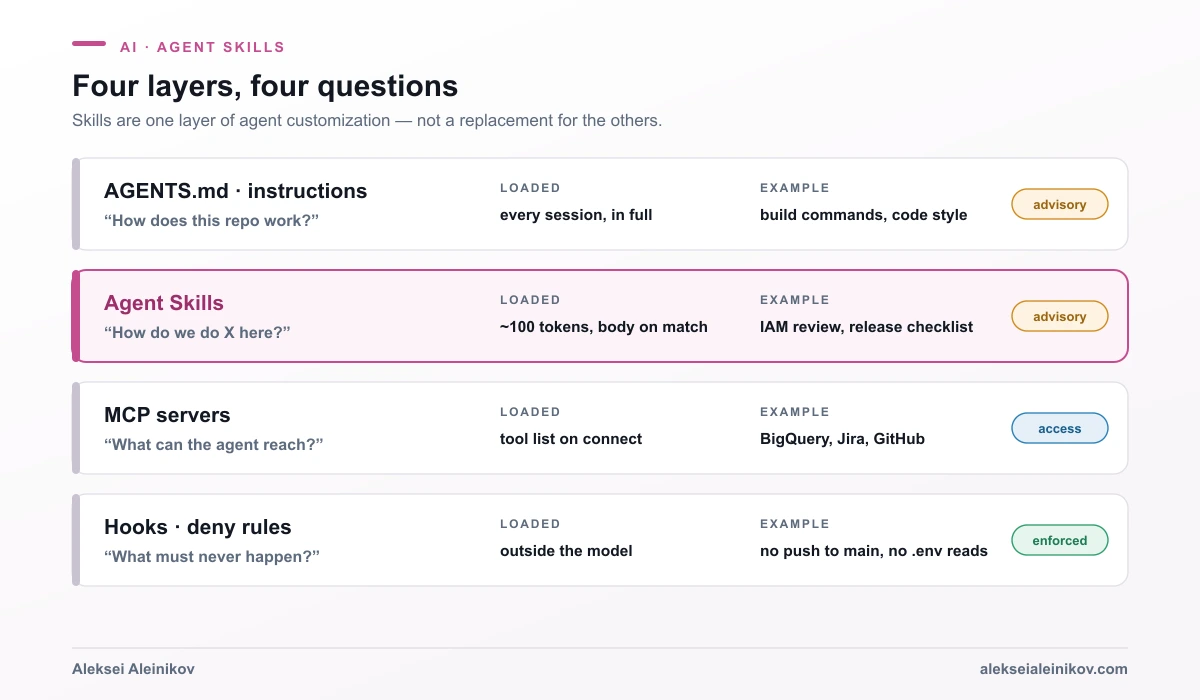
This is where most of the confusion lives, so here is the short version: MCP gives an agent access, a skill gives it know-how, AGENTS.md gives it the house rules, and hooks give you guarantees. They are layers, not competitors.
| Agent Skill | MCP server | AGENTS.md / custom instructions |
Subagent | Hook / deny rule | |
|---|---|---|---|---|---|
| What it is | A folder: SKILL.md + optional scripts and docs |
A process exposing tools, resources and prompts over a protocol | A Markdown file loaded into every session | A separate agent with its own context window | Deterministic code or policy on agent events |
| Gives the agent | A procedure: how we do X | Reach: the ability to touch Y | Facts: how this repo works | Isolation: do Z elsewhere and report back | Limits: this never happens |
| When it costs context | ~100 tokens always, body on match | Tool list from the connected server; Claude Code loads full schemas only on demand (tool search), many clients load them upfront | Always, in full | Only its final result | Never |
| Runs code | Optional bundled scripts, through the agent’s shell | Yes, inside the server | No | Through its own tools | Yes, outside the model |
| Portable | Open standard, 40+ clients | Open protocol | AGENTS.md is an open format |
Product-specific | Product-specific |
| Can the model ignore it | Yes | It can choose not to call a tool | Yes | — | No |
Three practical rules fall out of this table:
- If the agent needs to reach a system it cannot reach today — a database, Jira, a cloud API — that is an MCP server, not a skill. Building and hardening one is covered in MCP Servers Explained.
- If you keep pasting the same checklist into chat, that is a skill. Claude Code’s documentation puts it almost exactly that way: create a skill when a section of
CLAUDE.mdhas grown into a procedure rather than a fact. - If a rule must hold every single time, neither a skill nor
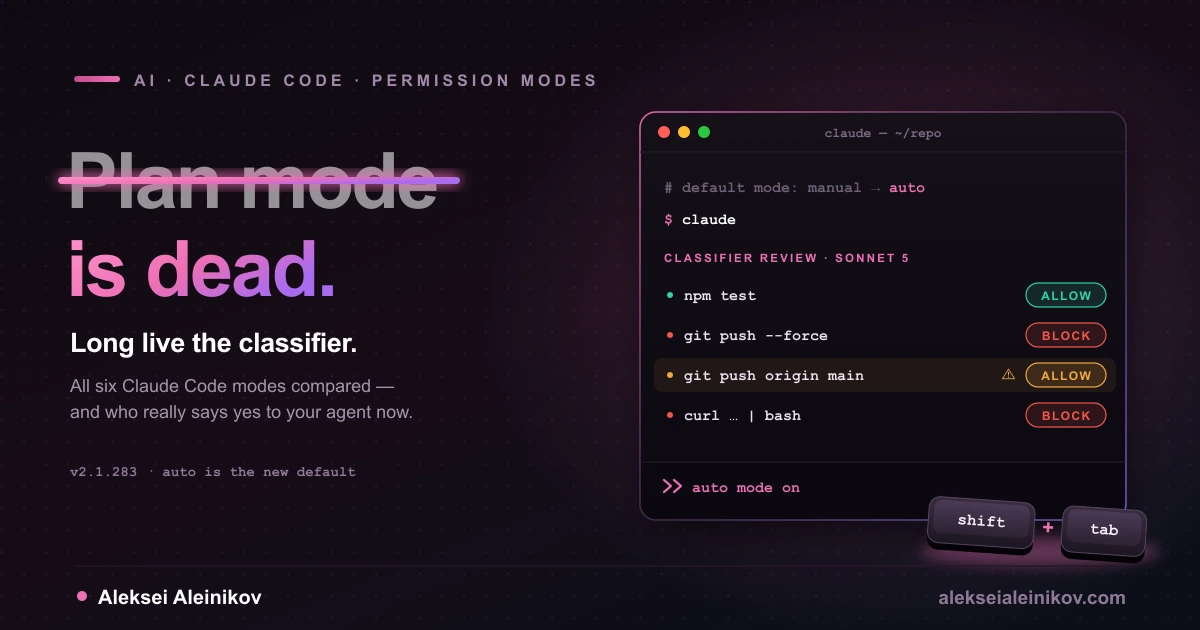
AGENTS.mdis enough — the model can skip instructions. Claude Code’s own troubleshooting guide says to move such rules into a hook. For tool permissions, that means deny and ask rules, as described in Claude Code Modes Compared.
The two also compose. A skill can tell the agent which MCP tools to call, in what order and with what checks in between. Anthropic’s best-practice guide even asks skill authors to reference MCP tools by their fully qualified name (BigQuery:bigquery_schema) so the agent picks the right server. That pairing — MCP for hands, a skill for the playbook — is where most of the real value is.
Where Each Agent Looks for Skills
The format is portable; the folder locations and the extras are not. As of October 2026:
| Agent | Project skills | Personal skills | Invoke explicitly | Opt out of automatic use |
|---|---|---|---|---|
| Claude Code | .claude/skills/<name>/ (and in parent directories up to the repo root) |
~/.claude/skills/<name>/ |
/name |
disable-model-invocation: true |
| GitHub Copilot in VS Code | .github/skills/, .claude/skills/, .agents/skills/ |
~/.copilot/skills/, ~/.claude/skills/, ~/.agents/skills/ |
/name |
disable-model-invocation: true |
| OpenAI Codex | .agents/skills/ from the working directory up to the repo root |
~/.agents/skills/ (admin: /etc/codex/skills) |
$name or /skills |
allow_implicit_invocation: false in agents/openai.yaml |
Sources: Claude Code skills, VS Code Agent Skills, Codex skills.
The lesson for teams: .agents/skills/ is the closest thing to a neutral location, and VS Code also reads .claude/skills/, so one checked-in folder can serve several tools. If your team mixes Claude Code and Codex, keep the canonical copy in one place and symlink the other — both Claude Code and Codex follow symlinked skill folders.
The portability trap: extra frontmatter
Every vendor extends the format, and the extensions do not travel. Claude Code adds disable-model-invocation, user-invocable, context: fork (run the skill in an isolated subagent), argument-hint, paths, model, hooks and more. VS Code supports several of the same names. Codex keeps its extras in a separate agents/openai.yaml file.
The trap: uploading a skill to claude.ai or the Claude Skills API with any field outside the spec’s six fails hard, with an error like Unexpected key(s) in SKILL.md frontmatter: argument-hint. If a skill should work everywhere, keep the frontmatter to name, description, license, compatibility, metadata and allowed-tools, and put tool-specific behaviour in the body or in a vendor sidecar file.
Build One: A Least-Privilege IAM Review Skill
Here is a skill a platform team could ship as is. It reviews a Google Cloud IAM policy, flags over-broad bindings with a deterministic script and proposes least-privilege replacements. It applies a few of the rules the free GCP IAM Policy Checker runs in the browser, packaged so an agent can use them inside a repository.
.agents/skills/reviewing-gcp-iam/├── SKILL.md├── scripts/│ └── check_policy.py└── references/ └── predefined-roles.mdSKILL.md, using only portable fields:
---name: reviewing-gcp-iamdescription: Reviews Google Cloud IAM policies for over-broad access. Flags basic roles (owner, editor, viewer), public principals and service accounts with project-wide power, and proposes least-privilege predefined roles. Use when the user shares an IAM policy, asks who has access to a GCP project, or requests an IAM, permissions or least-privilege review.license: MITmetadata:  author: platform-team  version: "1.0"---
# Reviewing GCP IAM policies
## Workflow1. Get the policy as JSON. If the user has not provided one, ask for the project ID and run:   `gcloud projects get-iam-policy PROJECT_ID --format=json > policy.json`2. Run the checker and use only its output:   `python3 scripts/check_policy.py policy.json`3. For each finding, propose a predefined role. Look up candidates in   [references/predefined-roles.md](references/predefined-roles.md) and read only the section for the affected service.4. Report using the table below. Never apply changes yourself; output `gcloud` commands for a human to run.
## Report format| Severity | Member | Current role | Proposed role | Why ||---|---|---|---|---|
## Rules- `allUsers` or `allAuthenticatedUsers` on any role is HIGH.- A service account with a basic role is HIGH: any code running as it inherits project-wide power.- Never propose removing the last owner of a project.
And the script, which does the part a language model should not improvise:
#!/usr/bin/env python3"""Flag risky bindings in a GCP IAM policy exported with --format=json."""import jsonimport sys
BASIC = {"roles/owner", "roles/editor", "roles/viewer"}PUBLIC = {"allUsers", "allAuthenticatedUsers"}

def check(policy: dict) -> list[tuple[str, str, str, str]]:    findings = []    for binding in policy.get("bindings", []):        role = binding.get("role", "")        for member in binding.get("members", []):            if member in PUBLIC:                findings.append(("HIGH", member, role, "public principal"))            elif role in BASIC and member.startswith("serviceAccount:"):                findings.append(("HIGH", member, role, "basic role on a service account"))            elif role in BASIC:                findings.append(("MEDIUM", member, role, "basic role; prefer a predefined role"))    return findings

if __name__ == "__main__":    if len(sys.argv) != 2:        sys.exit("usage: check_policy.py policy.json")    with open(sys.argv[1]) as f:        results = check(json.load(f))    for severity, member, role, why in results:        print(f"{severity}\t{member}\t{role}\t{why}")    print(f"{len(results)} finding(s)")
Why it is built this way:
- The description carries the trigger words people actually use — IAM policy, who has access, permissions, least-privilege — and says what the skill does before it says when.
- The script is the source of truth for detection. Anthropic’s guidance is blunt: prefer a pre-written script for deterministic operations, because generated code is less reliable and costs tokens on every run. The model does the part it is good at: explaining findings and choosing replacement roles.
- The reference file is loaded selectively. A predefined-roles catalogue is long; the instructions tell the agent to read only the section it needs.
- It has no side effects. It prints
gcloudcommands instead of running them. A skill that changes things should be one you trigger by hand — in Claude Code and VS Code, that isdisable-model-invocation: true.
Test it like code
A skill that triggers is not the same as a skill that works. Anthropic recommends building at least three evaluations before writing extensive instructions, then comparing results with and without the skill in a fresh session. In Claude Code, the skill-creator plugin automates the loop: it runs each test case in an isolated subagent, grades the output, benchmarks pass rate, tokens and time with and without the skill, and generates should-trigger and should-not-trigger prompts to tune the description. /skill-doctor shows what each installed skill costs in context and which ones you never use.
Writing Descriptions That Actually Trigger
If a skill does not fire, the description is almost always the reason. The agent matches your request against a list of one-line descriptions — sometimes dozens of them — and picks one. The rules that work across Claude, Copilot and Codex:
- Say what it does, then when to use it. “Generates commit messages by analysing staged diffs. Use when the user asks for a commit message or wants to review staged changes.”
- Write in third person. The description is injected into the system prompt; Anthropic warns that “I can help you…” or “You can use this to…” causes discovery problems.
- Front-load the key use case and trigger words. Both Claude Code and Codex shorten descriptions when the listing is crowded. Whatever is at the end may be the first thing cut.
- Name the boundaries. Codex’s guide recommends stating clearly when the skill should not trigger. A skill that fires on everything is as broken as one that never fires.
- Name it after the activity. Anthropic suggests gerunds —
processing-pdfs,reviewing-gcp-iam— and warns againsthelper,utilsortools.
Bad: description: Helps with IAM. Good: the one in the example above.
The Part Nobody Puts on the Slides: Skills Are a Supply Chain
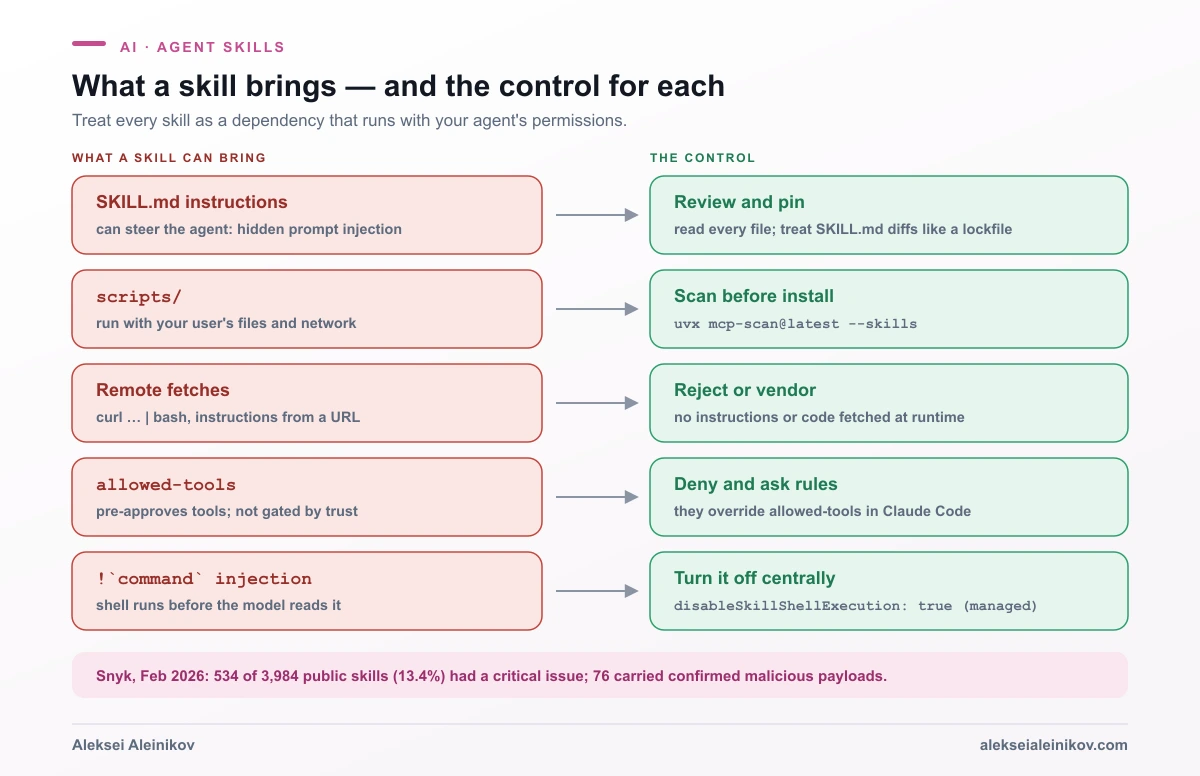
A skill is not documentation. It is instructions an agent will follow plus code it may run, with your permissions, on your machine. Anthropic’s own overview says to use skills only from trusted sources and to treat installing one like installing software. In Claude Code, unlike the Claude API’s sandboxed container, a skill’s scripts have the same network access as any other program on your computer.
The ecosystem has already been tested. On February 5, 2026, Snyk published ToxicSkills, a scan of 3,984 public skills from ClawHub and skills.sh:
- 534 skills (13.4%) had at least one critical issue — malware distribution, prompt injection or exposed secrets.
- 1,467 skills (36.8%) had at least one security flaw of any severity.
- 76 confirmed malicious payloads designed for credential theft, backdoors and data exfiltration.
- 91% of the confirmed malicious skills combined prompt injection with malicious code: the instructions talk the agent out of its caution, then the script does the damage.
The patterns are familiar to anyone who lived through early npm: a “prerequisites” step that downloads a password-protected ZIP, a base64-encoded curl … | bash, a skill that fetches its real instructions from a remote URL at runtime so the reviewed version is not the one that runs.
Two Claude Code behaviours deserve special attention because they are easy to miss:
allowed-toolsis not gated by workspace trust. The documentation says it plainly: a project skill’sallowed-toolsapplies whenever the skill is invoked, including in a-prun in a folder you have never trusted. A cloned repository can ship a skill that pre-approvesBash(curl *)for the turn it runs. Read the frontmatter of every skill in a repository before you point an agent at it.!`command`runs before the model sees anything. Claude Code’s dynamic context injection executes shell commands while rendering the skill and inlines their output. Those commands are checked against your permission rules — a deny rule aborts the invocation — but they are still shell commands authored by whoever wrote the skill. Organisations can turn this off for user, project and plugin skills with"disableSkillShellExecution": truein managed settings.
A checklist that holds up in practice:
- Install from sources you can name. Your own repositories, your organisation’s, or vendors’ official collections (anthropics/skills, openai/skills, github/awesome-copilot) — and read them anyway.
- Pin skills in git and review diffs. A skill is a dependency. Treat a changed
SKILL.mdlike a changed lockfile. - Scan.
uvx mcp-scan@latest --skillschecks installed skills for prompt injection, suspicious downloads and secrets. - Reject remote instructions. A skill that fetches instructions or scripts from a URL at runtime cannot be reviewed. Vendor or reject.
- Keep secrets out of skill folders. Snyk found hardcoded secrets in 10.9% of ClawHub skills.
- Back skills with hard limits. Deny rules, ask rules for side effects and an OS-level sandbox stop a skill that has talked the model into something. This is the lethal trifecta again: private data, untrusted content and an exfiltration channel in one agent is the condition to break.
When Not to Use a Skill
A practical rule of thumb: if you have explained the same procedure to an agent three times, it becomes a skill; if a rule must never be broken, it becomes a hook; if the agent needs to reach a new system, it becomes an MCP server. Keep the number of skills small, too: every skill you add is another description competing for the agent’s attention.
Skills are the right tool less often than the hype suggests:
- One-off tasks. Just write the prompt.
- Facts the agent needs on every turn — build commands, code style, directory layout. That is
AGENTS.mdor your custom instructions file. - Access to systems. Authentication, live data and remote actions belong in an MCP server, ideally behind a gateway with per-user permissions, as in user-level permission controls for MCP.
- Guarantees. “Never push to main”, “never read
.env” — use deny rules and hooks. - Context the skill would pull from the internet at runtime. That is not a skill; it is a remote prompt with extra steps.
The Bottom Line
Agent Skills won because they are boring in the best way: a folder, a Markdown file and two required fields, readable by humans, diffable in git and portable across more than 40 agents. The clever part is progressive disclosure — about 100 tokens per skill until the moment a task needs it — which finally lets you give an agent deep, specific know-how without drowning every conversation in it.
They are not a replacement for MCP, AGENTS.md or permission rules; they are the missing layer between them. Write descriptions that say what and when, push deterministic work into scripts, keep the frontmatter portable — and review every skill you install with the same suspicion you would apply to a package that runs with your credentials. Because that is exactly what it is.
From the community
Discussion on the Fediverse
Replies from Mastodon and Bluesky — straight from the open web, no tracking.
Loading replies …
No replies yet. Start the conversation:
Replies could not be loaded right now.