
Every Postgres team eventually types CREATE INDEX in a hurry, and most of them type the same one. B-tree is the right default, but it is not always the right answer. On a table with 10 million rows I found an index that was 3,000 times smaller and only 3 times slower, an index that did nothing at all, and a “covering” index that made queries faster until a routine UPDATE took the advantage away.
This is Part 1 of Postgres in Production, a series about the decisions that matter once a database leaves the tutorial: indexes, VACUUM and bloat, connection pooling, partitioning and JSONB. Each part follows one rule: measure first, then explain. The numbers below come from PostgreSQL 18.6 and an open-source benchmark that you can run yourself.
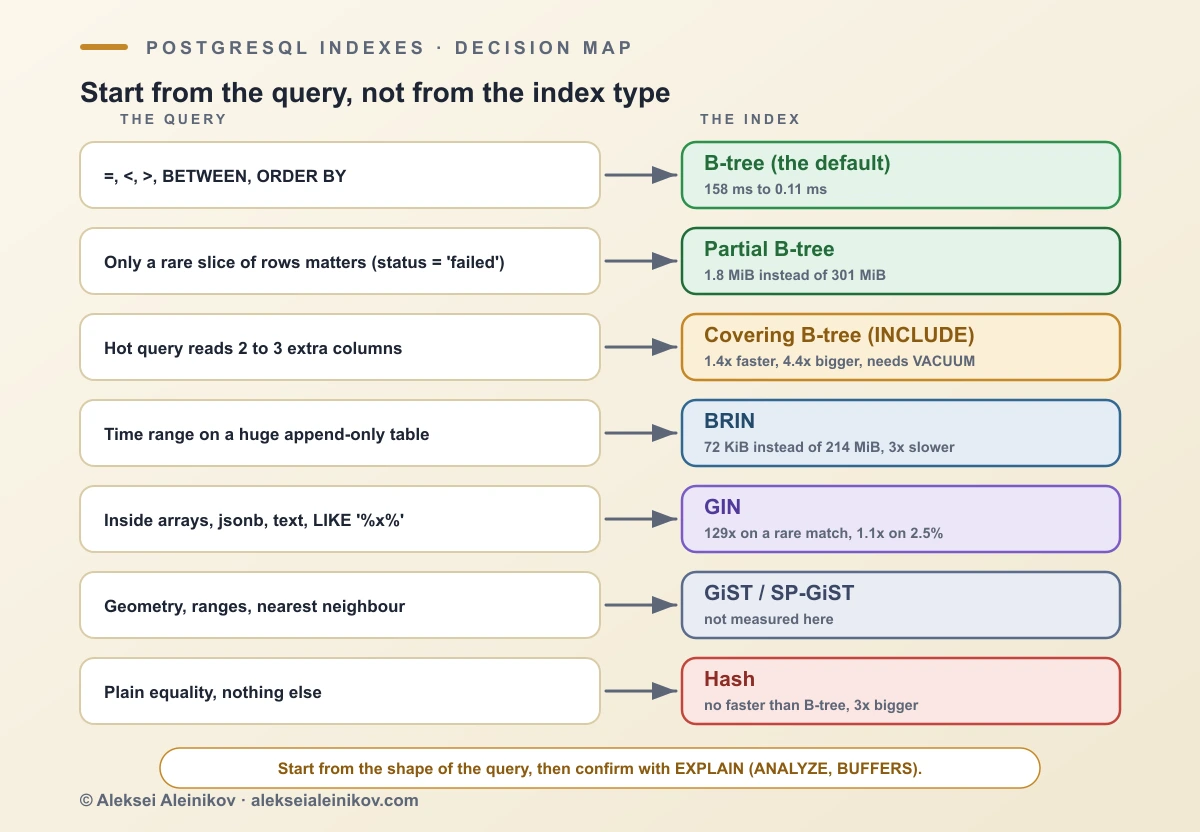
Which PostgreSQL index type to use: the short answer
A PostgreSQL index is a separate data structure that lets the database find rows without reading the whole table. The type decides which questions it can answer and how much space and write time it costs.
| Your query | Index to use | Measured on 10 million rows |
|---|---|---|
WHERE user_id = 42, ranges, ORDER BY |
B-tree (the default) | 158 ms scan, 0.11 ms with the index |
Only a rare slice of rows matters (status = 'failed') |
Partial B-tree | 1.8 MiB instead of 301 MiB, same speed |
| Few columns, many lookups | Covering B-tree (INCLUDE) |
0.109 to 0.078 ms, at 4.4 times the size |
| Time range on append-only, ordered data | BRIN | 72 KiB instead of 214 MiB, 3 times slower |
Contains: arrays, jsonb, full-text, LIKE '%x%' |
GIN | 360 ms to 2.8 ms for a rare tag |
| Geometry, ranges, nearest neighbour | GiST or SP-GiST | not benchmarked here |
| Equality only | Hash | no faster than B-tree, 3 times bigger |
How an index finds a row, and what a scan costs
Without an index, PostgreSQL reads the table page by page and checks every row. The test table here is 1.6 GB, 208,376 pages of 8 KB, and a sequential scan counted every one of them. A B-tree index on the same table is a tree three to four levels deep, so finding one key touches a handful of pages instead: the lookup below read 14 buffers instead of 208,376.
That is the whole idea, and everything else is a trade. A bigger index answers more kinds of questions but costs space, build time and write time. The planner chooses between a scan and an index by estimated cost, which is why an index that exists is not always used (more on that below). To see what actually happened, run EXPLAIN (ANALYZE, BUFFERS). Since PostgreSQL 18, BUFFERS is included automatically with ANALYZE.
The benchmark: one table, 10 million rows, and what each index costs
One events table with a bigint primary key, user_id (random, about 10 rows per user), status (70% done, 20% active, 9% pending, 0.85% failed, 0.15% archived), created_at (one row every 3 seconds, so it grows with id), a tags text[] column and a payload jsonb column. The table is 1.6 GB and the primary key 214 MiB. Data comes from a fixed random seed, so every run produces the same rows.
Each query ran once as a warm-up and then three times, and the table shows the median. Point and range queries were repeated for several parameter values. Every measured query was also run with index scans disabled, and the answers had to match, otherwise the script stops. PostgreSQL 18.6, warm cache, autovacuum off so the visibility map stays under control (a production database should not run like that).
B-tree: the default for a reason
B-tree is a balanced tree of sorted keys. Because the keys are sorted, one structure answers =, <, >, BETWEEN, ORDER BY and IS NULL, and it is what CREATE INDEX builds unless you ask for something else.
CREATE INDEX ix_user ON events (user_id);SELECT * FROM events WHERE user_id = 424242;Lookup on user_id |
Time | Buffers | Index size | Build |
|---|---|---|---|---|
| No index (sequential scan) | 158 ms | 208,376 | none | none |
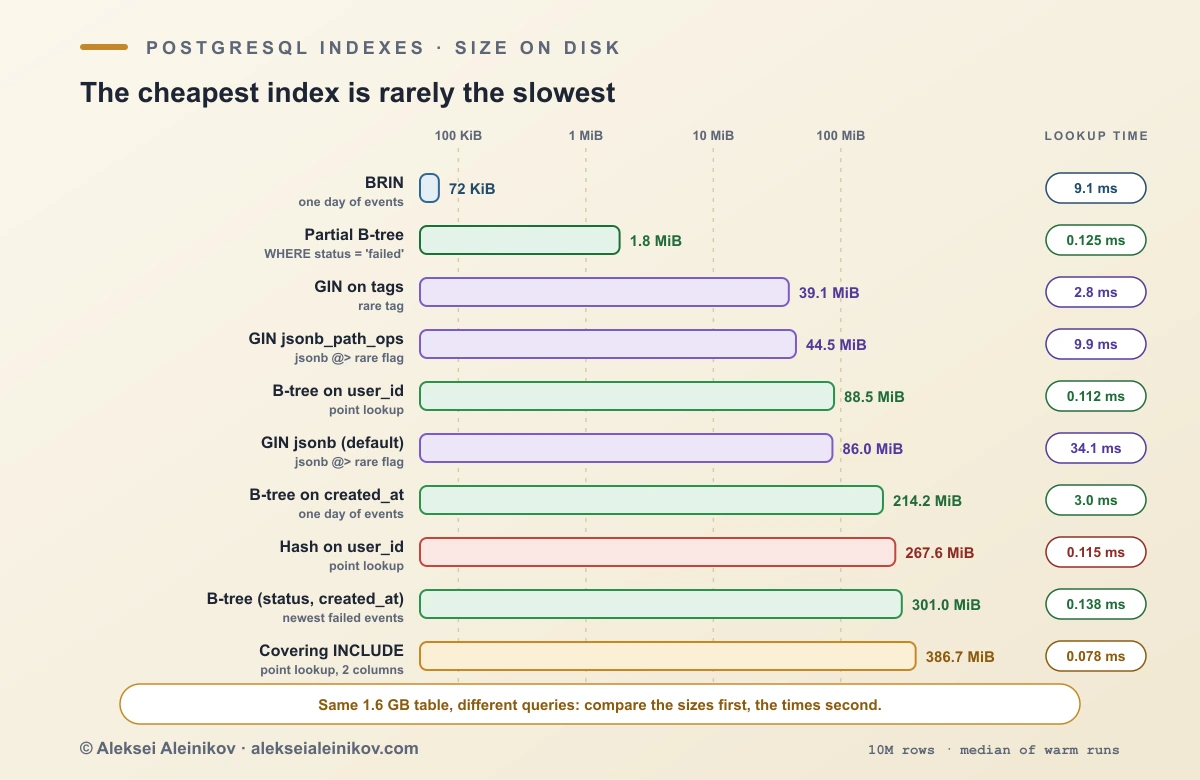
| B-tree | 0.112 ms | 14 | 88.5 MiB | 1.4 s |
That is about 1,400 times faster for one extra index of 88.5 MiB, built in 1.4 seconds on a 1.6 GB table. The index is small because B-tree stores each duplicate key once and keeps a list of row pointers (deduplication, since PostgreSQL 13). The same index on a time column, where every key is unique, is 214 MiB.
If a column appears in
WHERE,JOINorORDER BYof a query that runs often and returns few rows, a B-tree is almost always the answer. The other types exist for what B-tree does badly.
Hash index: no better than B-tree
A hash index stores a hash of the key and supports only equality. The theory says it should be faster for point lookups. In this test it was not:
user_id = ? |
Lookup | Index size | Build |
|---|---|---|---|
| B-tree | 0.112 ms | 88.5 MiB | 1.4 s |
| Hash | 0.115 ms | 267.6 MiB | 13.0 s |
Same speed, three times the space, nine times the build time, and no ranges or sorting. Hash indexes have been crash-safe since PostgreSQL 10, so they are not dangerous, but with duplicate-heavy keys they have no advantage over a B-tree that deduplicates. This is one data set, not a law: if your keys are long strings, hashing them may save space, so measure before dismissing it.
BRIN: a 72 KiB index for time-ordered data
A BRIN (block range index) stores a summary, normally the minimum and maximum value, for each range of table pages. A query skips every range whose summary cannot match. It is tiny, but it works only if the values in the column follow the physical order of the table, and an append-only created_at does exactly that: here pg_stats reports a correlation of 1.0 for created_at and about 0 for user_id.
CREATE INDEX ix_ts_brin ON events USING brin (created_at);The query: one day of events, 28,800 rows out of 10 million.
One day by created_at |
Time | Buffers | Index size | Build |
|---|---|---|---|---|
| No index | 635 ms | 208,376 | none | none |
| B-tree | 3.0 ms | 690 | 214.2 MiB | 1.7 s |
| BRIN (default range of 128 pages) | 9.1 ms | 785 | 72 KiB | 0.2 s |
BRIN (pages_per_range = 32) |
8.2 ms | 683 | 232 KiB | 0.2 s |
B-tree is three times faster, and BRIN is about 3,000 times smaller. For a table that grows by billions of rows, that is the difference between an index that fits in memory and one that does not, and a BRIN index can be rebuilt in a fraction of a second. If your queries are always “the last day” or “last month”, BRIN is the cheap choice. If one lookup must return in under a millisecond, use B-tree. A smaller pages_per_range makes the index slightly larger and sharper.
Partial indexes: index only the rows that matter
A partial index has a WHERE clause and contains only the rows that match. It is the cheapest optimisation in this article because many queries care about a small, well-defined slice: unprocessed jobs, failed payments, active sessions.
CREATE INDEX ix_failed_ts ON events (created_at) WHERE status = 'failed';
SELECT id, created_at FROM eventsWHERE status = 'failed' ORDER BY created_at DESC LIMIT 50;| Newest 50 failed events | Time | Index size | Build |
|---|---|---|---|
| No index | 177 ms | none | none |
Full index (status, created_at) |
0.138 ms | 301.0 MiB | 3.5 s |
Partial index WHERE status = 'failed' |
0.125 ms | 1.8 MiB | 0.2 s |
Failed events are 0.85% of the rows. The partial index answers the query as fast as the full one and is about 160 times smaller, builds in a fraction of the time, and costs almost nothing on writes because 99% of inserts never touch it. The rule: the query’s WHERE must imply the index’s WHERE, so write the condition the same way in both. A parameter such as status = $1 can keep the planner from proving the match in a generic plan, so confirm with EXPLAIN that the partial index is used.
Covering indexes: faster, but only on a clean table
An index-only scan answers a query from the index alone, without visiting the table. INCLUDE (PostgreSQL 11 and later) adds extra columns to the index for exactly that purpose.
CREATE INDEX ix_user_cov ON events (user_id) INCLUDE (created_at, status);SELECT created_at, status FROM events WHERE user_id = 424242;| Covering index vs plain B-tree | Time | Buffers | Index size |
|---|---|---|---|
Plain B-tree on user_id |
0.109 ms | 14 | 88.5 MiB |
| Covering, table just vacuumed | 0.078 ms | 9 | 386.7 MiB |
| Covering, after updating 1% of the rows | 0.109 ms | 13 | 386.7 MiB |
Covering, after VACUUM |
0.079 ms | 9 | 386.7 MiB |
Two lessons here. First, the gain is real but modest (1.4 times) while the index is 4.4 times bigger: for a query that returns ten rows, a plain B-tree is already good. In theory a covering index pays off more when a query returns many rows from one index range and every heap fetch counts; measure that on your own data. Second, an index-only scan still checks the visibility map to see whether a page is all-visible, and an UPDATE clears those bits. After touching 1% of the rows, spread over every page, the advantage was gone until VACUUM ran again. Autovacuum normally does this for you; the benchmark turns it off to make the effect visible.
Multicolumn indexes and skip scan in PostgreSQL 18
A multicolumn B-tree sorts by the first column, then the second within each first value, so the order of the columns matters. Before PostgreSQL 18, a query that filtered only on the second column could not use such an index efficiently. PostgreSQL 18 adds skip scan, which jumps through the distinct values of the leading column.
CREATE INDEX ix_status_ts ON events (status, created_at);-- no filter on status at all:SELECT count(*) FROM eventsWHERE created_at >= '2025-02-12' AND created_at < '2025-02-12 01:00';One hour by created_at |
Time | Buffers | Plan |
|---|---|---|---|
| No index | 233 ms | 210,460 | Seq Scan |
(status, created_at) index |
0.246 ms | 72 | Index Only Scan, Index Searches: 11 |
EXPLAIN now reports Index Searches: 11 descents through the index instead of one, which is still tiny. Skip scan makes an index you already have more useful. It works when the skipped column has few distinct values (five statuses here). With millions of distinct leading values it degrades, so it does not replace a dedicated index on the column you filter by.
GIN: when a row contains many values
A GIN (generalized inverted index) maps each element to the rows that contain it, like the index at the back of a book. It is the index for arrays, jsonb, full-text search (tsvector) and, with the pg_trgm extension, LIKE '%text%'.
CREATE INDEX ix_tags ON events USING gin (tags);CREATE INDEX ix_payload ON events USING gin (payload jsonb_path_ops);
SELECT count(*) FROM events WHERE tags @> ARRAY['rare'];SELECT count(*) FROM events WHERE payload @> '{"beta": true}';| Query | Matches | No index | GIN | Index size |
|---|---|---|---|---|
| Array, rare tag | 1,042 rows | 360 ms | 2.8 ms (129x) | 39.1 MiB |
| Array, common tag | 99,778 rows (1%) | 364 ms | 113 ms (3.2x) | 39.1 MiB |
jsonb @> rare flag |
5,064 rows | 353 ms | 34.1 ms (10x) with default ops | 86.0 MiB |
jsonb @> rare flag |
5,064 rows | 353 ms | 9.9 ms (36x) with jsonb_path_ops |
44.5 MiB |
jsonb @> country and plan |
250,512 rows (2.5%) | 399 ms | 347 ms (1.1x) default, 262 ms (1.5x) jsonb_path_ops |
86.0 / 44.5 MiB |
Three things to take from this:
- Selectivity decides everything. GIN shines when the match is rare (129 times faster) and barely helps when the match is 2.5% of the table, because the heap pages still have to be read. An unselective containment query is a data-modelling signal, not an index problem.
- For
jsonb, tryjsonb_path_ops. It is about half the size and faster on@>containment, at the cost of not supporting the key-existence operators (?,?|,?&). - Parallel builds are new. PostgreSQL 18 can build a GIN index with parallel workers: 3.8 s with four workers against 14.4 s serial on the
tagsindex, 3.8 times faster, which matters when you rebuild on a large table.
GiST and SP-GiST: for shapes and ranges
I did not benchmark these on this data, because the test table has no geometry or ranges, and inventing a benchmark would only measure my schema. GiST is a framework for balanced-tree indexes over data that is not linearly ordered: geometric types (PostGIS uses it), range types, and nearest-neighbour search (ORDER BY location <-> point). It also backs exclusion constraints such as “no two bookings of the same room overlap”. SP-GiST supports space-partitioned structures like quad-trees and radix tries, useful for unbalanced data such as IP addresses or phone-number prefixes. If your query uses &&, <-> or @> on shapes or ranges, start here.
When the planner ignores your index
The most common index mistake is not choosing the wrong type, it is writing a query the index cannot serve. Two cases measured on the same table:
One day by created_at or a status filter |
Plan | Time |
|---|---|---|
created_at >= ... AND created_at < ... |
Index Scan | 3.0 ms |
created_at::date = '2025-04-01' |
Seq Scan | 329 ms |
Same, with an expression index on (created_at AT TIME ZONE 'UTC')::date |
Index Scan | 2.7 ms |
status = 'done' (70% of rows), index on status |
Seq Scan | 263 ms |
status = 'archived' (0.15% of rows), same index |
Index Scan | 20.9 ms |
Wrapping an indexed column in a function or a cast makes the index unusable, so rewrite the condition as a range, or index the expression. Note that timestamptz::date depends on the session time zone and so cannot be indexed directly: the expression index uses AT TIME ZONE 'UTC'. And when a query matches most of the table, the planner is right to skip the index: reading 70% of a table through an index is slower than a sequential scan.
The write tax: every index costs on every insert
Reads are only half of the bill. Every insert must add an entry to every index on the table. I inserted 1 million rows into an empty table with a primary key and then 0, 1, 3 and 5 more indexes:
| Secondary indexes | Insert 1M rows | Compared with primary key only |
|---|---|---|
| 0 | 1.9 s | 1.0x |
1 (B-tree on user_id) |
4.3 s | 2.3x |
3 (adds created_at and (status, created_at)) |
5.8 s | 3.1x |
5 (adds GIN on tags and on payload) |
12.1 s | 6.4x |
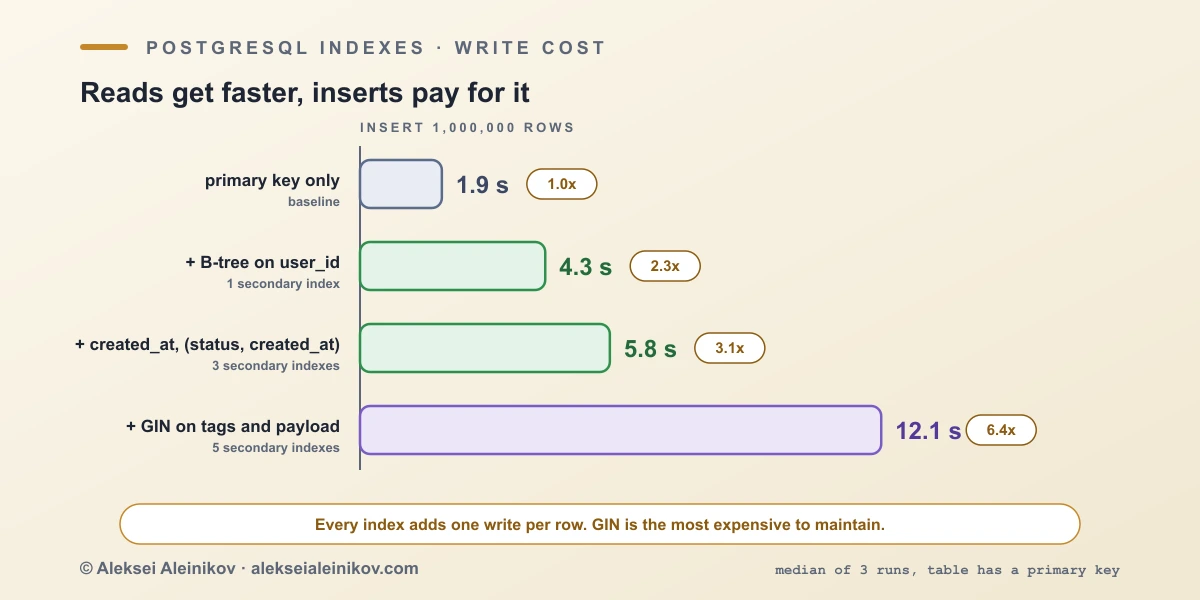
The jump from 3 to 5 indexes, more than doubling the time, is the two GIN indexes: they are the most expensive to maintain, and by default PostgreSQL buffers GIN updates in a pending list to soften that. Indexes also slow UPDATE (when an indexed column changes) and VACUUM, and take memory and disk. An index you do not use is pure cost.
Random UUID keys: a hidden index cost
A primary key is an index too, and its type decides how the B-tree grows. A random UUIDv4 lands anywhere in the tree, so inserts touch pages all over it and split them. A UUIDv7 starts with a timestamp, so new keys arrive in order at the right edge, like a sequence. PostgreSQL 18 has a built-in uuidv7() for this. I inserted 5 million rows into a table with each kind of primary key:
| Primary key | Insert 5M rows | Primary key size |
|---|---|---|
UUIDv4 (gen_random_uuid()) |
12.9 s | 191 MiB |
UUIDv7 (uuidv7()) |
9.6 s | 150 MiB |
The time-ordered key inserted 1.3 times faster and produced an index about a fifth smaller. These tables fit in memory, so the gap is likely to widen once the index no longer does, because random keys then miss the cache on every insert. UUIDv7 also reveals the creation time inside the id, which matters if the id is public. A bigint sequence is smaller still (8 bytes against 16).
How to find unused and missing indexes
Do not guess, ask the statistics. Indexes that were never scanned since the last statistics reset (check pg_stat_database.stats_reset to see how long the counters have been collecting):
SELECT s.relname AS table_name, s.indexrelname AS index_name, pg_size_pretty(pg_relation_size(s.indexrelid)) AS size, s.idx_scanFROM pg_stat_user_indexes sJOIN pg_index i ON i.indexrelid = s.indexrelidWHERE s.idx_scan = 0 AND NOT i.indisunique AND NOT i.indisprimaryORDER BY pg_relation_size(s.indexrelid) DESC;Skip unique and primary-key indexes, they enforce constraints. Observe over a full business cycle (month-end jobs), and remember that each replica keeps its own counters. For missing indexes, look at tables with many rows read by sequential scans:
SELECT relname, seq_scan, seq_tup_read, idx_scan, n_live_tupFROM pg_stat_user_tablesWHERE seq_scan > 0ORDER BY seq_tup_read DESC LIMIT 10;Then find the queries behind them with pg_stat_statements and check the plan with EXPLAIN (ANALYZE, BUFFERS). On a live system, always build with CREATE INDEX CONCURRENTLY, which does not block writes (it cannot run inside a transaction, and a failed build leaves an INVALID index that you must drop), and remove an index with DROP INDEX CONCURRENTLY. An index that has bloated after many updates and deletes can be rebuilt without blocking writes with REINDEX INDEX CONCURRENTLY.
What changed in PostgreSQL 18 and 19 for indexes
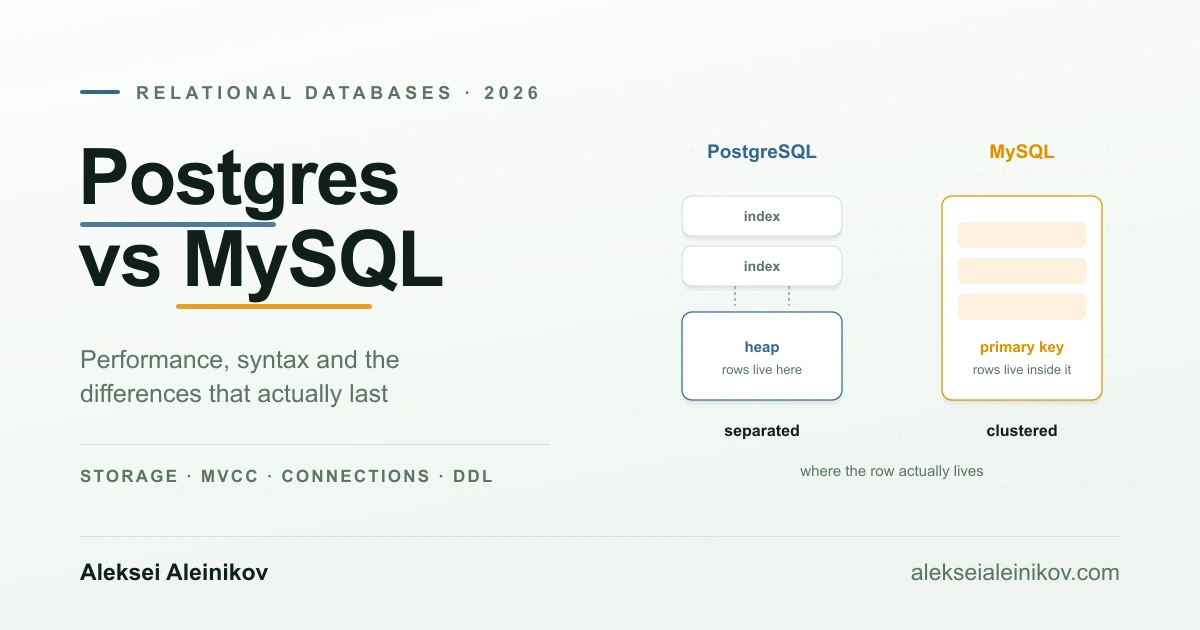
PostgreSQL 18, the current major release, brought four index-related changes used in this article: skip scan for multicolumn B-tree indexes, parallel GIN builds, Index Searches plus automatic BUFFERS in EXPLAIN ANALYZE, and the built-in uuidv7() for index-friendly keys. It also added the new asynchronous I/O subsystem, which speeds up the sequential and bitmap scans that these indexes are competing with. PostgreSQL 19 is at the release candidate stage, and PostgreSQL 14 reaches end of life on 12 November 2026, so now is a good moment to check which version your own database runs. The official release notes have the full list, and if you are still deciding on a database, Postgres vs MySQL in 2026 compares the two.
A practical checklist
- Write the query first and look at its plan with
EXPLAIN (ANALYZE, BUFFERS). - Start with a B-tree on the columns in
WHEREandJOIN, equality columns first. - If only a small slice of rows matters, make it partial.
- If the table is huge, append-only and time-ordered, try BRIN before B-tree.
- For arrays,
jsonband text search, use GIN, and check that the matches are selective. - Add
INCLUDEonly for hot queries returning many rows, and keepVACUUMrunning. - Build with
CREATE INDEX CONCURRENTLY, and reviewpg_stat_user_indexesevery quarter. - Index the referencing column of every foreign key you join or delete by: PostgreSQL does not create it for you.
- For UUID primary keys, prefer UUIDv7 over random UUIDv4 on PostgreSQL 18.
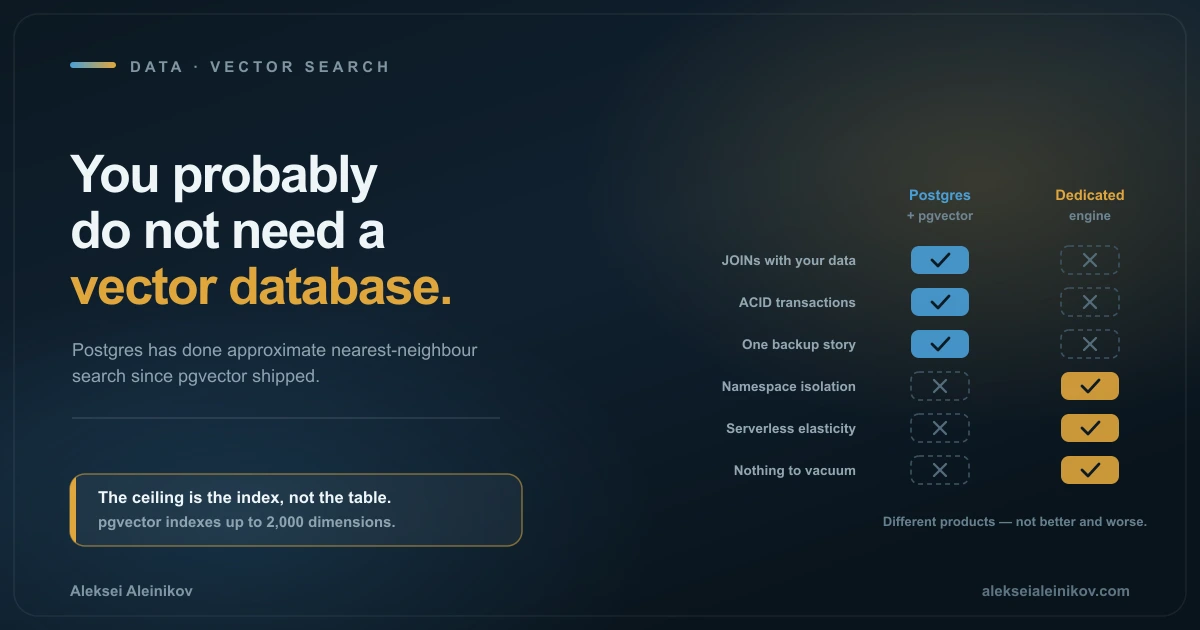
For query-level habits that go together with this, see SQL Query Optimization in 2026, and for the case of vectors inside Postgres, Do You Need a Vector Database?.
The Bottom Line
Use B-tree by default and measure before reaching for anything else. Make it partial when only a slice of rows matters, use BRIN when the table is huge and time-ordered, and use GIN when you search inside arrays and documents and the matches are rare. Be careful with the rest: a hash index was no faster, a covering index was 4.4 times bigger for a 1.4 times gain, and every extra index slowed inserts. The best index is the smallest one that answers your query, and the second best is the one you deleted.
Indexes are not free speed. Each one is a trade between read time, disk, memory and write time, so choose the type from the shape of the query and keep only the ones the statistics show are used.
Postgres, PostgreSQL and the Slonik Logo are trademarks or registered trademarks of the PostgreSQL Community Association of Canada.

From the community
Discussion on Mastodon & Bluesky
Replies to this article from the open web, pulled in live. No ads, no tracking scripts.
Reply there — it shows up here automatically.