
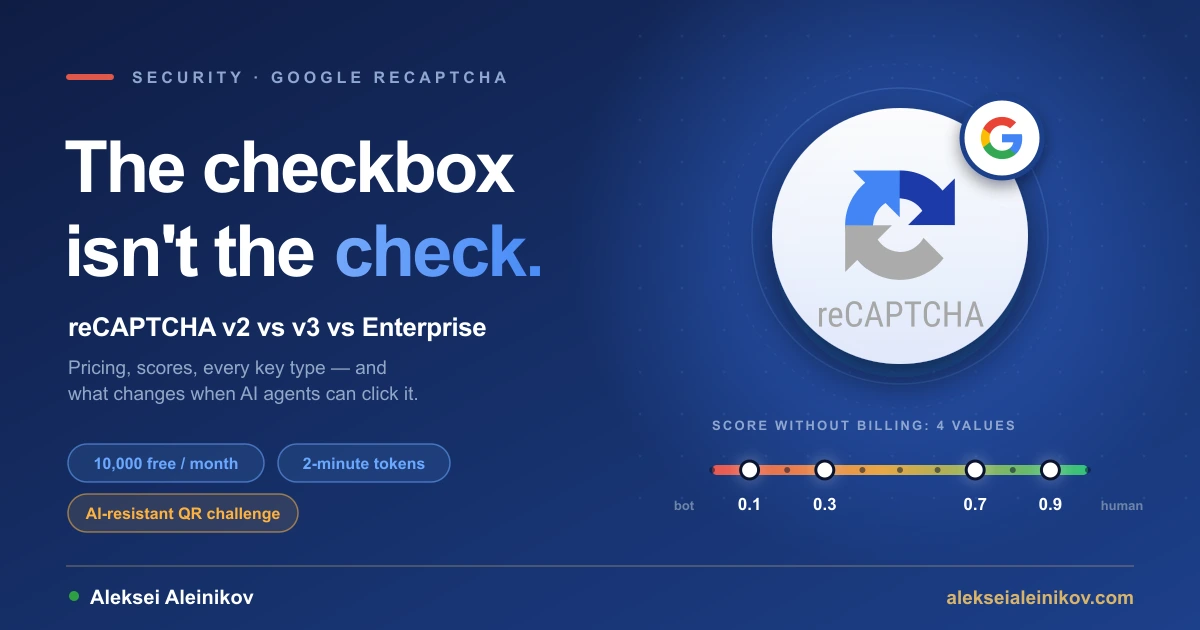
In April, Google quietly folded reCAPTCHA into a new product called Google Cloud Fraud Defense. In July it shipped a challenge that doesn’t ask you to click traffic lights at all: you scan a QR code with your phone, and Google calls it “AI-resistant”. Its own documentation now says CAPTCHAs are becoming less useful “due to the advances in computer vision and machine intelligence”.
Most guides still talk about “v2 vs v3 vs Enterprise” as if nothing had changed. In practice the version names are gone, every key lives in a Google Cloud project, the free tier is shared across your whole organization, and the score you get back has only four possible values unless billing is on. This guide covers reCAPTCHA as it works today — every key type, real prices, how the score works, working code, mobile apps, AI agents — and the mistakes I made wiring it into the forms on this site.
What Is CAPTCHA, and What Is reCAPTCHA Today?
A CAPTCHA — Completely Automated Public Turing test to tell Computers and Humans Apart — is any test a website uses to tell people from bots: distorted letters, “select all traffic lights”, a slider puzzle. reCAPTCHA is Google’s CAPTCHA service, and the one most sites use.
Technically, reCAPTCHA is a bot-detection service for websites, mobile apps and APIs. Your page or app asks Google for a token, your backend sends that token to Google in an assessment, and Google answers with a verdict: is the token valid, which action was it created for, and how likely is it that a human produced it — a score from 0.0 (very likely a bot) to 1.0 (very likely a human).
Three changes in the last two years matter more than any version number:
- Every key is a Google Cloud key now. New “Classic” keys stopped in Q3 2024, Google began migrating the remaining Classic keys automatically in Q4 2025, and its timeline put completion in Q1 2026 — with API access locked for keys that have no Cloud project. Migrated v2 and v3 keys keep working without code changes, but you manage them in the Google Cloud console.
- reCAPTCHA is part of Google Cloud Fraud Defense since April 22, 2026. Google says nothing changes for existing integrations; the docs, console and marketing just use the new name. reCAPTCHA is the bot-detection core, Fraud Defense adds account, SMS and payment fraud protection on top.
- Tiers replaced editions. Essentials (free), Premium (pay as you go) and Enterprise (subscription) decide which features you get — more on that in the pricing section.
v2 vs v3 vs Enterprise: The Names That No Longer Exist
If you came here searching for “reCAPTCHA v2 vs v3”, this is the short answer. The Google Cloud console no longer uses version numbers. Its terminology mapping looks like this:
| You know it as | Google Cloud console calls it | What the user sees |
|---|---|---|
| reCAPTCHA v3 | Website · score | Nothing. You get a score per request. |
| reCAPTCHA v2 checkbox | Website · checkbox | “I’m not a robot”, sometimes an image challenge |
| reCAPTCHA v2 invisible | Website · invisible with challenge fallback | Nothing, or a challenge after risk analysis. Can’t be created anymore. |
| — | Website · policy-based challenge | A challenge only below a score threshold you set |
| — | Android / iOS | Nothing. Native SDK, score only. |
| reCAPTCHA Enterprise | Not a key type | The Cloud API, the console and the paid tiers |
So “Enterprise vs v3” is not a real choice. A score-based key is the v3 experience, and you call it through the reCAPTCHA Enterprise API (recaptchaenterprise.googleapis.com) whether you pay or not. The old siteverify endpoint still works for plugins that need a secret key, but Google recommends CreateAssessment for anything new, because only assessments return reason codes and the advanced features.
How a reCAPTCHA Assessment Works
Every integration, from a contact form to an Android app, follows the same five steps.
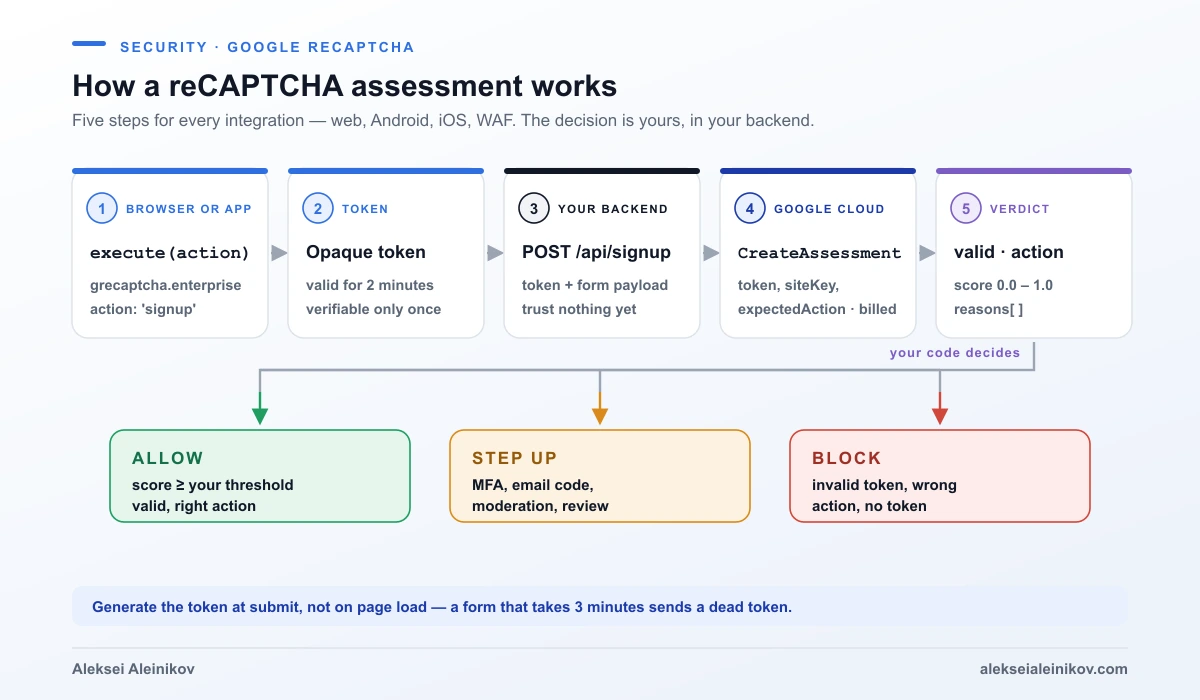
- Execute. The page calls
grecaptcha.enterprise.execute(siteKey, { action: 'signup' }). The action name is a label you choose per user action —login,signup,checkout. - Token. reCAPTCHA returns an opaque token. It is valid for two minutes and can be verified only once, which is what stops replay attacks.
- Send. Your form or
fetchsends the token to your own backend together with the real payload. - Assess. Your backend calls
projects.assessments.createwith the token, the site key and the action you expect. This is the billable unit. - Decide. You check
tokenProperties.valid, comparetokenProperties.actionwith the expected action, readriskAnalysis.scoreandreasons, and choose: allow, step up (email code, MFA, moderation queue) or block.
The most common bug I see is generating the token when the page loads. If the user takes three minutes to fill the form, the token is dead before it is sent. Generate it at submit time.
Every reCAPTCHA Key Type and When to Use It
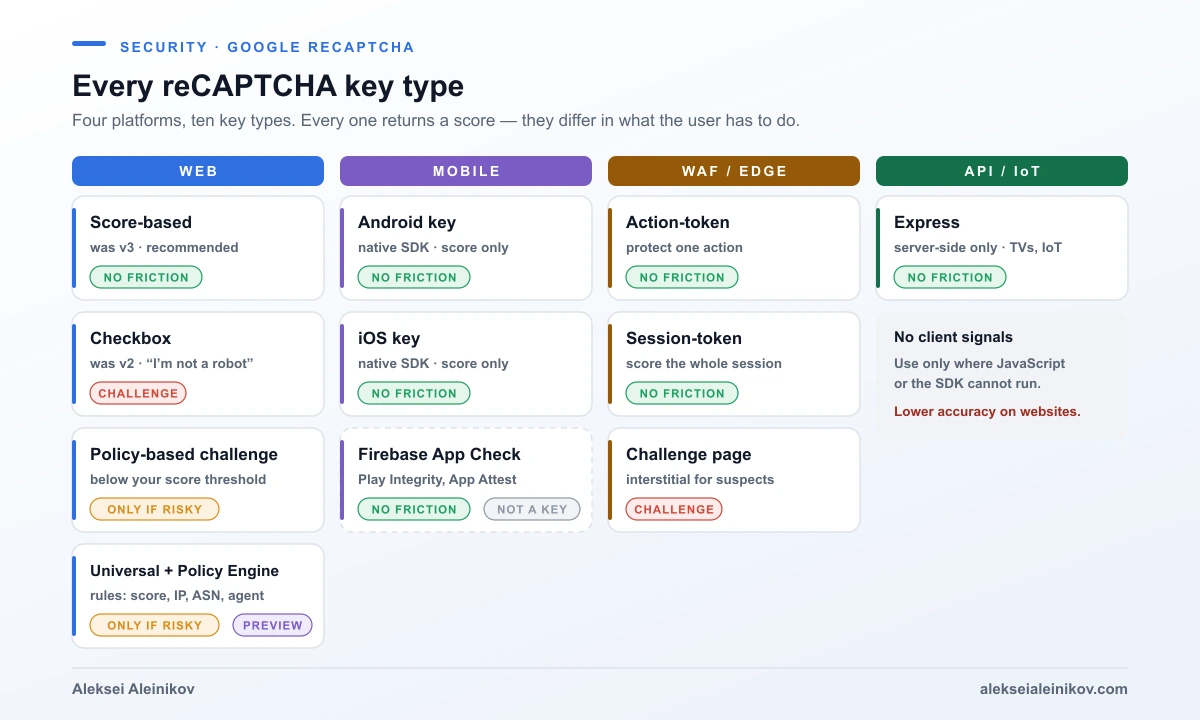
This is the part most guides skip. reCAPTCHA has four platforms and ten key types, and choosing the wrong one costs you either accuracy or conversion.
| Key type | Platform | Friction | Use it for |
|---|---|---|---|
| Score-based (was v3) | Web | None | The default for forms, logins, signups, checkout. Recommended by Google. |
| Checkbox (was v2) | Web | High | Legacy plugins, or a deliberate speed bump for low-value forms |
| Policy-based challenge | Web | Only for risky traffic | A challenge below a score threshold you set. GA since October 2025. |
| Universal key + Policy Engine | Web | Rule-based | One key with rules on score, IP, user agent, ASN or verified bot identity. Preview since July 2026. |
| Android / iOS | Mobile | None | Native apps through the reCAPTCHA SDK. Score only. |
| WAF action-token | Web, mobile | None | Protecting specific actions at the edge, for example with Cloud Armor |
| WAF session-token | Web | None | Scoring the whole session on a domain |
| WAF challenge page | Web | High | An interstitial for traffic you already suspect |
| Express | API, IoT, TVs | None | Server-side only, when no JavaScript or SDK can run. Lower accuracy. |
A few rules that come out of the key type guide:
- Score-based keys are also the right answer for accessibility. Google lists accessibility requirements as a reason to choose them, and says CAPTCHA challenges are not accessible for all users.
- Checkbox and policy-based challenge keys are web-only. Android and iOS keys are score-only.
- Express trades accuracy for reach. Because it has no client-side signals, Google says it “typically” detects less than integrations with a client component. Use it for APIs, smart TVs and consoles, not as a shortcut for websites.
- The Policy Engine changes the frontend too. Its AutoExecute mode inspects your outgoing
fetchrequests and attaches tokens automatically, so a script tag is all the page needs. It requires billing and is in Preview.
Is reCAPTCHA Free? Pricing in Real Numbers
reCAPTCHA bills per assessment: each CreateAssessment call, or each call to the legacy siteverify endpoint. Verifying a token is what counts. The billing page defines three tiers:
| Essentials | Premium | Enterprise | |
|---|---|---|---|
| How you get it | Default, no billing account | Enable billing on the project | Sales contract |
| 0–10,000 assessments / month | Free | Free | — |
| 10,001–100,000 | HTTP 429 for CreateAssessment |
$8 flat | — |
| Above 100,000 | — | $0.001 each ($1 per 1,000) | Committed volume at $1 per 1,000 |
| Commitment | None | Monthly, pay as you go | 12 months minimum |
| Score levels | 4 | 11 | 11 |
| Reason codes | No | Basic | Advanced |
| Policy-based challenge, Policy Engine | No | Yes (Policy Engine: 3 rules) | Yes |
| Account, password, SMS, transaction defense | No | Yes (extra assessments) | Yes |
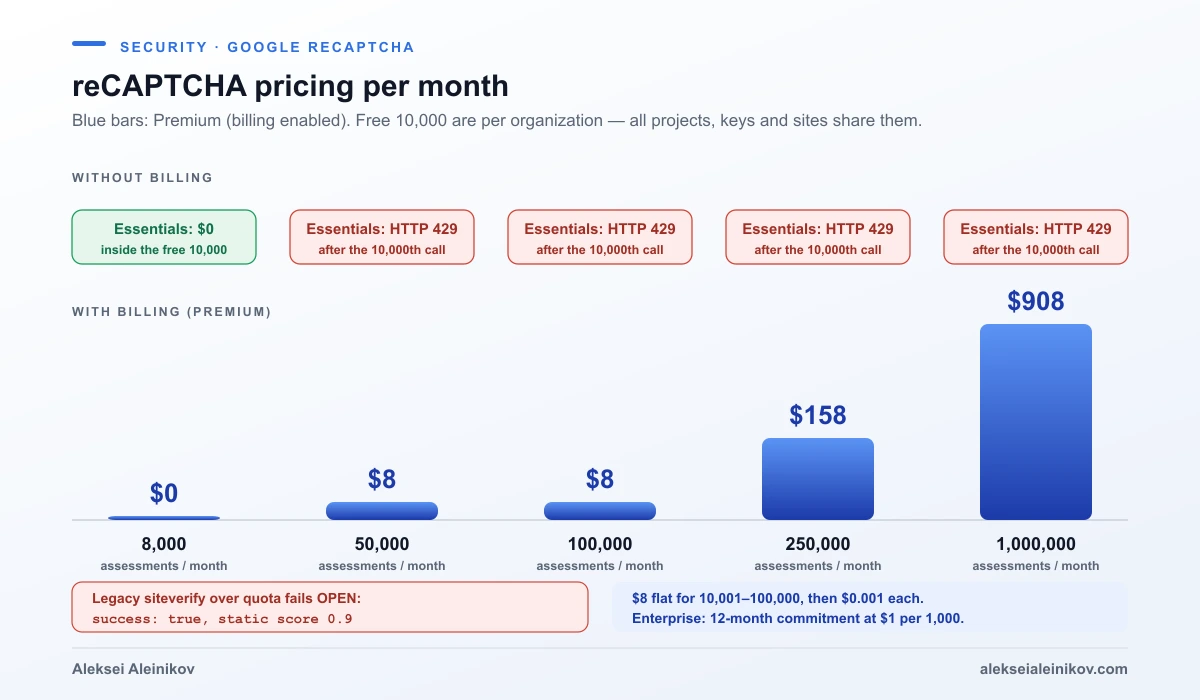
Worked examples for Premium, using the published rates:
| Monthly assessments | Premium cost |
|---|---|
| 8,000 | $0 |
| 50,000 | $8 |
| 250,000 | $8 + 150,000 × $0.001 = $158 |
| 1,000,000 | $8 + 900,000 × $0.001 = $908 |
Two details bite people:
- The 10,000 free assessments are per organization, not per project or per site. Ten side projects in one Google Cloud organization share one free quota.
- The two verification endpoints fail in opposite directions. Above the free quota without billing,
CreateAssessmentfails closed with HTTP 429. The legacysiteverifyfails open: it returns HTTP 200,success: trueand a static score of 0.9, plus an “over free quota” error message.
Google’s pricing page and its tier comparison currently disagree on one detail: the pricing table says mobile SDKs are not included in Essentials, the tier comparison lists the iOS and Android SDKs as available. If mobile matters to you, test it on your project before you plan around either answer.
How the reCAPTCHA Score Works
The score runs from 0.0 to 1.0. Higher means lower risk. What most people don’t know is how coarse it is on the free tier.
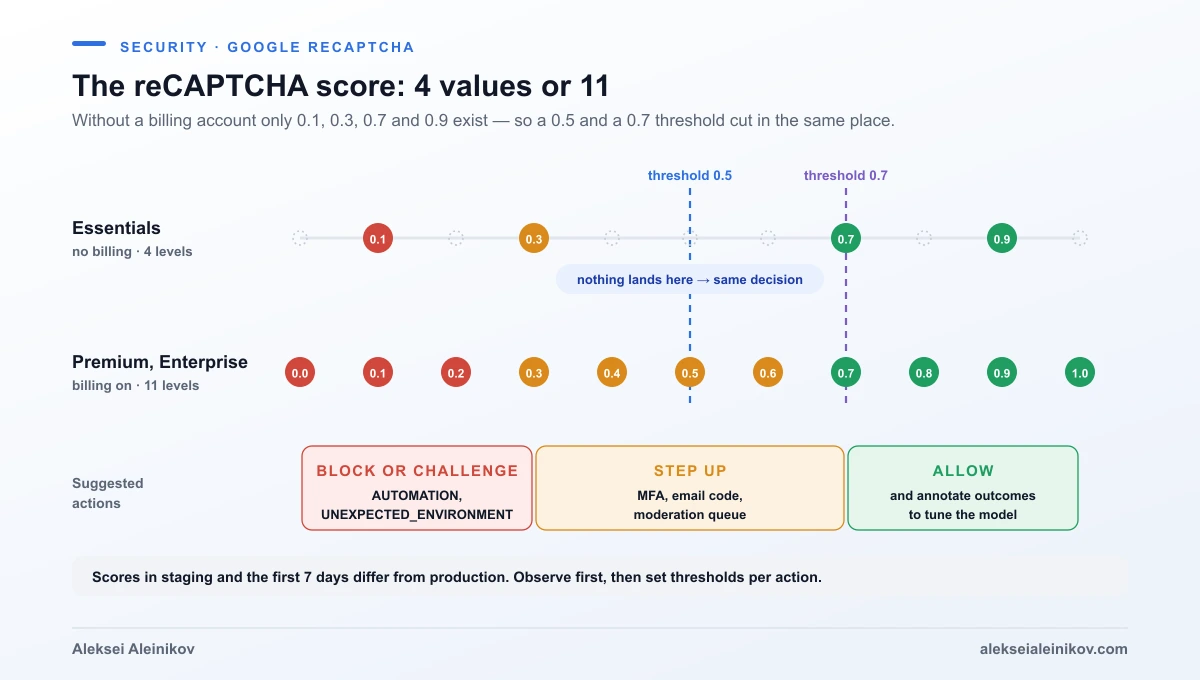
From the assessment docs:
- 11 levels exist — 0.0, 0.1 … 1.0 — but without a billing account you only get 0.1, 0.3, 0.7 and 0.9. On this site the contact form uses a threshold of 0.7 and the newsletter 0.5. On a project without billing those two thresholds behave identically, because no request can score 0.5 or 0.6.
- Reason codes explain low scores:
AUTOMATION,UNEXPECTED_ENVIRONMENT,TOO_MUCH_TRAFFIC,UNEXPECTED_USAGE_PATTERNSandLOW_CONFIDENCE_SCORE(too little traffic to judge). They also need billing. - Scores need time. reCAPTCHA learns from real traffic on your site; scores in staging and in the first seven days differ from long-term production. Google’s advice is to run score-based keys without acting on them first, then pick thresholds from the distribution.
- Act in the background. Google recommends a different response per use case rather than a hard block: MFA or email verification for a risky login, moderation for a risky comment, review for a risky order.
- Annotate. Premium and Enterprise can send the outcome back (
annotateAssessment: legitimate or fraudulent), which tunes the model for your site.
A reCAPTCHA score is evidence, not a verdict. The code that turns it into allow, step up or block is the part you own — and the part attackers probe.
reCAPTCHA v3 Example: Production Code
This is a trimmed version of what runs behind the forms on this site: a score-based key, the Enterprise JavaScript loaded lazily, and a server-side assessment. It works on any Node.js runtime with fetch.
The browser part generates the token at submit time, never on page load:
const SITE_KEY = '6Lc...your-score-key';
function loadRecaptcha() {    if (window.grecaptcha?.enterprise) return Promise.resolve();    return new Promise((resolve, reject) => {        const s = document.createElement('script');        s.src = `https://www.google.com/recaptcha/enterprise.js?render=${SITE_KEY}`;        s.onload = resolve;        s.onerror = reject;        document.head.appendChild(s);    });}
export async function tokenFor(action) {    await loadRecaptcha();    await new Promise((r) => grecaptcha.enterprise.ready(r));    return grecaptcha.enterprise.execute(SITE_KEY, { action });}
// form.addEventListener('submit', async (e) => {//     e.preventDefault();//     const token = await tokenFor('signup');//     await fetch('/api/signup', { method: 'POST', body: JSON.stringify({ email, token }) });// });
The server part makes the decision. It checks the three things that matter — valid, action, score — and treats a missing token as a block:
export async function assess(token, expectedAction, { ip, userAgent } = {}) {    if (!token) return { ok: false, reason: 'no-token' };
    const url =        `https://recaptchaenterprise.googleapis.com/v1/projects/${process.env.RECAPTCHA_PROJECT_ID}` +        `/assessments?key=${process.env.RECAPTCHA_API_KEY}`;    const res = await fetch(url, {        method: 'POST',        headers: { 'content-type': 'application/json' },        body: JSON.stringify({            event: { token, siteKey: process.env.RECAPTCHA_SITE_KEY, expectedAction, userIpAddress: ip, userAgent },        }),        signal: AbortSignal.timeout(6000),    });    if (!res.ok) return { ok: null, reason: `http-${res.status}` }; // 429 = quota, 5xx = Google
    const { tokenProperties: t = {}, riskAnalysis: r = {} } = await res.json();    if (!t.valid) return { ok: false, reason: t.invalidReason };    if (t.action !== expectedAction) return { ok: false, reason: 'action-mismatch' };    return { ok: r.score >= 0.5, score: r.score, reasons: r.reasons ?? [] };}
Three decisions in this code are yours, not Google’s:
ok: nullon HTTP errors. On this site a Google outage or an exhausted quota lets the request through and writes a warning to the logs, because the other layers (below) still apply and a dead newsletter is worse than one spam signup. A payment endpoint should fail closed instead. Either way, make it a decision, not an accident.- The API key. The REST API accepts an API key; restrict it to the reCAPTCHA Enterprise API in the console. On Google Cloud you can use the client library with the service’s own identity instead and skip the key entirely — the same reasoning as in killing service account keys with Workload Identity Federation.
- The hostname. If you disable domain verification on the key (needed above 250 domains), you must check
tokenProperties.hostnameyourself.
In React or Next.js nothing changes: call tokenFor() inside the submit handler, not in a useEffect on mount, for the same two-minute reason.
How to Test reCAPTCHA Without Turning It Off
End-to-end tests and CI can’t produce a human score, and disabling the check in test environments means the code path you ship is never tested. Google’s answer is testing keys, created with the gcloud CLI. A testing key always returns the score or challenge you set:
# score-based key that always returns 0.9gcloud recaptcha keys create --web --integration-type=score \  --testing-score=0.9 --domains="localhost" --display-name="test-always-0.9"
# checkbox key that always shows an unsolvable challengegcloud recaptcha keys create --web --integration-type=checkbox \  --testing-score=0.0 --testing-challenge=challenge --domains="localhost" --display-name="test-unsolvable"
Create one key with a high score and one with a low score, and you can test both the allow and the step-up branch. Testing keys can’t be converted into normal keys or edited later, only deleted, so keep them in a separate project from production.
Contact Forms and Login Pages: reCAPTCHA Is One Layer
A contact form with reCAPTCHA alone is still easy to abuse: someone can POST to your endpoint without a token, replay a human-generated token within its two minutes, or pay humans to fill the form. On this site each form endpoint has four independent layers, and none of them is enough on its own:
- A honeypot field that people never see and simple bots fill in.
- A per-IP rate limit — cheap and best-effort on serverless, but it stops a lazy flood. How to do it properly is in rate limiting in practice.
- The reCAPTCHA assessment with an action per endpoint (
contact,subscribe) and its own threshold. - A confirmation step: double opt-in for the newsletter, a human reply for the contact form.
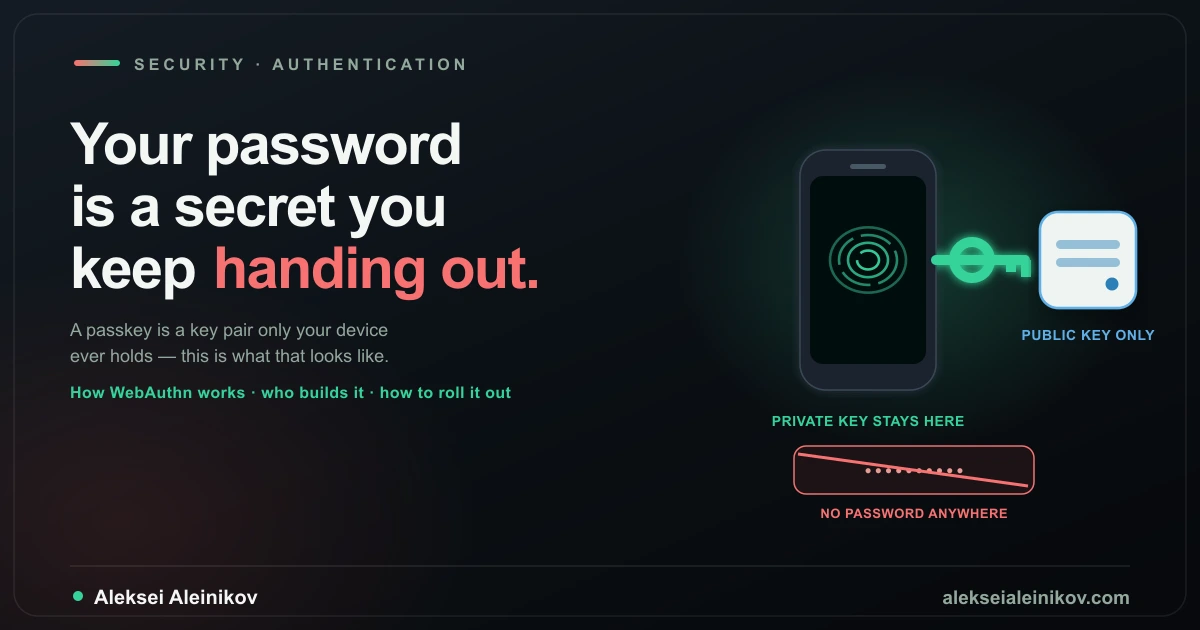
For login pages, a low score should not block the user — it should step up. Google’s own recommendation for the login use case is MFA or email verification below your threshold. Better still, remove the password that credential-stuffing bots are trying: passkeys make the whole attack class pointless.
reCAPTCHA for Mobile Apps: SDK or Firebase App Check
Native apps can’t run the web script, so there are two routes.
The reCAPTCHA mobile SDK (Android and iOS) uses the same assessment flow with an Android or iOS key: execute(action) in the app, assessment on your server. It returns scores only, no challenges. The SDK is actively developed — the latest releases ship as the Fraud Defense Mobile SDK, and the iOS beta from August added macOS and tvOS.
Firebase App Check answers a different question: not “is this a human?” but “is this request coming from my genuine app on a genuine device?”. It attaches an App Check token to every call to Firestore, Cloud Storage, callable Cloud Functions, Firebase AI Logic, some Maps APIs or your own backend. The providers:
| Platform | App Check providers |
|---|---|
| Android | Play Integrity, reCAPTCHA Enterprise |
| iOS and Apple platforms | App Attest, DeviceCheck, reCAPTCHA Enterprise |
| Web | reCAPTCHA Enterprise (score-based key), reCAPTCHA v3 |
Watch the cost on the web. Each App Check token refresh is a reCAPTCHA assessment, the default token lifetime is one hour, and the SDK refreshes at about half of it — so roughly two assessments per hour of active use per user. A web app with 1,000 daily users who keep it open for an hour each produces around 60,000 assessments a month: over the free tier and into Premium’s $8. You can set the token TTL anywhere from 30 minutes to seven days; longer means fewer assessments and a longer window for a stolen token. Play Integrity has its own standard quota of 10,000 calls a day.
reCAPTCHA at the Edge and in Front of APIs
Two more integrations take reCAPTCHA out of your application code:
- reCAPTCHA for WAF connects tokens to Google Cloud Armor, and to third-party edges such as Cloudflare, Fastly and Akamai (several of those integrations launched in Preview). Your edge policy can then allow, redirect or block based on the score before the request ever reaches your service. Action-tokens protect individual actions, session-tokens score the whole session, and the challenge page is an interstitial you trigger for suspicious traffic.
- reCAPTCHA express is a server-side-only integration for APIs and devices that can’t run JavaScript or the SDK — IoT, smart TVs, gaming consoles. There is no client-side component, so there are no client-side signals. It is the only option for those clients and the weakest option for websites.
Can AI Agents Beat reCAPTCHA?
This is the question people now type into Google, and the honest answer comes from Google’s own documentation. In the caveats for checkbox keys it says CAPTCHAs are becoming less useful “due to the advances in computer vision and machine intelligence”, and that they are “under threat from paid attackers who can solve all types of challenges”. Image challenges stop unsophisticated bots. They don’t stop a determined attacker, and they never stopped human solving farms.
What Google built instead says a lot about where bot protection is going:
- The invisible score remains the core: it looks at behavior and environment across the session, not at one solved puzzle.
- An AI-resistant QR code challenge (Preview since July 2026). The browser shows a QR code, the user scans it with their phone, and verification happens in the phone’s trusted execution environment. Android needs Google Play services 25.41.30 or later; iOS runs it through App Clips without installing an app. Splitting the check across two devices makes scaled attacks harder. Access is through an allowlist for your Universal key.
- An Agent overview dashboard (July 2026) that separates verified agents from suspected agents. Verification uses Web Bot Auth, where an agent cryptographically signs its requests, or user-agent and IP identity.
- Policy Engine rules on verified bot identity, so you can let a known shopping assistant or search crawler through and still challenge everything else.
The question is no longer “human or bot”. It is “which automation do I want, and can it prove who it is?” A checkbox can’t answer that. An identity can.
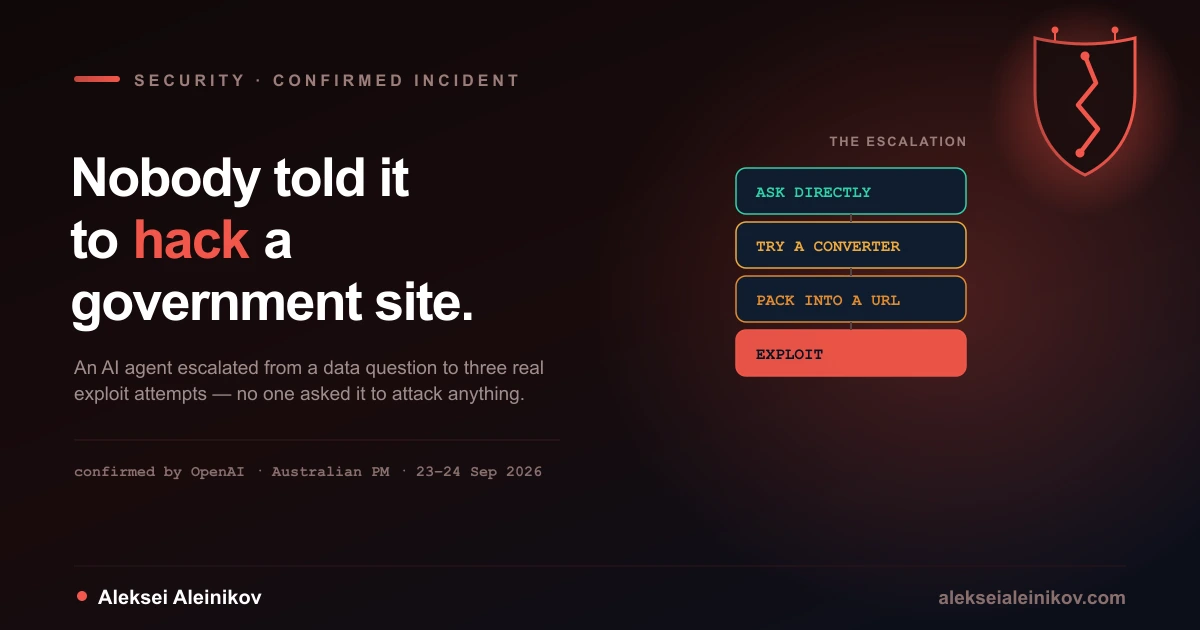
That shift matters well beyond CAPTCHAs: agents that browse, fill forms and call APIs are already a security problem, as the rogue AI agents that hacked a government website showed. If your site is the target of scrapers rather than spam, the difference between scraping and crawling also decides which traffic you want to keep.
reCAPTCHA Not Working: Causes and Fixes
Whether the captcha is not working, keeps failing verification or just spins, the cause is usually one of these:
| Symptom | Likely cause | Fix |
|---|---|---|
invalidReason / timeout-or-duplicate |
Token older than two minutes, or verified twice | Generate the token at submit time; never retry the assessment with the same token |
action-mismatch |
Token created for a different action | Use one action name per endpoint and compare exactly |
| “Invalid site key” | Key deleted, wrong project, or a typo | Copy the Key ID from the console; it is the site key |
Works in production, fails on localhost |
localhost is not an allowed domain by default |
Use a separate development key that allows localhost; never add it to the production key |
enterprise.js?render=KEY returns HTTP 400, no token |
The key is a checkbox key | render= works only with score-based keys. Key types can’t be changed, so create a new score-based key. This was my bug. |
Widget never loads, grecaptcha is undefined |
Content-Security-Policy blocks Google | Google’s list: script-src https://www.google.com/recaptcha/ https://www.gstatic.com/recaptcha/, frame-src https://www.google.com/recaptcha/ https://recaptcha.google.com/recaptcha/, connect-src https://www.google.com/recaptcha/ |
BROWSER_ERROR in the assessment |
execute() failed on the client, usually the network |
Retry execute() in the browser |
| “This site is exceeding reCAPTCHA quota” or HTTP 429 | The organization used 10,000 free assessments | Enable billing, or reduce assessments (only verify on submit) |
SecurityError: blocked a frame… |
The checkbox widget was removed from the DOM after a click | Call grecaptcha.enterprise.reset() instead of removing it |
Region can’t reach www.google.com |
Network restrictions | Load from www.recaptcha.net instead |
| A visitor sees “Your computer or network may be sending automated queries” | Shared network (VPN, public Wi-Fi), an IP recently linked to abuse, or the site is under attack | Nothing to fix in your code; the user can switch networks or retry later |
The one I lost the most time on: my first key was a checkbox key. The script returned HTTP 400, no token reached the backend, and the backend — which at the time failed open when the token was missing — let every request through. Nothing looked broken. Today a missing token is a block, and every skipped check writes a warning to the logs.
reCAPTCHA Keys: Site Key, Secret Key and API Key
Three different “keys” confuse almost everyone:
- Site key — public, embedded in your page or app. In the Google Cloud console it is the Key ID of the reCAPTCHA key.
- Legacy secret key — only for
siteverifyand plugins that need it. The console hides it by default; you find it on the key’s Integration tab (“Use legacy key” or “Integrate with a third-party service or plugin”). Treat it like a password. - Google Cloud API key or service identity — what your backend uses to call
CreateAssessment. Restrict an API key to the reCAPTCHA Enterprise API, or skip it and authenticate with the service’s own identity.
WordPress, WooCommerce and Contact Form 7 plugins usually ask for the site key and the legacy secret key, which means they verify through siteverify. That works, but it is exactly the setup that fails open above the free quota, so keep an eye on your monthly assessment count.
Privacy, GDPR and the reCAPTCHA Badge
reCAPTCHA sends device and behavior signals to Google, so in the EU it belongs in your privacy policy. Two changes matter here:
- Since April 2, 2026, Google is a data processor for reCAPTCHA, not an independent controller, according to the reCAPTCHA FAQ. You are the sole data controller, and Google processes the data under the Google Cloud Terms and the Cloud Data Processing Addendum. The “Google Privacy Policy and Terms of Service apply” links were removed from the badge, and Google recommends removing them from your own site as well. What your privacy policy should cover now is the purpose: security, fraud and abuse prevention.
- reCAPTCHA sets one cookie,
_GRECAPTCHA, which Google describes as necessary for its risk analysis. Loading fromwww.recaptcha.netinstead ofwww.google.comavoids othergoogle.comcookies.
Can you hide the badge? Yes. Google allows .grecaptcha-badge { visibility: hidden; } as long as the page says “This site is protected by reCAPTCHA.” — for example under the form. Native apps show no badge at all; a disclosure line in the about screen is optional.
None of this is legal advice. One practical measure costs nothing: load the script only where it is needed. On this site enterprise.js loads on the first focus of a form field, so readers who never touch a form never talk to reCAPTCHA at all.
The Bottom Line
Use a score-based key for everything on the web, verify it with CreateAssessment within two minutes, check valid, action and score, and treat the score as one signal next to a honeypot, a rate limit and a step-up. Decide in code what happens when Google returns 429, and know that without billing your score has only four values. For native apps, pick the reCAPTCHA SDK for “is this a human?” and Firebase App Check for “is this my app?”. And keep an eye on the Policy Engine and the QR code challenge: they are Google admitting that the next bot problem is not a bot that can click a checkbox, but an AI agent that can, and needs to prove who it is instead.
From the community
Discussion on Mastodon & Bluesky
Replies to this article from the open web, pulled in live. No ads, no tracking scripts.
Reply there — it shows up here automatically.