
A password is a secret two parties have to keep at the same time: you, and every server you ever typed it into. That is the entire design flaw. It does not matter how long or random the string is — if it can be typed, it can be phished, and if it is stored anywhere else, it can be breached and reused.
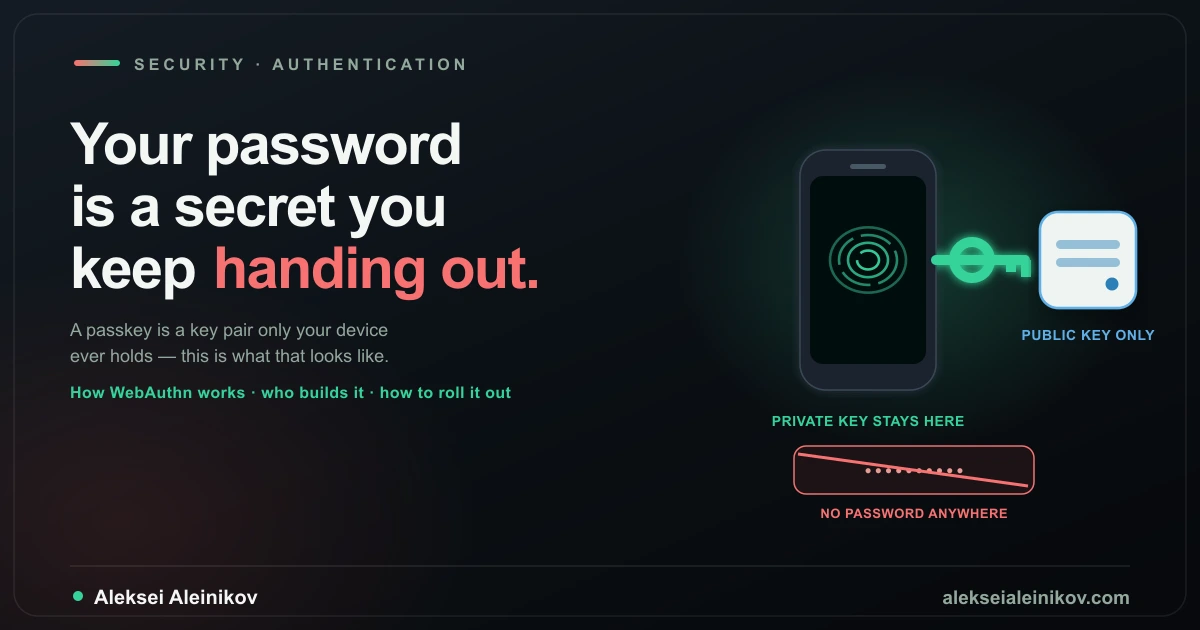
A passkey is not a stronger secret. It is not a secret at all, on the server side. It is one half of a key pair, and the half the server gets is mathematically useless to an attacker.
That distinction gets lost in most “turn on passkeys” marketing copy, which is a shame, because the protocol underneath is genuinely elegant and worth understanding at the message level — especially if you are the one who has to implement it. This article covers how the two core WebAuthn ceremonies actually work, what “synced” versus “device-bound” really means, who ships passkeys today and what they each hold, how to implement support without breaking account recovery, and an honest read on where this is still rough.
What a Passkey Actually Is
Strip away the product framing and a passkey is a WebAuthn public-key credential, and WebAuthn is a W3C standard that, paired with the FIDO Alliance’s CTAP2 protocol, forms FIDO2. Three parties are involved in every ceremony, and it is worth naming them precisely because the vendor documentation rarely does:
- The relying party (RP) — the website or app that wants to authenticate you. This is your server. It never sees, stores, or transmits a private key at any point.
- The client — the browser or OS, which mediates between the RP’s JavaScript (
navigator.credentials) and the authenticator, and — this part matters — independently verifies the origin before anything is signed. - The authenticator — the thing that actually holds the private key: a phone’s secure enclave, a laptop’s TPM, or a roaming hardware key (YubiKey, Titan). It never talks to the network directly; it only talks to the client over CTAP2.
A password login has two parties and one shared secret. A passkey login has three parties and zero shared secrets — the public key that sits on your server is, by definition, safe to leak. That is the whole point, and everything else in this article is detail on how that property is achieved and where it leaks back into “well, actually, it’s complicated.”
How Registration Works
“Adding a passkey” to an account is a WebAuthn registration ceremony (navigator.credentials.create()). Six messages, three parties, and the private key touches exactly one of them.
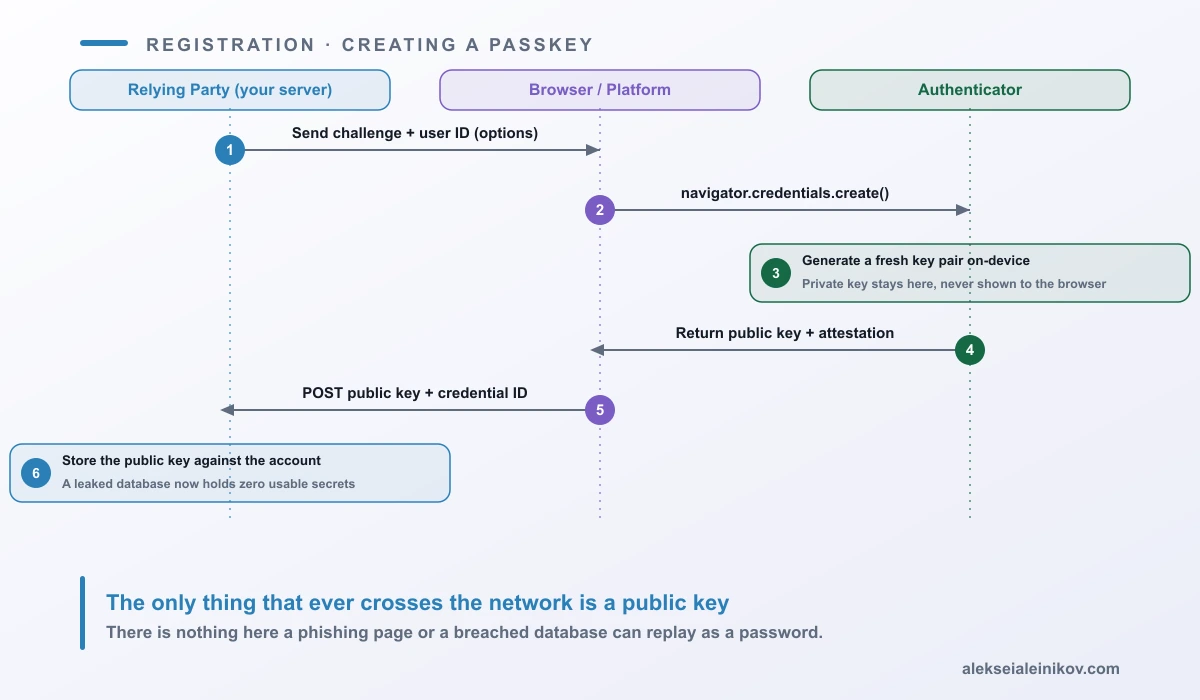
A few details that matter once you actually implement this:
- The challenge is single-use and server-generated. It exists purely to prevent replay — the signature the authenticator eventually produces is only valid for that exact challenge, so a captured registration response cannot be replayed against a different session.
- Attestation is optional and mostly not worth requiring. The authenticator can cryptographically prove what make/model it is (
attestation: "direct"), but doing so leaks device fingerprinting information, requires you to maintain a metadata trust store, and most consumer flows useattestation: "none". Reach for direct attestation only in regulated/enterprise contexts where you must enforce a specific hardware allow-list. - Discoverable (resident) credentials are what make “passkey” different from old-style WebAuthn 2FA. Setting
residentKey: "required"tells the authenticator to store the credential such that it can be found without the RP sending a username first — that is what powers the “sign in with a passkey” account picker instead of “type your username, then use your security key.” - The credential ID and public key are what you store — never anything else. A minimal schema is
(user_id, credential_id, public_key_cose, sign_count, transports, created_at).sign_countis a legacy anti-cloning counter from single-device authenticators; most synced passkeys report it as a flat0, so treat it as advisory, not a security boundary.
How Login Works
Logging in is the authentication ceremony (navigator.credentials.get()), and it is the mirror image of registration — a challenge goes out, a signature comes back, and this time the server has something to check the signature against.
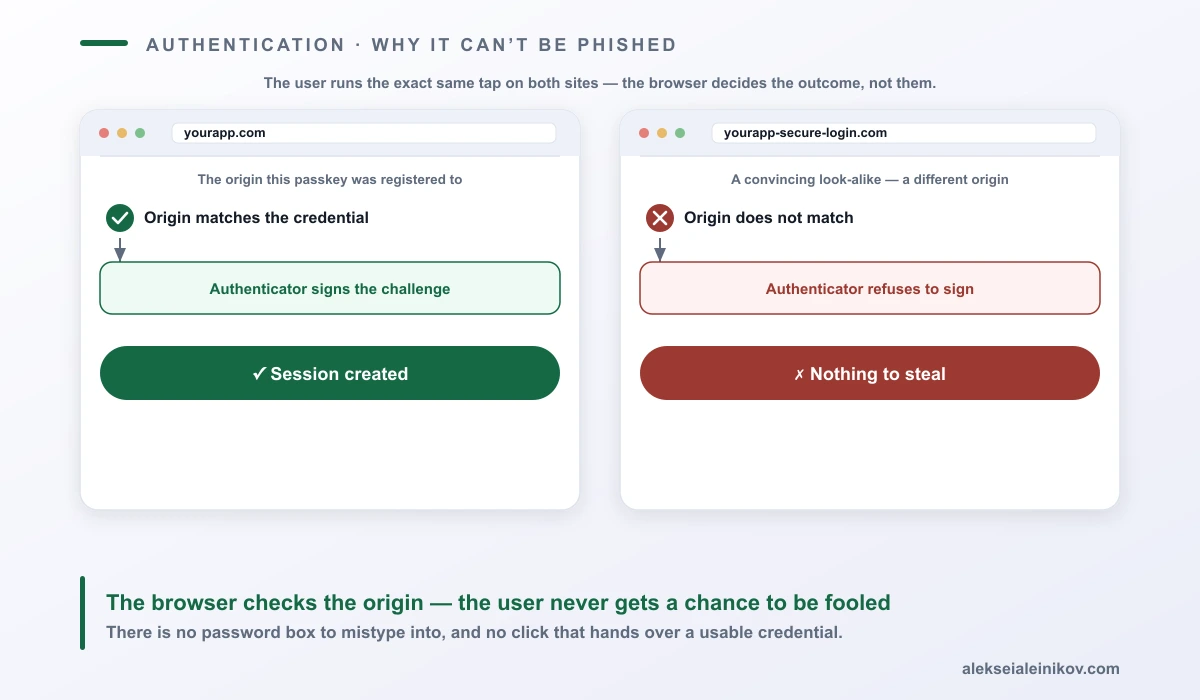
The detail that actually delivers the anti-phishing property is easy to skim past: the client — not the user — checks that the origin requesting the assertion matches the origin the credential was registered to. A pixel-perfect clone of your login page hosted on a look-alike domain can render an identical navigator.credentials.get() call, and the browser will simply refuse to produce a valid signature for it. There is no “type the password into the wrong box” failure mode, because there is no box.
Two implementation notes:
- Conditional UI (autofill) is what makes this feel like a password field. Calling
get()withmediation: "conditional"on page load lets the browser surface saved passkeys in the normal username autofill dropdown, so the login form still looks like a plain input — it just also offers a one-tap passkey option. Skipping this is the single biggest reason “we added passkeys” rollouts get low adoption: users never see the option because it is hidden behind a separate button. - User verification (
userVerification: "preferred"vs"required") decides whether a bare “is a device present” check is enough, or whether the local biometric/PIN unlock is mandatory. For anything beyond a trivial account, require it — otherwise an unlocked, unattended device becomes a full authentication bypass.
Who Actually Holds the Private Key
Here is where the “just use passkeys” pitch gets less simple, and it is worth being precise about it because it changes your account-recovery design.
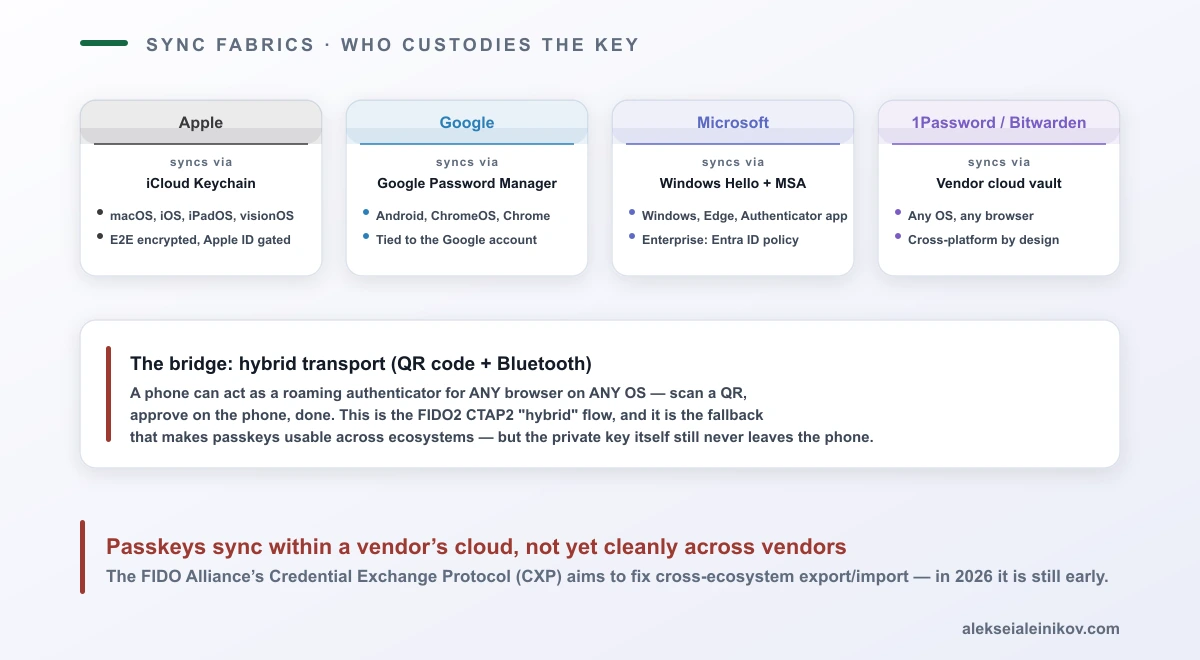
Synced passkeys live inside a platform vendor’s end-to-end-encrypted cloud and follow the user’s account, not their device:
- Apple syncs through iCloud Keychain across macOS, iOS, iPadOS and visionOS, gated behind the Apple ID and (for viewing) device passcode.
- Google syncs through Google Password Manager across Android, ChromeOS and Chrome on any OS, tied to the Google account.
- Microsoft anchors platform passkeys to Windows Hello and the Microsoft account; on the workforce side, Entra ID adds policy control over which authenticators are acceptable.
- 1Password, Bitwarden, Dashlane and other password managers sync passkeys through their own vault, cross-platform by design — the whole point of a password manager is not being locked to one OS vendor.
Device-bound passkeys are the other model: the private key is generated inside one specific piece of hardware and is never exported, backed up, or synced anywhere, by design. This is the default (and often the only option) for FIDO2 hardware security keys, and it is a mode some enterprise MDM policies force even for platform authenticators, trading recoverability for a much narrower attack surface — the key can only ever be exfiltrated by physically compromising that one device.
What does not yet work cleanly: moving a synced passkey from one vendor’s fabric to another. A passkey created in iCloud Keychain does not appear in Google Password Manager. The practical bridge across ecosystems is FIDO2 CTAP2 hybrid transport — scan a QR code on a laptop, approve on a phone over Bluetooth, and that phone acts as a one-time roaming authenticator for that browser session. It is a genuinely useful fallback for “I’m on a friend’s computer” or a platform gap, but the private key still never leaves the phone, and it is not a migration tool. The FIDO Alliance’s Credential Exchange Protocol (CXP) is the standardization effort aimed at proper cross-vendor export/import; as of 2026 it is still early.
Who Offers What in 2026
For most teams the real decision is not “should we implement raw WebAuthn,” it is “which layer do we implement it at.” Here is the landscape, roughly ordered from consumer platform down to identity infrastructure:
| Provider | What it is | Passkey role |
|---|---|---|
| Apple, Google, Microsoft | OS / browser platforms | Ship the authenticator + sync fabric (iCloud Keychain, Google Password Manager, Windows Hello) that end users already have on their device |
| 1Password, Bitwarden, Dashlane | Password managers | Store and sync passkeys across any OS/browser as a vault item, independent of any single platform vendor |
| Okta, Auth0, Microsoft Entra ID, Ping Identity | Enterprise IdPs | Let you turn on passkey sign-in for your workforce or customer app without touching WebAuthn code directly — the IdP is the relying party |
| Keycloak, Authentik | Self-hosted IdPs | Same idea, open source — see Keycloak vs Authentik if you are choosing between them; both support WebAuthn as a self-service credential |
| AWS Cognito, Clerk | Managed app-auth platforms | Ship WebAuthn/passkey sign-in as a built-in configuration option — no custom ceremony code required |
SimpleWebAuthn, webauthn4j, go-webauthn/webauthn, py_webauthn |
Open-source relying-party libraries | What you reach for if you are building the identity layer yourself — parse/verify the ceremony without hand-rolling CBOR/COSE |
| Yubico, Google (Titan), SoloKeys | Hardware security keys | Device-bound roaming authenticators for workforce/high-assurance accounts, independent of any OS sync fabric |
The honest read: if your product already sits behind Okta, Auth0, Entra ID, or a self-hosted Keycloak/Authentik instance, turning on passkeys is a configuration change, not an engineering project. The IdP is already the relying party; you are enabling a credential type it already knows how to handle. The engineering project described below is for the case where you are the relying party — you run your own auth stack and want to add passkeys as a first-class credential.
How to Actually Implement It
Assume you are the relying party. The shape of the work:
1. Pick a server library — do not parse CBOR/COSE by hand. The WebAuthn wire format (attestation objects, COSE public keys, CBOR-encoded authenticator data) is exactly the kind of thing that is easy to get subtly wrong in a way that only shows up as a security bug later. Use a maintained library for your stack: SimpleWebAuthn (TypeScript/Node, also ships a browser helper), webauthn4j (Java), Fido2NetLib (.NET), go-webauthn/webauthn (Go, the actively maintained fork of the original Duo Labs library), py_webauthn (Python), webauthn-rs (Rust). All of them expose roughly the same two functions you need: “generate registration/authentication options” and “verify registration/authentication response.”
2. Get the Relying Party ID right before anything else. The rpID is the domain the credential is bound to (no scheme, no port) — example.com, not https://example.com or app.example.com if you also need it valid on www.example.com. Get this wrong and passkeys registered in one environment silently fail to authenticate in another (a very common “works locally, breaks in staging” bug, because localhost and your staging subdomain are different RP IDs).
3. Require resident keys and conditional UI from day one, not as a later enhancement — a passkey rollout without the autofill-picker UX gets a fraction of the adoption, because users never discover it is an option.
4. Design account recovery before you ship, not after the first support ticket. This is the part every “add passkeys” tutorial skips. At minimum:
- Let users register more than one authenticator (phone + a backup security key, or two synced devices) — a single point of failure with an unrecoverable credential is worse than a password.
- Keep a fallback path (email magic link, backup codes generated at enrollment, or a human-verified support flow) for the case where every registered authenticator is lost.
- Decide explicitly whether you allow downgrading to a password/OTP fallback per-account, and if so, gate it behind extra friction (a low reCAPTCHA score on the login action is a good trigger for it) — it is the path an attacker will try first once passkeys make direct credential theft useless.
5. Migrate gradually, not as a hard cutover. Add passkeys as an additional credential option alongside existing password/MFA, prompt existing users to enroll one after a successful login (when you already have a trusted session to authorize the enrollment), and only consider removing password login once enrollment is high and recovery paths are proven. If your session/token layer needs work in parallel, see Stop Storing JWTs in localStorage — the two problems (how you authenticate, how you keep someone authenticated) are separate and often get conflated.
6. Test the failure paths, not just the happy path: a user who cancels the OS biometric prompt, a browser with no platform authenticator (older desktop Safari/Firefox configurations), a user switching from a lost Android phone to a new iPhone mid-session. Passkeys degrade differently than passwords do, and “no fallback UI for a cancelled ceremony” is the most common bug in first passkey implementations.
What Still Breaks in Practice
- Cross-ecosystem migration is genuinely unfinished. A user moving from Android to iPhone today re-enrolls passkeys per-site rather than carrying them over, unless they were using a cross-platform manager like 1Password or Bitwarden from the start.
- Enterprise device loss is an operational problem, not just a cryptographic one. Someone’s laptop with device-bound corporate passkeys is stolen — who revokes it, how fast, and does your IdP even expose per-credential revocation cleanly? Test this before you need it.
- Not every user has a passkey-capable device. Older phones, shared/kiosk devices, and some enterprise-locked-down machines cannot register a platform authenticator; you need a real fallback, not a workaround bolted on.
- “Passkey” as a support term is confusing precisely because it hides the sync-fabric question. Support staff need to know to ask “which device and which account” was used to create it, because the recovery path is completely different for a synced iCloud Keychain passkey versus a device-bound YubiKey.
The Bottom Line
The cryptography is not the hard part — WebAuthn is a well-specified, narrow protocol, and the registration/login ceremonies above are genuinely all there is to the core exchange. The hard part is everything the protocol deliberately leaves to you: account recovery, fallback UX, and the fact that “passkey” quietly means four different sync fabrics with different failure modes depending on which vendor’s cloud a user happens to be in.
If you are not already an identity provider, the pragmatic move is to let one absorb this problem for you — Okta, Auth0, Entra ID, or a self-hosted Keycloak/Authentik — and spend your own engineering time on account recovery and rollout sequencing instead of CBOR parsing. If you are the relying party, the protocol rewards careful reading far more than most auth features do, and the payoff is real: there is no password database left to breach, and no login page left to phish in the way that has worked for thirty years.

From the community
Discussion on Mastodon & Bluesky
Replies to this article from the open web, pulled in live. No ads, no tracking scripts.
Reply there — it shows up here automatically.