
The first GKE cluster you stand up feels reassuringly managed: Google runs the control plane, nodes auto-repair, upgrades are a click. It is easy to assume “managed” means “secure.” It does not. A default cluster is built to work, and almost every security control that matters is opt-in — the public endpoint, the broad node permissions, the lack of image provenance, the root containers. None of that is a bug. It is just not your threat model’s problem until it is.
This is a secure-by-default GKE reference architecture: a blueprint where the hardened configuration is the baseline, not a backlog item. It is organized as defense in depth — six independent layers, each of which assumes the one in front of it might fail.
The goal is not a single wall. It is that an attacker who gets past identity still meets the network controls, who gets past the network still meets a supply-chain gate, and so on. Break one layer and the others still hold.
This is the security half of a bigger GCP architecture story. For the messaging side — keeping an event-driven system clean instead of secure — see Pub/Sub or Eventarc? Event-Driven GCP Without the Spaghetti.
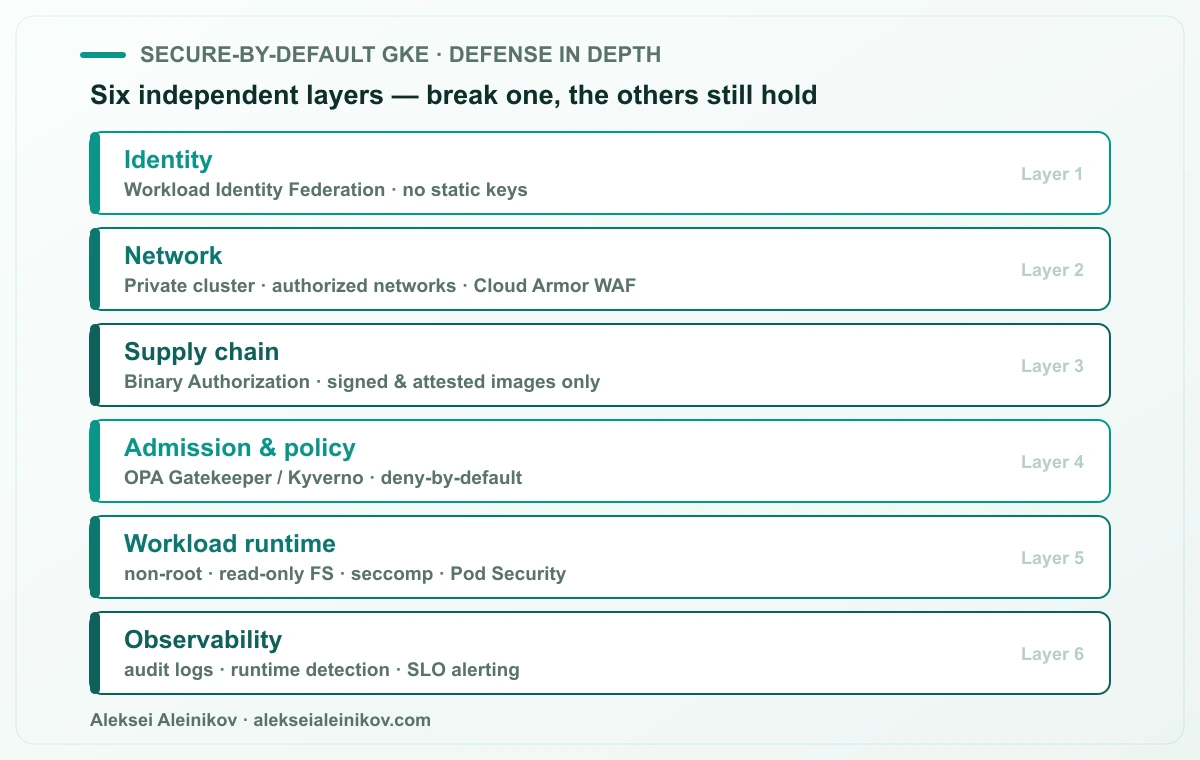
Let’s walk the layers, from the outside in.
Layer 1 — Identity: kill the static keys
The highest-impact change you can make to a GKE cluster has nothing to do with the network. It is getting rid of long-lived service-account keys.
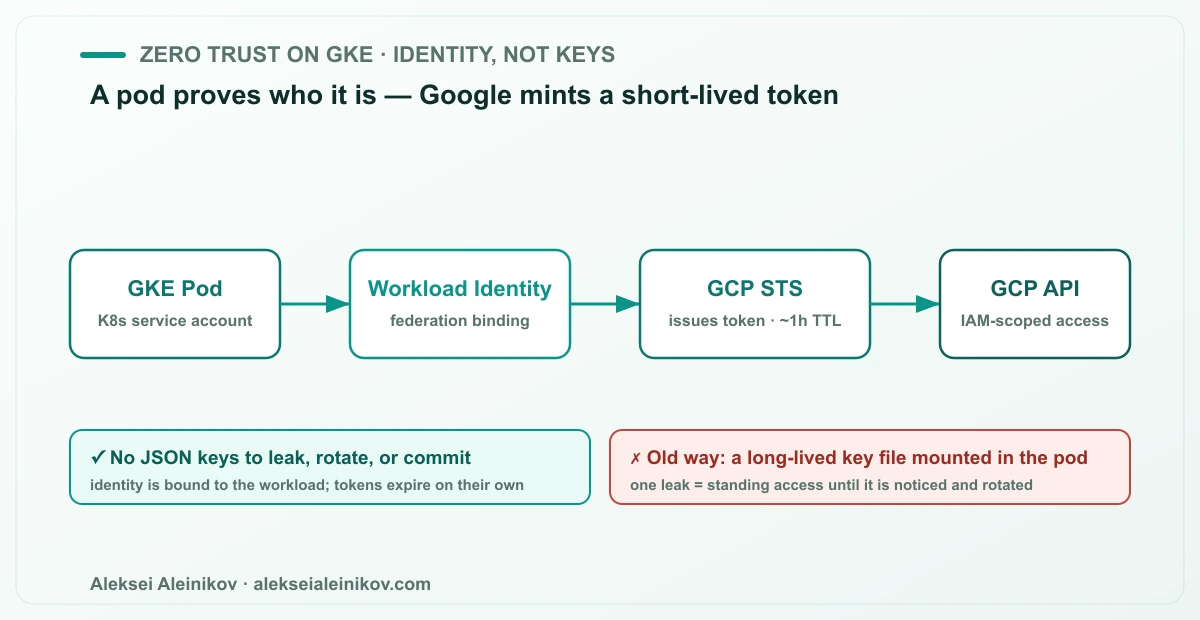
The old pattern is a JSON key file mounted into the pod. It works, and it is a liability: that file gets copied into images, committed to Git, printed in an env dump, and it keeps granting access until a human notices and rotates it. A leaked static key is the most common — and most preventable — cloud compromise.
Workload Identity Federation replaces it. A Kubernetes service account is bound to a Google identity; when the pod calls a GCP API, Google mints a short-lived, IAM-scoped token on the spot. There is no key at rest, nothing to leak, and the token expires on its own.
# enable Workload Identity on the clustergcloud container clusters update CLUSTER \  --workload-pool=PROJECT_ID.svc.id.goog
# bind a Kubernetes SA to a Google SAgcloud iam service-accounts add-iam-policy-binding \  GSA@PROJECT_ID.iam.gserviceaccount.com \  --role roles/iam.workloadIdentityUser \  --member "serviceAccount:PROJECT_ID.svc.id.goog[NAMESPACE/KSA]"
The rule for this layer: no service-account JSON keys anywhere in the cluster. If a workload needs GCP access, it federates. If a human needs access, they use short-lived credentials too.
Layer 2 — Network: private by default
The next assumption to flip is reachability. A default cluster can expose its control plane to the public internet and place nodes on routable addresses. Neither should be true in production.
- Private cluster — nodes get internal IPs only; the control-plane endpoint is private.
- Authorized networks — the API server is reachable only from the CIDR ranges you name (your CI, your bastion, your VPN).
- Cloud Armor — a WAF and DDoS layer in front of anything you do expose through a load balancer, with rules tuned to your traffic instead of the defaults.
The principle is that nothing is reachable unless there is a reason for it to be. The network is not the whole defense — it is the layer that buys you time when identity is bypassed.
Layer 3 — Supply chain: only signed images run
Most “container security” effort goes into scanning images. Scanning tells you what is in an image; it does not guarantee that only your images run. That guarantee is the supply-chain layer, and on GKE it is Binary Authorization.
Binary Authorization is an admission gate. Every image must carry the attestations your policy demands — typically a signature from your CI proving it was built from reviewed source and passed its gates. Anything unsigned or untrusted is blocked before it reaches a node.
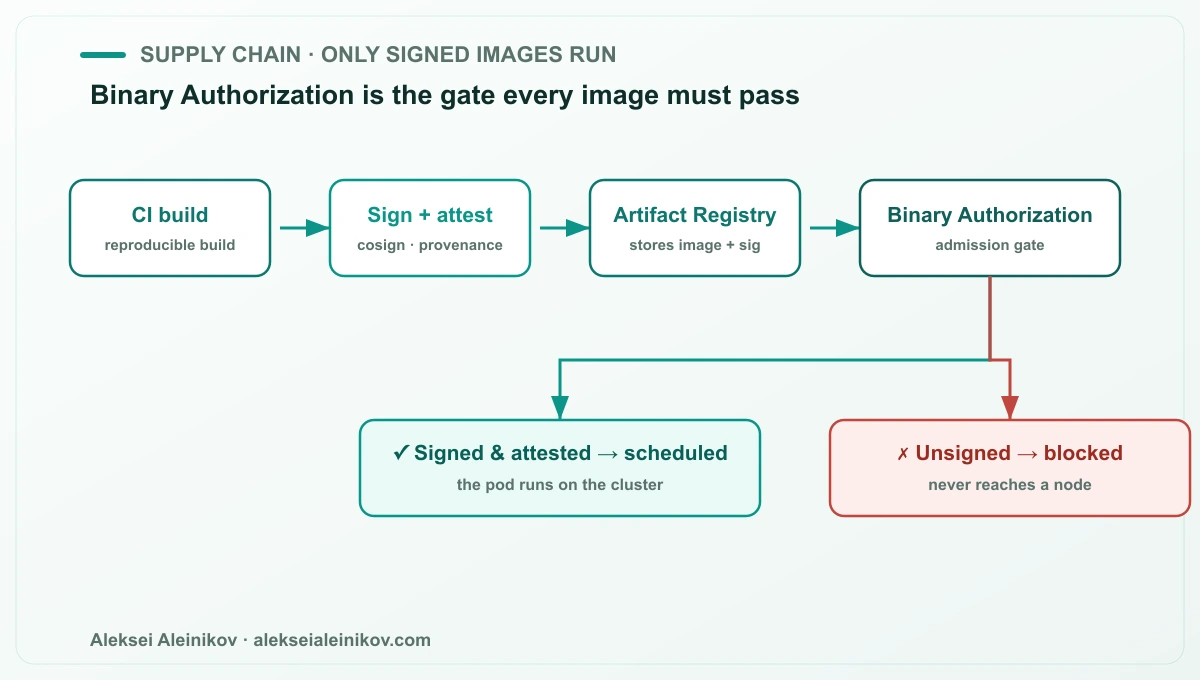
# Binary Authorization policy (excerpt)globalPolicyEvaluationMode: ENABLEdefaultAdmissionRule: evaluationMode: REQUIRE_ATTESTATION enforcementMode: ENFORCED_BLOCK_AND_AUDIT_LOG requireAttestationsBy: - projects/PROJECT_ID/attestors/prod-attestorThis is what closes the gap between “we build securely” and “only what we built securely actually runs” — the exact space supply-chain attacks live in. Roll it out in audit mode first so you can see what would be blocked, then switch to enforcement.
Layer 4 — Admission and policy: deny by default
Binary Authorization answers “is this image trusted?” It does not answer “does this workload obey our rules?” That is the job of a policy engine — OPA Gatekeeper or Kyverno — running as an admission controller.
This is where you encode the rules specific to your platform, as code, enforced deny-by-default:
- only images from your Artifact Registry
- required labels and owners on every workload
- resource requests and limits mandatory
- no
hostPath, no privileged containers, nolatesttags
# Kyverno: block privileged containers, cluster-wideapiVersion: kyverno.io/v1kind: ClusterPolicymetadata: name: disallow-privilegedspec: validationFailureAction: Enforce rules: - name: privileged-containers match: any: - resources: kinds: ["Pod"] validate: message: "Privileged containers are not allowed." pattern: spec: containers: - =(securityContext): =(privileged): "false"Pair this with Kubernetes Pod Security as the built-in floor. Pod Security enforces the baseline; the policy engine enforces everything your organization specifically cares about.
Layer 5 — Workload runtime: shrink the blast radius
Assume something eventually gets a shell in a container. Layer 5 is about making that as boring as possible.
- Run as non-root — a
runAsNonRootsecurity context, norootin the image. - Read-only root filesystem — writable paths are explicit
emptyDirmounts, nothing else. - Drop capabilities — start from none and add back only what is needed.
- seccomp — the
RuntimeDefaultprofile filters dangerous syscalls.
securityContext: runAsNonRoot: true runAsUser: 10001 readOnlyRootFilesystem: true allowPrivilegeEscalation: false capabilities: drop: ["ALL"] seccompProfile: type: RuntimeDefaultNone of these stop an intrusion on their own. Together they mean a compromised container is a locked room, not a hallway.
Layer 6 — Observability: assume you will need the tape
The final layer is not prevention, it is knowing. When something does go wrong, the difference between a five-minute triage and a five-day incident is whether you can see it.
- Audit logs — Kubernetes and Cloud Audit Logs, retained and queryable.
- Runtime detection — a tool like Falco or GKE’s built-in threat detection watching for anomalous syscalls and process activity.
- SLO-based alerting — alerts that fire on symptoms your users feel, with clear ownership, not a wall of noise nobody reads.
Security observability is what turns the first five layers from “we hope it worked” into “we can prove what happened.”
How to adopt it without a big bang
You do not roll this out all at once. Order the work by how much standing risk each layer removes:
- Identity first. Migrate off static keys to Workload Identity Federation — highest impact, and a leaked key is the cheapest possible compromise.
- Network second. Private control plane, authorized networks.
- Supply chain and policy third, both in audit mode before enforcement so you can see what would break.
- Runtime hardening as you touch each workload.
- Observability wired throughout, so you can watch each layer as you enable it.
Enforce nothing in production until you have watched it in audit mode. Secure-by-default is a destination you reach deliberately — but once you are there, the safe configuration is the one you get for free, and every new cluster starts hardened instead of hoping someone remembers to do it later.
Verdict
“Managed” is not “secure,” and a default GKE cluster proves it every day. The fix is not a single control but a stack of independent ones: kill static keys with Workload Identity Federation, make the network private, admit only signed images with Binary Authorization, enforce deny-by-default policy with a policy engine, harden the runtime, and watch all of it with real observability. Adopt them in risk order, run everything in audit before you enforce, and secure-by-default stops being a slogan and becomes the baseline every workload inherits.
Hardened is the foundation; sovereign is the next question on top of it. Once the cluster is secure, decide who can compel, read, and lock in your platform — see Sovereign by Design: Building a Sovereign Platform on Kubernetes.

From the community
Discussion on the Fediverse
Replies from Mastodon and Bluesky — straight from the open web, no tracking.
Loading replies …
No replies yet. Start the conversation:
Replies could not be loaded right now.