
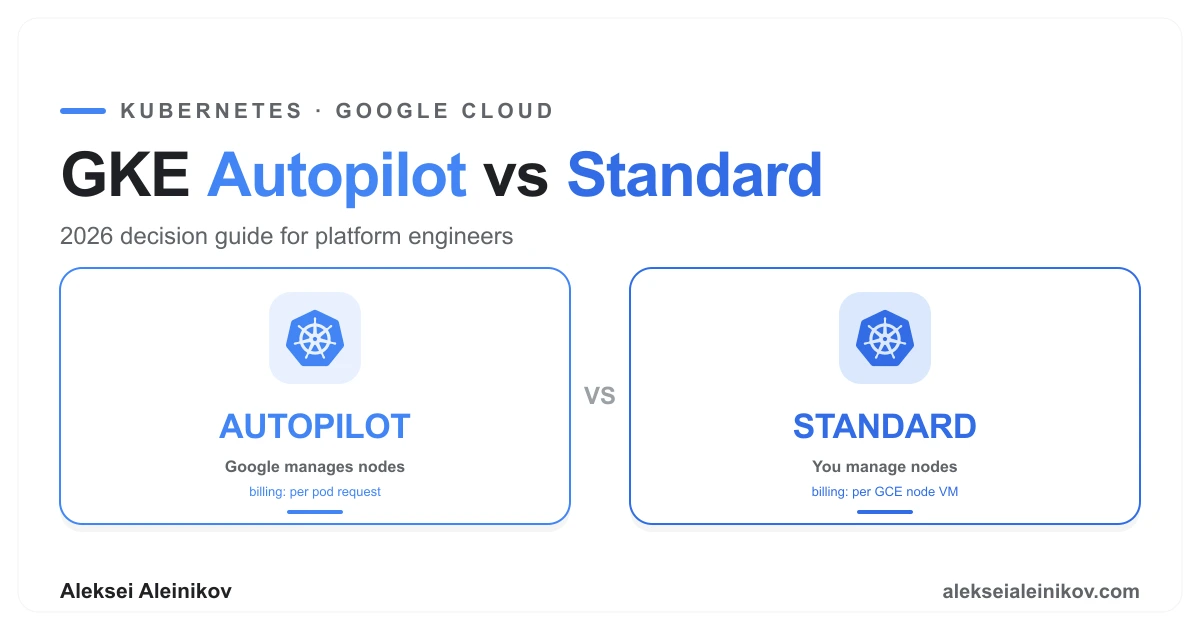
Choosing between GKE Autopilot and Standard looks like a checkbox decision at cluster creation time. It is actually a commitment that determines your billing model, your operational ceiling, and what workloads you can run — for the lifetime of the cluster. You cannot switch modes after creation.
Most comparisons list features. This one starts where the feature list hides the real answer: who owns the worker node layer.
The One Thing Both Modes Have in Common
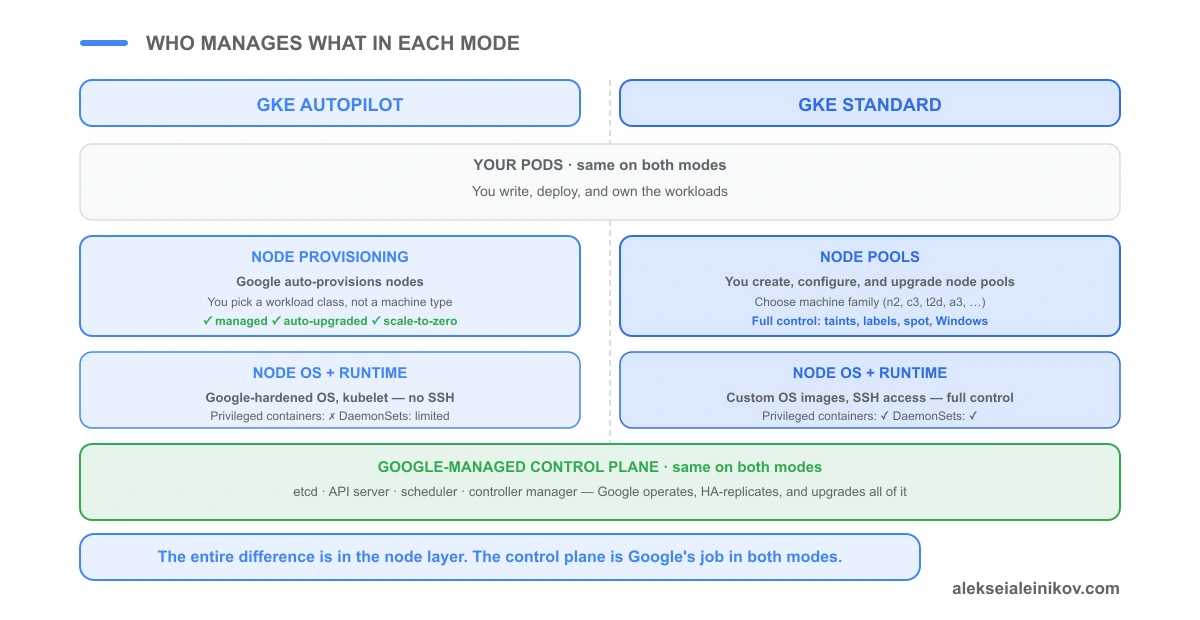
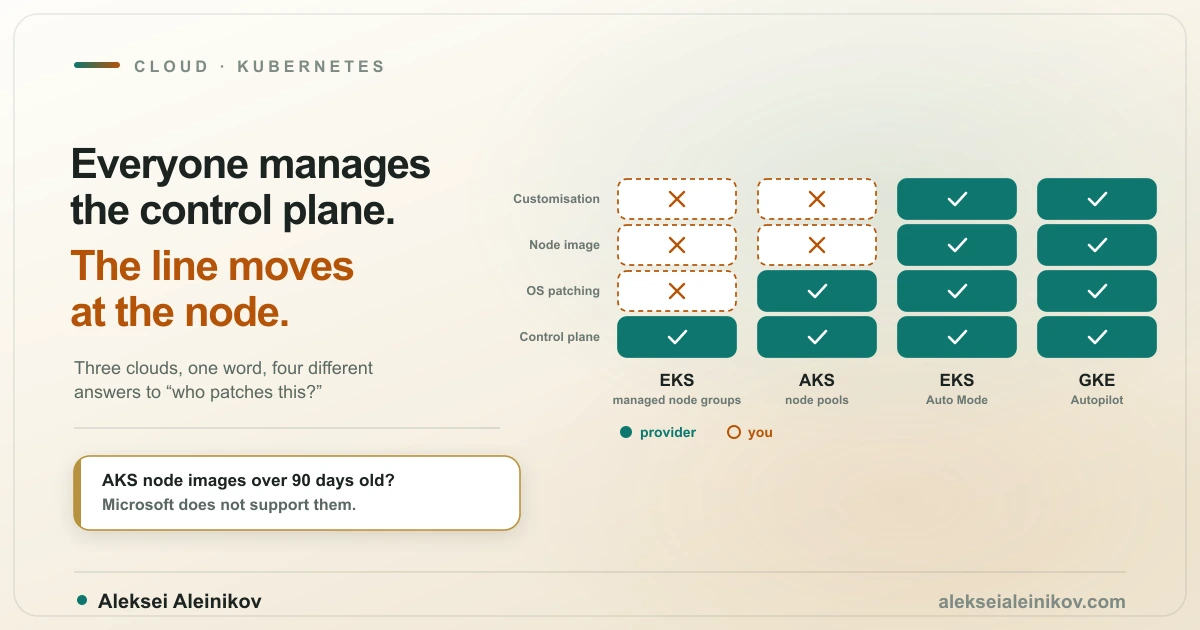
Both modes run the exact same Google-managed control plane. etcd, the API server, the scheduler, the controller manager — Google manages, upgrades, and HA-replicates all of it. You never provision a control plane node, because there are none to provision. It is a fully managed service behind the container.googleapis.com endpoint.
This is not a differentiator. Stop treating it as one. The actual split is entirely below the control plane.
Autopilot: The Node Layer Disappears
In Autopilot mode, Google abstracts away everything below the pod level.
Node provisioning is automatic. You never create or delete a node pool. When you deploy a pod with a valid resource request, Google provisions a node that fits it. When the pod leaves, the node scales down. The node is an implementation detail you do not manage.
You request capacity, not machines. By default (GKE 1.32.3-gke.1927002 and later) pods run on the container-optimized compute platform — nodes that dynamically resize while running and scale from a fraction of a vCPU, so new pods rarely wait for a node to boot. When a workload needs specific hardware, you request a ComputeClass instead of managing a node pool:
- Balanced / Scale-Out — general-purpose; Scale-Out selects Arm (T2A) for stateless density
- Performance — compute-optimised machine series
- Accelerator — GPUs and TPUs, requested in the ComputeClass or the pod spec
- autopilot-spot — interruption-tolerant Spot pods
GKE provisions and sizes the matching nodes automatically.
Security posture is enforced. Pods run as non-root by default, hostPath volumes and host networking are blocked, and Google maintains the node OS. These constraints are not configuration options — they are what makes the managed model work.
Resource requests are mandatory. Autopilot rejects pods without resources.requests. This will break workloads that lazily omit them, but it is the right constraint to enforce anyway.
Standard: You Own the Node Layer
In Standard mode, you are the node operator.
Node pools are yours. You create them, choose machine families (n2, n2d, c3, t2d, m3, a2/a3 GPU, and more), configure boot disk size, set node taints and labels, and decide upgrade strategy.
Full workload freedom. Privileged containers, custom DaemonSets for your own agents, hostPath volumes, host networking, Windows workloads — all supported. This is the mode when your security tooling, network plugin, or compliance agent needs low-level node access.
Your upgrade cadence. You configure node pool upgrade strategy (surge or blue-green), maintenance windows, and patch exclusions. You choose the release channel.
Billing is predictable but blunt. You pay for the GCE VMs in your node pools whether pods are running on them or not. Three n2-standard-8 nodes in europe-west3 running 24 h → you pay for 72 vCPU-hours and 288 GB-hours of RAM, regardless of actual pod load.
The Billing Model Is the Real Decision
This is where teams make expensive mistakes.
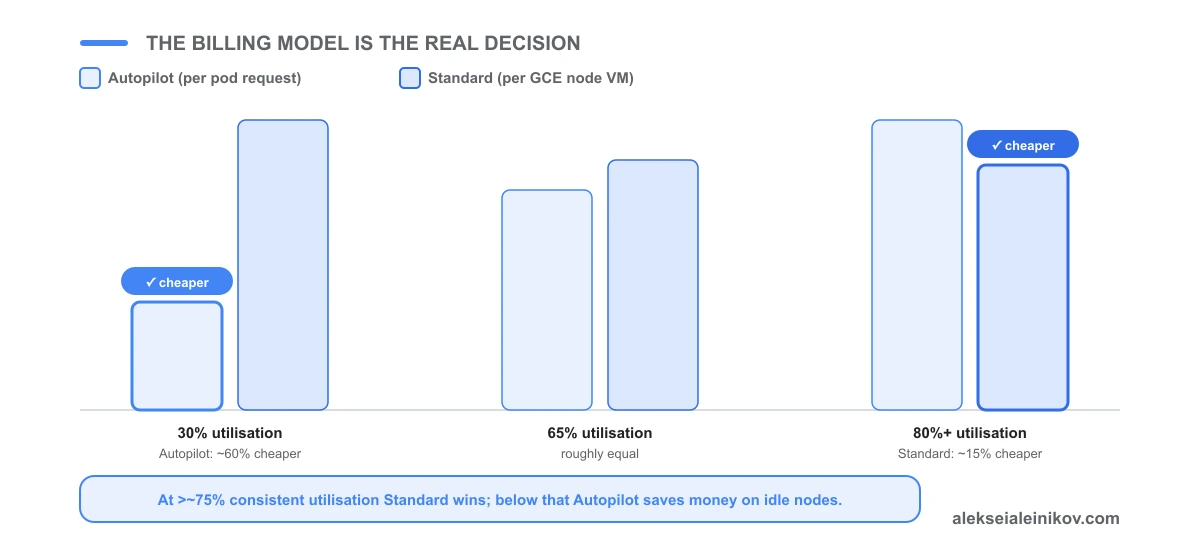
Autopilot cost = sum of pod resources.requests × per-unit rates (vCPU-hour + GB-hour + ephemeral storage GB-hour). The rates include a managed-cluster premium over raw VM equivalent — roughly 10–20% per unit. No pods → no compute cost.
One caveat that surprises people: per-pod billing only applies to general-purpose pods. The moment a pod selects specific hardware — a GPU, a TPU, or a named Compute Engine machine series — Autopilot switches that workload to per-node billing (the whole node plus a management premium), exactly like Standard. Autopilot’s “pay only for what pods request” advantage is about general-purpose compute, not accelerator nodes.
Standard cost = sum of node VM prices × hours running. A node at 20% utilisation costs the same as a node at 95%.
The crossover: at roughly 70–80% consistent node utilisation, Standard’s total cost typically drops below Autopilot’s. Below that threshold, Autopilot is usually cheaper because you are not paying for idle capacity.
In practice:
- Dev and test clusters: Autopilot almost always wins. Variable load, pods idle overnight, no one scales down properly.
- Batch workloads with spikes: Autopilot wins — you pay for the spike, not for waiting.
- Production clusters with steady, high load: model it. If your p50 node utilisation is reliably above 75%, Standard is likely cheaper.
- Avoid over-specifying resource requests in Autopilot — over-requested pods inflate your bill directly. Get sizing right before migrating.
What Changed — and What Autopilot Still Cannot Do in 2026
The gap between the modes has narrowed sharply since Autopilot launched in 2021. What now works on Autopilot:
- GPUs and TPUs — requested through a ComputeClass or the pod spec; no accelerator node pools to manage
- Spot pods — per-pod interruption-tolerant capacity, no Spot node pool
- Arm (T2A) — via the Scale-Out class or an Arm ComputeClass
- DaemonSets — supported, as long as they do not need elevated access on the node (most monitoring and logging agents qualify)
- Confidential GKE Nodes — AMD SEV memory encryption is now an Autopilot option, not a Standard-only feature
- GKE Sandbox (gVisor) — enabled by default on Autopilot for an extra syscall-isolation layer
- GKE Dataplane V2, CMEK, Binary Authorization, Workload Identity Federation — all available, several on by default
The hard limits that remain — the real reasons to reach for Standard:
- No elevated node access — privileged containers and anything that needs root on the host are rejected; an agent that must touch the node directly will not run
- No node SSH — you cannot SSH or exec into worker nodes; you debug at the pod level
- No custom node OS — Autopilot is Container-Optimized OS only, with no Ubuntu image and no custom startup scripts
- No Windows nodes — Linux workloads only
- No host networking or arbitrary hostPath volumes — node-enforced security restrictions
- No Cloud Marketplace apps and no
externalIPsService field
Two corrections worth flagging, because older comparisons still get them wrong: DaemonSets and Confidential GKE Nodes both work on Autopilot in 2026. The blocker was never “DaemonSets” — it is elevated node access.
Side-by-Side: The Full Picture
| GKE Autopilot | GKE Standard | |
|---|---|---|
| Node management | You | |
| Cluster location | Regional only | Regional or zonal |
| General-purpose billing | Per pod request | Per node VM |
| Specific-hardware billing | Per node (+ premium) | Per node VM |
| Idle node cost | None | Full node price |
| Compute selection | ComputeClasses | Any GCE machine series |
| Node OS | Container-Optimized OS | COS / Ubuntu / Windows |
| Node SSH | No | Yes |
| Privileged / elevated node access | No | Yes |
| DaemonSets | Yes (no elevated access) | Yes (unrestricted) |
| Windows nodes | No | Yes |
| Confidential GKE Nodes | Yes | Yes |
| GKE Sandbox (gVisor) | On by default | Optional |
| GPU / TPU | Yes (ComputeClass) | Yes (node pools) |
| Spot | Per pod | Node pool |
| Arm (T2A) | Yes | Yes |
| Dataplane V2 | Default | Optional |
| Workload Identity Federation | Pre-configured | Optional |
| Node auto-upgrade | Mandatory | Configurable |
| Autopilot-mode workloads | Whole cluster | Per-workload via ComputeClass |
The Line Is Blurring in 2026
Two changes make this less of a binary choice than it used to be.
Autopilot workloads inside Standard clusters. You no longer have to pick one mode for the whole cluster. In a Standard cluster you can mark specific workloads to run in Autopilot mode by requesting an Autopilot ComputeClass — GKE provisions and manages those nodes for you, while the rest of the cluster stays under your control with your own node pools. Hands-off nodes for the workloads that want them, full control for the ones that need it.
The container-optimized compute platform. On recent versions (GKE 1.32.3-gke.1927002+), general-purpose Autopilot pods run on nodes that resize dynamically while running and draw from a pool of pre-provisioned capacity. This removes most of the cold-start delay that used to be Autopilot’s weak point — new pods usually schedule without waiting for a fresh node to boot.
The takeaway: “Autopilot vs Standard” is increasingly “how much of this cluster do I want managed”, not two separate worlds.
How to Choose: Three Questions
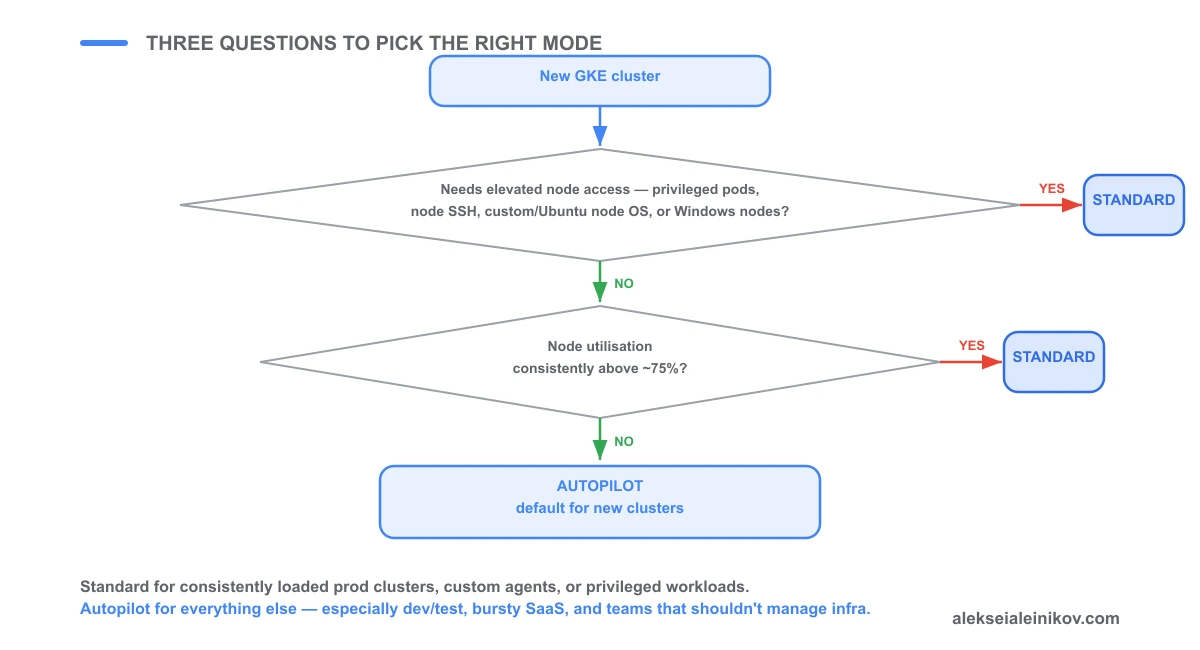
1. Does any workload need elevated node access — privileged containers, a custom DaemonSet that touches the node, node SSH, a custom or Ubuntu node OS, or Windows nodes?
If yes → Standard, full stop. These are hard constraints in Autopilot, not settings you can unlock. (Note what is not on this list anymore: GPUs, TPUs, Spot, Arm, and Confidential GKE Nodes all work on Autopilot.)
2. Is your cluster running at consistently high node utilisation (above ~75%)?
If yes → run the numbers for Standard. At high, consistent utilisation you are paying for capacity you are actually using, and Standard’s per-VM price undercuts Autopilot’s per-pod-request price. Use the GCP Pricing Calculator with your actual resource requests.
3. Should the team running this cluster manage infrastructure?
If no → Autopilot. Dev environments, internal developer platforms, SaaS product clusters, batch processing — Autopilot removes node-pool-management toil so the team focuses on the application layer.
When still unsure: default to Autopilot for new clusters unless you hit one of the hard limits above. You can always run a parallel Standard cluster for workloads that need it.
A Pattern That Works at Scale
Building the first production GCP platform at Deutsche Telekom, the split that emerged over time was:
- Standard for the production data plane: consistent high utilisation, security DaemonSets for compliance agents, full Dataplane V2 configuration, spot-node pools for batch processing.
- Autopilot for dev and pre-prod environments: automatic scale-to-zero on weekends and overnight, no idle node cost, developers get a cluster without owning it.
Both clusters join the same GKE Enterprise fleet, share Policy Controller rules, and report to the same Cloud Monitoring workspace. The mode is an implementation detail; the governance layer sits above both.
The Security Baseline Does Not Change
Regardless of mode, these practices are identical and non-negotiable:
Workload Identity Federation — no service account key files on nodes or in pods. WIF issues short-lived OIDC tokens. Dropping SA keys entirely removes one of the most common GCP credential-exfiltration vectors — see the full walkthrough in Kill Service Account Keys: Workload Identity Federation on GKE.
Binary Authorization — enforce that only signed, approved images run in your cluster.
GKE Dataplane V2 — eBPF-based network policy enforcement (Cilium). Default on Autopilot; opt-in on Standard.
Least-privilege RBAC — ClusterAdmin for humans is almost never correct. Bind roles to service accounts, not to Google identities directly.
Node auto-upgrade — on Standard, configure a release channel (Regular or Stable) and enable auto-upgrade. Falling behind on node versions is the single most common cause of preventable security exposure in production GKE clusters. On Autopilot, Google handles this for you.
The mode you pick does not change the security work. Do it regardless.
For more on isolation trade-offs when running untrusted workloads inside GKE, see MicroVMs in 2026: Firecracker vs gVisor for Secure Workloads.

From the community
Discussion on Mastodon & Bluesky
Replies to this article from the open web, pulled in live. No ads, no tracking scripts.
Reply there — it shows up here automatically.