
On paper, the UGREEN NASync DXP4800 Plus and TerraMaster F4-424 Max target the exact same buyer: someone who wants a compact, quiet, x86-64 4-bay 10GbE NAS capable of running TrueNAS Community Edition or Proxmox VE instead of stock vendor firmware.
Look closer at their internal board layouts and installation documentation, however, and a hidden architectural trade-off decides which box actually fits your build: isolated OS boot storage vs. raw CPU threads and dual 10GbE.
The short verdict. Buy the UGREEN DXP4800 Plus if you run TrueNAS bare-metal and want both M.2 NVMe slots free for a mirrored app/Docker pool (thanks to its dedicated 128 GB OS SSD). Buy the TerraMaster F4-424 Max if you run Proxmox VE, heavy VMs, or dual 10GbE workflows where a 10-core/12-thread Core i5-1235U matters more than a dedicated boot drive.
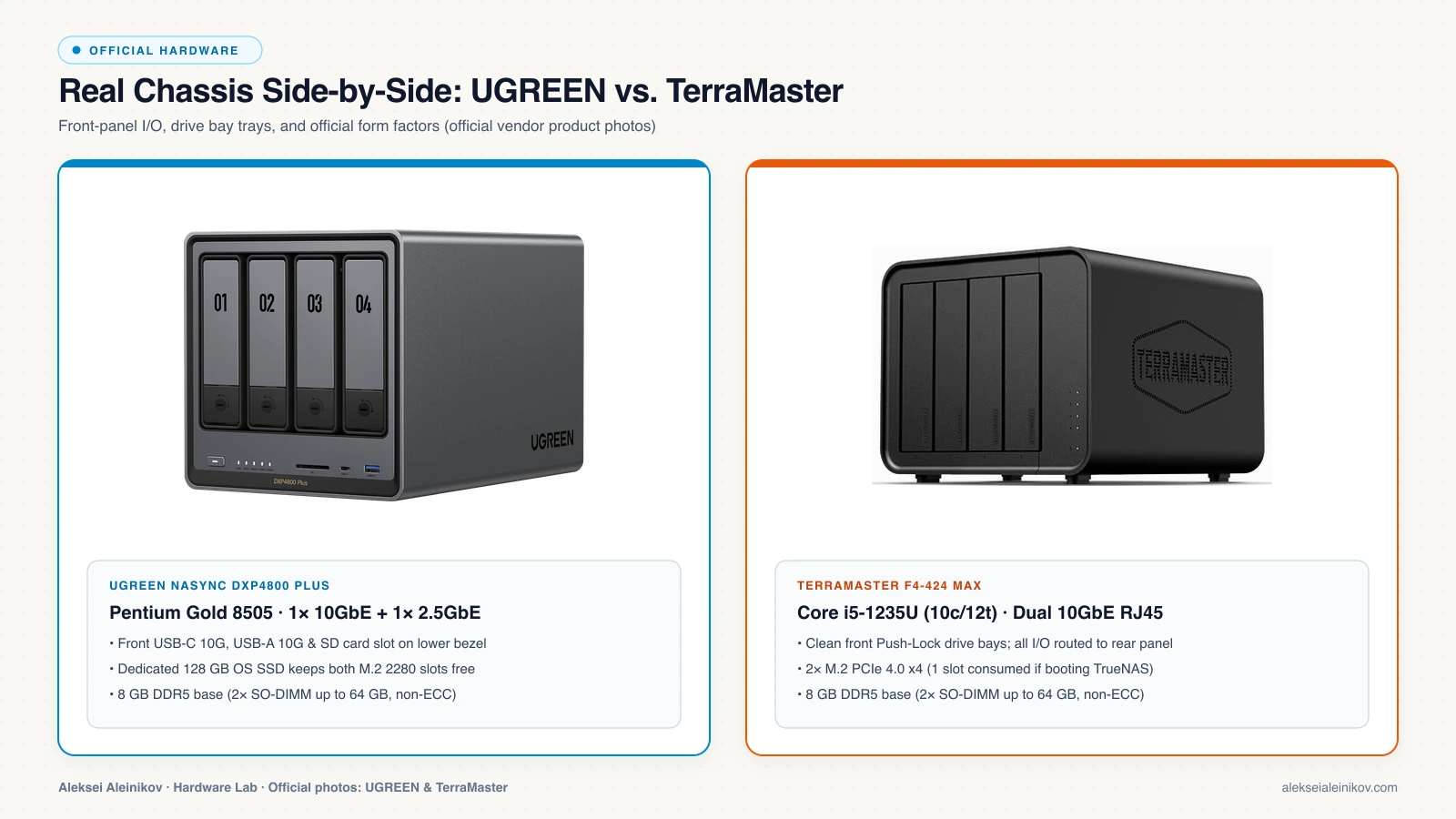
Official Hardware Specs Side by Side
If you have not picked your software layer yet, start with our companion breakdown of Proxmox VE vs. Docker vs. TrueNAS Scale. Once you know which OS you want, here is how the two chassis compare on official specifications:
| Specification | UGREEN NASync DXP4800 Plus | TerraMaster F4-424 Max |
|---|---|---|
| CPU | Intel Pentium Gold 8505 (5c / 6t: 1P + 4E, up to 4.4 GHz) | Intel Core i5-1235U (10c / 12t: 2P + 8E, up to 4.4 GHz) |
| TDP / iGPU | 15 W base · Intel UHD Graphics (QuickSync) | 15 W–55 W · Intel Iris Xe Graphics (QuickSync) |
| Base RAM | 8 GB DDR5-4800 (non-ECC, 1× SO-DIMM) | 8 GB DDR5-4800 (non-ECC, 1× SO-DIMM) |
| Max RAM | 64 GB DDR5 (2× SO-DIMM slots) | 64 GB DDR5 (2× SO-DIMM slots) |
| SATA Bays | 4× 3.5” / 2.5” SATA III (tool-less hot-swap) | 4× 3.5” / 2.5” SATA III (tool-less hot-swap) |
| Dedicated OS Drive | Yes — 128 GB internal system SSD | No (TOS boots from internal flash; custom OS uses M.2) |
| M.2 NVMe Slots | 2× M.2 2280 (PCIe 4.0) | 2× M.2 2280 (PCIe 4.0 x4) |
| Networking | 1× 10GbE + 1× 2.5GbE RJ45 | 2× 10GbE RJ45 |
| Front / Rear USB & Display | USB-C 10G, USB-A 10G/5G/2.0, SD card slot, HDMI 4K60 | 1× USB-C 10G, 2× USB-A 10G, HDMI 2.0 |
| ECC / PCIe Add-in Slot | No ECC · No PCIe slot | No ECC · No PCIe slot |
The Hidden Decider: 128 GB System SSD vs. Losing an M.2 Slot
Most comparisons stop at the CPU and network ports, then miss the biggest practical difference when installing TrueNAS Community Edition (formerly TrueNAS SCALE).
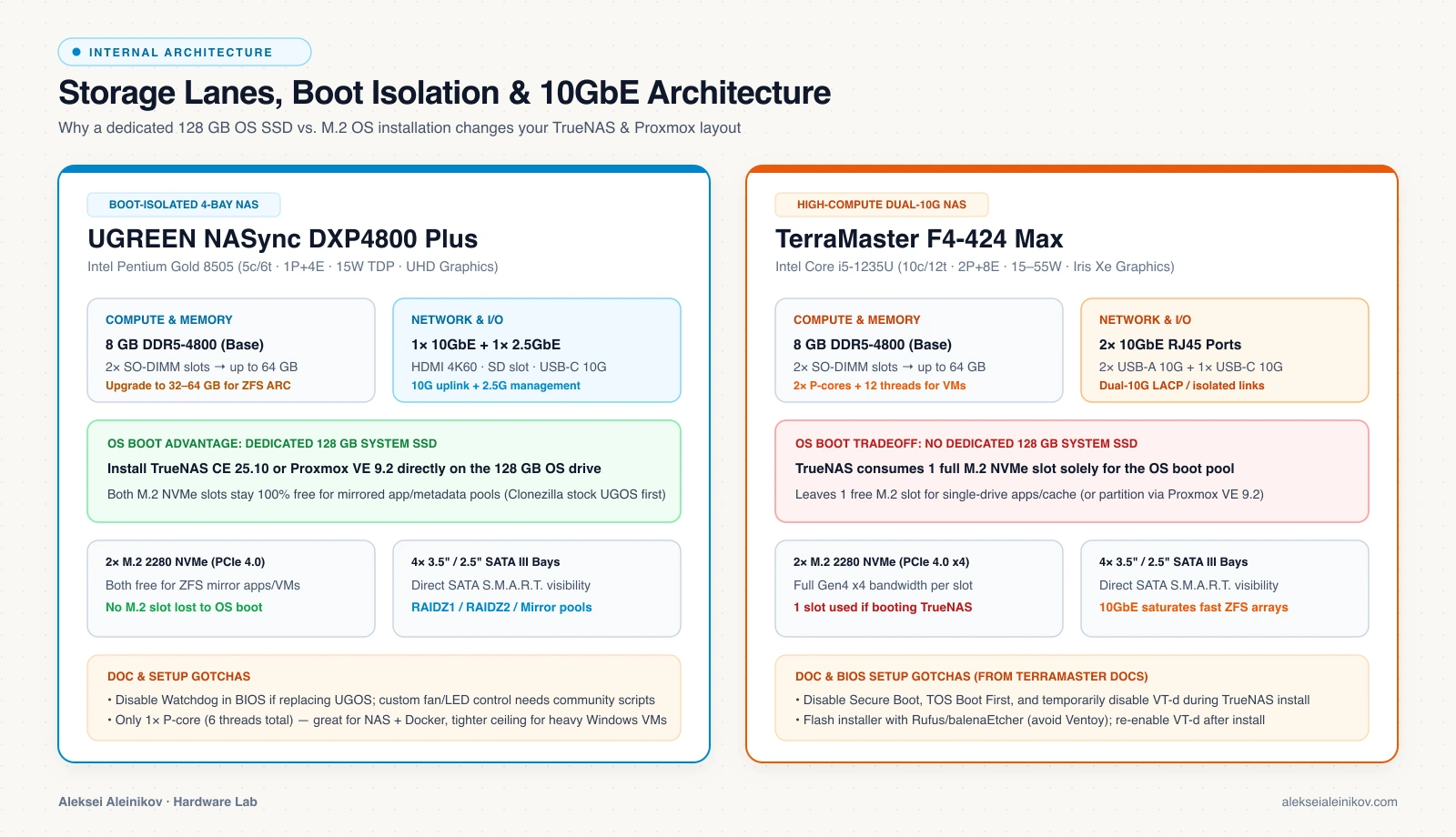
Per TrueNAS storage architecture, TrueNAS takes over the entire drive you install it on as a dedicated boot pool — you cannot partition a boot NVMe SSD to share space with Docker apps or VM disks.
- On the UGREEN DXP4800 Plus: You install TrueNAS directly onto the factory 128 GB system SSD. Both PCIe 4.0 M.2 2280 slots remain 100% free to form a redundant 2-drive ZFS mirror for your Docker Compose containers (Immich, Jellyfin metadata, databases) and fast VM storage. (Tip: back up or clone the 128 GB SSD with Clonezilla before wiping it if you ever want to restore stock UGOS.)
- On the TerraMaster F4-424 Max: Because there is no separate user-replaceable 128 GB SATA/NVMe boot SSD for third-party OSes, installing TrueNAS onto an M.2 drive consumes one of your two M.2 slots solely for the OS. You are left with only one free M.2 slot — meaning your fast NVMe app/cache pool has no drive-level mirror redundancy unless you sacrifice one of the 4 main SATA bays.
CPU Headroom: Pentium Gold 8505 vs. Core i5-1235U
Both chips share Intel’s 12th-Gen Alder Lake architecture with hardware QuickSync for 4K media transcoding, but their core budgets target very different workloads:
- Pentium Gold 8505 (UGREEN DXP4800 Plus): 1 Performance core (2 threads) + 4 Efficient cores (4 threads) = 5 cores / 6 threads at 15 W base TDP. For SMB/NFS file serving, ZFS scrubs, 10GbE transfers, and 10–20 lightweight Docker containers, it runs cool and quiet without breaking a sweat.
- Core i5-1235U (TerraMaster F4-424 Max): 2 Performance cores (4 threads) + 8 Efficient cores (8 threads) = 10 cores / 12 threads with Intel Iris Xe graphics and up to 55 W turbo power. If you plan to run Proxmox VE with multiple full VMs, Windows guests, local CI runners, or heavy ZFS encryption under 10GbE load, double the Performance cores and double the thread count gives TerraMaster a clear compute advantage.
Networking & Real-World 10GbE Use Cases
- UGREEN (1× 10GbE + 1× 2.5GbE): Ideal for 95% of home labs. Put your main LAN/storage traffic on the 10GbE port and dedicate the 2.5GbE port to a management VLAN, Proxmox Corosync/backup link, or a secondary router.
- TerraMaster (2× 10GbE): Valuable if you actually have a multi-port 10GbE switch and want LACP link aggregation, separate 10GbE storage + VM VLANs, or a direct 10GbE DAC/RJ45 link from a workstation plus a 10GbE uplink to your switch.
The 8 GB DDR5 Trap & BIOS Gotchas From the Docs
Both manufacturers ship these boxes with 8 GB DDR5-4800 in a single SO-DIMM slot. As detailed in the Proxmox VE Administration Guide and TrueNAS Hardware Guide, 8 GB is the bare hard minimum for OpenZFS — before you even start Docker apps or VMs. Plan an upgrade to 32 GB (1×32 GB or 2×16 GB) or 64 GB (2×32 GB DDR5-4800) from day one.
When replacing vendor firmware with TrueNAS or Proxmox, check these documented firmware quirks:
- TerraMaster F4-424 Max BIOS checklist (from TerraMaster’s TrueNAS guide):
- Connect an HDMI monitor + USB keyboard and press
Delat boot. - Disable Secure Boot (
Security -> Secure Boot -> Disabled). - Disable TOS Boot First (
Fast / Boot -> TOS Boot First -> Disabled). - Temporarily disable VT-d (
Chipset -> North Bridge -> VT-d -> Disabled) during TrueNAS installation if the installer stalls, then re-enable VT-d afterward for VM passthrough. - Flash your installer USB with Rufus or balenaEtcher — TerraMaster explicitly notes avoiding Ventoy due to bootloader issues on these boards.
- Connect an HDMI monitor + USB keyboard and press
- UGREEN DXP4800 Plus BIOS & chassis checklist:
- Disable the hardware Watchdog in BIOS so the chassis does not reboot unexpectedly while running TrueNAS or Proxmox.
- Stock chassis LED indicators and custom UGOS fan curves are not natively driven by TrueNAS/Proxmox without community scripts; verify fan behavior under load after switching OSes.
- Note that HDMI output on either box is for BIOS/installer access — TrueNAS does not output a desktop GUI or media player over HDMI.
Buyer Decision Matrix: Which One Should You Pick?
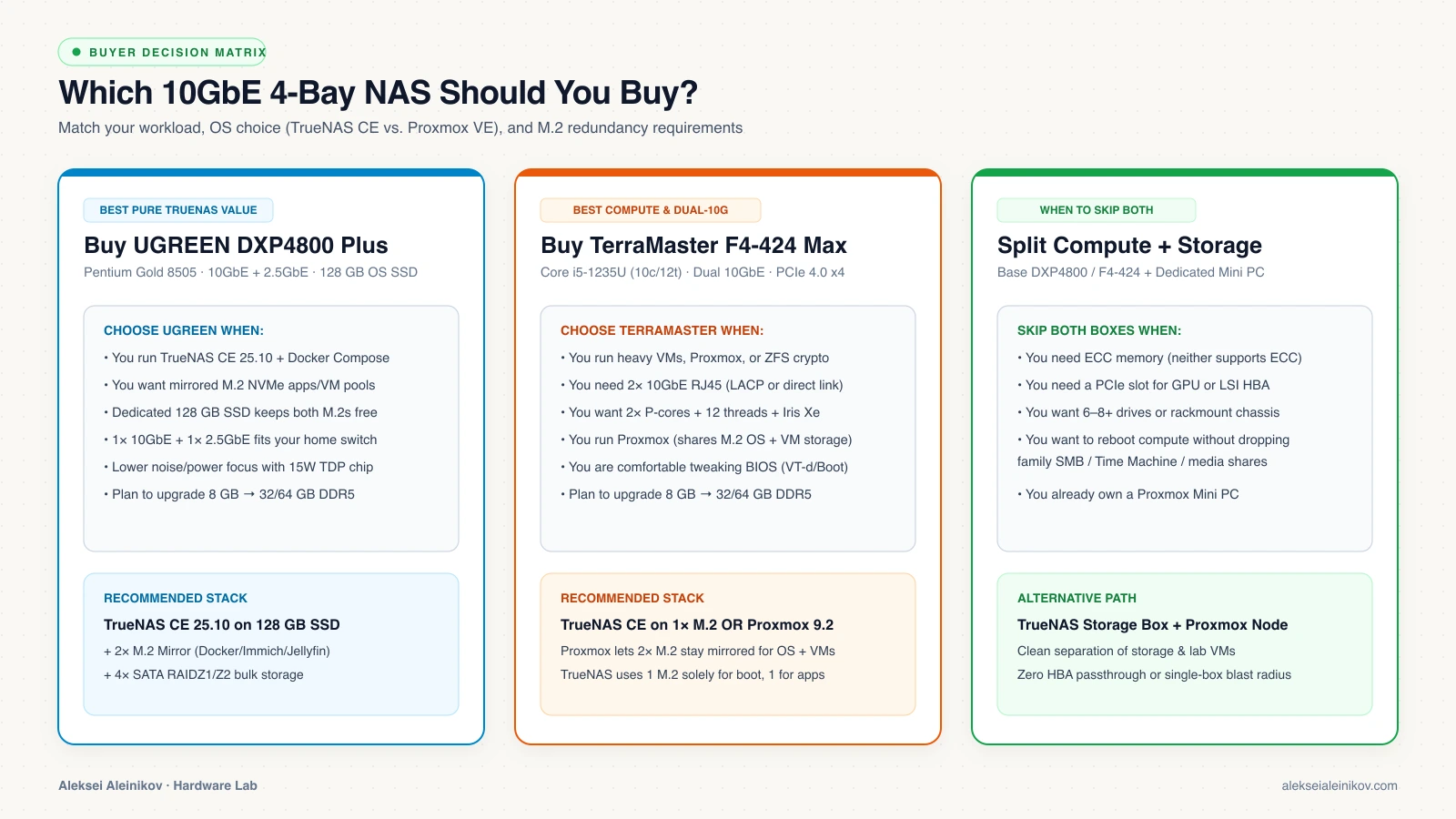
- Pick the UGREEN NASync DXP4800 Plus if: You are building a TrueNAS bare-metal storage + Docker Compose box and want the dedicated 128 GB OS SSD so both PCIe 4.0 M.2 slots stay free for a mirrored app/VM pool.
- Pick the TerraMaster F4-424 Max if: You are running Proxmox VE (where the M.2 mirror holds both OS and VMs cleanly), need 10 cores / 12 threads for heavy VMs, or actively use dual 10GbE ports.
- Skip both if: You require ECC memory, a physical PCIe x8/x16 slot for a discrete GPU or LSI SAS HBA, or 6–8+ drives — in that case, pair a dedicated Proxmox compute node with a separate storage server.


From the community
Discussion on Mastodon & Bluesky
Replies to this article from the open web, pulled in live. No ads, no tracking scripts.
Reply there — it shows up here automatically.