

Every home server build hits the same fork before you even flash a USB stick: do you install a Type-1 hypervisor (Proxmox VE), a storage appliance (TrueNAS Scale), or plain Linux with Docker?
Pick wrong and you feel it six months later — either fighting ZFS memory starvation on an 8 GB Mini PC, or trying to pry virtualized disks out of a hypervisor without corrupting your array.
The short verdict. On a 4-bay+ NAS, run TrueNAS Scale bare-metal (it now runs native Docker Compose without Kubernetes). On a 32–64 GB Ryzen Mini PC or multi-OS lab, run Proxmox VE with a dedicated Docker VM. On an 8–16 GB N100/N150 Mini PC, run bare-metal Debian + Docker Compose so ZFS doesn’t eat half your memory.

Architecture Comparison at a Glance
The table below reflects current official specifications across Proxmox VE, TrueNAS Scale, and Docker Engine:
| Dimension | Proxmox VE 9.2 | TrueNAS CE 25.10 (ex-SCALE) | Bare-Metal Linux + Docker |
|---|---|---|---|
| Base OS & lifecycle | Debian 13 “Trixie” (8.x EOL Aug 2026) | Debian-based (Goldeye; ex-SCALE) | Debian / Ubuntu LTS |
| Primary design goal | Type-1 hypervisor (KVM + LXC) | OpenZFS storage appliance | Lightweight container host |
| Container runtime | KVM VM (recommended) or LXC | Native Docker Compose (replaced K3s) | Native Docker Engine / Compose |
| VM support | Best-in-class KVM + PCIe passthrough | Incus VMs & LXC (25.04 / 25.10) | Manual (libvirt / QEMU) |
| Base OS RAM floor | 2 GB (8 GB+ required for ZFS) | 16 GB recommended for ZFS + apps | 1–2 GB (ext4 / XFS) |
| Storage integrity | ZFS, Ceph, LVM-thin | OpenZFS RAIDZ1/2/3 + RAIDZ expansion | ext4 / mdadm / Btrfs |
| Native backup story | Proxmox Backup Server (PBS) | ZFS snapshots + replication + S3 sync | Restic / Borg / Compose YAML in Git |
| Clustering / HA | Multi-node quorum + live migration | Single-node (Enterprise HA on TrueNAS HW) | Swarm / K3s / manual |
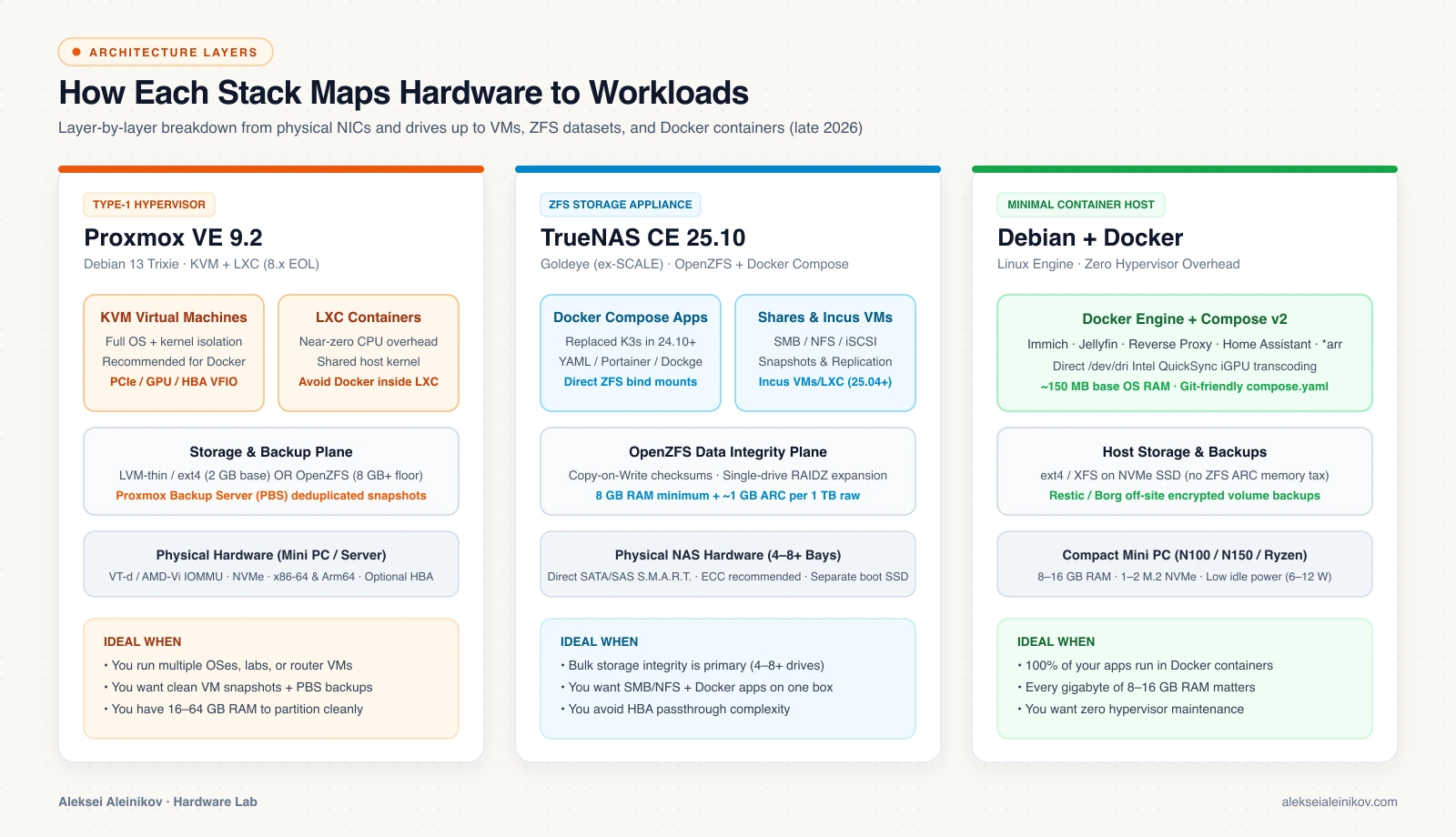
What Changed: TrueNAS Dropped Kubernetes & Added RAIDZ Expansion
For years, the default homelab advice was: “TrueNAS apps run on K3s and Helm charts, so install Proxmox and run a Debian VM for Docker — and never pick ZFS if you want to add one drive later.”
Both objections are now outdated. Starting with TrueNAS Scale 24.10 (Electric Eel), continuing through 25.04 (Fangtooth), and now unified under TrueNAS Community Edition 25.10 (Goldeye):
- Native Docker & Compose: Kubernetes (K3s) is completely gone. Standard
compose.yamlstacks, Portainer, and Dockge run directly on TrueNAS without a hypervisor layer. - Single-drive RAIDZ expansion: OpenZFS now lets you expand an existing RAIDZ1 or RAIDZ2 vdev one drive at a time — removing the biggest historical pain point for 4-bay to 8-bay NAS buyers starting with 2 or 3 drives.
- Proxmox VE 9.2 (Debian 13 Trixie): Meanwhile, Proxmox moved to the 9.x line (with official Arm64 builds alongside x86-64, and Proxmox VE 8.x reaching EOL in August 2026). If you run Docker on Proxmox, run it inside a dedicated KVM virtual machine rather than an LXC container: Proxmox’s own guidance notes that running Docker inside unprivileged LXC risks
overlay2,cgroup, and AppArmor breakages on host kernel updates, whereas a KVM VM isolates Docker’s kernel cleanly and backs up cleanly via PBS.
Memory & ZFS Math: Why Hardware Dictates the Stack
According to the Proxmox VE Administration Guide and TrueNAS Hardware Guide:
- Proxmox VE OS overhead: Minimum 2 GB RAM for Proxmox services (1 GB evaluation floor), plus whatever you assign to VMs and containers.
- ZFS RAM floor: Both Proxmox and TrueNAS warn that ZFS relies heavily on memory — Proxmox specifies an 8 GB RAM hard minimum to start using ZFS pools, with a general production rule of thumb of 2 GiB base + ~1 GB RAM per 1 TB of raw storage for the Adaptive Replacement Cache (ARC), plus ECC memory strongly advised to guard against silent bit flips.
- Hardware RAID warning: Never layer ZFS on top of a hardware RAID controller with its own write cache; use direct AHCI/NVMe or an HBA flashed strictly to IT Mode.
That math immediately separates two common home-server classes:
- 8–16 GB N100/N150 Mini PC (1–2 NVMe SSDs, 6–10 W idle): If you install ZFS with 8 GB allocated to ARC, half your box is gone before you launch Immich or Home Assistant. Bare-metal Debian + Docker (or Proxmox on
LVM-thin/ext4) leaves nearly all RAM free for workloads. - 16–64 GB 4-Bay+ NAS (UGREEN, TerraMaster, or DIY ATX): With 4+ spinning/NVMe bays and 32–64 GB RAM, ZFS ARC shines — and TrueNAS Scale bare-metal gives you automated scrubs, bitrot protection, and SMB/NFS shares out of the box.
The #1 Trap: Virtualizing TrueNAS Without an HBA
If you decide to run TrueNAS Scale as a VM inside Proxmox VE, there is one non-negotiable hardware rule: never pass virtual disks (virtio-blk or .qcow2 images) into TrueNAS as your ZFS pool.
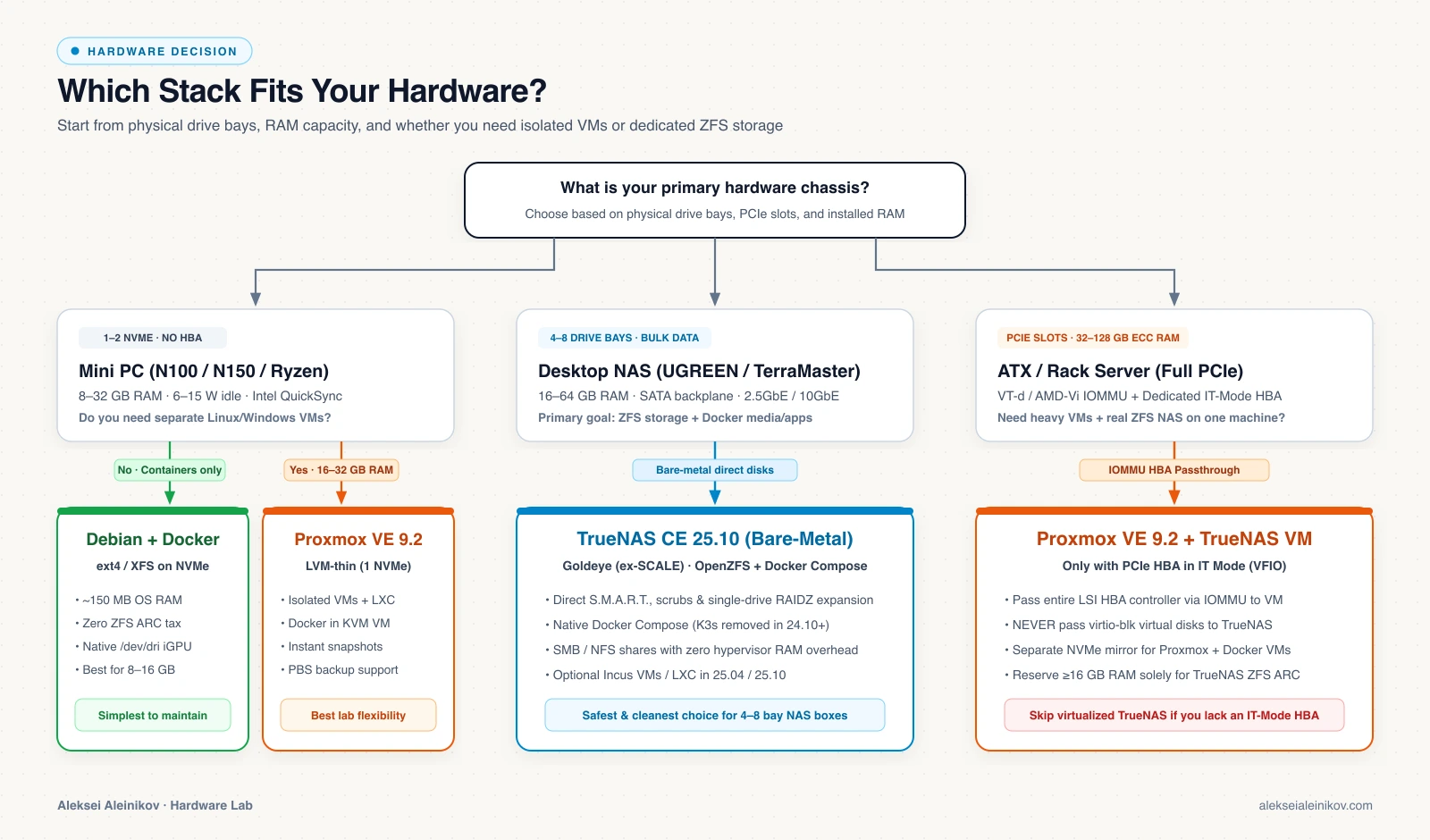
Why virtual disks break TrueNAS:
- ZFS assumes direct hardware visibility for write barriers, sector alignment, S.M.A.R.T. wear alerts, and bad-block self-healing.
- Virtualized disks hide physical drive failures until the underlying host filesystem or pool degrades silently.
To virtualize TrueNAS safely inside Proxmox, you must meet all three requirements:
- CPU and motherboard with Intel VT-d or AMD-Vi (IOMMU) enabled in BIOS and the Proxmox kernel (
intel_iommu=onoramd_iommu=on). - A dedicated physical SAS/SATA HBA card (such as an LSI 9207/9300 series) flashed to IT Mode (Initiator Target) — which most compact Mini PCs simply do not have a PCIe slot for.
- Full PCIe device passthrough of that HBA straight into the TrueNAS VM.
If your Mini PC has no PCIe slot for an HBA, do not virtualize TrueNAS. Either run TrueNAS bare-metal on a multi-bay NAS, or run Proxmox/Docker on the Mini PC and keep bulk storage on a separate NAS box.
Backups and Day-2 Operations
A clean home server is one you can rebuild in an hour after an SSD dies — keeping in mind that RAID snapshots are not disaster recovery:
- Proxmox VE: Pair it with Proxmox Backup Server (PBS) on a second cheap box or NAS share for incremental, deduplicated, encrypted VM and LXC snapshots. Restoring a broken Linux VM takes minutes.
- TrueNAS Scale: Use scheduled ZFS snapshots for instant local rollback, plus Cloud Sync tasks to replicate encrypted datasets offsite (for example, to S3-compatible object storage without egress fees).
- Bare-Metal Docker: Keep every
compose.yamland.env.examplein Git, and run scheduled Restic or Borg backups of your/srv/dockervolumes to a NAS or S3 bucket.
Which Stack Should You Pick?
- You bought an N100/N150 Mini PC (8–16 GB RAM, 1–2 NVMe drives): Install bare-metal Debian + Docker Compose for maximum simplicity and zero RAM tax — or Proxmox VE (
LVM-thin) if you want clean VM snapshots before experiments. - You bought a 4-bay to 8-bay NAS (UGREEN, TerraMaster, or DIY ATX with 16–64 GB RAM): Install TrueNAS Scale bare-metal. With native Docker Compose now built in, you get enterprise-grade OpenZFS storage and containers without hypervisor complexity.
- You run a 32–128 GB Ryzen Mini PC, workstation, or multi-node lab: Install Proxmox VE as your hypervisor, run Docker inside a dedicated Ubuntu/Debian VM (backed up by PBS), and keep bulk ZFS storage either on a separate NAS or behind an IT-mode HBA.
Sources
- Proxmox VE — Official Overview & Virtualization Features
- Proxmox VE Administration Guide — System Requirements & ZFS
- Proxmox Backup Server — Overview & Deduplicated Backups
- TrueNAS Scale Documentation — Apps, Docker Compose & Virtualization
- TrueNAS Scale — Official Hardware Guide & ECC/RAM Sizing
- Docker Engine — Official Documentation