
It’s 3am and the primary region is gone. The on-call engineer is calm at first — “we have backups, we’re fine.” The backups are pristine. Every byte is there.
Fourteen hours later, the service is still down. Not because the data wouldn’t restore — it restored in twenty minutes. Because nobody had a plan to rebuild the network, re-point DNS, recreate the IAM roles, and stand up the infrastructure those backups needed to restore into. The backup was perfect. The recovery was a scramble invented live, at the worst possible time.
This is the most expensive misunderstanding in operations: “we have backups” is not the same as “we can recover.” One is a copy of your data. The other is a capability to get your business running again. Confusing them is how a two-hour incident becomes a two-day outage.
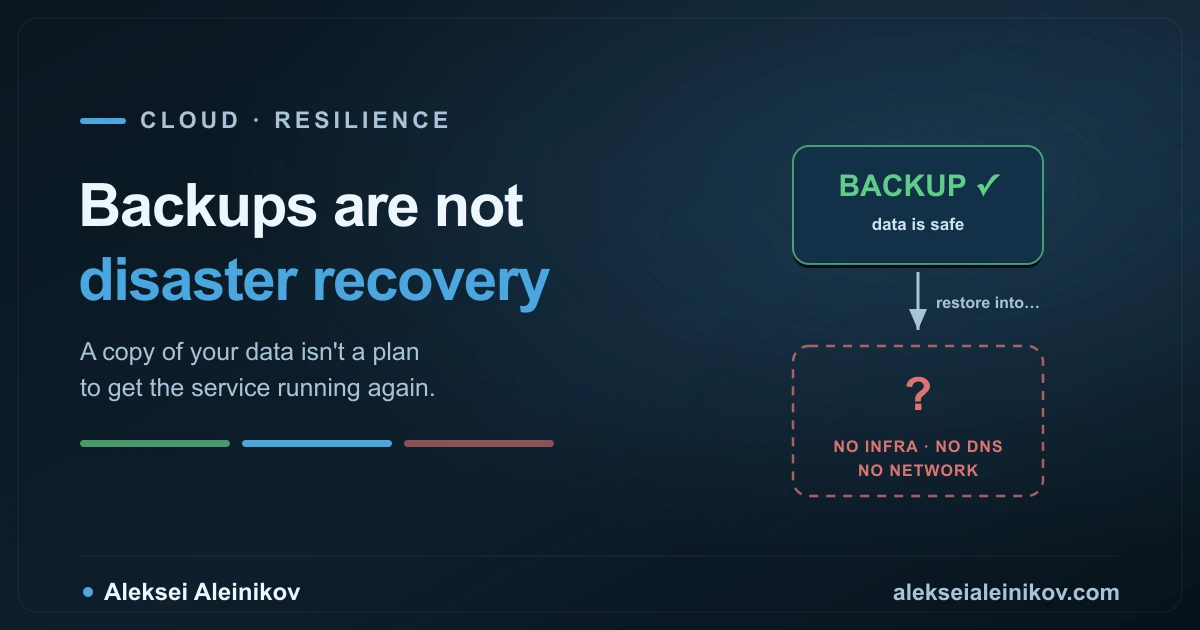
Here’s the difference, laid out — and how to build the one that actually saves you.
A Backup Answers One Question. DR Answers a Bigger One.
Strip away the jargon and it’s simple:
- A backup is a point-in-time copy of your data. It answers exactly one question: can I get the data back?
- Disaster recovery is the whole plan and capability to bring a service back online after a disaster. It answers the questions that actually matter to the business: how fast are we back, and how much did we lose?
A backup is a component of disaster recovery — a necessary one — but it is nowhere near the whole thing. DR also includes the infrastructure to run on, the network and DNS to route traffic, the secrets and certificates to establish trust, the IAM to grant access, and the runbook a stressed human follows at 3am.
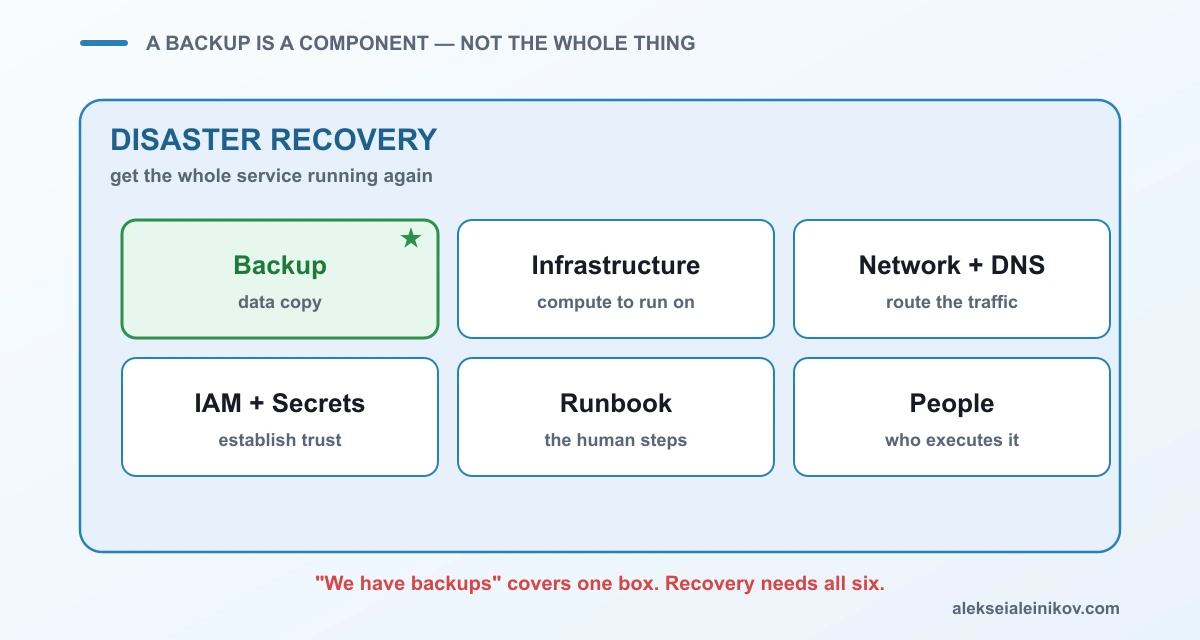
You can have flawless backups and still fail catastrophically, because the data had nowhere to land. That’s not a hypothetical — it’s the single most common way DR goes wrong.
RTO and RPO: The Two Numbers That Define Everything
Before you pick a strategy, you need two numbers, and most teams conflate them. They are different questions with different costs.
- RPO — Recovery Point Objective: how much data can you afford to lose? It looks backward from the disaster to your last recoverable state. A 1-hour RPO means you back up or replicate at least hourly; lose the last hour of writes and that’s acceptable.
- RTO — Recovery Time Objective: how long can you afford to be down? It looks forward from the disaster to service restored. A 15-minute RTO means you must be back within fifteen minutes.
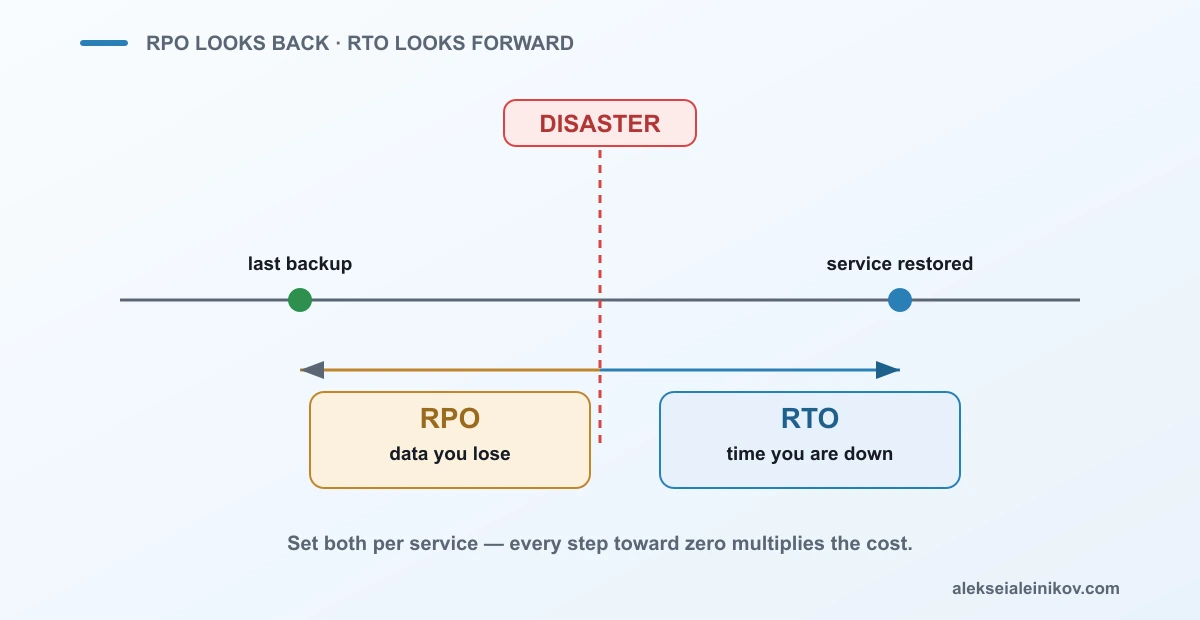
These are independent. A payments ledger might tolerate hours of downtime (high RTO) but zero data loss (near-zero RPO). A live analytics dashboard might tolerate losing an hour of data (high RPO) but must never be down (low RTO). Set them per service, from business impact — not by reflexively demanding “as low as possible,” because every step toward zero multiplies the cost.
The RPO conversation is really a consistency conversation in disguise. If you want the theory underneath it, see The CAP Theorem, Honestly: What It Really Means When You Pick a Database.
The Four DR Strategies: A Cost-vs-Speed Ladder
There isn’t one “disaster recovery.” There are four standard strategies, and they trade money for speed. From cheapest and slowest to priciest and fastest:
- Backup & Restore — keep backups; after a disaster, rebuild the environment and restore into it. Cheapest to run, RTO of hours to days. Fine for non-critical, tolerant workloads.
- Pilot Light — a minimal core is always on in the recovery region (typically a live database replica), everything else is dormant infrastructure-as-code you scale up on demand. Lower RTO, modest cost.
- Warm Standby — a scaled-down but running copy of the full stack in the recovery region, ready to take traffic and scale up fast. Faster RTO, higher steady cost.
- Multi-Site Active/Active — full capacity running in two or more regions simultaneously, serving traffic from all. RTO near zero, RPO near zero — and the most expensive to run.
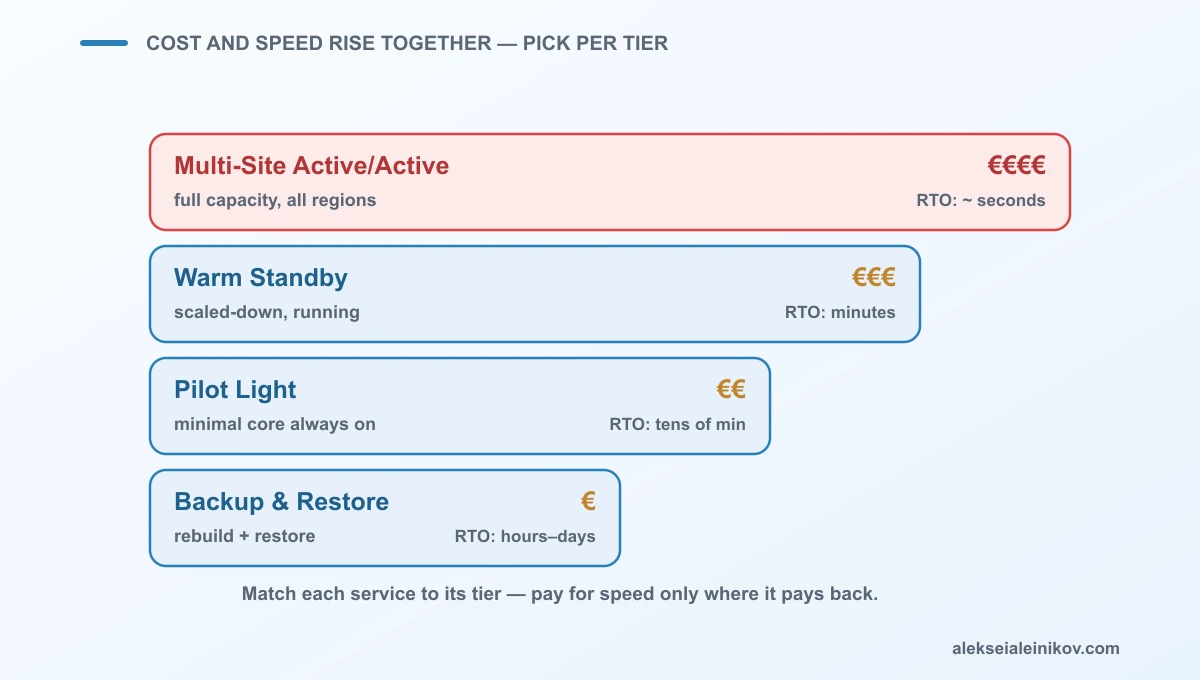
The mistake is picking one strategy for everything. The right move is to tier your services: multi-site for the checkout path, warm standby for the core API, pilot light for internal tools, plain backup & restore for the reporting job nobody misses for a day. Match the strategy to each service’s RTO/RPO, and you stop overpaying to protect things that don’t need it — and stop under-protecting the things that do.
The Untested Plan Is the Real Failure
Here is the part that separates teams who have DR from teams who think they do: a plan you have never executed is a hypothesis, not a capability.
When a real disaster hits, the data restore is rarely what fails. The failures hide in the parts nobody rehearsed:
- DNS — records with a 24-hour TTL keep sending users to the dead region long after failover. The service is up; the traffic can’t find it.
- Certificates — the TLS cert in the recovery region expired months ago because nothing was serving traffic there to alert on it.
- IAM & secrets — the roles and API keys the app needs were created by hand in the primary region and never existed in the recovery one.
- Network routes — the peering, firewall rules, and load-balancer config were never replicated, so packets have nowhere to go.
None of these show up in a tabletop read-through. They only surface when you actually fail over — which is why regular DR drills (game days) that move real traffic are non-negotiable. Automated failover that has never been triggered by hand should be assumed broken until proven otherwise.
Resilience is designed in before the incident, not bolted on after. For the architecture side of surviving load and failure, see How to Send 1,000,000 Notifications Without Falling Over.
How to Actually Build It
Skip the binder that gathers dust. Do these four things:
- Set RTO and RPO per service, from business impact. Not one global number — a tier list. The checkout path and the nightly report do not deserve the same protection.
- Pick a DR strategy per tier. Multi-site where seconds matter, backup & restore where a day is fine. Pay for speed only where speed pays back.
- Put the whole environment in code. Infrastructure, network, DNS, IAM — if recovery depends on someone remembering how it was built, you don’t have recovery. Terraform/OpenTofu it so the recovery region is a
planandapplyaway. - Test it on a schedule, for real. Quarterly at minimum, and after every major change. Fail over production-like traffic, measure against your RTO/RPO, and fix every gap the drill exposes. The drill that never fails isn’t a real drill.
The Field Rule
Backups are not disaster recovery. A backup answers “can I get the data back”; disaster recovery answers “how fast are we running again, and how much did we lose.” Define those two numbers — RTO and RPO — per service from business impact, choose one of the four strategies per tier so you pay for speed only where it matters, put the entire environment in code so the data has somewhere to land, and test the whole thing on a schedule by actually failing over. Do that, and the 3am outage is a controlled, measured recovery — not a fourteen-hour scramble to reinvent your infrastructure while the clock and the losses run.


From the community
Discussion on Mastodon & Bluesky
Replies to this article from the open web, pulled in live. No ads, no tracking scripts.
Reply there — it shows up here automatically.