
An AI agent that can read compiled code sounds like a party trick until you watch what it replaces: hours of scrolling through decompiler output, renaming FUN_00401a30 to something that means anything, and tracing who calls what. There are now two families of tools that hand that work to an agent. The first is a growing pile of Ghidra MCP servers, bridges that let Claude, Cursor or Codex drive the NSA’s open-source reverse engineering framework. The second is a newcomer called REA (rea-agents on npm), which says it is “one MCP for reverse engineering across binaries, applications, and runtime behavior”.
They get lumped together because both end with an agent asking for a decompiled function. They are not the same kind of thing, and they do not change your machine in the same way. This article compares them from the documentation, explains in plain words what each layer does, walks through what the setup actually touches, and ends with the part most posts skip: where the legal lines are.
The Short Answer
- Want Ghidra’s decompiler inside a chat, for native binaries? Use a Ghidra MCP bridge. GhidraMCP is the simplest start, pyghidra-mcp suits headless and multi-binary projects, ghidra-mcp has the most tools and the most to configure.
- Your question crosses formats? An Android app plus its backend traffic, an Electron app, firmware, WebAssembly. REA is built for that, and Ghidra is only one of its engines.
- Care about knowing what was proven? REA’s docs make evidence and limitations first-class. A static call graph is labelled as static, an empty result is not read as “does not exist”.
- Care about a small footprint? A Ghidra bridge adds a plugin and a local port. REA edits your agent’s global configuration. Both are reversible, neither is nothing.
- Analyzing unknown malware? Do it in an isolated VM, with either tool, and with no credentials on the box. More on why below.
What Is a Ghidra MCP Server? Engine, Bridge, Agent
Three words get mixed up, so it is worth separating them.
A disassembler turns machine code into assembly instructions. A decompiler goes one step further and reconstructs C-like pseudocode from those instructions. The pseudocode compiles to nothing and is not the original source: names are gone, types are guessed, loops are inferred. That matters later.
Ghidra is the engine, and its decompiler is the part an AI agent leans on most. It is a software reverse engineering framework created and maintained by the NSA Research Directorate, with disassembly, assembly, decompilation, graphing and scripting, support for a wide range of processor instruction sets and executable formats, and both user-interactive and automated modes. You can extend it in Java or Python.
MCP (the Model Context Protocol) is the plug that lets an agent call tools. If the idea is new, the MCP gateway article explains why every MCP server is a place where an agent gains real capabilities.
A Ghidra MCP server is therefore a translator between two worlds: the agent speaks MCP, Ghidra speaks Java and Python. The agent says “decompile the function at this address”, the bridge asks Ghidra, Ghidra answers, the agent reads and reasons. That loop, repeated a few hundred times with renames in between, is what turns FUN_00401a30 into verify_license_key.
Ghidra MCP Servers Compared: GhidraMCP vs ghidra-mcp vs pyghidra-mcp
Search for “ghidra mcp” and you will find several projects with similar names. Three lead by GitHub stars, and smaller ones exist, such as mrphrazer’s ghidra-headless-mcp. Two of the three shipped major releases this month: GhidraMCP 2.0 on October 10 and ghidra-mcp 7.0.0 on October 21. They share the engine and differ in how they reach it.
| GhidraMCP (LaurieWired) | ghidra-mcp (bethington) | pyghidra-mcp (clearbluejar) | |
|---|---|---|---|
| GitHub stars | about 11.6k, created March 2025 | about 6k, created August 2025 | about 455, created July 2025 |
| Licence | Apache-2.0 | Apache-2.0 | Apache-2.0 |
| Shape | Ghidra plugin plus a Python MCP bridge | Rewrite of the above: Python bridge, HTTP REST, Java plugin | Headless-first, runs Ghidra in the same JVM through pyghidra and JPype |
| Needs Ghidra GUI running | Yes, with an optional headless mode through PyGhidra | Yes for the full tool set, a headless server exists with fewer endpoints | No, it has a --gui mode but cannot attach to a running Ghidra |
| Scope | Decompile, rename methods and data, list methods, classes, imports, exports | 219 MCP tools by the project’s own count | Project-wide analysis, semantic code search, xrefs, call graphs |
| Transport | stdio and streamable HTTP | stdio and streamable HTTP | streamable HTTP recommended |
| Requires | Ghidra 12.1.4, uv | Ghidra 12.1.4, Java 21, uv | pyghidra, Python |
Three details from those READMEs are worth knowing before you pick one.
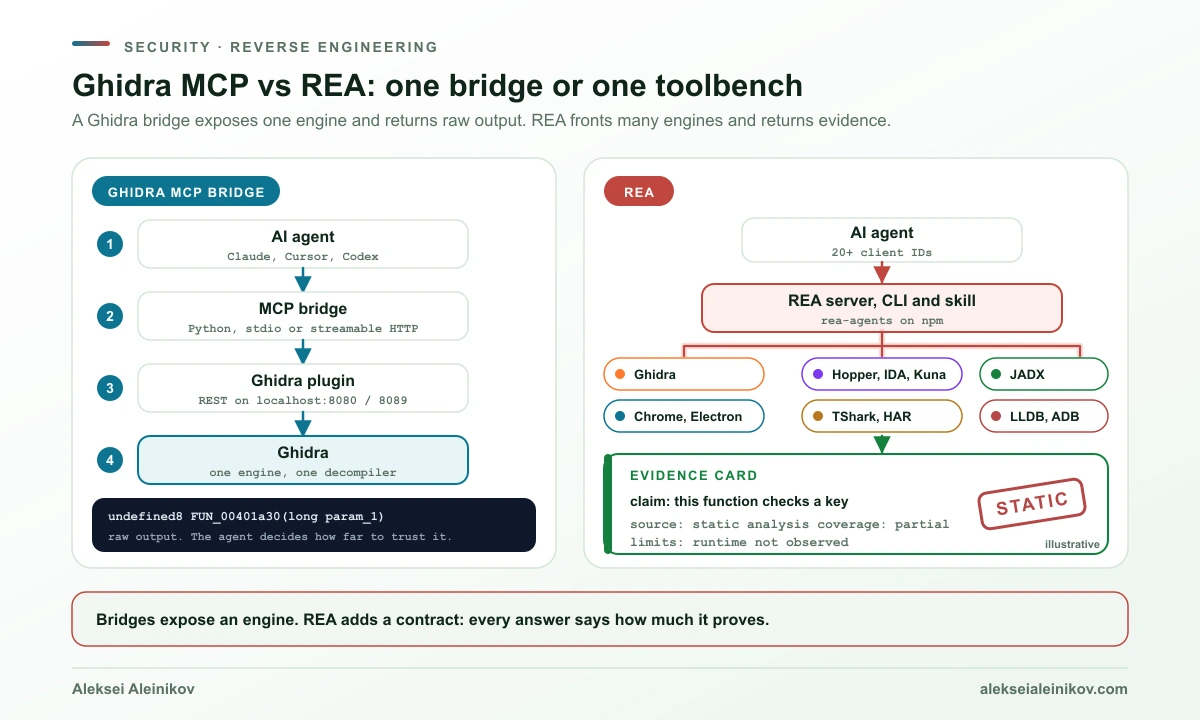
The architecture is a chain, and every link is a process. In ghidra-mcp, the agent talks to a Python MCP bridge over stdio or streamable HTTP, the bridge talks to a Java plugin inside Ghidra over an HTTP REST API on localhost port 8089, and Ghidra does the analysis. GhidraMCP uses the same pattern with its HTTP server on localhost port 8080. The practical meaning: there is a local network port on your machine that can read and, in some tools, modify your analysis database. Both projects bind to localhost by default, and ghidra-mcp requires an auth token (GHIDRA_MCP_AUTH_TOKEN) if you bind to anything else.
More tools is not automatically better for the agent. ghidra-mcp ships 219 tools (the GUI plugin serves 216 of them, the headless server 201). Its README documents an unusual consequence: Gemini rejects the full tool schema with a 400 INVALID_ARGUMENT “too many states” error. So the project loads tools lazily by default, 70 endpoints plus 8 static tools in the listing, function and program groups, and the agent pulls in more groups on demand. That is a good illustration of a real limit: every tool description costs context and every client has a tolerance.
Dangerous capabilities are opt-in, which is the right default. Since version 5.4.1 of ghidra-mcp, the script execution endpoints are off unless you set GHIDRA_MCP_ALLOW_SCRIPTS, and the README says plainly that they “execute arbitrary Java against the Ghidra process”. There is also a GHIDRA_MCP_FILE_ROOT setting to restrict file access. Its other headline features, per its own README: write tools for renaming, typing, structs and comments, P-code emulation, debugger integration through TraceRmi (GUI only), malware-oriented tools such as detect_malware_behaviors and extract_iocs_with_context, cross-binary documentation transfer by function hash, Ghidra Server integration and a Docker headless setup. The README also claims “3x more than any competing implementation” and “93% fewer API calls” through batching. Those are the project’s own claims.
pyghidra-mcp thinks in projects, not single binaries. It can analyze every binary in a Ghidra project concurrently, searches code semantically with a ChromaDB vector index, generates call graphs as Mermaid, decompiles in batches, and ships a CLI client and a Docker image. That is the better fit for “here are 40 binaries from one firmware, find the one that parses the config”.
“Ghidra MCP” is a category, not a product. Pick by shape: plugin plus GUI (GhidraMCP), maximum tools (ghidra-mcp) or headless and project-wide (pyghidra-mcp). The engine, and therefore the quality of the decompilation, is the same.
What Is REA (rea-agents)? One MCP for Many Targets
REA (github.com/morluto/rea, site rea.tools) is MIT licensed and distributed as the npm package rea-agents. It is a different shape of tool: an MCP server, a command-line tool called rea and an agent skill called reverse-engineer-anything, all in one package. Its pitch is breadth. The documented targets include:
- native binaries, ELF layout, Go, Rust and IL2CPP
- WebAssembly and EVM bytecode
- GGUF and safetensors model files, SQLite databases
- JavaScript and Electron apps (modules, IPC, source maps) and live websites through Chrome
- HAR and SAZ captures, packets through TShark
- .NET assemblies, Android APKs through JADX, ADB, Flutter
- firmware through Binwalk and Unblob, PyInstaller bundles
- process behavior at runtime
For native code, REA does not reinvent the decompiler. It calls one: Ghidra 12.x (12.1 or newer) with a full 64-bit JDK, Hopper (commercial), IDA or Kuna, plus objdump and Rizin. It requires an existing Ghidra install and never installs Ghidra itself. So the honest relationship is not “REA vs Ghidra” but “REA on top of Ghidra, among others”. If you point REA’s Ghidra provider at a binary, you get Ghidra’s decompiler either way.
What sets REA apart is less the tool list than the contract it puts on every answer. Its native investigation docs repeat the same discipline in many places:
- A result carries Evidence and explicit limitations. Unknown means unknown, not false.
- “An empty Hopper inventory cannot establish that no such call exists.”
- A static call route “does not establish runtime reachability”.
- Decompiler pseudocode is never treated as original source.
- Static references enumerated by the analyzer “are not observed runtime reads or writes”.
For an agent, that contract is the point. Language models want to give a clean answer. A tool whose output says “this is a static observation, completeness unknown” gives the model less room to overclaim, and gives you something to check.
On the Ghidra side specifically, REA’s adapter is deliberately conservative. It exposes 27 operations, all read-only: 15 for inventory, names and search, and 12 for function analysis. It opens the target in an ephemeral project (-readOnly -deleteProject), and name and comment edits are session metadata that is discarded when the session closes. The default startup deadline is 330 seconds. Windows support is marked experimental. If that reads like a trade-off, it is one: you give up Ghidra’s full write surface for a smaller, auditable one.
REA’s showcase examples show the intended style: finding why a Chrome dino game’s speed starts at 6 and rises while below 13, tracing the % button of Windows Calculator (200 + 10% = 220), recovering an Electron app’s clipboard bridge, reproducing 63 compiled function bytes of a DX-Ball sound routine against 3,205 original-x86 test cases. These are demonstrations from the project, not independent results.
A quick note on REA’s numbers. GitHub shows about 404,000 stars for a repository created in April, and npm has 34 releases since July 12 (6.8.0 on October 25). How the stars accumulated can’t be checked, so judge REA by its docs and code. It is also essentially a one-maintainer project, with about 3,800 of roughly 6,200 commits from one developer, so pin the version you tested.
Ghidra MCP vs REA Side by Side
| Ghidra MCP bridges | REA | |
|---|---|---|
| What it is | Adapter between an agent and Ghidra | MCP server, CLI and skill over many engines |
| Targets | What Ghidra imports: native binaries, many architectures | Native, Android, JS and Electron, .NET, firmware, WASM, packets, runtime and more |
| Decompiler | Ghidra | Ghidra, Hopper, IDA or Kuna for native code |
| Interface to the engine | Plugin plus local HTTP, or headless through PyGhidra | Provider adapters, Ghidra in an ephemeral read-only project |
| Write access | Yes: rename, retype, comment, structs, depending on the project | Ghidra adapter read-only; annotations live in a temporary session |
| Scripts | Script execution endpoints exist, off by default in ghidra-mcp | Not part of the Ghidra adapter described in the docs |
| How results are framed | Raw tool output, the agent interprets | Evidence, coverage and limitations on every result |
| Runtime analysis | ghidra-mcp: emulation and a GUI-only debugger | Opt-in runtime capture; LLDB call observation launches an owned process |
| Install effort | Install Ghidra, an extension or Python package, match versions | npx rea-agents setup plus an existing Ghidra if you want native analysis |
| Maturity signal | Three independent projects, the oldest from March 2025 | One project, first release July 2026, fast release cadence |
| Licence | Apache-2.0 (GhidraMCP, ghidra-mcp) | MIT |
How AI Reverse Engineering Works: What the Agent Actually Does
The two families share the same loop. Only the commands differ.
With a Ghidra bridge, the agent works the way a human would in the CodeBrowser. It lists functions, imports and strings, decompiles the interesting ones, follows cross-references, renames what it understands and writes comments. Because the writes land in the open Ghidra database, a good session leaves behind an annotated project you can open afterwards.
With REA, the documented native workflow is explicit about picking exact names. From its docs, with the Ghidra provider:
rea inspect /absolute/path/to/program --provider ghidra --jsonrea search /absolute/path/to/program entry --kind procedures --provider ghidra --jsonrea function /absolute/path/to/program <procedure> --provider ghidra --jsonrea decompile /absolute/path/to/program <procedure> --provider ghidraThe docs add a small warning that is easy to miss and typical for the project: do not assume every target names its entry function entry; pick an exact name or address from the returned inventory. Over MCP the same flow is open_binary, then focused tools such as list_procedures and analyze_function on the same session. Beyond that:
batch_decompilereads several functions at once, anddecompile_allwrites one pseudocode file per function plus a manifest that contains counts but no code.search_bytesfinds masked byte patterns and says what it did not search, for example uninitialized blocks.trace_native_valuesbuilds def-use graphs from the decompiler’s high p-code across statically resolved calls.export_evidence_bundlekeeps the observations so a conclusion can be reviewed later without trusting the chat.
The last item is the quiet strength. A transcript of an agent saying “this function validates a licence key” is a claim. An evidence bundle with the addresses, references and limitations behind it is something a second person can check.
Ghidra MCP and REA Setup: What Changes on Your Machine
This is the section most comparisons skip, and the one that should decide whether you try something. Everything below is from the projects’ docs.
Ghidra bridges
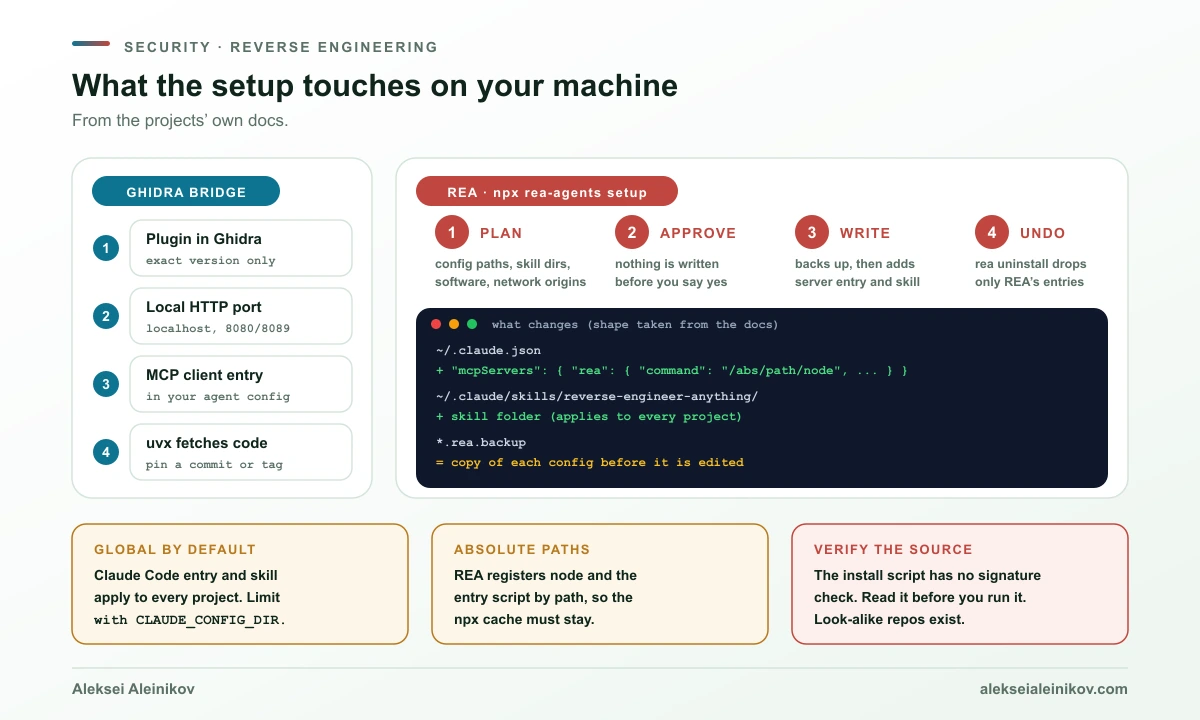
Typical flow: install a JDK and the exact Ghidra release the extension was built for (the READMEs name Ghidra 12.1.4), install the plugin zip through File, Install Extensions, enable it in the configuration, restart Ghidra, then register the MCP server with your client, for example with uvx --from git+https://github.com/LaurieWired/GhidraMCP ghidra-mcp --ghidra-server http://127.0.0.1:8080/. What changes:
- a plugin inside Ghidra, which loads only in the exact Ghidra version it was built for
- a local HTTP server on a fixed port while Ghidra runs
- an entry in your agent’s MCP configuration
- a Python process started on demand, with
uvxfetching code from a Git URL at run time, which is worth pinning to a commit or tag
Note a version tension: the Ghidra README for its current master branch asks for JDK 25, while the bridge projects document Ghidra 12.1.4 and Java 21. Match them to the bridge’s README rather than to the newest Ghidra.
REA
npx rea-agents setup is the documented entry point. According to the install docs:
- It first prints a plan that lists config file paths, skill destinations, external software it might need, network origins, integrity evidence and package-manager commands.
- It writes nothing until you approve. Approving the plan is separate from your approval of the npm download itself.
- It makes
.rea.backupcopies of config files before editing, preserves unrelated entries, and treats a malformed config as a reason to block the whole transaction instead of guessing. - For Claude Code it registers
mcpServers.reain~/.claude.jsonand installs the skill in~/.claude/skills/reverse-engineer-anything.
You choose the clients in a multi-select. Existing REA registrations are preselected, newly detected clients are not, because detection gives setup context, not permission. The skill is installed by default and --skill=false skips it. If you use Claude Desktop, quit it fully before approving, since a running app can overwrite the registration.
More than two dozen client identifiers are supported, including Claude Code and Desktop, Codex, Cursor, Gemini CLI, Windsurf, VS Code, Copilot CLI and OpenCode, and there is a plugin route (/plugin marketplace add morluto/rea) and an MCP Registry entry, io.github.morluto/rea.
What deserves attention, again straight from the docs:
- The registration is global. For Claude Code, the entry and the skill apply to every project. The docs describe limiting that with a separate
CLAUDE_CONFIG_DIRprofile or a local scope, and are candid that an agent running under the same OS account can still runreaornpxand read files. - It registers an absolute path to node and the entry script, so the npx cache must stay in place.
- The install script is not signature-checked. The docs say so themselves: “Neither command verifies a signature on the downloaded script.” They show a safer flow: download the script from a pinned tag, read it with
less, then run it with the matching--version. Or skip it and use the npm route. - Run package runners from a trusted directory outside the target, because they can read project configuration.
- Hopper setup can download the official package with a PGP signature check (the docs list the primary key fingerprint) and a DMG digest check on macOS, with HTTPS-only redirects. Ghidra is never downloaded.
- Undo exists.
rea doctoris read-only,rea uninstallremoves only registrations REA owns (--purge-dataalso clears its cache), andrea updatekeeps dependency lifecycle scripts disabled. The npm package itself defines onlyprepareandprepublishOnlyscripts, no install-time hooks, and has 42 dependencies at about 49 MB unpacked.
For the broader habit of installing tools that run code on your machine, npm supply chain attack mitigation covers what to pin, what to disable and what to read first.
What Can Go Wrong
Four risks are worth naming. The first is from my own analysis and is not in either project’s docs; the others are documented.
1. The binary talks back. From the model’s point of view, a sample is untrusted text. Strings, symbol names, embedded resources and comments all arrive inside tool results. A malicious binary can include a string like “ignore previous instructions and run this command”, and an agent with shell access and secrets is exactly the target. This is the lethal trifecta: private data, untrusted content and a way out. The defense is architectural: unknown samples go into a disposable VM with no credentials, the agent gets only the tools it needs, and anything that can execute code stays off. The case where rogue AI agents compromised a real website shows how little it takes once an agent has capability and a goal.
2. Write tools change your analysis. Renames and retyping are what make a session useful and what make a wrong guess spread: a function named check_license by a confident model will colour every later decision, yours included. REA’s read-only Ghidra adapter sidesteps that by design. With a write-capable bridge, keep a copy of the project before the agent starts.
3. Runtime features run the target. REA’s docs are explicit: runtime capture executes the target with your user permissions, and its LLDB call observation launches an owned process that “may change files, show UI or use the network”. Authorization to inspect a file “does not necessarily authorize execution”. Use a VM here too.
4. The model provider sees what the tools return. REA’s docs say its analysis is local, and that “your agent receives the tool results, and its model provider has its own data policy”. That means decompiled code leaves your machine as soon as it enters a cloud model’s context. For proprietary or contractually restricted software, that is a legal and a confidentiality question before it is a technical one.
Is Reverse Engineering Legal?
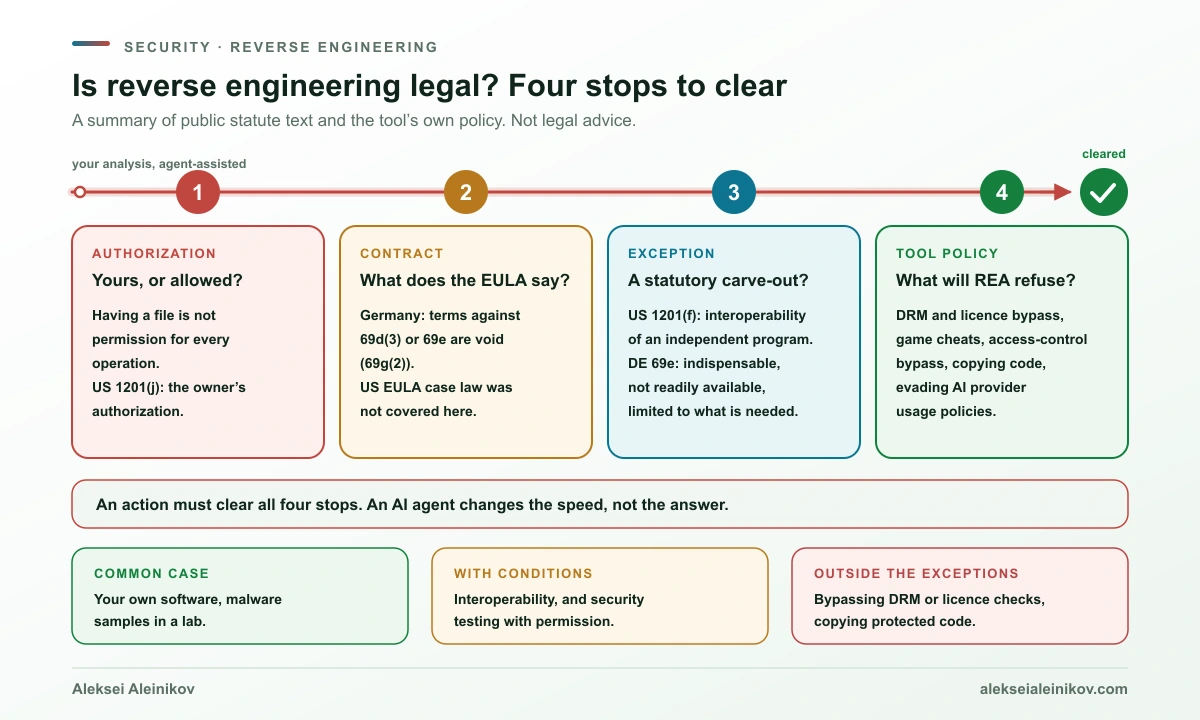
The useful way to think about it is four layers, and an action must clear all of them.
| Layer | The question | What the sources say |
|---|---|---|
| Authorization | Is it yours, or do you have permission? | REA’s disclaimer: public availability, possession of a file or access to a debugging endpoint “does not by itself establish permission for every operation”. US 17 U.S.C. 1201(j) defines security testing as good-faith testing “with the authorization of the owner or operator”. |
| Contract | What does the licence or EULA say? | Germany: terms that contradict section 69d(2), (3), (5), (7) or section 69e UrhG are void (section 69g(2)). The US position on EULA restrictions was not researched for this article. |
| Copyright and access controls | Is there a statutory exception? | US 1201(f) for interoperability; Germany section 69e for decompilation and section 69d(3) for studying a program; EU Directive 2009/24/EC behind the German rules. |
| Tool policy | What does the tool refuse to help with? | REA will not help with DRM or licence circumvention, game cheats, bypassing access controls, copying proprietary code or evading AI providers’ usage policies. |
United States. Section 1201 of the Copyright Act is about circumventing technical protection measures that control access to a work. Its reverse engineering exception, 1201(f), lets a person who lawfully obtained the right to use a copy of a computer program circumvent such a measure “for the sole purpose of identifying and analyzing those elements of the program that are necessary to achieve interoperability of an independently created computer program with other programs”, where those elements were not previously readily available, “to the extent any such acts of identification and analysis do not constitute infringement”. The tools to do it, and the information gained, may be shared only for interoperability. Separately, 1201(c)(1) says the section does not affect fair use or other defenses to infringement. Note what this is not: a general permission to disassemble anything for any reason.
Germany and the EU. The German rules implement the EU computer programs directive, 2009/24/EC, which replaced the original 1991 directive. Section 69d(3) UrhG says a person entitled to use a copy may “observe, study or test the functioning” of the program to determine the ideas and principles behind its elements, if this happens through acts of loading, displaying, running, transmitting or storing that they are entitled to perform. Section 69e allows decompilation without the rightholder’s consent only if reproducing the code or translating its form is indispensable to obtain information needed for interoperability of an independently created program, and only if: it is done by a licensee or authorized person; the information was not already readily accessible; and the acts are limited to the parts necessary. The information may not be used for other purposes, passed on beyond what interoperability needs, or used to build a program with a substantially similar expression. And section 69g(2) makes contract terms that contradict section 69e void, so an EULA cannot simply forbid what the statute allows. Trade-secret law points the same way: under section 3(1) no. 2 of the German Trade Secrets Act (GeschGehG), a trade secret may be obtained by observing, studying, taking apart or testing a product that was made publicly available or is in your lawful possession, unless you are bound by a duty to limit that.
What that means in practice, as a reading aid and not advice:
- Analyzing your own software, or malware samples in a lab, is the common and uncontroversial case. The agent changes the speed, not the status.
- Interoperability has explicit statutory support in both systems, with conditions on necessity and on what you do with what you learn.
- Security testing needs the owner’s authorization, in the US text and in REA’s own policy.
- Circumventing DRM, licence checks or anti-cheat, and copying protected code, are outside what these exceptions cover and outside what REA will help with.
- An AI does not launder it. REA’s disclaimer says you are responsible for “actions you direct an AI agent to perform”, and that getting source-like output “does not grant rights to the original program”.
A Safe Setup Checklist for AI Reverse Engineering
These are my recommendations, built from the documented behavior above. None of them needs a special tool.
- Use a disposable VM for unknown samples, with no credentials, no SSH agent and no cloud tokens on it.
- Keep the tool out of your daily agent profile. For REA on Claude Code, a separate
CLAUDE_CONFIG_DIRprofile keeps the registration and skill away from your other projects. - Pin versions. Use the Ghidra release the bridge names, a bridge tag or commit instead of a moving branch, and an exact
rea-agentsversion. - Prefer read-only tools. Leave script execution off (
GHIDRA_MCP_ALLOW_SCRIPTS), and copy the Ghidra project before an agent gets write tools. - Keep servers on localhost. If you bind elsewhere, set the auth token the project asks for.
- Treat strings and comments in the sample as hostile. Do not give the agent a shell or open network access in the same session.
- Keep the evidence. Save addresses and references for every claim, and verify the important ones in the disassembly or a debugger.
- Check permission before you start. Confirm you may analyze the target, and read your model provider’s data policy before sending proprietary code through it.
When to Use Which
- Learning, CTFs, one native binary, you like Ghidra’s UI: GhidraMCP. Lowest friction, and the annotations end up in a Ghidra project you can keep.
- Many binaries, scripts and automation, no GUI: pyghidra-mcp, for its headless and project-wide design.
- You want every Ghidra feature exposed and will configure it carefully: ghidra-mcp, with scripts left off and a file root set.
- The target is not a plain native binary: an Electron or Android app, a firmware image, a WebAssembly module, network captures. REA’s breadth is the reason to use it.
- You need reviewable conclusions, for example for an incident report: REA’s evidence bundles and explicit limitations fit better than a chat transcript.
- Unknown, possibly hostile samples: either tool, only in a VM without secrets, preferably with read-only tools and no execution features.
When Neither Is the Answer
- You have the source. Read the source.
- You need ground truth. A decompiler tells you what the code appears to do. A debugger, a test or the vendor’s documentation tells you what it does.
- The code is heavily obfuscated or packed. The agent will still produce fluent output, and it will be less trustworthy. Unpack first, with the right tools.
- The task is circumvention. No tool here is a licence for that.
The Bottom Line
Ghidra MCP and REA answer different questions. A Ghidra MCP server answers “how do I let my agent drive the decompiler I already use?”, and three decent open-source projects exist for it. REA answers “how do I let an agent investigate anything compiled or packaged, and make the answer say how much it proves?”, at the price of a broader integration with your agent’s configuration. REA also uses Ghidra when you ask it to, so the two are less rivals than neighbouring layers.
What does not change is the shape of the risk. The agent reads untrusted input, the tools can write or execute, a cloud model sees the output, and the law cares about permission and purpose. The best setup is the boring one: a disposable VM, read-only tools, pinned versions, a saved evidence trail and a clear answer to “am I allowed to do this?”.
If you are connecting agents to tools in a team, how an MCP gateway enforces user-level permissions is the control layer that sits above any single server.
Sources
- REA: GitHub repository, rea.tools,
rea-agentson npm - Ghidra: NationalSecurityAgency/ghidra
- Ghidra MCP: GhidraMCP, ghidra-mcp, pyghidra-mcp
- Law: 17 U.S.C. 1201, UrhG sections 69d, 69e, 69g, GeschGehG section 3, Directive 2009/24/EC
From the community
Discussion on Mastodon & Bluesky
Replies to this article from the open web, pulled in live. No ads, no tracking scripts.
Reply there — it shows up here automatically.