
For nearly a decade, every Google Cloud billing thread ended with the same warning: a GCP budget is an alarm bell, not a circuit breaker. If a runaway AI agent loop, leaked API key, or misconfigured Cloud Run revision burned $4,000 overnight, Google Cloud emailed you politely — and kept billing.
In November 2026, Google Cloud finally moved native Spend Cap Budgets to General Availability in Cloud Billing Budgets. You can now hard-cap monthly usage on eligible services without writing brittle Pub/Sub kill-switches. At the same time, engineers testing the first release quickly noticed sharp boundaries: only 6 services are covered, caps only run on a calendar month, and core infrastructure like GKE and egress can still run uncapped.

The short verdict. Native GCP Spend Caps are a huge win for Gemini API, Cloud Run, and Firebase sandboxes because they pause only the capped service without nuking your entire project. However, they are not an org-wide safety net: you still need API quotas,
max-instances, and Pub/Sub alerts for GKE, BigQuery, Cloud SQL, and network egress.
How Native Spend Caps Differ From the Old Pub/Sub Kill-Switch
Previously, enforcing a hard limit in Google Cloud Billing meant wiring budget notifications to a Pub/Sub topic and a Cloud Function that detached the billing account from the project. That pattern had two nasty failure modes: settled billing exports lagged behind spikes by hours, and unlinking billing killed every resource in the project — databases, DNS, and storage included.
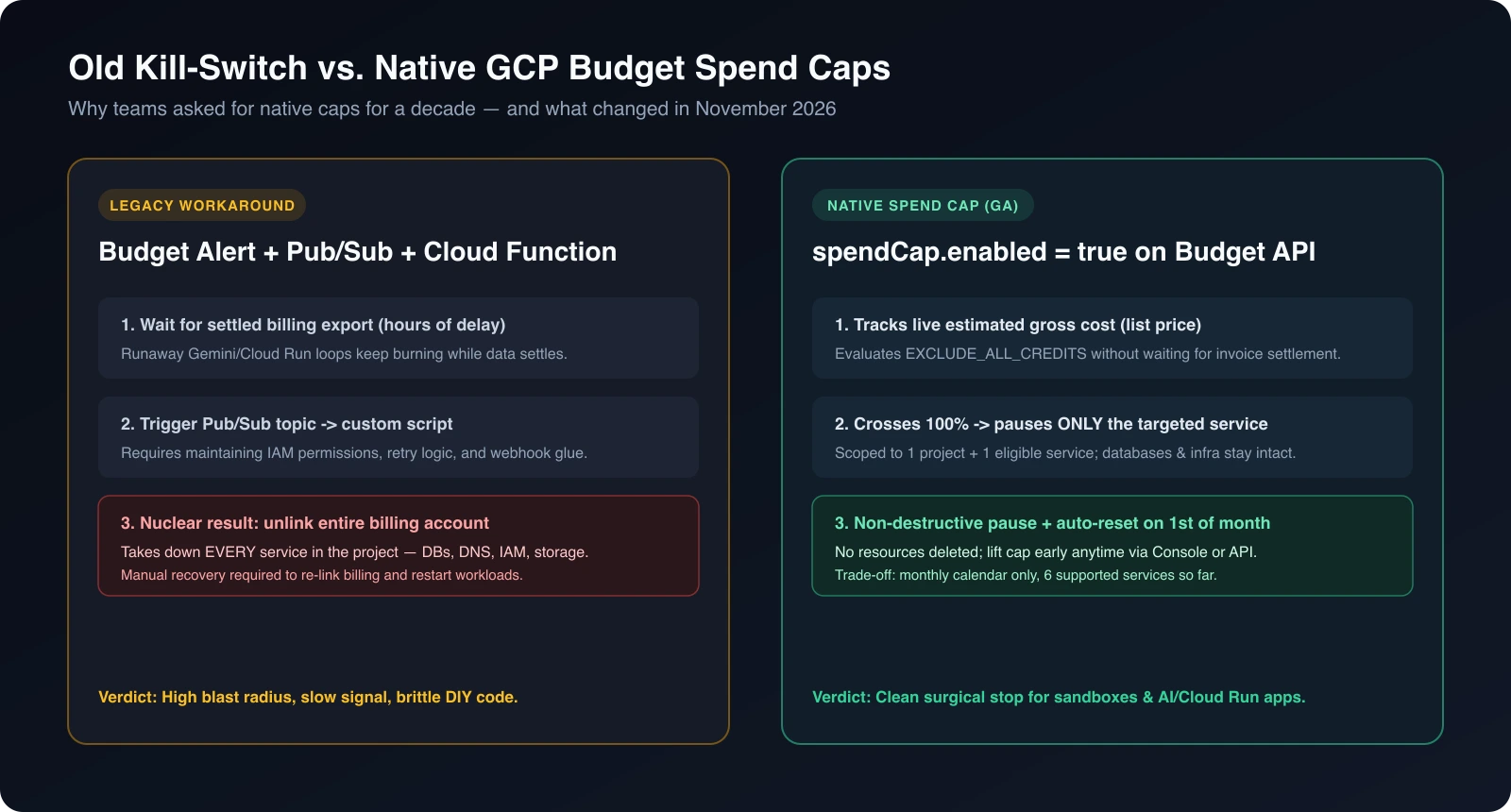
Native spend caps fix the blast radius:
- Live estimated cost signals: Instead of waiting for finalized invoice rows, spend caps evaluate near-real-time gross estimated costs at list price.
- Surgical, non-destructive pause: When usage crosses 100% of the cap, Google pauses only new pay-as-you-go requests for that specific service in that specific project. Underlying configuration and data stay intact.
- Automatic monthly reset (or manual lift): Caps reset on the 1st day of the next calendar month, automatically resuming service — or you can raise or remove the cap anytime in the Cloud Console or API.
Which 6 Services Are Covered (and What Still Leaks)
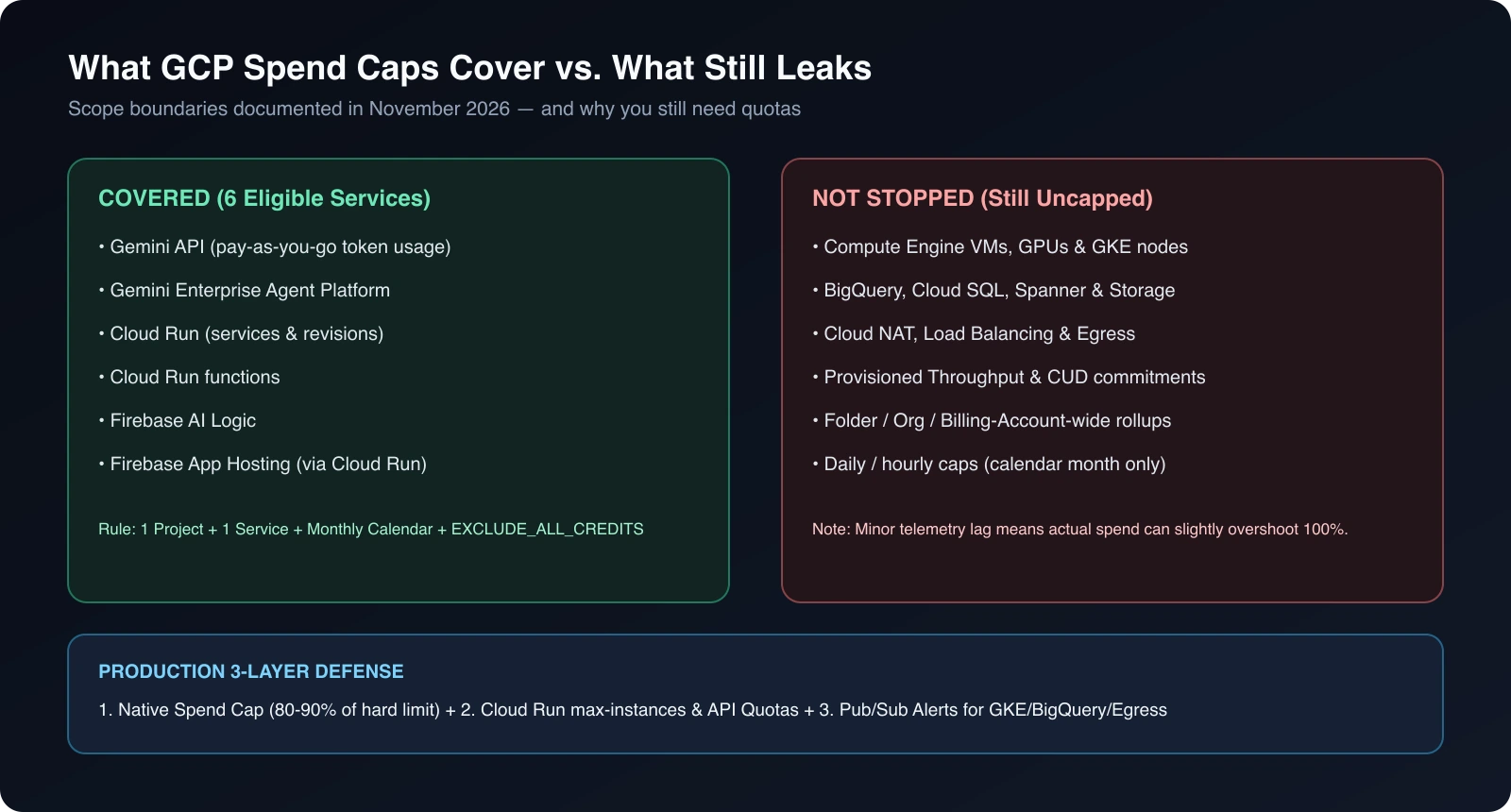
Here is the exact boundary documented for General Availability — and why developer reaction has been split between “finally!” and “why isn’t X covered yet?”:
| Layer / Scope | Covered by Native Spend Caps? | Details & Caveats |
|---|---|---|
| Gemini API | Yes | Pauses pay-as-you-go token usage once cap hits 100% (Gemini pricing) |
| Gemini Enterprise Agent Platform | Yes | Pay-as-on-demand agent/model requests paused at cap |
| Cloud Run & Cloud Run functions | Yes | Halts new serverless invocations/revisions (Cloud Run pricing) |
| Firebase AI Logic & App Hosting | Yes | Enforced via Gemini / underlying Cloud Run (Firebase billing guide) |
| Compute Engine, GPUs & GKE | No | VMs, node pools, and attached disks keep running and billing |
| BigQuery, Cloud SQL & Cloud Storage | No | Storage, queries, and managed DB instances remain uncapped |
| Cloud NAT & Network Egress | No | Outbound data transfer and NAT traffic are not stopped |
| CUDs & Provisioned Throughput | No | Committed Use Discounts and reserved AI capacity bill flat regardless |
Five Limitations Engineers Are Flagging
Before relying on a spend cap in production or client sandboxes, account for five strict rules in the Cloud Billing Budget REST API:
- One project, one service per cap. You cannot create a single spend cap across a folder, an organization, or a whole billing account. Every project + service pair needs its own budget resource.
- Calendar month only (
MONTH). There are no hourly, daily, or rolling 24-hour spend caps yet. If a bug burns your entire monthly$200cap on November 2, the service stays paused until December 1 unless you manually lift it. - Mandatory
EXCLUDE_ALL_CREDITS. Spend caps measure gross list-price usage, ignoring promotional credits and negotiated discounts. Any API request withspendCap.enabled: truefails validation unlesscreditTypesTreatmentis explicitly set toEXCLUDE_ALL_CREDITS. - No IAM-level or per-API-key caps inside the budget. You cannot cap “User A” or “Staging key B” inside one project — isolation still requires separate GCP projects per environment or tenant.
- Small ingestion lag still exists. Under a sudden burst of parallel requests, telemetry lag can let actual spend creep slightly above 100% before enforcement kicks in. Always set the cap at 80–90% of your hard ceiling.
API Configuration: Creating a Spend Cap via Budget API
If you provision sandbox or AI projects with Terraform or CI pipelines, attach a spend cap right at project creation using the Budget API:
{ "displayName": "sandbox-gemini-spend-cap", "budgetFilter": { "projects": ["projects/my-ai-sandbox-123"], "services": ["services/gemini-api-service-id"], "creditTypesTreatment": "EXCLUDE_ALL_CREDITS", "calendarPeriod": "MONTH" }, "amount": { "specifiedAmount": { "currencyCode": "USD", "units": "100" } }, "spendCap": { "enabled": true }}The Production 3-Layer Defense Stack
Native spend caps work best as one layer inside a broader cloud cost optimization setup, not as a replacement for architecture hygiene:
- Layer 1 — Native Spend Caps on AI & Serverless: Put per-project monthly spend caps on
Gemini API,Cloud Run, andFirebasein all non-production and experimental projects at 80–90% of your max tolerance. - Layer 2 — Service Quotas & Concurrency Limits: Cap Cloud Run
--max-instancesand--concurrency, set Vertex/Gemini requests-per-minute quotas, and enforce BigQuerymaximum_bytes_billedper query so a single bad loop stalls at the API boundary in seconds. - Layer 3 — Pub/Sub Alerts for Uncapped Infra: Keep alert-only budgets (50%, 80%, 100%) wired to Slack/PagerDuty for GKE, Compute Engine, Cloud SQL, and egress — and isolate untrusted experiments in dedicated projects so a billing alert never threatens core databases.
The Bottom Line
Google Cloud’s native Budget Spend Caps finally solve the #1 hobbyist and AI-prototype nightmare: waking up to a four-figure Gemini or Cloud Run invoice with zero circuit breaker. Just don’t mistake a 6-service, single-project monthly cap for full-account protection — keep quotas on your APIs, caps on your sandboxes, and alerts on everything else.
Sources
- Google Cloud Billing — Create, edit, or delete budgets and spend caps
- Google Cloud Billing — Concepts & budget evaluation
- Google Cloud Billing — Manage programmatic budget notifications
- Google Cloud Billing — Budget REST API Reference
- Google Cloud Run — Pricing & billing model
- Google AI for Developers — Gemini API Pricing
- Firebase Docs — Avoid surprise bills
From the community
Discussion on Mastodon & Bluesky
Replies to this article from the open web, pulled in live. No ads, no tracking scripts.
Reply there — it shows up here automatically.