
For years, exposing an application on Kubernetes meant one of two things: a cloud Ingress object stuffed with annotations, or a self-hosted nginx ingress controller running as pods in your cluster. Both work. Both are now the old way.
In 2026 the Kubernetes community’s answer is the Gateway API, and on GKE it is generally available, role-oriented, and backed directly by Google’s Cloud Load Balancing. This is a practical guide to what it is, the four GatewayClasses you actually get, the one thing regional clusters must configure, and the honest case for retiring nginx.
Why Ingress Ran Out of Road
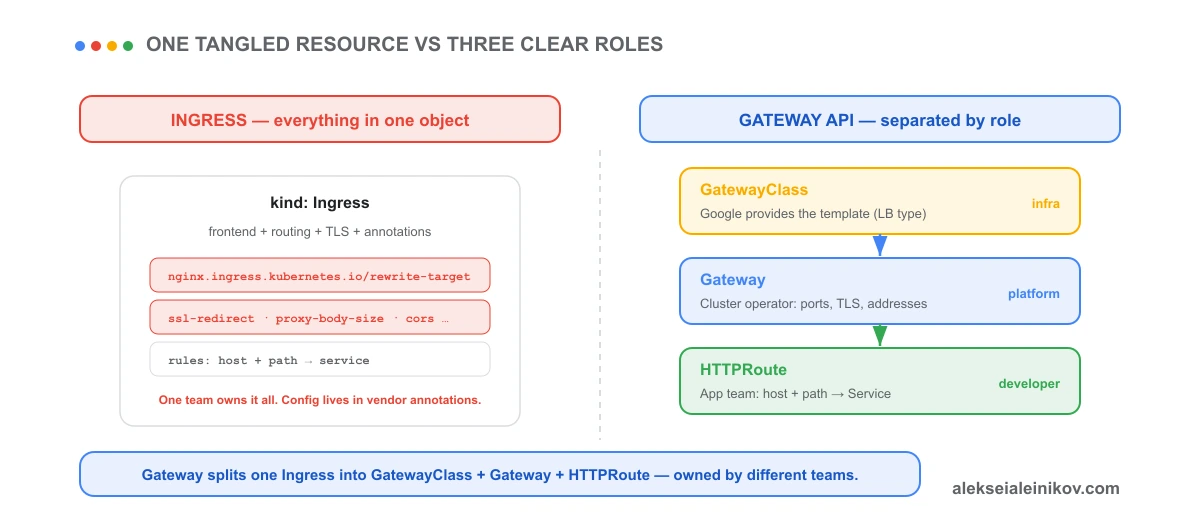
Ingress was designed as a single resource that does everything: it defines the frontend (ports, TLS), the routing rules (host and path to Service), and — because the base spec is thin — a pile of controller-specific annotations for anything advanced. Rewrites, redirects, timeouts, CORS, body size: all annotations.
That creates two problems. First, one object owned by one team mixes platform concerns (TLS, IP addresses) with application concerns (routes). Second, every annotation is vendor-specific, so your config is not portable and not expressive in any standard way.
The Gateway API Model: Three Roles, Not One Object
Gateway API is an evolution of Ingress that breaks the single object into three resources aligned to who actually owns each concern:
- GatewayClass — a cluster-scoped template for a load balancer. On GKE, Google provides these; you don’t write them. Each GatewayClass maps to a specific Cloud Load Balancer type.
- Gateway — created by the platform / cluster operator. It declares where and how to listen: ports, protocols, TLS, and IP addresses. It picks a GatewayClass.
- HTTPRoute — created by application teams. It declares routing: which hostnames and paths map to which Services, plus header matching, traffic splitting, redirects, and rewrites — all native fields, no annotations.
Gateway and Route binding is bidirectional: a Gateway declares which namespaces may attach, and a Route declares which Gateway it attaches to. That is what makes a single load balancer safely shareable across teams and namespaces — the multi-tenancy Ingress never had.
The GKE Gateway controller itself is Google-hosted and runs out of band: it watches the Kubernetes API and reconciles Cloud Load Balancing resources. It is not a data plane, it does not sit in the request path, and it does not run on your control plane or in your project. That is a meaningful robustness and scale difference from an in-cluster nginx controller.
The Four GatewayClasses You Get by Default
Enable Gateway API and GKE installs the single-cluster GatewayClasses automatically. Four matter for day-to-day work:
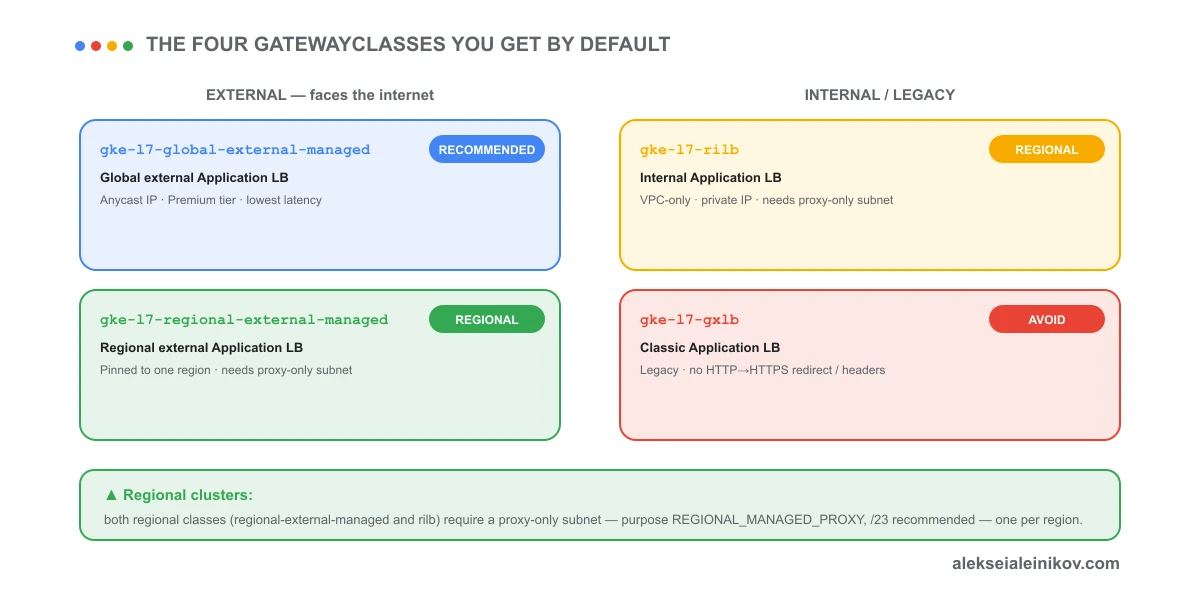
| GatewayClass | Load balancer | Use it for |
|---|---|---|
gke-l7-global-external-managed |
Global external Application LB | Recommended default for internet-facing apps; Anycast IP, Premium Tier, lowest global latency |
gke-l7-regional-external-managed |
Regional external Application LB | External traffic pinned to a single region |
gke-l7-rilb |
Internal Application LB | Private, VPC-only traffic |
gke-l7-gxlb |
Classic Application LB | Legacy — avoid; no HTTP-to-HTTPS redirect, no custom headers |
Google explicitly recommends gke-l7-global-external-managed over the classic gke-l7-gxlb to get the advanced security and traffic-management features. There are also multi-cluster (-mc) variants for fleets and a service-mesh class (gke-td), but the four above cover the vast majority of single-cluster deployments.
Regional Clusters: The Proxy-Only Subnet Is Mandatory
This is the step that trips people up, so it gets its own section.
Both regional GatewayClasses — gke-l7-regional-external-managed and gke-l7-rilb — require a proxy-only subnet in every region where you deploy them. The global external class does not. The proxy-only subnet is where Cloud Load Balancing places its managed Envoy proxies; without it the Gateway controller fails with an error that a reserved managed proxy subnetwork with purpose REGIONAL_MANAGED_PROXY is required.
Create it once per region, before the Gateway:
gcloud compute networks subnets create proxy-only-subnet \ --purpose=REGIONAL_MANAGED_PROXY \ --role=ACTIVE \ --region=europe-west3 \ --network=my-vpc \ --range=10.129.0.0/23A /23 is the recommended range so there are enough IPs for the proxies to scale; /26 (64 addresses) is the hard minimum. One ACTIVE proxy-only subnet serves all regional Gateways in that region and VPC — you don’t create one per Gateway.
If a proxy-only subnet already exists in the region with the older INTERNAL_HTTPS_LOAD_BALANCER purpose, migrate it to REGIONAL_MANAGED_PROXY; GKE Gateway only accepts the latter.
A Minimal Gateway + HTTPRoute
The platform team deploys the Gateway once:
kind: GatewayapiVersion: gateway.networking.k8s.io/v1metadata: name: external-httpspec: gatewayClassName: gke-l7-global-external-managed listeners: - name: https protocol: HTTPS port: 443 tls: mode: Terminate certificateRefs: - name: store-example-comAn application team then attaches routes independently, in their own namespace:
kind: HTTPRouteapiVersion: gateway.networking.k8s.io/v1metadata: name: storespec: parentRefs: - kind: Gateway name: external-http hostnames: - "store.example.com" rules: - matches: - path: value: /de backendRefs: - name: store-german port: 8080 - backendRefs: - name: store-v1 port: 8080Header matching, weighted traffic splitting, path redirects, and URL rewrites are first-class fields on the HTTPRoute — the things that were nginx annotations are now portable spec. For anything load-balancer-specific (health checks, backend policies) you attach a Policy resource (HealthCheckPolicy, GCPBackendPolicy) instead of a BackendConfig.
When to Stop Using nginx
Here is the honest version.
A self-hosted nginx ingress controller runs as Deployment pods inside your cluster. You own their autoscaling, their resource footprint, their upgrades, and every nginx and ingress-controller CVE that lands. In return you get a very capable in-cluster L7 proxy.
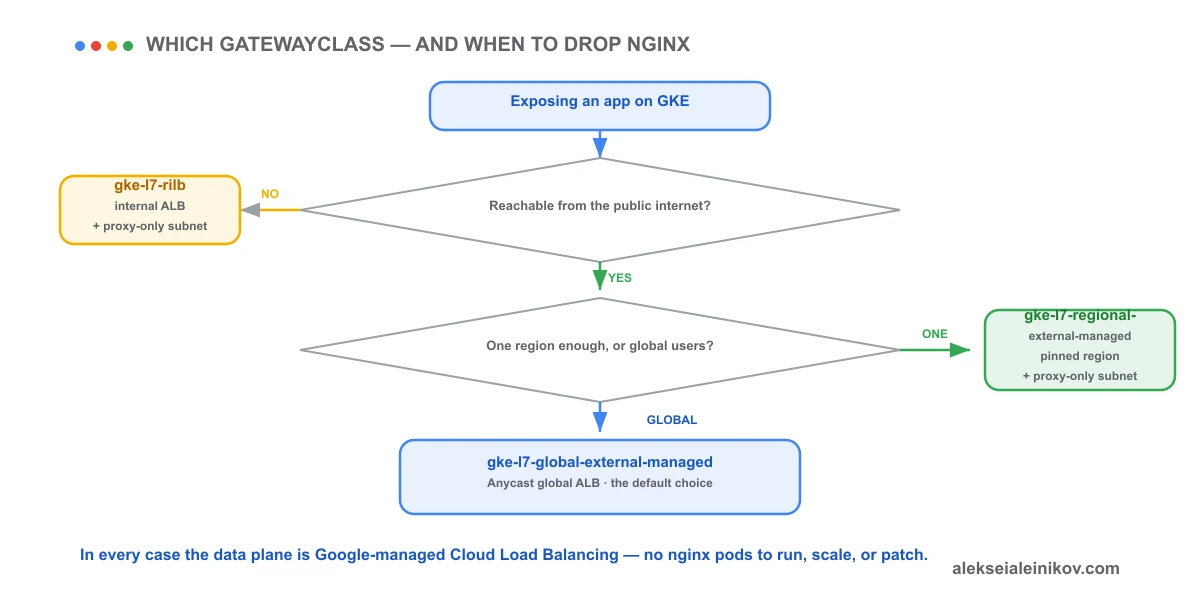
GKE Gateway removes that operational surface entirely. The data plane is Google-managed Cloud Load Balancing. There are no ingress pods to run, scale, or patch; the controller is out of band; and the load balancer is Google’s global infrastructure, not three replicas you sized by guesswork.
Migrate to Gateway when:
- You want the L7 data plane to be someone else’s operational problem — the common case.
- You need global load balancing, Anycast IPs, or Cloud Armor / Cloud CDN integration that plugs straight into Cloud Load Balancing.
- You want role separation: platform owns Gateways, app teams own Routes, across namespaces.
- You are starting fresh — every existing Ingress maps cleanly to one Gateway plus one HTTPRoute.
Keep nginx only when:
- You depend on in-cluster L7 features Cloud Load Balancing doesn’t offer (exotic Lua/rewrite logic, specific auth modules, protocols beyond HTTP/S).
- You need TCP/UDP or TLS-passthrough routing — GKE Gateway currently supports HTTPRoute only; TCPRoute, UDPRoute, and TLSRoute are not supported.
- You want one self-managed L7 data plane you fully control across clouds, not tied to each provider’s managed load balancer. Note the honest caveat: Gateway API is itself a portable standard, so a portable Gateway implementation (Envoy Gateway, NGINX Gateway Fabric) usually serves this better than sticking with classic nginx-ingress.
The Field Rule
Gateway API is where Kubernetes ingress is going, and on GKE it is GA, free with the platform, and backed by Google’s Cloud Load Balancing. Split the old Ingress into GatewayClass + Gateway + HTTPRoute, default to gke-l7-global-external-managed for internet-facing apps, drop to gke-l7-rilb for private traffic, and remember the one hard prerequisite: regional classes need a proxy-only subnet per region. For most teams, that combination is the moment self-hosted nginx stops being worth running.
For the cluster mode this all runs on, see GKE Autopilot vs Standard in 2026. To lock down what those workloads can reach once traffic is inside, see Kill Service Account Keys: Workload Identity Federation on GKE.


From the community
Discussion on Mastodon & Bluesky
Replies to this article from the open web, pulled in live. No ads, no tracking scripts.
Reply there — it shows up here automatically.