

Running MongoDB in Docker takes ten seconds in a local tutorial—and one unexpected traffic spike to trigger an OOMKill (exit 137) or broken multi-document writes in production.
Most outages with containerized MongoDB come down to five defaults: running standalone without a Replica Set, letting WiredTiger and aggregation pipelines collide inside an untuned memory limit, forgetting --keyFile when turning on auth, leaving Docker’s 10-second SIGKILL timeout in place, and exposing 27017 or Mongo Express on 0.0.0.0.
The production checklist. Pin
mongo:8.0.x, initialize a single-node Replica Set (rs0) with akeyFile, cap--wiredTigerCacheSizeGBat 50% of container RAM, size--oplogSizeexplicitly, setstop_grace_period: 60s, bindmongo-expressto127.0.0.1, and back up withmongodump --oplog.
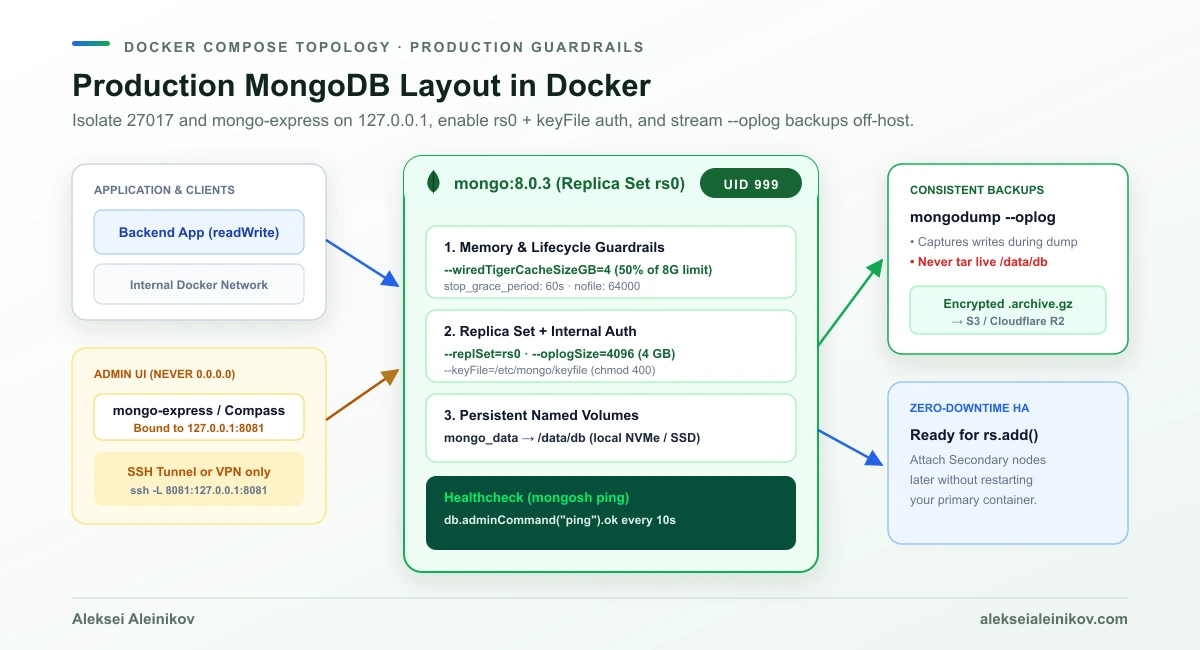
Why standalone docker run mongo breaks in production
If you launch docker run -d mongo without --replSet, MongoDB boots in standalone mode. That silently disables three features modern backends rely on:
- Multi-document ACID transactions: any
session.withTransaction()call throws an error (Transaction numbers are only allowed on a replica set member or mongos). - Change Streams: event-driven workers and CDC pipelines (
watch()) require anoplog, which only exists in a Replica Set. - Zero-downtime scaling later: converting a busy standalone container into a Replica Set requires a maintenance restart, whereas a single-node Replica Set (
rs0) lets you attach secondaries live withrs.add().
Sizing WiredTiger Cache and Container Memory
Inside Docker, WiredTiger does not own all of your container’s RAM. Even if you set deploy.resources.limits.memory: 8G, WiredTiger needs headroom for the Linux filesystem page cache (where compressed data pages live), per-connection thread stacks, MongoDB 8.0 parallel oplog applier buffers, and in-memory sorts (100 MB default cap per stage).
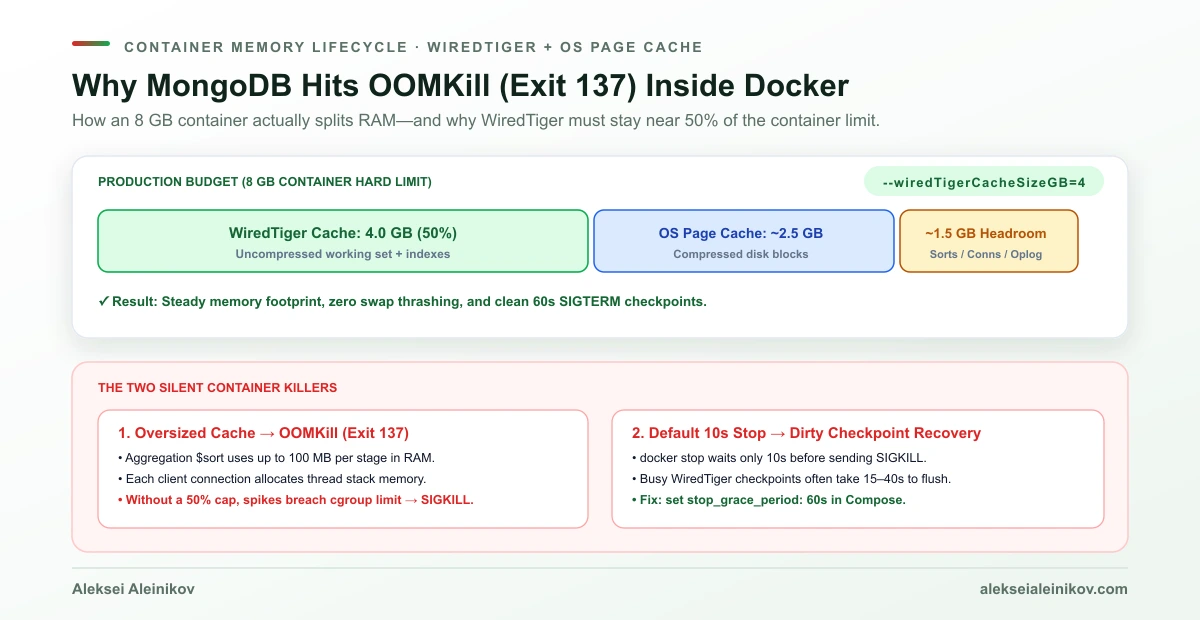
Use this straightforward sizing rule in production:
| Container RAM Limit | --wiredTigerCacheSizeGB |
Remaining RAM (Page Cache + Connections + Sorts) | Recommended Workload |
|---|---|---|---|
| 2 GB | 0.75 – 1 |
~1 – 1.25 GB | Small internal tools / dev staging |
| 4 GB | 2 |
~2 GB | Light production APIs (< 50 GB hot set) |
| 8 GB | 4 |
~4 GB | Standard production services |
| 16 GB+ | 8 – 10 |
~6 – 8 GB | High-concurrency & heavy aggregations |
Sizing the Oplog explicitly
In MongoDB 8.0, the default oplog (local.oplog.rs) takes 5% of free disk space (minimum 990 MB). On a 500 GB cloud volume, that wastes 25 GB on a tiny database; on a tight 20 GB volume, a 990 MB oplog can roll over during a heavy batch import before a backup or secondary catches up.
Pass --oplogSize in megabytes explicitly (for example --oplogSize=4096 for 4 GB) so your retention window covers 24–48 hours of peak writes.
Production compose.yaml (MongoDB 8.0 + Replica Set + Auth + Mongo Express)
Before starting the stack, generate the keyFile required for internal Replica Set authentication. Note that the official mongo image runs mongod as UID/GID 999:
mkdir -p ./mongo-secretsopenssl rand -base64 756 > ./mongo-secrets/mongo-keyfilechmod 400 ./mongo-secrets/mongo-keyfilesudo chown 999:999 ./mongo-secrets/mongo-keyfileNow pin the exact MongoDB 8.0 patch version and put every production safeguard into compose.yaml:
services:  mongodb:    image: mongo:8.0.3    container_name: mongodb-prod    restart: unless-stopped    stop_grace_period: 60s    command:      - "mongod"      - "--replSet=rs0"      - "--keyFile=/etc/mongo/keyfile"      - "--bind_ip_all"      - "--wiredTigerCacheSizeGB=4"      - "--oplogSize=4096"    environment:      MONGO_INITDB_ROOT_USERNAME: ${MONGO_ROOT_USER}      MONGO_INITDB_ROOT_PASSWORD: ${MONGO_ROOT_PASS}    ports:      - "127.0.0.1:27017:27017"    volumes:      - mongo_data:/data/db      - mongo_config:/data/configdb      - ./mongo-secrets/mongo-keyfile:/etc/mongo/keyfile:ro    ulimits:      nofile:        soft: 64000        hard: 64000      nproc:        soft: 32000        hard: 32000    deploy:      resources:        limits:          memory: 8G        reservations:          memory: 4G    healthcheck:      test: ["CMD", "mongosh", "--quiet", "--eval", "db.adminCommand('ping').ok"]      interval: 10s      timeout: 5s      retries: 5      start_period: 20s
  mongo-express:    image: mongo-express:1.0.2    container_name: mongo-express-admin    restart: unless-stopped    depends_on:      mongodb:        condition: service_healthy    ports:      - "127.0.0.1:8081:8081"    environment:      ME_CONFIG_MONGODB_URL: "mongodb://${MONGO_ROOT_USER}:${MONGO_ROOT_PASS}@mongodb:27017/?authSource=admin"      ME_CONFIG_BASICAUTH: "true"      ME_CONFIG_BASICAUTH_USERNAME: ${ME_USER}      ME_CONFIG_BASICAUTH_PASSWORD: ${ME_PASS}
volumes: mongo_data: mongo_config:Initialize the Replica Set and create an app user
Once mongodb-prod reports healthy, initialize rs0 once:
docker exec -it mongodb-prod mongosh -u "$MONGO_ROOT_USER" -p "$MONGO_ROOT_PASS" --authenticationDatabase admin --eval 'rs.initiate({ _id: "rs0", members: [{ _id: 0, host: "mongodb:27017" }]})'Never let your application connect with the root user. Create a least-privilege application user scoped only to its target database (readWrite):
// Run inside mongosh as rootuse app_proddb.createUser({ user: "app_service", pwd: "REPLACE_WITH_STRONG_PASSWORD", roles: [{ role: "readWrite", db: "app_prod" }]})Then configure your application with an explicit Replica Set connection string (replicaSet=rs0, authSource=app_prod, retryWrites=true, w=majority):
mongodb://app_service:REPLACE_WITH_STRONG_PASSWORD@mongodb:27017/app_prod?replicaSet=rs0&authSource=app_prod&retryWrites=true&w=majorityNamed Volumes, ulimits, and Graceful Shutdown
Three host-level settings decide whether MongoDB survives restarts and traffic bursts:
- Use Docker named volumes on local NVMe/SSD: Never place
/data/dbon NFS, SMB, or macOS/Windows host bind mounts. WiredTiger relies on POSIXfsyncguarantees and direct file locking; network shares risk silent corruption, and macOS VirtioFS/osxfs bind mounts cripple random I/O. - Raise
nofile(64000) andnproc(32000): WiredTiger opens a file descriptor per collection and per index file, plus one socket per client connection. Under Docker’s default low limits,mongodfails withToo many open filesduring traffic spikes. - Set
stop_grace_period: 60s: Docker’s defaultdocker stopwaits only 10 seconds before sendingSIGKILL. If WiredTiger is flushing a large checkpoint,SIGKILLforces crash recovery from journal files on the next boot.
Monitoring WiredTiger Cache and Oplog Window
Before an OOMKill or replication stall happens, two built-in mongosh checks tell you whether your container budget is healthy:
// 1. Check WiredTiger cache pressure (bytes currently in cache vs configured max)const wt = db.serverStatus().wiredTiger.cache;print({  usedGB: (wt["bytes currently in the cache"] / 1e9).toFixed(2),  maxGB: (wt["maximum bytes configured"] / 1e9).toFixed(2),  dirtyPct: ((wt["tracked dirty bytes in the cache"] / wt["maximum bytes configured"]) * 100).toFixed(1)});
// 2. Verify oplog retention window (aim for 24–48h+)rs.printReplicationInfo();
If dirtyPct consistently stays above 20% or docker stats shows container memory climbing past 85%, either reduce --wiredTigerCacheSizeGB slightly or upgrade the container RAM limit.
Backups without downtime (--oplog)
Never back up a live MongoDB container by copying or tarring /data/db—WiredTiger files are actively mutated in memory and on disk, producing a corrupt snapshot.
Because your container runs as a Replica Set, mongodump --oplog captures all writes that occur while the dump is running so the archive restores to a consistent point in time:
docker exec mongodb-prod mongodump \ --username="$MONGO_ROOT_USER" \ --password="$MONGO_ROOT_PASS" \ --authenticationDatabase=admin \ --oplog \ --gzip \ --archive > "mongo-backup-$(date -u +%Y%m%dT%H%M%SZ).archive.gz"Ship the encrypted .archive.gz off-host (for example to S3 or Cloudflare R2) with a retention policy, and test mongorestore --oplogReplay --gzip --archive=... into a disposable container every month.
Read next: Running relational workloads alongside MongoDB? See our PostgreSQL in Docker for Production guide for
PGDATAvolume paths,shm_size, and PgBouncer pooling.
The Bottom Line
Containerized MongoDB is rock-solid in production once you stop treating it like a throwaway local container:
- Boot with
--replSet=rs0and--keyFilefrom day one so transactions, Change Streams, and future secondaries work cleanly. - Cap
--wiredTigerCacheSizeGBat 50% of container memory, set--oplogSizeexplicitly, and raisestop_grace_period: 60s+nofilelimits. - Keep
27017andmongo-expressbound to127.0.0.1, create a scopedreadWriteapp user, and run scheduledmongodump --oplogbackups off-host.


From the community
Discussion on Mastodon & Bluesky
Replies to this article from the open web, pulled in live. No ads, no tracking scripts.
Reply there — it shows up here automatically.