Most comparisons between Valkey and Redis still read like a licensing post-mortem from two years ago: “Valkey is a drop-in fork of Redis 7.2.4 under BSD-3-Clause.”
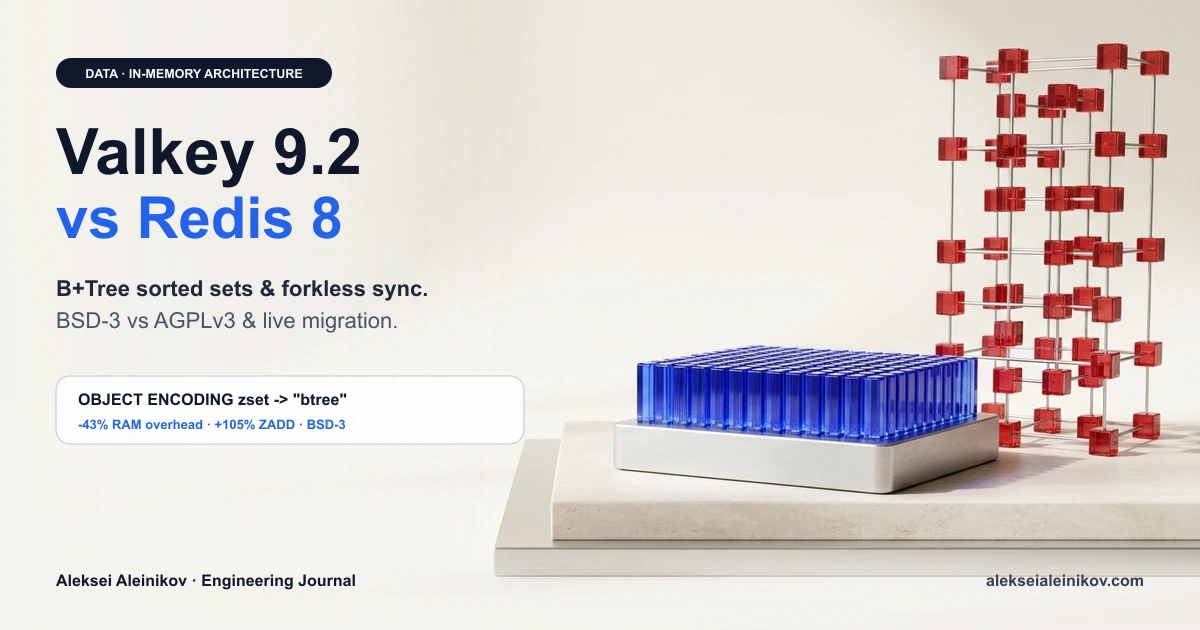
That framing is obsolete. With Valkey 9.2 and Redis 8, the two engines have diverged architecturally. Valkey 9.2 replaced the classic skiplist in large sorted sets with a cache-friendly B+ tree (fbtree) — cutting per-member memory overhead by up to 43% while doubling ZADD throughput — and added forkless snapshots, Path Hash (PH*), and native HOTKEYS GET. Meanwhile, Redis 8 added AGPLv3 to its tri-license and folded Vector Sets, JSON, and TimeSeries straight into core.
The short verdict: On basic
GET/SETcaching, Valkey and Redis 8 are within single-digit percentages of each other. Pick Valkey when memory cost, BSD-3-Clause licensing, cloud-managed defaults (AWS ElastiCache, GCP Memorystore), or heavy sorted-set workloads matter. Pick Redis 8 only if you specifically want native core Vector Sets, JSON, and TimeSeries in one binary and your legal team clears AGPLv3.
Valkey 9.2 vs Redis 8 at a Glance
The decision today is no longer about “who owns the trademark” — it is a trade-off between memory-first core engineering (Valkey) and all-in-one native data modules (Redis 8):
| Dimension | Valkey 9.2 | Redis 8 | Engineering Impact |
|---|---|---|---|
| Governance | Linux Foundation | Redis Ltd. | Neutral vendor governance vs single-vendor roadmap |
| License | BSD 3-Clause | Tri-license: RSALv2 / SSPLv1 / AGPLv3 | Permissive enterprise default vs copyleft / source-available |
| Large Sorted Sets | B+ tree (fbtree) (OBJECT ENCODING → btree) |
Traditional skiplist + hash table | Up to 43% less RAM & +105% ZADD in Valkey |
| Snapshots & Sync | Forkless RDB/sync option + Zstd/LZ4 compression | Fork-based BGSAVE (copy-on-write) |
No 2× RAM CoW spikes under heavy writes in Valkey |
| AI & Search Types | PH* Path Hash (radix tree) + valkey-search module |
Native Vector Sets (HNSW), JSON, TimeSeries in core | Redis 8 wins out-of-the-box RAG; Valkey wins KV-prefix routing |
| Hot Key Detection | Native HOTKEYS GET (Space-Saving algorithm) |
Client/proxy sampling or commercial tooling | Zero-overhead hot-key visibility built into Valkey |
| Access Control | ACL + reusable ACL SETROLE |
ACL categories & per-user rules |
Cleaner RBAC management across large fleets |
1. Inside Valkey 9.2’s B+ Tree (fbtree): 43% Less Memory
For over a decade, Redis and Valkey backed large sorted sets (ZSET) with two structures per entry: a hash table for O(1) score lookups and a skiplist for ordered range queries.
Skiplists are simple to implement, but they punish modern CPUs and RAM budgets at scale:
- Pointer bloat: Every skiplist node sits in its own heap allocation and carries forward pointers, backward pointers, and span counters — roughly ~29 bytes of structural overhead per node before storing the actual member string.
- Cache misses: Because nodes are scattered across the heap, traversing a sorted set forces the CPU to chase pointers across uncached memory pages.
In Valkey 9.2, large sorted sets swap the skiplist for an internal feature B+ tree (fbtree) with high fanout (up to 61 entries per node). Running OBJECT ENCODING myzset now returns btree instead of skiplist.
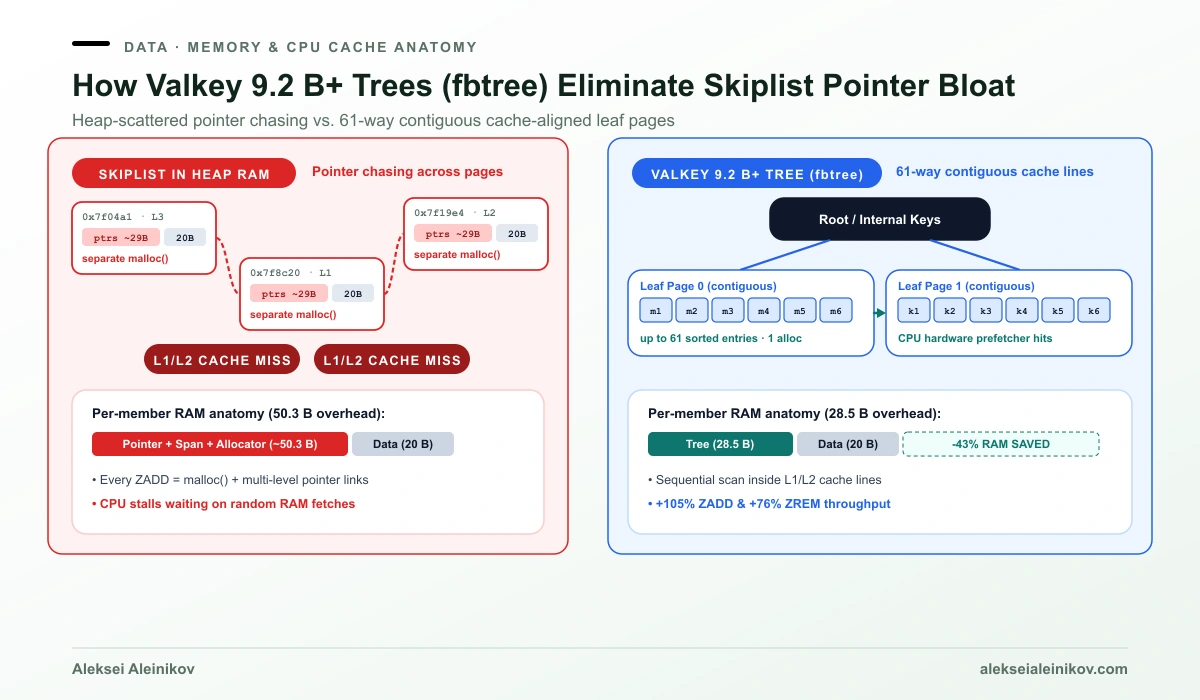
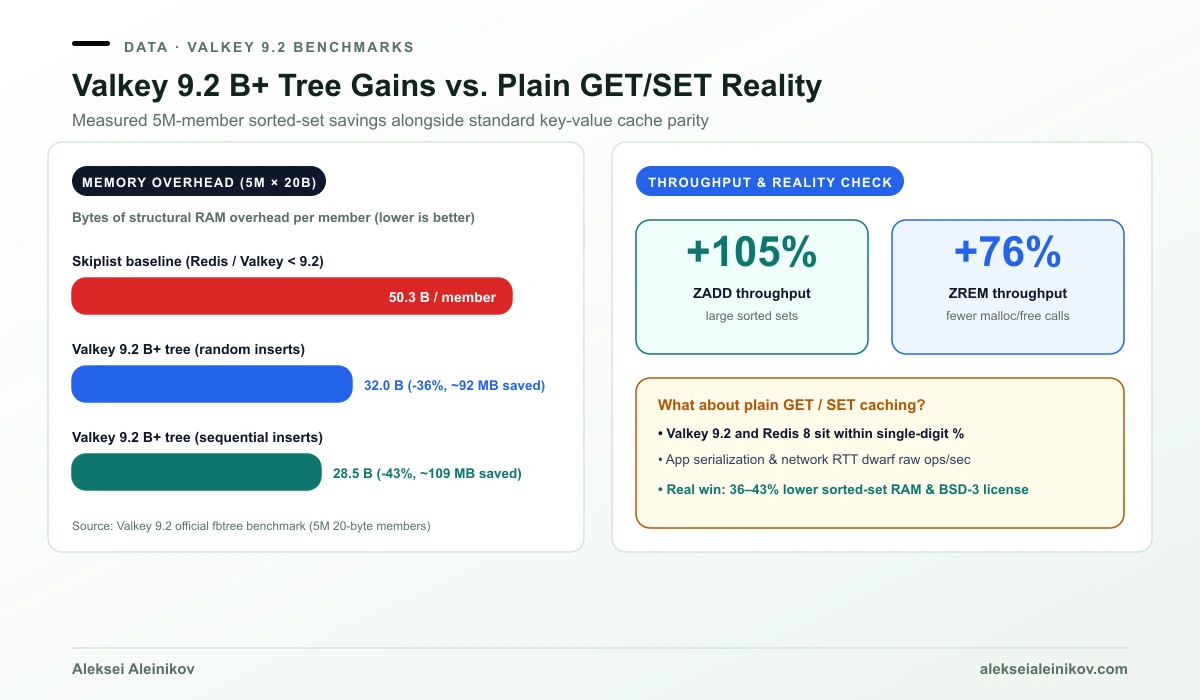
Because entries sit contiguously inside fixed cache-friendly nodes, the official Valkey 9.2 benchmarks (5 million 20-byte members) measured both dramatic RAM savings and faster mutations:
- Sequential inserts: per-member overhead dropped from 50.3 bytes → 28.5 bytes (43% reduction, saving ~109 MB on a 5M-entry set).
- Random inserts: per-member overhead dropped to 32.0 bytes (36% reduction, saving ~92 MB).
- Mutation throughput:
ZADD+105% andZREM+76% thanks to CPU cache locality and far fewermalloc/freecalls.
2. Throughput, Forkless Snapshots & Production Operations
On plain GET/SET key-value caching, independent benchmarks between Redis 8 and Valkey 8+/9+ consistently show single-digit percentage differences (Redis 8 sometimes edges ahead under extreme 1,000+ connection saturation, while Valkey often wins at moderate concurrency). Network RTT and serialization in your application dwarf those differences.
Where Valkey 9.2 meaningfully changes production reliability is memory stability under load:
Forkless Snapshots (BGSAVE without the 2× RAM tax)
Traditional fork()-based RDB snapshots rely on OS copy-on-write (CoW). Under write-heavy workloads, mutating pages during a snapshot forces the kernel to duplicate memory — a classic cause of OOM kills at 60–70% RAM utilization.
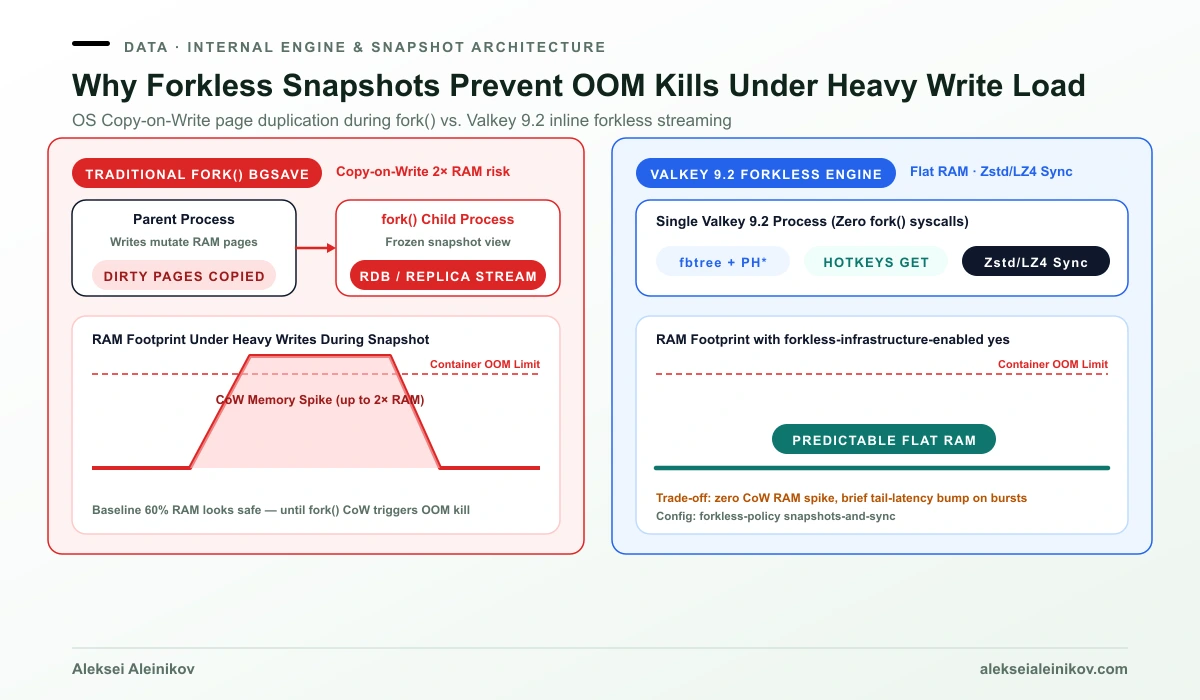
Valkey 9.2 introduces opt-in forkless snapshots and full replica sync alongside Zstd/LZ4 replication stream compression:
# Keep memory flat during RDB snapshots and replica syncsforkless-infrastructure-enabled yesforkless-policy snapshots-and-sync
# Built-in Space-Saving hot key tracking (zero external agents)hotkeys-top-k 20Native HOTKEYS GET, ACL SETROLE, and Path Hash (PH*)
HOTKEYS GET/HOTKEYS RESET: Uses the Space-Saving algorithm inside the engine to surface your top-$K$ hottest keys by estimated QPS without external packet sniffers.ACL SETROLE: Define reusable permission templates once and attach them to users instead of duplicating long command masks.- Path Hash (
PHSET,PHPREFIXES): A radix-tree data type built for binary-safe hierarchical paths — useful for longest-prefix routing, autocomplete, and indexing LLM KV-cache prefixes.
3. Where Redis 8 Still Wins (and the License Reality)
Credit where it is due: Redis 8 is not standing still. With Salvatore Sanfilippo (antirez) back contributing, Redis 8 introduced Vector Sets (HNSW similarity search extending sorted sets for AI embeddings) and folded JSON, TimeSeries, probabilistic filters, and the Redis Query Engine straight into the core binary.
If your team wants one managed Redis Cloud instance for hybrid RAG vector search + JSON documents + caching without assembling separate modules (valkey-search, valkey-json, valkey-bloom), Redis 8 has the smoother out-of-the-box developer experience.
The catch remains licensing:
- Valkey: BSD 3-Clause on every release — zero copyleft, zero restrictions on embedding or multi-tenant SaaS.
- Redis 8: Tri-licensed under RSALv2, SSPLv1, or AGPLv3. Even though AGPLv3 is OSI-approved, many enterprise compliance teams still block AGPL software in network-facing backends.
4. Verify Locally & Migrate Without Downtime
You do not have to trust vendor blog posts. Spin up both containers locally with Docker Compose and inspect OBJECT ENCODING and INFO memory on your exact key sizes (just like we do for production PostgreSQL in Docker):
services: valkey: image: valkey/valkey:9.2-alpine ports: ["6379:6379"] redis: image: redis:8-alpine ports: ["6380:6379"]# Verify B+ tree encoding on Valkey vs skiplist on Redis after loading >128 entriesvalkey-cli -p 6379 OBJECT ENCODING leaderboard # -> "btree"redis-cli -p 6380 OBJECT ENCODING leaderboard # -> "skiplist"Zero-Downtime Migration (Redis → Valkey)
Because Valkey speaks the exact same RESP protocol, client libraries (redis-py, ioredis, go-redis) work without code changes. For live clusters running Redis 7.2.x or compatible core data types:
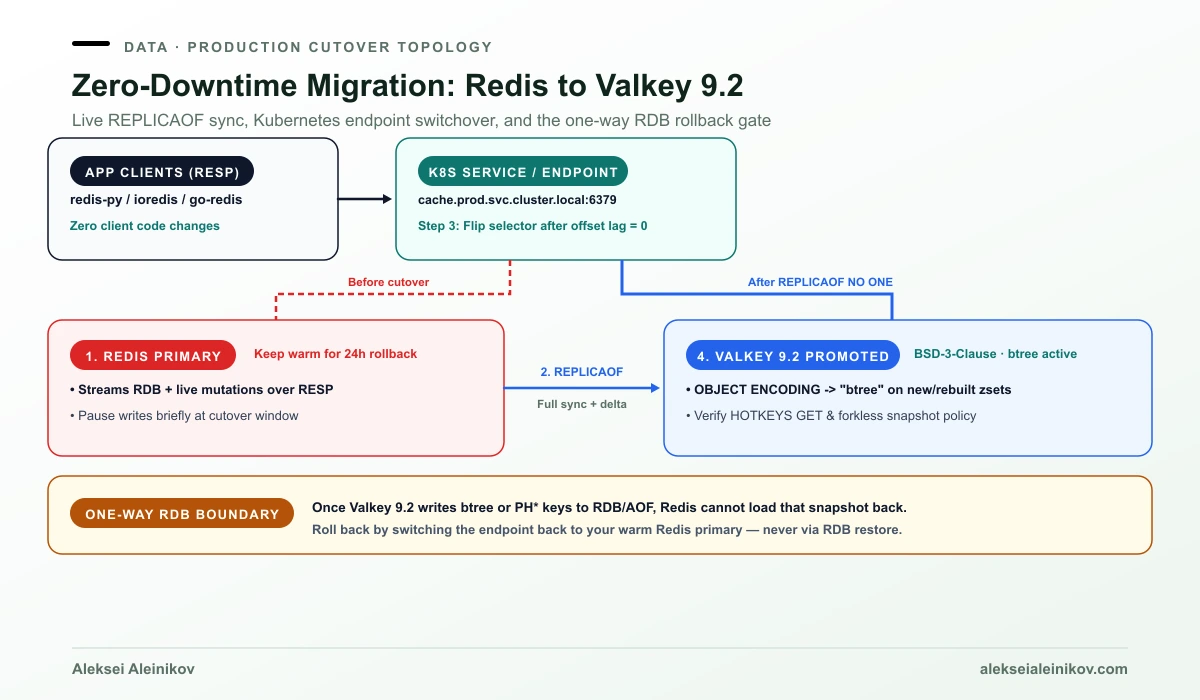
- Provision Valkey with matching
maxmemory, eviction policy, and ACLs. - Attach as replica: run
REPLICAOF <redis-host> 6379on Valkey and wait formaster_link_status:upand zero replication offset lag. - Cut over cleanly: briefly pause writes (or switch via your Kubernetes Service / endpoint), run
REPLICAOF NO ONEon Valkey, and point clients to Valkey. - Watch the RDB trap: Once Valkey 9.2 persists
btreesorted sets orPH*keys to RDB/AOF, you cannot roll back by loading that snapshot into Redis — keep your old Redis primary warm during your rollback window.
The Bottom Line
If you run Redis mainly for caching, sessions, rate limiting, queues, or large sorted-set leaderboards, Valkey 9.2 is the stronger engineering and financial choice: permissive BSD-3-Clause, up to 43% lower sorted-set RAM overhead, forkless snapshots, and native HOTKEYS GET. Keep Redis 8 only when core Vector Sets / JSON / TimeSeries are central to your architecture and AGPLv3 (or Redis Cloud) is already cleared by legal.
Check how Valkey fits alongside your primary database and cluster stack: