
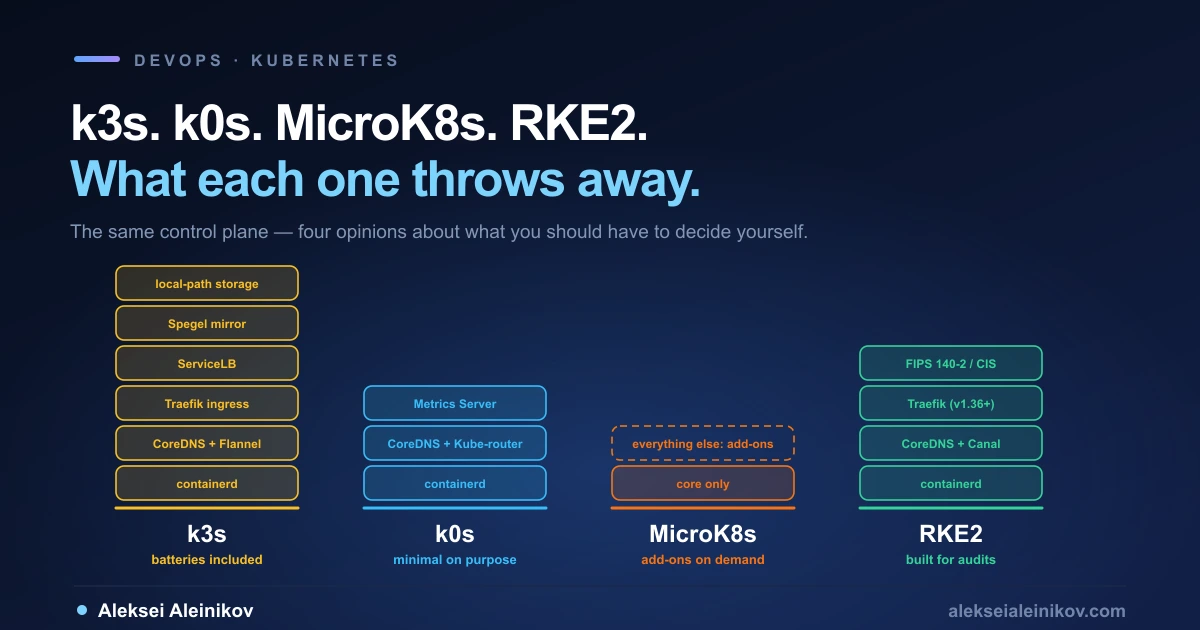
Every comparison of lightweight Kubernetes distributions opens with a table of memory footprints, and every one of them misses the point.
The interesting question is not which distribution is smallest. It is what each one decided to throw away, and whether you can live without it. A Kubernetes control plane has a fixed set of jobs; the difference between these four projects is which of those jobs they hand to you, which they hide, and which they refuse to have an opinion about at all.
Here is what actually separates them in 2026 — including a change that landed this year and quietly rewrote one distribution’s defaults.
First: “Lightweight” Means Three Different Things
Before comparing anything, it is worth separating three claims that get blended together:
- A small install artifact. k3s ships as a single binary under 100MB. k0s is a single self-extracting binary that embeds the Kubernetes components and is statically compiled.
- A low memory floor. How little RAM the control plane needs before you put any workload on it.
- Few bundled components. How much of a cluster you get before you install anything yourself.
These pull in opposite directions. A distribution that bundles an ingress controller, a load balancer and a storage provisioner gives you a working cluster faster — and uses more memory doing it. When you see one project claim a lower footprint than another, check whether it is measuring the same cluster.
k3s — Batteries Included, Optimised for the Edge
k3s is the one most people mean when they say “lightweight Kubernetes.” The name is a joke about size: Kubernetes is a ten-letter word stylised as K8s, so something half as big is a five-letter word stylised as K3s. There is no long form and no official pronunciation.
What makes it distinctive is how much arrives in that single binary:
- containerd as the container runtime
- Flannel for CNI
- CoreDNS for cluster DNS
- Traefik as the ingress controller
- ServiceLB as a load-balancer controller
- Kube-router for network policy
- local-path-provisioner for persistent volumes
- Spegel, an embedded distributed container image registry mirror
- host utilities like iptables and socat
That last one matters more than it looks. Spegel lets nodes pull images from each other instead of reaching out to a registry, which is the difference between a working edge site and a stalled rollout when the uplink is thin.
The datastore is the other headline. k3s defaults to SQLite rather than etcd, with etcd, MySQL and PostgreSQL available as alternatives. For high availability you run three or more servers with embedded etcd, or point k3s at an external database.
Minimum requirements are 2 cores and 2GB for a server, 1 core and 512MB for an agent. The published sizing guide is more useful than the minimums: a 2 vCPU / 4GB server handles up to 350 agents, 4 vCPU / 8GB handles up to 900, and a three-server HA setup scales roughly 50% further — three servers at 4 vCPU / 8GB reach about 1,200 agents.
One caveat from the docs that catches homelab builders: etcd is write-intensive, and SD cards and eMMC cannot handle the IO. If you run k3s on a Raspberry Pi with embedded etcd, use an external SSD.
k0s — Minimal on Purpose, and the Only One That Isolates the Control Plane
k0s takes the opposite position, and states it openly. Its documented scope is to bundle as few add-ons as possible, because things like ingress, service meshes and storage are “VERY opinionated” and keeping up with upstream releases of many bundled add-ons is maintenance-heavy.
So you get the core — Konnectivity, CoreDNS, Metrics Server, containerd with runc, Kube-router as the default CNI with Calico as a preconfigured alternative — and no ingress controller.
The architectural decision that actually distinguishes k0s is this: its controllers run no container engine and no kubelet by default. The control plane components run as ordinary processes supervised by the k0s binary itself. The practical consequence is that a cluster user cannot schedule workloads onto controller nodes — control plane isolation is the default, not something you configure with taints.
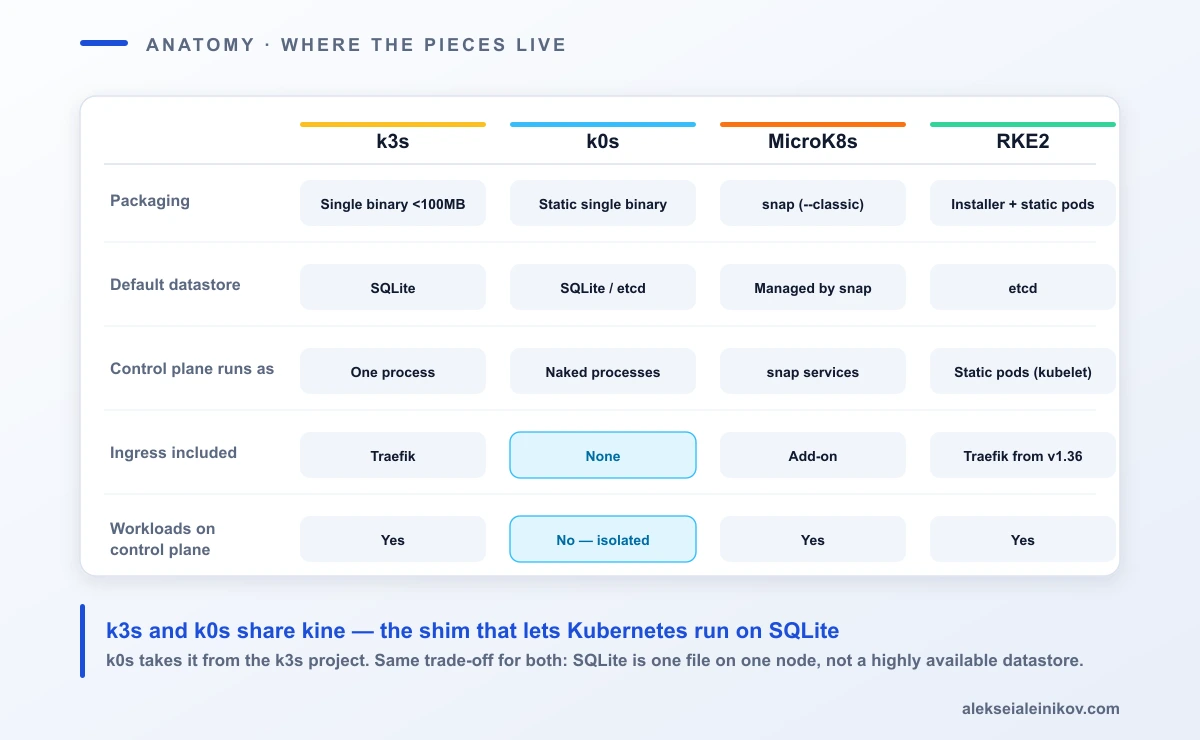
The packaging claim is also stronger than it first appears. The binary is statically compiled with no OS-level dependencies besides the kernel: no RPMs, no snaps, no distro-specific packaging. The motivation stated in the docs is worth repeating, because it is a real operational problem — when Kubernetes runs on a host OS that upgrades independently, nobody owns the vulnerabilities that come from the gap between them. k0s closes the gap by not depending on the host.
Requirements are 1 vCPU and 1GB for a controller, 0.5 vCPU and 1GB for a worker. The measured numbers are more honest than minimums: a controller with one worker and no pods sits around 510MB; with 20 workers and 2,000 pods, about 1GB; with 200 workers and 20,000 pods, about 3.3GB.
Architectures cover x86-64, ARM64 and ARMv7, plus RISC-V — with the caveat, stated in the docs, that RISC-V has no pre-compiled binaries and no CI coverage. Windows support is experimental.
The shared secret: both run on kine
Here is a detail that explains why k3s and k0s feel similar under the hood. Kubernetes normally supports only etcd as its datastore. Both projects get around this using kine, a shim that translates the etcd API into SQL — and k0s takes kine directly from the k3s project.
That is why both can boot a single-node cluster on SQLite and scale to MySQL or PostgreSQL later. It also means the same trade-off applies to both: SQLite is a single file on a single node. It is excellent for one machine and it is not a highly available datastore.
MicroK8s — The Workstation Cluster, With a Packaging Opinion
MicroK8s is Canonical’s distribution, and its defining characteristic is the delivery mechanism: it installs as a snap.
sudo snap install microk8s --classic --channel=1.35That single line is genuinely the fastest path to a cluster on an Ubuntu laptop, and it is also the reason MicroK8s is a non-starter in some fleets. If your production hosts do not run snapd — and many hardened, minimal or non-Ubuntu server images do not — this is a hard blocker rather than an inconvenience.
Canonical states MicroK8s runs in as little as 540MB of memory, while recommending 4GB of memory and 20GB of disk to actually accommodate workloads. Treat the 540MB as the floor for an idle cluster, not a promise about your workload.
Two operational quirks worth knowing before you start:
kubectl is namespaced. MicroK8s bundles its own, invoked as microk8s kubectl, specifically to avoid colliding with an existing kubectl install. Most people immediately alias it away.
DNS is not on by default. MicroK8s ships “the minimum of components for a pure, lightweight Kubernetes” and everything else arrives through add-ons:
microk8s enable dnsmicrok8s enable hostpath-storageIf you have ever watched a fresh MicroK8s cluster fail to resolve a service name and assumed something was broken, this is why. It is a design decision, not a bug — but it is the single most common first-hour surprise.
The part that is better than its reputation: HA
MicroK8s is usually filed under “laptop cluster”, which undersells its clustering story. High availability turns on automatically once a cluster has three or more nodes — there is no separate HA mode to configure.
The datastore behind it is dqlite, and the node roles are worth knowing because they explain the failure behaviour:
- voters replicate the database and take part in leader election
- standby nodes replicate the database but do not vote
- spare nodes do neither, and exist to be promoted
The documented timings are refreshingly specific: if the leader disappears ungracefully it takes up to 5 seconds to elect a new one, and promoting a non-voter to voter takes up to 30 seconds. Every node in an HA MicroK8s cluster runs the control plane, so microk8s commands work from anywhere in the cluster.
RKE2 — The One Built to Pass an Audit
RKE2 is SUSE’s distribution, and it is the outlier here: it is not trying to be small. It is trying to be defensible in front of an auditor. Its other name says it plainly — RKE Government — and its stated focus is security and compliance within the U.S. Federal Government sector.
Concretely, that means:
- Defaults and configuration options that let clusters pass the CIS Kubernetes Benchmark v1.7 or v1.8 with minimal operator intervention
- FIPS 140-2 compliance support
- Components scanned for CVEs with Trivy in the build pipeline
Architecturally, RKE2 is a deliberate hybrid. From k3s it inherits the usability and deployment model. From RKE1 it inherits close alignment with upstream Kubernetes — and Rancher’s docs are refreshingly direct about why that matters: k3s has diverged from upstream in order to optimise for edge deployments, while RKE1 and RKE2 stay closely aligned.
It also runs its control plane differently from everything else here. RKE2 launches control plane components as static pods managed by the kubelet, with containerd as the embedded runtime. No Docker dependency, unlike RKE1.
On networking, RKE2 bundles four primary CNI plugins — Canal is the default, with Cilium, Calico and Flannel also included, plus Multus as a secondary plugin. One warning from the docs deserves repeating because it is expensive to learn the hard way: RKE2 does not support changing the primary CNI, the CNI backend, or the cluster and service CIDRs on a running cluster. Switching later is untested and may leave stale interfaces and routes behind; the documented remedy is to rebuild the cluster. Choose before first start.
Also new this year: nftables support, available as of the July 2026 releases (v1.36.3+rke2r1, v1.35.7+rke2r1, v1.34.10+rke2r1) and still marked experimental. It is supported by kube-proxy and most bundled CNIs, and enabled per component — proxy-mode=nftables for kube-proxy, plus a HelmChartConfig for the CNI.
The 2026 change: Ingress NGINX is gone
This is the newest thing on this page and it is easy to miss. Ingress NGINX reached end-of-life in March 2026. As a direct result, starting with v1.36, RKE2 ships Traefik as the default ingress controller for new clusters; existing clusters have a documented migration path.
If you are standardising on RKE2 right now, this is the detail that will bite you later: clusters built before and after v1.36 will not have the same ingress controller, and any Helm values, annotations or IngressClass references you templated against nginx will need revisiting. Annotation-heavy NGINX configurations do not port over cleanly.
The Comparison Table
| k3s | k0s | MicroK8s | RKE2 | |
|---|---|---|---|---|
| Backed by | SUSE / CNCF, Linux Foundation | Mirantis / LF Projects | Canonical | SUSE Rancher |
| Packaging | Single binary <100MB | Single static self-extracting binary | snap (--classic) |
Installer; control plane as static pods |
| Default datastore | SQLite | SQLite (single node), etcd (multi-node) | dqlite | etcd |
| Control plane runs as | Components in one process | “Naked” supervised processes | snap services | Static pods under kubelet |
| Workloads on control plane | Yes | No — isolated by default | Yes | Yes |
| Default CNI | Flannel | Kube-router | Bundled with the snap | Canal (Cilium, Calico, Flannel also bundled) |
| Ingress included | Traefik | None | Add-on | Traefik from v1.36 |
| Upstream alignment | Diverges for edge | 100% upstream | Upstream | Closely aligned |
| Compliance story | — | CIS via kube-bench | — | CIS v1.7/v1.8, FIPS 140-2, Trivy |
| OS dependency | Kernel + cgroups | Kernel only | Requires snapd | Standard Linux |
| Documented minimum | 2 core / 2GB server | 1 vCPU / 1GB controller | 540MB floor, 4GB advised | Not published as a single figure |
Choosing: Match the Distribution to the Constraint
Forget rankings. Every one of these is the right answer to a specific question.
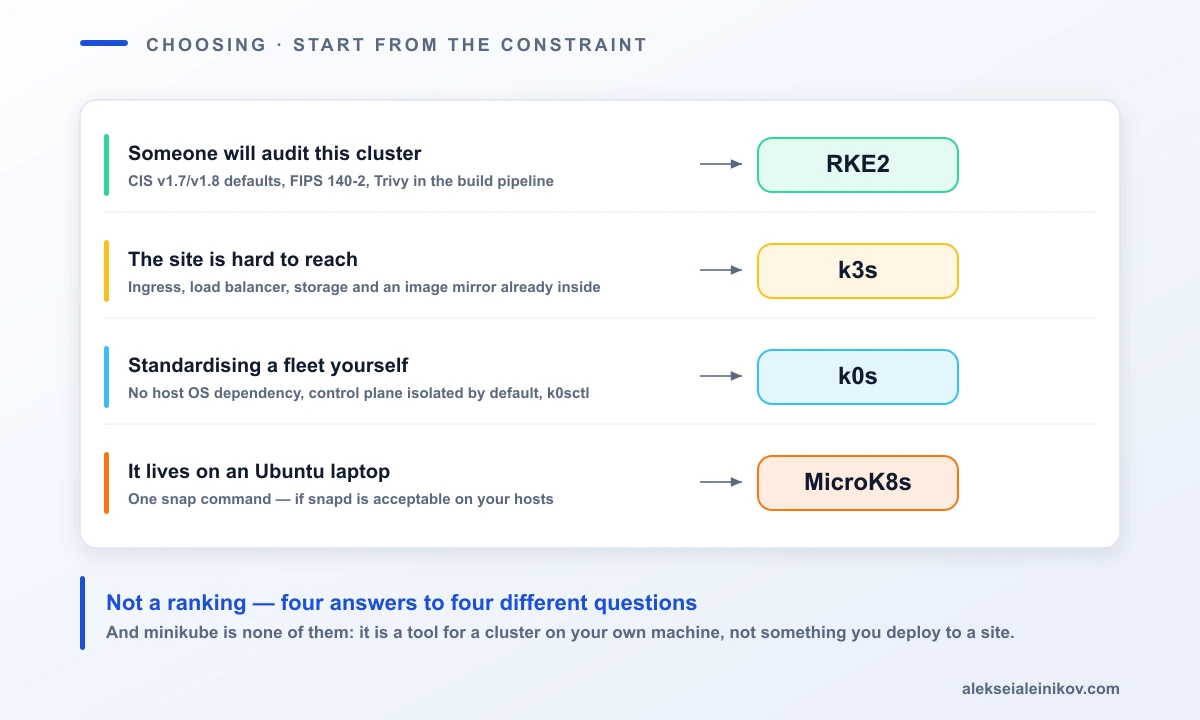
Choose RKE2 if a person will audit this cluster. FIPS, CIS benchmark defaults and pipeline CVE scanning are not things you retrofit onto another distribution in a weekend. If “regulated”, “government”, “FedRAMP” or “our security team must sign off” appear anywhere in your requirements, the decision is already made.
Choose k3s if the cluster lives somewhere you cannot easily reach. Remote sites, single-board computers, air-gapped installs, CI runners. The bundled ingress, load balancer and storage class mean fewer moving parts to provision, and the embedded registry mirror keeps a site working when its connection does not.
Choose k0s if you are standardising your own platform across a fleet. No host OS dependency, control plane isolation for free, k0sctl for lifecycle management, and a deliberate refusal to pick your ingress for you. If you already know which CNI and ingress you want, k0s stays out of the way — and the isolated control plane is a genuine security property you would otherwise have to enforce with taints and hope.
Choose MicroK8s if the cluster lives on an Ubuntu workstation. For local development, demos and teaching, one snap command and an add-on list is hard to beat. Verify snapd is acceptable on your servers before promoting it further than that.
And use minikube for none of these. It is a development tool for running a cluster on your own machine, and it is not in the same category as the four above — it is not what you deploy to a site.
What People Get Wrong
A few failure patterns worth naming, since they cost real time:
- Treating single-node k3s on SQLite as production. It is one file on one machine. For anything with an uptime expectation, run three servers with embedded etcd or point k3s at an external datastore.
- Comparing published memory minimums directly. They are measured under different conditions and against different bundled component sets. A bare k0s controller and a k3s server running Traefik plus ServiceLB are not the same cluster.
- Assuming ARM means ARM. k0s covers ARM64 and ARMv7 and lists RISC-V — with no pre-compiled binaries and no CI coverage. Check the specific architecture, not the family.
- Running embedded etcd on flash storage. etcd is write-intensive; SD cards and eMMC will not survive it. Use an SSD.
- Templating ingress against
nginxon RKE2 today. With Ingress NGINX end-of-life and Traefik becoming the v1.36 default, that assumption has an expiry date. - Planning to “switch the CNI later” on RKE2. The docs say plainly that changing the primary CNI, its backend, or the cluster and service CIDRs on a running cluster is unsupported. That decision is made once, before first start.
A Short Checklist
- Write down the constraint you cannot negotiate — audit, connectivity, host OS, or nothing at all.
- Check whether snapd is permitted on your target hosts. This eliminates or elects MicroK8s in one step.
- Decide whether you want an opinionated ingress or your own. That splits k3s from k0s more cleanly than any benchmark.
- If the control plane must not run workloads, note that only k0s gives you this without configuration.
- For anything highly available, plan the datastore first: three servers with embedded etcd, or an external database. SQLite is a single-node answer.
- If you land on RKE2, pin your version and check which side of v1.36 you are on before writing ingress manifests.
The Honest Summary
These four distributions are not competing to be the lightest. They are encoding four different opinions about what a team should have to decide for itself.
k3s decides most of it for you and optimises for places engineers rarely visit. k0s decides almost nothing and hands you a clean, isolated base. MicroK8s decides the packaging and lets add-ons do the rest. RKE2 decides the security posture, because in its target sector that is the only decision that matters.
Pick the one whose opinions you already agree with. That is a more durable basis than a memory footprint that will change with the next release.
Related reading: for the layer above these clusters, see platform engineering on Kubernetes and GitOps with Argo CD. For hardening whichever one you pick, see OPA vs Kyverno and the secure-by-default GKE reference architecture.
Sources: all figures and claims come from each project’s own documentation — k3s docs, k3s requirements, k0s docs, k0s architecture, MicroK8s getting started and RKE2 docs.
From the community
Discussion on the Fediverse
Replies from Mastodon and Bluesky — straight from the open web, no tracking.
Loading replies …
No replies yet. Start the conversation:
Replies could not be loaded right now.