
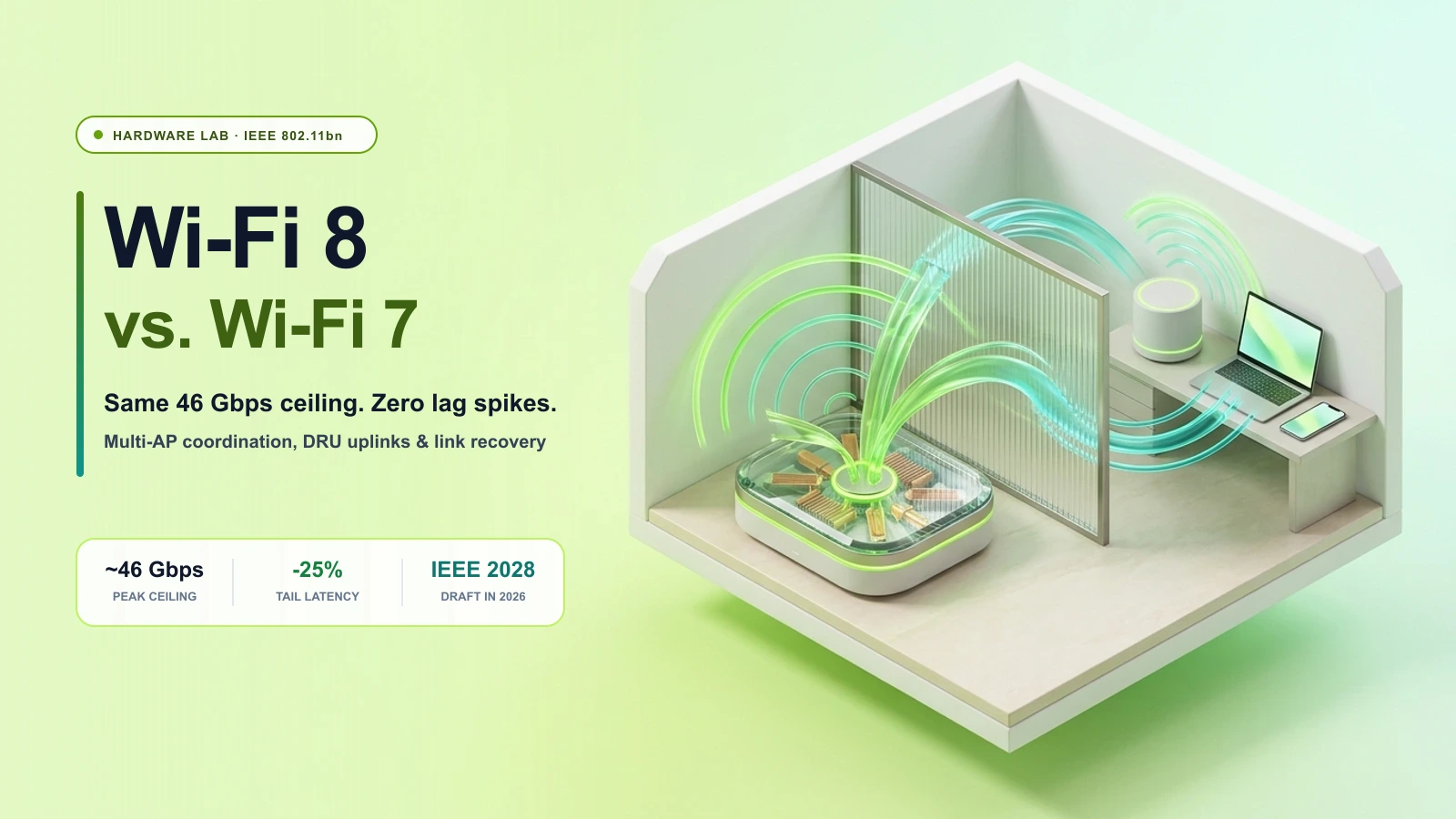
For nearly twenty-five years, every new Wi-Fi generation followed the same script: widen the radio channel, pack more bits into every wave, and print a bigger gigabit number on the retail box. Wi-Fi 8 (IEEE 802.11bn) deliberately breaks that pattern. Instead of chasing a higher theoretical speed ceiling, it keeps Wi-Fi 7’s 46 Gbps limit and targets the real reason wireless networks still stutter: interference, signal drop-offs through walls, and unpredictable latency spikes.
Whether you run a dense apartment mesh, a multi-node home lab, or simply want to know if waiting for a Wi-Fi 8 router makes sense over buying Wi-Fi 7 today, here is how 802.11bn works in plain English.
Why Wi-Fi 8 Stops Chasing Peak Speed
Think of Wi-Fi 7 (802.11be) as building an eight-lane superhighway (320 MHz channels) and raising the speed limit to 4096-QAM. On an empty road right next to the router, it is astonishingly fast. Put three neighbors’ routers on the same floor, add two concrete walls, and walk 12 meters away, and that superhighway still turns into stop-and-go traffic.
The IEEE Ultra High Reliability (UHR) working group designed 802.11bn around tail latency and edge reliability—specifically targeting at least a 25% reduction in worst-case (95th–99th percentile) latency and 25% fewer dropped packets when moving between access points.
| Feature | Wi-Fi 7 (802.11be) |
Wi-Fi 8 (802.11bn UHR) |
What Changes for Users |
|---|---|---|---|
| Frequency Bands | 2.4 GHz, 5 GHz, 6 GHz | 2.4 GHz, 5 GHz, 6 GHz | Same spectrum; no new band required |
| Max Channel Width | 320 MHz | 320 MHz | Identical peak lane width |
| Max Modulation | 4096-QAM | 4096-QAM + finer MCS steps | Smoother speed fallback through walls |
| Theoretical Max Rate | ~46 Gbps | ~46 Gbps | Peak box number stays the same |
| Primary Design Goal | Extremely High Throughput (EHT) | Ultra High Reliability (UHR) | Fewer lag spikes & better range stability |
| AP Behavior | Independent contention (CSMA/CA) | Coordinated Multi-AP scheduling | Adjacent nodes cooperate instead of colliding |
| 6 GHz Edge Uplinks | Contiguous Resource Units (RU) | Distributed Resource Units (DRU) | Stronger smartphone uplink from far rooms |
| Link Failover | Standard MLO / re-association | Enhanced Link Recovery (ELR) | Near-instant recovery when signal drops |
| IEEE Ratification | Finalized (2024) | Projected 2028 (Draft silicon in 2026) | Early routers ship on draft 802.11bn |
Multi-AP Coordination: Ending the Airtime Traffic Jam
In traditional Wi-Fi—including Wi-Fi 7—every router and mesh node acts like a polite but blind speaker in a crowded room. Before transmitting, it listens for silence (CSMA/CA). If two nearby access points hear each other, they take turns and halve available airtime. If they fail to hear a hidden client, they talk over each other and corrupt packets.
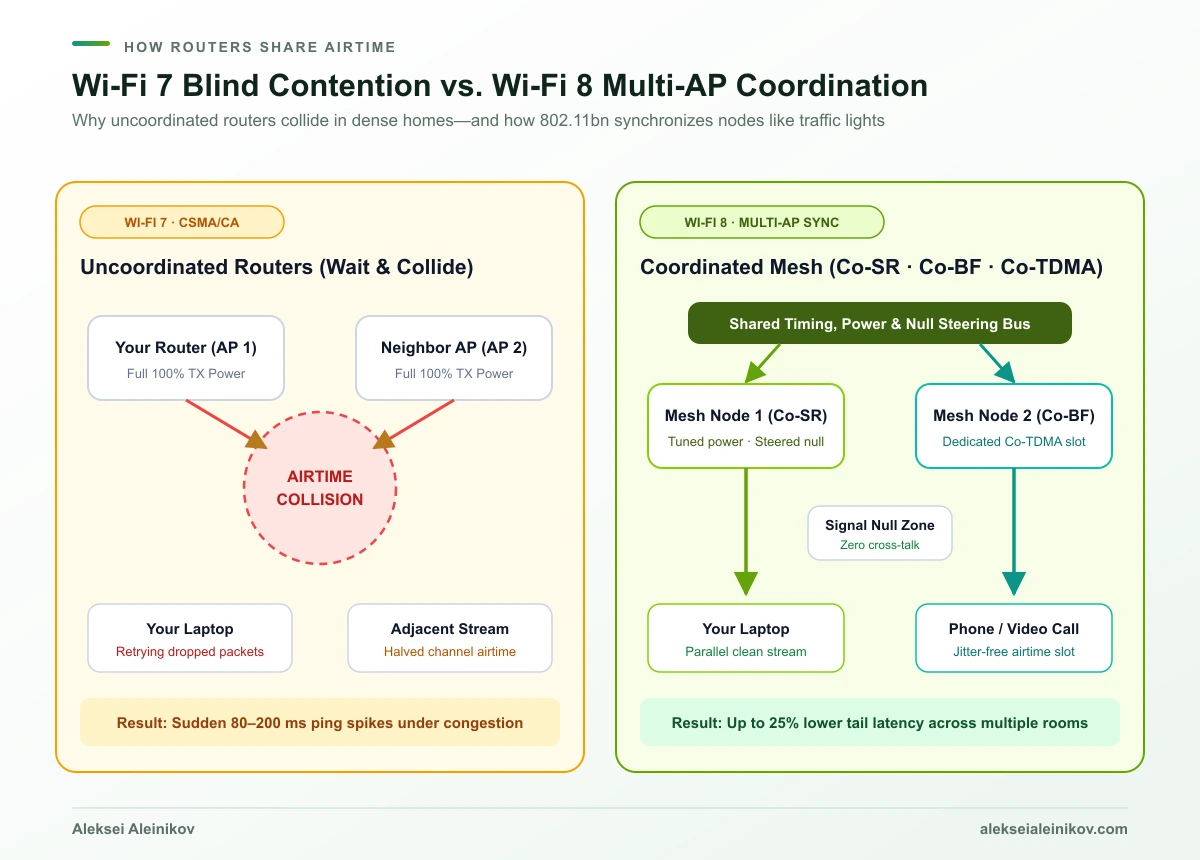
Wi-Fi 8 replaces guesswork with Multi-AP Coordination, allowing access points in the same mesh or enterprise network to act as one synchronized radio array:
- Coordinated Spatial Reuse (Co-SR): Access points dynamically negotiate lower transmit power when serving nearby clients so two rooms can transmit simultaneously without drowning each other out.
- Coordinated Beamforming (Co-BF): Neighboring APs actively steer signal nulls (quiet zones) toward each other’s active clients, letting parallel streams travel through overlapping space cleanly.
- Coordinated TDMA (Co-TDMA): Nodes divide airtime into strict micro-slots so latency-sensitive traffic (video calls, cloud gaming, remote desktop) never gets trapped behind a neighbor’s bulk download.
Beginner takeaway: Wi-Fi 7 made one router faster when you sit right next to it. Wi-Fi 8 teaches multiple routers in a house or apartment building to coordinate like synchronized traffic lights so your ping stays flat everywhere.
Inside 802.11bn: DRU, ELR, and Finer MCS Steps
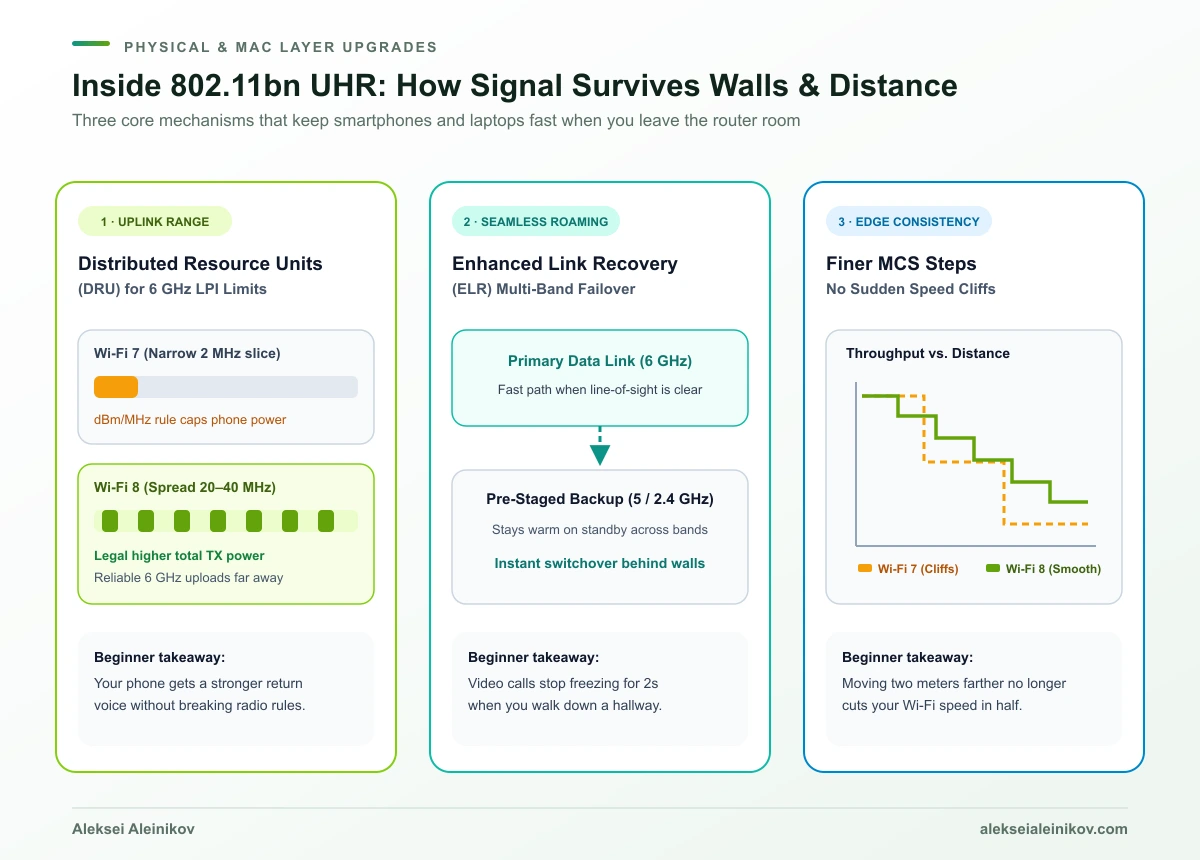
Beyond Multi-AP scheduling, 802.11bn introduces three physical- and MAC-layer upgrades designed specifically for real homes with walls, hallways, and battery-powered phones.
1. Distributed Resource Units (DRU) Fix Weak 6 GHz Uploads
In the 6 GHz band, regulators enforce strict Low Power Indoor (LPI) limits measured in power per megahertz (dBm/MHz). Under Wi-Fi 6E and Wi-Fi 7, a smartphone uploading data from two rooms away is packed into a narrow contiguous slice of spectrum (2 MHz or 4 MHz), which caps its total transmit power.
DRU scatters the exact same number of subcarriers evenly across a much wider swath (such as 20 MHz or 40 MHz). Because the signal spans more megahertz, the phone can legally transmit with higher total power without exceeding the per-MHz limit—dramatically extending reliable 6 GHz uplink range.
2. Enhanced Long Range / Link Recovery (ELR) and NPCA
Walk down a hallway on a video call and your phone often clings to a fading router too long before dropping and reconnecting. ELR (Enhanced Long Range / Link Recovery) pairs resilient control paths across bands (2.4 / 5 / 6 GHz) with Non-Primary Channel Access (NPCA), letting clients and access points switch cleanly or opportunistically use clear secondary sub-channels when the primary channel is congested.
3. Finer MCS Steps Smooth Out Distance Drop-Offs
In Wi-Fi 7, moving slightly farther from a router often forces a steep jump down in Modulation and Coding Scheme (MCS), causing sudden throughput cliffs. Wi-Fi 8 fills in intermediate MCS levels so speeds step down gracefully as signal-to-noise ratio drops.
Wi-Fi 8 Release Date & First 2026 Routers
The IEEE 802.11bn specification is not scheduled for final ratification until 2028, but Wi-Fi hardware historically launches on finalized-enough drafts—just as draft Wi-Fi 7 routers arrived in 2023.
By late 2026, first-wave silicon and consumer hardware have already surfaced:
| Hardware / Platform | Category | Announced Key Specs | Status (Late 2026) |
|---|---|---|---|
| Broadcom BCM4918 | Reference SoC | Draft 802.11bn silicon with Multi-AP & DRU engine |
Sampling / shipping to OEMs |
| TP-Link Archer 8 Ultra (BN19000) | Standalone Router | Tri-band up to 19 Gbps, dual 10G + 2.5G LAN, 18 internal antennas, StabilityEngine (DRU + ELR) | Pre-orders opened Sept 30, 2026 |
| TP-Link Deco 8 Ultra (BN22000) | Tri-Band Mesh | 3-pack up to 22 Gbps, ~9,800 sq. ft. coverage, Multi-AP coordination | Announced alongside Archer 8 Ultra |
| ASUS ROG NeoCore | Gaming Concept / Router | Multi-AP scheduling focus & low-latency prioritization | Previewed as early Wi-Fi 8 showcase |
If you are building a multi-gigabit backbone for future access points, make sure your wired infrastructure—including remote management tools like IP-KVMs and portable WAN failovers like Starlink Mini—is not stuck on 1 GbE links.
Should You Buy Wi-Fi 7 Now or Wait for Wi-Fi 8?
For 90% of buyers in late 2026, buying Wi-Fi 7 now is the smarter decision:
- Client ecosystem: Practically zero mainstream laptops or phones shipping today support
802.11bnDRU or Co-SR. Even if you buy a draft Wi-Fi 8 router, existing devices fall back to Wi-Fi 6E or Wi-Fi 7 behavior. - Draft vs. final standard: Buying pre-ratification draft hardware carries early-adopter pricing and potential firmware quirks before the 2028 IEEE freeze.
- When waiting makes sense: If you already own a solid Wi-Fi 6E or Wi-Fi 7 setup, skip first-gen draft hardware and wait for 2027–2028 when certified client devices and full Multi-AP mesh ecosystems arrive together.
Summary
Wi-Fi 8 (802.11bn) is the most practical Wi-Fi upgrade in a decade precisely because it stops inflating lab benchmarks and fixes real-world wireless pain: Multi-AP coordination stops neighboring routers from fighting over airtime, DRU fixes weak 6 GHz phone uploads, and ELR eliminates roaming dropouts. Keep Wi-Fi 7 for upgrades needed today, and plan your wired 2.5G/10G backbone for the 802.11bn wave arriving between now and 2028.
From the community
Discussion on Mastodon & Bluesky
Replies to this article from the open web, pulled in live. No ads, no tracking scripts.
Reply there — it shows up here automatically.